
Replacing a desktop gaming setup is less about finding the biggest screen and more about making one machine handle everything your desk currently does. An 18-inch laptop needs enough processor and graphics headroom for demanding games, enough memory and storage for a substantial library, and a display that can serve as your primary monitor. It also needs to make sense in the room: a large chassis can be ideal for a permanent workstation, but less appealing if you regularly move between a desk, sofa, or bedroom.
This roundup focuses on the best 18 inch gaming laptop for desktop replacement from eight configurations, ranging from $659.99 to $3,249. The list includes affordable large-screen options, high-end QHD+ systems, and memory-and-storage-heavy Crosshair models. Because listed specifications vary considerably, the best choice depends on whether you prioritize value, CPU performance, graphics capability, screen quality, or a laptop that can replace a desktop with minimal compromises in 2026.
As an Amazon Associate we earn from qualifying purchases at no extra cost to you.




Top 3 picks at a glance
Quick Picks
| Product | Best for | Price |
|---|---|---|
| MSI Crosshair 18 HX AI, Core Ultra 9, RTX 5070 | Best overall value | $1,899.99 |
| 18.5-inch Gaming Laptop, Ryzen 7430U | Budget large-screen gaming | $659.99 |
| MSI Vector A18 HX, Ryzen 9, RTX 5070 Ti | Premium AMD performance | $2,989 |
| ASUS ROG Strix G18, Ryzen 9, RTX 5070 | Color-focused gaming | $2,719 |
| MSI Crosshair 18 HX AI, 32GB RAM, 1TB SSD | High-refresh gaming setup | $2,249 |
| ASUS ROG Strix G18, Core Ultra 9, RTX 5070 Ti | High-end Intel configuration | $3,199.99 |
| MSI Crosshair 18 HX AI, 64GB RAM, 4TB SSD | Maximum built-in storage | $3,249 |
| MSI Crosshair 18 HX AI, 64GB RAM, 1TB SSD | Heavy multitasking | $2,749 |
How We Picked
We compared the listed processor, graphics, display, memory, storage, operating system, and price for each configuration. Desktop replacement potential received the most weight: a large, high-resolution screen is useful only when the internal hardware is strong enough to support demanding games and everyday workloads. We also considered upgrade-minded buying decisions, such as whether paying more gets you a meaningfully faster GPU or simply more RAM and storage.
We did not assign performance claims that are not supported by the supplied specifications. Battery capacity appears in the second listing, while most listings do not provide battery details, dimensions, weight, or wattage. Those missing figures should be confirmed before purchase, particularly if you plan to carry an 18-inch laptop regularly.
The 8 Best Picks
1. MSI Crosshair 18 HX AI with Core Ultra 9 and RTX 5070
At $1,899.99, this is the most balanced desktop-replacement option in the group. Its 18-inch 2560×1600 display runs at 240Hz, while the Intel Core Ultra 9 275HX provides 24 cores with listed speeds from 2.1 to 5.4 GHz. The RTX 5070 includes 8GB of GDDR7 memory, and 32GB of RAM plus a 1TB NVMe SSD gives the configuration a sensible starting point. It is aimed at buyers who want serious gaming hardware without moving into the highest price tier.
- Pro: Strong combination of a 240Hz 2560×1600 display and RTX 5070 graphics.
- Pro: 32GB RAM and a 1TB NVMe SSD suit gaming and general desktop replacement use.
- Con: The 8GB graphics memory may be less appealing to buyers planning especially demanding future workloads.
Skip it if you specifically need 2TB or 4TB of built-in storage from day one.
2. 18.5-inch Gaming Laptop with Ryzen 7430U
This $659.99 system is the value outlier and the simplest way to get a screen larger than the typical gaming laptop display. Its AMD Ryzen 7430U is listed with speeds up to 4.3GHz, and the 7,000mAh battery is the only explicitly stated battery capacity in this group. It makes the most sense for buyers who want a large-screen laptop for lighter gaming, schoolwork, streaming, and everyday applications rather than a premium desktop replacement. The listing supplies fewer detailed specifications than the other products, so expectations should remain measured.
- Pro: Lowest price in the roundup at $659.99.
- Pro: Largest listed screen at 18.5 inches and a stated 7,000mAh battery.
- Con: The listing does not provide graphics, RAM, storage, or display-refresh details.
Skip it if high-end gaming performance or a clearly specified dedicated GPU is essential.
3. MSI Vector A18 HX with Ryzen 9 and RTX 5070 Ti
The MSI Vector A18 HX is a premium pick at $2,989, built around an AMD Ryzen 9-9955HX and NVIDIA GeForce RTX 5070 Ti. Its 18-inch QHD+ 240Hz display targets buyers who want a large, sharp, fast panel, while 32GB of DDR5 RAM and a 2TB NVMe SSD provide a stronger storage starting point than the 1TB models. Type-C connectivity, Wi-Fi 7, Windows 11 Pro, and the Cosmo Gray finish add appeal for a workstation-style setup. This is a logical choice for demanding users who want more graphics power and storage without choosing the most expensive configuration here.
- Pro: RTX 5070 Ti graphics paired with a Ryzen 9-9955HX processor.
- Pro: 32GB DDR5 RAM and 2TB NVMe storage are desktop-replacement friendly.
- Con: Its $2,989 price is a substantial jump from the best-value MSI Crosshair.
Skip it if you do not need the faster graphics tier or 2TB capacity.
4. ASUS ROG Strix G18 with Ryzen 9 and RTX 5070
Priced at $2,719, this ROG Strix configuration emphasizes its display and AMD processor. The 18-inch panel has a 2560×1600 resolution, 240Hz refresh rate, and 100% DCI-P3 coverage. Inside is an AMD 16-core Ryzen 9 9955HX, 32GB of DDR5 RAM, a 2TB SSD, and GeForce RTX 5070 graphics. A backlit RGB keyboard and FHD camera make it well suited to a permanent gaming and video-call station. It is expensive for an RTX 5070 laptop, but the combination of a color-focused screen, 2TB storage, and 16-core CPU gives it a distinct position.
- Pro: 100% DCI-P3 coverage and a 240Hz 2560×1600 display.
- Pro: 2TB SSD and 32GB DDR5 RAM support a sizable game library.
- Con: The $2,719 price is high relative to the listed RTX 5070 graphics tier.
Skip it if display color coverage is not important to your buying decision.
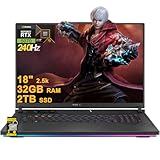
5. MSI Crosshair 18 HX AI with 32GB RAM and 1TB SSD
This $2,249 Crosshair is a straightforward choice for shoppers who want an 18-inch QHD+ 2.5K display running at 240Hz, 32GB of RAM, and a 1TB SSD. The supplied listing does not identify the processor or GPU, so it cannot be compared as precisely with the fully specified first Crosshair configuration. Still, it may suit buyers who have found a particular hardware combination elsewhere in the product listing or who prefer this specific configuration and price. Its appeal is centered on the display, memory, and familiar Crosshair format rather than on a complete published component list.
- Pro: QHD+ 2.5K resolution and a 240Hz refresh rate.
- Pro: 32GB RAM is a comfortable amount for gaming and multitasking.
- Con: The supplied specifications omit the processor and graphics card.
Skip it until those core components are confirmed.
6. ASUS ROG Strix G18 with RTX 5070 Ti and Core Ultra 9
At $3,199.99, this ASUS ROG Strix G18 is aimed at buyers who want a high-end Intel-based configuration. The listing identifies an RTX 5070 Ti and a 24-core Intel Core Ultra 9 275HX, putting it in the same premium performance conversation as the fastest systems in this roundup. It is a sensible desktop replacement for someone who values a powerful CPU and upgraded graphics in an 18-inch gaming chassis. However, the listing provides no memory, storage, or display details, making it harder to judge overall value against the other ROG Strix and MSI options.
- Pro: Combines an RTX 5070 Ti with a 24-core Core Ultra 9 275HX.
- Pro: High-end component pairing is appropriate for demanding desktop-replacement use.
- Con: Important RAM, storage, and display specifications are not supplied.
Skip it if you need a fully documented configuration before spending more than $3,000.
7. MSI Crosshair 18 HX AI with 64GB RAM and 4TB SSD
This is the capacity champion at $3,249. With 64GB of RAM and a 4TB SSD, it is designed for users who keep large game libraries, creative projects, virtual machines, or extensive media files on the laptop itself. Its 18-inch QHD+ 2.5K 240Hz display supports the desktop-replacement concept, though the supplied listing does not identify the CPU or GPU. The extra memory and storage are valuable only if the underlying configuration can take advantage of them, so buyers should verify those components before ordering.
- Pro: 64GB RAM and 4TB SSD provide the most capacity in the roundup.
- Pro: QHD+ 2.5K resolution and a 240Hz refresh rate suit a primary gaming screen.
- Con: It is the most expensive option, and core performance specifications are not listed.
Skip it if your priority is maximum gaming performance per dollar rather than capacity.
8. MSI Crosshair 18 HX AI with 64GB RAM and 1TB SSD
For $2,749, this Crosshair trades the 4TB model’s storage for the same 64GB RAM capacity. That makes it a more focused option for heavy multitasking, data-heavy applications, and buyers who already use external storage. The 18-inch QHD+ 2.5K 240Hz display remains the headline feature, but the listing does not identify its CPU or GPU. As a result, the configuration is difficult to rank on gaming performance alone. It is best considered when unusually high memory capacity matters more than having a large internal game library.
- Pro: 64GB RAM is the highest listed memory capacity alongside the 4TB model.
- Pro: It costs $500 less than the 64GB/4TB configuration.
- Con: The 1TB SSD may feel limited for a large modern game library.
Skip it if you want both high memory and maximum built-in storage.
Buying Guide
Prioritize the graphics card
For a desktop replacement, the GPU usually matters more than small processor differences. The listed RTX 5070 and RTX 5070 Ti systems are easier to evaluate because their graphics hardware is identified. Be cautious with listings that omit the GPU, even when they advertise generous RAM or storage.
Match storage and memory to your routine
32GB is the most common listed memory tier, while select Crosshair models offer 64GB. Choose 64GB if you routinely run demanding applications together. For game libraries and large files, 2TB or 4TB is more convenient than 1TB, but only if the extra capacity justifies the price.
Check the missing practical details
Before buying, confirm dimensions, weight, power adapter wattage, battery details, ports, and the exact display specification. Those figures are not consistently supplied here, yet they determine whether an 18-inch laptop works on your desk and whether it is realistic to carry.
Our Verdict
The MSI Crosshair 18 HX AI with Core Ultra 9 275HX, RTX 5070, 32GB RAM, and 1TB NVMe SSD is the best overall choice at $1,899.99. It offers the clearest balance of price, screen quality, processor capability, and graphics hardware. Choose the MSI Vector A18 HX if you want an RTX 5070 Ti and 2TB storage, or the ASUS ROG Strix G18 Ryzen 9 model if 100% DCI-P3 coverage matters. For capacity above all else, the 64GB/4TB Crosshair is the specialist pick.
FAQ
What is the best 18 inch gaming laptop for desktop replacement?
The MSI Crosshair 18 HX AI with the Core Ultra 9 275HX, RTX 5070, 32GB RAM, and 1TB NVMe SSD is the strongest all-around value in this roundup.
Is an 18-inch laptop large enough to replace a desktop monitor?
It can be, especially when the display has a 2560×1600 or QHD+ 2.5K resolution. Buyers who want a much larger workspace can still connect an external monitor, but the listed screen sizes are suitable as a primary laptop display.
Which model has the most storage?
The MSI Crosshair 18 HX AI with 64GB RAM and a 4TB SSD has the most built-in storage. It costs $3,249.
Should I choose 32GB or 64GB of RAM?
For gaming and everyday desktop use, 32GB is the more balanced choice in this selection. Choose 64GB for unusually heavy multitasking or specialized applications, particularly if you also want to keep the laptop for many years.


