
Choosing a workstation for your home is not just about where your laptop sits — it’s about how you work, how much space you can give up, and what kind of performance you actually need day to day. A thin and light workstation promises portability, clean lines, and easy storage. A bulky workstation promises stability, power delivery, better ergonomics for long sessions, and room to spread out. Both can hold a laptop, but they serve very different home lifestyles, and picking the wrong one means daily frustration, clutter, or wasted money on features you never use.
As of 2026, most buyers are not choosing between two laptops, but between two philosophies for their home setup: stay light and flexible, or commit to a dedicated, high-performance station. Here is how they compare where it counts for real homes.
As an Amazon Associate we earn from qualifying purchases at no extra cost to you.


Top 3 picks at a glance
Quick Verdict
Choose a thin light workstation if you work from the couch, bed, kitchen table, or move between rooms, have under 600 square feet to work with, and your tasks are writing, browsing, video calls, light photo editing, and streaming. You will get the most comfort and value with the least footprint.
Choose a bulky workstation if you work 6+ hours at a desk daily, need multiple monitors, want built-in power, storage, and better heat management, and you have a dedicated corner or home office. You will get better long-term ergonomics, durability, and performance support for demanding laptop setups.
If you are on the fence and have no dedicated office, start thin and light. You can always anchor a bulky setup later without losing the portable piece.
Side by Side
| Feature | Thin Light Workstation | Bulky Workstation |
|---|---|---|
| Comfort (Long Sessions) | Good for 1-3 hour sessions; ergonomic angles help but limited height range (typically 2-4 inches of lift, 3 preset angles) | Excellent for 4-8 hour sessions; adjustable height 27-45 inches, full keyboard and monitor height alignment |
| Durability & Build | Lightweight MDF, plastic, or aluminum; 4-9 lbs total; supports 15-35 lbs | Solid steel frame, hardwood or reinforced laminate; 35-75 lbs total; supports 100-250 lbs |
| Price Range | $29.99 to $85 typical; premium models to $150 | $129.99 to $350 typical; studio-grade rolling stations to $500+ |
| Maintenance | Wipe clean, no assembly or 5-minute assembly; easy to replace | Periodic tightening, caster and cable management upkeep; 30-60 minute assembly |
| Space Needed | Footprint 21” x 14” to 31” x 15”; stores vertically in closet or under bed | Footprint 40” x 22” to 60” x 30”; needs permanent floor space plus 24” clearance behind |
| Look & Style | Minimal, modern, low visual weight; blends with living room or bedroom | Professional, anchored; makes a room feel like an office or studio |
| Features & Power | Passive design; may include phone groove or small mouse pad; no built-in power | Often includes power outlets, USB ports, drawers, monitor arms, and task lighting (e.g., 60W adjustable LED) |
| Resale & Longevity | Lower resale ($10-$30 used); 2-4 year lifespan with daily use | Higher resale ($50-$150 used); 5-10 year lifespan |
| Best For | Students, renters, hybrid workers, bed/sofa users | Remote professionals, creators, gamers, anyone with a fixed home office |
Where Thin Light Workstation Wins
Portability is the biggest advantage. A thin light workstation goes where you go. A product like the AboveTEK Adjustable Laptop Lap Desk, with 3 ergonomic angles, a PU leather non-slip surface, and a retractable mouse pad, weighs under 4 lbs and lets you create a stable work surface on a bed, sofa, or balcony in seconds. That heat shield underneath also matters — it keeps lap temperatures down when your laptop fan kicks in, which bulky stations do not need to worry about.
Space efficiency is second. In a small home, a bulky desk dominates the room whether you are using it or not. A thin rolling alternative such as the Yaheetech Small Rolling Computer Desk with Power Outlet takes up about 31.5” x 15.7” of floor space and can be rolled to the wall when not in use. It even offers a built-in power outlet for charging, giving you a taste of workstation convenience without the bulk. You get a laptop cart that functions as a side table, standing desk, or sofa desk, then disappears.
There is also the comfort of variety. Ergonomists consistently recommend changing positions throughout the day, and a lightweight setup encourages that. Move from sofa to kitchen counter to bedroom without unplugging a complex cable tree. For households that share space, this flexibility prevents one person’s work setup from taking over the living area.
Finally, cost and commitment are low. At $29.99 to $53.85 for entry-level lap pads and small rolling carts, you can test a work-from-home routine before investing $200 or more in a permanent desk. If your needs change, you have not lost a large piece of furniture.
Where Bulky Workstation Laptop Performance Wins
When laptop performance really matters — sustained CPU load, external monitors, color-accurate work, video editing, CAD, or long compile times — a bulky workstation provides the support system that thin designs cannot.
Stability and thermals are the foundation. A heavier frame does not wobble when you type, and it allows for better airflow. Your laptop stays flat, elevated, or docked, with room for a cooling pad or stand. That keeps clock speeds more consistent during long tasks compared to working on a soft lap pad or a narrow cart.
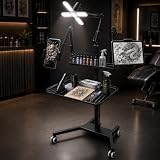
Power and organization are the second win. Bulky workstations are built to manage the clutter that kills performance: chargers, hubs, external drives, and lights. A studio-style example like the Rolling Tattoo Workstation with 60W Adjustable 4-Leaf LED Light, 14.96″ x 10.43″ Magnetic Tattoo Tray, Dual Phone & Tablet Holders, and Locking Casters — priced around $179.99 — shows how a rolling workstation can integrate task lighting, magnetic trays for tools or accessories, and device holders into one mobile but solid unit. While designed for artists, the concept translates directly to a home laptop workstation: dedicated lighting reduces eye strain, trays keep accessories within reach, and locking casters let you move a fully loaded station without rebuilding it.
Ergonomics at scale also favors bulk. You can set monitor height to eye level (36-42 inches from floor when seated), place a keyboard and mouse at proper elbow height (28-30 inches), and add an ergonomic chair with full leg clearance. Over a 40-hour work week, that alignment reduces neck and wrist strain far more than any lap-based angle adjustment.
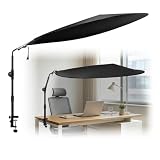
Light control is another often overlooked factor. If your dedicated desk faces a window or sits under harsh overhead LEDs, glare will hurt productivity and cause headaches. A bulky station in a fixed location can be paired with solutions like the Cubicle Shade for Desk, a 51″ Large Desk Canopy that blocks overhead light for about $39.99. That kind of environmental control is not practical with a lap desk you move every hour — it works because the workstation stays put.
In short, if your laptop is your primary computer and you push it hard, the bulky workstation lets the machine perform as intended for hours, not just in bursts.
Cost Over 5 Years
The sticker price tells only part of the story. Here is what ownership typically looks like for a home user:
Thin Light Workstation: Initial cost $30 to $85. No chair upgrade required, no installation, negligible electricity use. Expect to replace a lap pad or small cart once in 5 years due to wear on hinges, surfaces, or casters. Total 5-year cost: $60 to $170. If you use a $53.85 rolling cart daily, budget $100 to $130 including replacement casters or a second unit.
Bulky Workstation: Initial cost $150 to $350 for desk plus $80 to $250 for an ergonomic chair if you do not already own one. Add $20 to $60 for cable management, lighting, and power strips if not built in. Maintenance is low — tighten hardware yearly, replace casters every 2-3 years ($15-$25). Energy use for a 60W task light at 4 hours per day is roughly 87 kWh per year, or about $12-$15 annually at average US rates. Total 5-year cost: $270 to $650, with most setups landing around $400.
The bulky option costs 2 to 4 times more over five years, but if it prevents you from buying a second laptop due to overheating or lets you avoid a co-working membership ($150-$300 per month), it pays for itself quickly. For light use, the thin option is clearly cheaper and often all you need.
Which One for Your Home
Small Apartment (Under 700 Sq Ft)
Go thin and light. You cannot afford to dedicate 12-15 square feet to a permanent desk that blocks flow. Choose a lap pad for bed/sofa work and a narrow rolling cart like the Yaheetech model for video calls at a proper height. Look for a cart under 32 inches wide with locking wheels so you can slide it beside a bookshelf when guests come over. Add a small storage ottoman to hide the lap desk.
Family with Kids or Pets
Stability and cleanability win, but flexibility still matters. A bulky workstation with locking casters is safer than a wobbly side table — it will not tip if a child bumps it, and lockable wheels prevent pets from pushing it. Choose laminate or powder-coated steel that wipes clean, avoid sharp corners, and manage cables in a covered tray. Keep a secondary thin light option like the AboveTEK lap pad for supervised homework or evening work in the living room, so the main station can stay clear and off-limits.
Rental (No Modifications Allowed)
Thin light is the safest bet for deposits and moves. No wall mounting, no anchoring, and nothing heavy to haul up stairs. A rolling cart and a lap desk leave no marks and fit in a car. If you do want a bulky station, pick one that is freestanding and on casters, like the rolling workstation style, so you can reposition it for light and avoid drilling for monitors or lights. The 51″ cubicle shade canopy is also rental-friendly because it clamps or sits on the desk without wall hardware.
Long-Term Home or Dedicated Office
Invest in bulky. This is where performance and health compound. Plan for a 48″ to 60″ wide surface, at least 24″ deep, with a built-in power outlet and space for two 24″ to 27″ monitors. Position the desk perpendicular to a window to reduce glare, then control overhead light with a canopy if needed. The higher upfront cost is justified by years of daily use, better posture, and the ability to leave your setup ready to go each morning. Keep a thin lap desk as a secondary station for reading or casual browsing elsewhere in the house.
FAQ
Will a thin light workstation hurt laptop performance?
Not for everyday tasks like email, video calls, and documents. For sustained heavy loads, a thin setup can restrict airflow if the laptop sits on fabric or your lap, causing the fan to run louder and speeds to dip slightly. Using a hard, ventilated surface and elevating the rear by 1-2 inches helps. For regular video editing, gaming, or compiling, a bulky desk with space for a stand or cooling pad will sustain higher performance longer.
Can a small rolling desk handle a full workstation setup?
A small rolling desk around 31” x 15” can hold a 15-16 inch laptop, a mouse, and a phone, and some include a power outlet. It is not designed for dual monitors, a full-size keyboard plus monitor arm, and a desktop tower. If you need two screens or many peripherals, step up to a 47”+ desk with a steel frame and at least 100 lbs capacity.
How much weight can these workstations actually hold?
Most lap desks are rated for 15-20 lbs total, which is fine for a 3-6 lb laptop plus accessories. Small rolling carts are typically rated for 30-45 lbs. Bulky home workstations range from 100 lbs for basic desks to 250 lbs for studio-grade rolling stations with reinforced frames. Always check the manufacturer’s rating and stay under 80 percent of it for daily use.
Which is easier to keep clean in a home with dust and clutter?
Thin light stations are easier to wipe and move to clean underneath — a quick vacuum around a 4 lb lap pad takes seconds. Bulky stations collect more dust due to larger surfaces and cable nests, so choose one with a magnetic tray or enclosed drawers to contain small items and a smooth laminate top that resists stains. Locking casters let you roll the entire unit to clean the floor beneath without lifting.
Related guides
- Alienware 16 Aurora RTX 5070 Review: Display, Portability and Configuration Gaps
- Lenovo Legion Pro 7i Gen 10 Review: 64GB RAM and Dual-SSD Configuration
- MSI Katana 15.6-inch RTX 5050 Review: Configuration Strengths and Upgrade Unknowns
- ASUS ROG Strix SCAR 16 G635LX-XS97 Review: Display Ambition, Upgrade Questions


