
Top 3 picks at a glance
The Short Answer
For an RTX 5080 thin laptop, you need a 280W to 380W power brick, with 330W being the most common size for thin 16-inch and 18-inch chassis. Unlike RTX 5070 or lower models that can run on a compact 240W adapter, the RTX 5080 requires higher wattage to handle its 150W-175W TGP plus the CPU load without throttling or battery drain under full load.
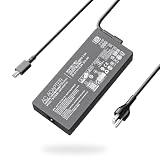
In terms of physical size, expect a modern GaN 330W brick to measure roughly 5.5 to 6.5 inches long, 2.6 to 3.0 inches wide, and 0.9 to 1.2 inches thick, and weigh between 1.3 and 1.9 pounds without the cable. A higher-capacity 380W GaN unit is slightly larger at about 6.2 to 7.0 inches long and 1.9 to 2.4 pounds. If you are replacing or upgrading a charger, match the wattage exactly to what the manufacturer specifies for your model, match the connector type and voltage, and choose GaN if you want the smallest possible brick for travel.
As an Amazon Associate we earn from qualifying purchases at no extra cost to you.


Standard Sizes
RTX 5080 thin laptops prioritize a slim chassis, so manufacturers pair them with Gallium Nitride (GaN) power bricks that are significantly smaller than older silicon bricks of the same wattage. Wattage determines both charging speed and physical size, and using an undersized brick will cause performance limits, slow charging, or shutdowns under load.
The table below covers the standard sizes you will find for this class of laptop as of early 2026. Dimensions are for the brick itself, not including the AC wall cord or DC cable strain relief.
| Wattage | Typical Use Case | Dimensions (Inches) | Dimensions (cm) | Weight (Brick Only) | Price Range |
|---|---|---|---|---|---|
| 240W | Undersized for RTX 5080; minimum for some 14-inch models | 5.1 x 2.3 x 0.85 | 13.0 x 5.8 x 2.2 | 1.1 – 1.4 lbs (0.50 – 0.64 kg) | $45 – $75 |
| 280W | Entry size for thin RTX 5080 laptops with lower-watt CPUs | 5.4 x 2.5 x 0.95 | 13.7 x 6.4 x 2.4 | 1.3 – 1.6 lbs (0.59 – 0.73 kg) | $60 – $110 |
| 330W GaN | Most common for RTX 5080 thin laptops (Blade 16/18, Zephyrus G16, Strix G16 class) | 6.0 x 2.8 x 1.05 | 15.2 x 7.1 x 2.7 | 1.5 – 1.9 lbs (0.68 – 0.86 kg) | $65 – $150 |
| 380W GaN | For 18-inch RTX 5080/5090 chassis with high-watt CPUs (Strix Scar 18, Strix G18 class) | 6.6 x 3.0 x 1.15 | 16.8 x 7.6 x 2.9 | 1.9 – 2.4 lbs (0.86 – 1.09 kg) | $130 – $185 |
| 400W Standard | Older non-GaN design, largest footprint | 7.8 x 3.4 x 1.4 | 19.8 x 8.6 x 3.6 | 2.5 – 3.0 lbs (1.13 – 1.36 kg) | $90 – $140 |
For reference, a modern 330W GaN adapter compatible with a Razer Blade 16 or 18 is about 35 to 40 percent smaller by volume than a legacy 330W silicon brick, which is why most thin RTX 5080 laptops have now switched to GaN. A 380W GaN brick, such as those sold for Asus ROG Strix G18 and Strix Scar 16/18 models with RTX 5080 and 5090 GPUs, costs more and runs larger, typically priced between $150 and $185, while compact 200W chargers for smaller ROG Zephyrus and TUF models are not sufficient for a 5080 and are included here only for comparison.
Total carry weight matters too. Add 0.4 to 0.7 pounds for the AC cord and DC cable. A full 330W kit usually totals 1.9 to 2.5 pounds in your bag, while a 380W kit totals 2.4 to 3.0 pounds.
How to Measure Your Space
Before you buy a replacement or spare power brick for an RTX 5080 thin laptop, measure both the brick and where you will store and use it. Use a tape measure or ruler and measure on a flat surface.
- Measure the brick’s footprint: Measure length, width, and thickness at the widest points, excluding cables. Write down all three numbers in inches and centimeters so you can compare against bag pockets and desk cable trays.
- Measure your laptop bag pocket: Measure the dedicated charger pocket inside your backpack or sleeve. Add 0.75 inches (1.9 cm) of clearance on each side for the cable bend. Most thin-laptop 330W bricks need a pocket at least 7.0 x 4.0 inches (17.8 x 10.2 cm).
- Check cable length and outlet distance: Measure from your wall outlet to your desk surface. Standard AC cords are 3.9 feet (120 cm) and DC cables are 4.9 to 5.9 feet (150 to 180 cm). For a floor outlet, you need at least 6 feet of total reach to avoid strain on the DC plug.
- Weigh your current kit: If you travel often, weigh the brick plus both cables on a kitchen scale. If your total is over 2.6 pounds and you fly frequently, a GaN 330W model will save 0.6 to 1.0 pounds over a legacy silicon brick.
- Confirm connector clearance: Measure the space around your laptop’s charging port. Right-angle slim-tip or barrel connectors need about 1.2 inches (3.0 cm) of side clearance. Do not force a straight barrel into a recessed port designed for a right-angle plug.
By Room or Use Case
Home Desk Setup
On a permanent desk, size matters less than heat and cable management. A 330W or 380W brick can sit on the floor or behind a monitor, but give it 2 to 3 inches of open airflow on all sides. Do not cover it with fabric or trap it in an enclosed cable box while gaming, as surface temperatures can reach 115 to 135 degrees Fahrenheit under sustained load. Use a holder or tray that is at least 8 x 4 inches (20.3 x 10.2 cm) for a 330W brick and 9 x 5 inches (22.9 x 12.7 cm) for a 380W brick. A brick with a 90-degree DC connector reduces strain if your desk is against a wall.
Dorm Room or Small Apartment
Space is tight and outlets are often behind furniture. Choose a GaN 330W brick for the smallest footprint that still delivers full power. Look for a model with a flat, low-profile AC plug if your outlet is behind a bed or dresser, since the brick plus plug depth can be 3.5 to 4.5 inches from the wall. If you share a power strip, remember a 330W brick draws about 2.8 amps at 120V and a 380W brick draws about 3.2 amps, so avoid overloading a strip with multiple high-watt chargers.
Travel and Commuting
For travel, every inch counts. A GaN 330W brick at 6.0 x 2.8 x 1.05 inches fits in most 15 to 16-inch laptop backpacks, while a legacy 330W or 400W brick often does not and adds a full pound. If your airline limits carry-on weight or you walk long distances on campus, prioritize a GaN unit. Pack the brick in a middle compartment, not pressed against the laptop lid, and coil cables loosely in a 3-inch loop to prevent fraying. Total travel weight for laptop plus 330W kit is typically 7.5 to 9.0 pounds.
Conference Room or Shared Workspace
In shared spaces, a smaller, quieter brick is less disruptive. GaN bricks run cooler and their smaller size is easier to place under a table without creating a tripping hazard. Bring an AC cord that is at least 4 feet long so you can route it along a table leg. If you present often, consider a second compact AC cord to leave in your bag so you are not unplugging your desk setup daily.
Common Sizing Mistakes
Buying a 200W or 240W brick to save space: Thin RTX 5080 laptops will limit GPU wattage, drain the battery while plugged in during games, or shut down under combined CPU and GPU load if the brick is undersized. Always match or exceed the manufacturer’s specified wattage. Going higher, for example using a 380W brick on a system that shipped with 330W, is safe only if voltage, amperage, and connector type match exactly; it will not make the system run faster but it will run cooler.
Ignoring connector type and polarity: Wattage alone is not enough. Asus, Razer, and other brands use different barrel sizes and slim-tip designs, often 5.5mm x 2.5mm or proprietary rectangular connectors. A physically similar plug with the wrong voltage can damage the battery board. Check the label on the bottom of your laptop and the fine print on the original brick for output voltage, for example 20V at 16.5A for 330W, and match it.
Forgetting cable thickness and bend radius: High-watt cables are thicker, about 0.24 to 0.30 inches in diameter, and need a gentle bend. Forcing a tight 90-degree bend right at the strain relief will crack the shielding over time. Leave at least 2 inches of straight cable coming out of both the brick and the laptop port.
Choosing the cheapest no-name 330W brick: Ultra-cheap bricks often list inflated wattage and use thinner internal wiring that overheats under sustained gaming loads. Stick to adapters that list safety certifications such as UL, CE, FCC, and protection for over-voltage, over-current, and short circuit. Expect to pay at least $65 to $85 for a reliable 330W GaN unit and $140 to $185 for a 380W GaN unit.
Measuring only the brick and not the kit: Buyers often measure the pocket for the brick but forget the coiled AC cord adds another 3.5 x 3.5 x 1.5 inch bundle. Measure the entire kit together before deciding it is travel-friendly.
FAQ
Can I use a 240W USB-C charger for an RTX 5080 thin laptop?
No, for full performance. USB-C PD 3.1 supports up to 240W, but most RTX 5080 thin laptops require 280W to 380W via their dedicated barrel or slim-tip port to run the GPU at full TGP. A 240W USB-C charger will charge the laptop when it is off or doing light tasks and can be useful for travel, but it will throttle gaming performance and may still drain the battery during heavy loads. Use it as a secondary charger, not your primary gaming power source.
Is a 380W brick better than a 330W brick for the same RTX 5080 laptop?
Only if your laptop was designed for 380W. If your model shipped with a 330W brick, a 380W replacement with the same voltage will work safely and may run slightly cooler, but it will not increase frame rates because power limits are set in firmware. If your 18-inch model shipped with 380W, do not downsize to 330W, as you will see power throttling in demanding games. Always follow the wattage printed on the original adapter and in the user manual.
How hot should the power brick get and how much space does it need?
Warm is normal. Surface temperatures of 100 to 130 degrees Fahrenheit are typical after 30 to 60 minutes of gaming. If it is too hot to touch for more than two seconds, unplug it and check ventilation. Keep it on a hard, flat surface with at least 2 inches of clearance on the sides and do not stack paper or clothing on top. Elevated temperatures do not indicate extra performance, and any adapter that smells like melting plastic or makes a buzzing sound should be replaced.
What exact dimensions should I look for in a travel-friendly RTX 5080 charger?
For the smallest travel setup, look for a GaN 330W brick no larger than 6.2 x 3.0 x 1.2 inches (15.7 x 7.6 x 3.0 cm) and under 1.9 pounds for the brick alone. For 18-inch models that require 380W, look for a GaN brick under 7.0 x 3.2 x 1.3 inches (17.8 x 8.1 x 3.3 cm) and under 2.4 pounds. Anything larger is likely an older silicon design and will take noticeably more bag space.
Related guides
- Alienware 16 Aurora RTX 5070 Review: Display, Portability and Configuration Gaps
- Lenovo Legion Pro 7i Gen 10 Review: 64GB RAM and Dual-SSD Configuration
- MSI Katana 15.6-inch RTX 5050 Review: Configuration Strengths and Upgrade Unknowns
- ASUS ROG Strix SCAR 16 G635LX-XS97 Review: Display Ambition, Upgrade Questions


