
Designing an efficient home studio or editing workspace requires balancing spatial aesthetics with heavy-duty connectivity. High-end creator laptops deliver incredible computing power for 8K video rendering, 3D modeling, and multi-track audio production, but they often lack the port density needed to drive a full desktop setup. A single cable running across a warm wooden desk should ideally handle ultra-fast data transfers, high-resolution display outputs, and fast charging without creating a tangled web of adapters. Finding the best thunderbolt 5 dock for high end creator laptops transforms a cramped desktop into a sleek, organized creative sanctuary.
The modern creative desk layout demands low-profile ergonomics, clever cable concealment under monitor risers, and effective heat dissipation for high-wattage hubs. Thunderbolt 5 technology unlocks massive bandwidth potential up to 120Gbps, allowing creators to run multiple high-refresh 4K or 8K displays alongside external NVMe SSD storage arrays and ultra-fast wired networks. Whether you are outfitting a minimalist standing desk or a multi-monitor editing suite, selecting the right dock ensures your workspace remains clean, cool, and fully powered throughout long creative sessions.
As an Amazon Associate we earn from qualifying purchases at no extra cost to you.


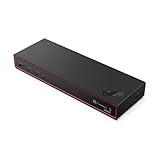


Top 3 picks at a glance
Quick Picks
| Product | Best for | Price |
|---|---|---|
| Anker Prime TB5 Docking Station, 14-in-1 Thunderbolt 5 Dock for Laptops | Best Overall Desktop Hub | $399.99 |
| iVANKY 26-in-1 FusionDock Ultra Compatible with Thunderbolt 5, 10GbE Dock | Best for Ultimate Connectivity | $649.99 |
| Lenovo ThinkPad Thunderbolt 5 Smart Dock 7500, 120Gbps Data Transfer, 180W Power Delivery, Multiple Display Support, 2.5Gbps Ethernet, Black | Best High Power Delivery | $372.21 |
| Dell SD25TB5 Pro Thunderbolt 5 Smart Dock with USB-C, HDMI & DisplayPort | Best Display Versatility | $445.99 |
| StarTech Thunderbolt 5 USB4 Dock, Dual 8K 60Hz, Triple 4K, 140W, 2.5GbE | Best Value High-Performance | $282.99 |
| Dell SD25TB5 Pro 300W 12-Port USB-C Thunderbolt 5 Smart Dock | Best Workstation Laptop Dock | $389.89 |
| WAVLINK Pro Docking Station 5 Monitors, Up to Five 4K Displays for Mac(M1-5, Neo) & Windows, DisplayLink Dock with PD100W, 2X DP 1.4(120Hz), 2X HDMI, Alt HDMI, 2.5Gbps Ethernet, Driver Required DL7400 | Best Multi-Monitor Setup | $299.99 |
| HP Thunderbolt 4 100W G6 Dock – for Desktop PC, Notebook – Charging Capability – 120 W – Thunderbolt 4-4 Displays Supported – 5 x USB Ports – 3 x USB Type-A Ports – Type-A – 2 -C – -C – 1 RJ-45 – Ne | Best Budget Studio Option | $189.87 |
How We Picked
Selecting the ideal studio docking station involves evaluating how each unit interacts with a modern desktop layout. We analyzed build quality, physical footprints, thermal management on composite and solid wood surfaces, and rear-port layout efficiency to ensure clean cable routing behind monitor mounts. As studio desktop design evolves into 2026, integration with high-end displays and network-attached storage (NAS) devices is essential.
We evaluated technical criteria including data throughput capabilities (ranging from standard 40Gbps up to 120Gbps), power delivery ranges (100W up to 300W power bricks), multi-monitor display pipelines, and ethernet bandwidth options (2.5GbE up to 10GbE). Price points across different budgets—from under $200 up to $649.99—were weighed against overall build quality and port utility to establish our final rankings.
The 8 Best Picks
Anker Prime TB5 Docking Station, 14-in-1 Thunderbolt 5 Dock for Laptops
This dock is designed for creators who want a balanced, modern vertical layout that conserves desktop real estate while organizing heavy peripheral cables cleanly behind a monitor setup.
- Sleek 14-in-1 vertical design saves valuable desk surface area
- Excellent thermal management keeps unit cool during heavy transfers
- Priced high at $399.99 for a standard desktop expansion hub
When to skip: Skip this model if you require extreme power delivery over 140W or specialized 10GbE networking for local storage servers.
iVANKY 26-in-1 FusionDock Ultra Compatible with Thunderbolt 5, 10GbE Dock
Built for high-end studio setups, this massive hub caters to video editors and colorists managing multiple external NVMe drives, audio interfaces, and high-speed local NAS networks.
- Unmatched 26-port expandability eliminates peripheral dongles
- Blistering 10GbE port speeds up high-resolution server workflows
- Substantial 8.5 x 4.2 inch footprint takes up notable desk space
When to skip: Skip if you have a minimal desk setup or only need basic dual-monitor routing without a $649.99 investment.
Lenovo ThinkPad Thunderbolt 5 Smart Dock 7500, 120Gbps Data Transfer, 180W Power Delivery, Multiple Display Support, 2.5Gbps Ethernet, Black
Ideal for power-hungry mobile workstations, this matte black dock delivers robust high-wattage charging and massive bandwidth to keep heavy rendering laptops fully energized.
- Heavy-duty 180W power delivery easily charges power-hungry creator laptops
- 120Gbps data bandwidth supports demanding external drive arrays
- Utilitarian black industrial styling lacks brushed metal studio elegance
When to skip: Skip if you prefer silver aluminum finishes designed to match minimalist glass or light wood office furniture.
Dell SD25TB5 Pro Thunderbolt 5 Smart Dock with USB-C, HDMI & DisplayPort
Perfect for hybrid visual editors using a mix of traditional DisplayPort and modern HDMI studio monitors alongside high-speed USB-C peripherals.
- Flexible display connection options with native HDMI and DisplayPort
- Enterprise-grade smart dock management features for clean stability
- Higher price tag of $445.99 compared to standard 140W options
When to skip: Skip if your desktop layout exclusively uses native Thunderbolt or USB-C monitors without legacy cables.
StarTech Thunderbolt 5 USB4 Dock, Dual 8K 60Hz, Triple 4K, 140W, 2.5GbE
Designed for visual media professionals pushing extreme resolutions, this dock easily drives dual 8K 60Hz displays or triple 4K monitor arrays under a $300 price point.
- Outstanding display pipeline supporting dual 8K or triple 4K outputs
- Competitive $282.99 price point for genuine next-gen performance
- Fewer front-facing quick-access ports than larger competitors
When to skip: Skip if you frequently plug in multiple front-facing thumb drives or SD cards directly from your desk chair.
Dell SD25TB5 Pro 300W 12-Port USB-C Thunderbolt 5 Smart Dock
Engineered for maximum power delivery, this workstation dock is built for intense laptop rigs with discrete graphics processing units that drain traditional chargers.
- Massive 300W total system power delivery prevents laptop battery drain
- Streamlined 12-port chassis keeps cable runs tightly organized
- Large external power adapter brick weighs nearly 2.2 lbs
When to skip: Skip if your laptop charges efficiently on standard 100W USB-C power delivery.
WAVLINK Pro Docking Station 5 Monitors, Up to Five 4K Displays for Mac(M1-5, Neo) & Windows, DisplayLink Dock with PD100W, 2X DP 1.4(120Hz), 2X HDMI, Alt HDMI, 2.5Gbps Ethernet, Driver Required DL7400
This specialty multi-display dock is tailored for audio producers, stock traders, and creators who need up to five 4K monitors operating simultaneously across Mac or PC platforms.
- Supports up to five 4K displays across Mac (M1-M5) and Windows systems
- High 120Hz refresh rate support on dual DisplayPort 1.4 connections
- Requires DisplayLink DL7400 driver software installation for multi-screen output
When to skip: Skip if you prefer native hardware plug-and-play video routing without installing secondary system drivers.
HP Thunderbolt 4 100W G6 Dock – for Desktop PC, Notebook – Charging Capability – 120 W – Thunderbolt 4-4 Displays Supported – 5 x USB Ports – 3 x USB Type-A Ports – Type-A – 2 -C – -C – 1 RJ-45 – Ne
A compact, entry-level option for creators seeking organized desktop cable management and reliable multi-monitor support without spending over $200.
- Budget-friendly price point of $189.87 for reliable brand build quality
- Supports up to four displays with a very small desk footprint
- Operates on Thunderbolt 4 standards limited below 120Gbps speeds
When to skip: Skip if your creative workflow requires full Thunderbolt 5 bandwidth for heavy external SSD RAID arrays.
Buying Guide
Bandwidth, Speed, and Multi-Monitor Display Pipelines
High-end digital creation relies heavily on display real estate and data throughput. Thunderbolt 5 docks offer up to 120Gbps of dynamic bandwidth, which is triple the speed of previous-generation docks. This massive pipeline allows creators to run dual 8K displays at 60Hz or triple 4K displays at high refresh rates without screen flicker or compressed color spaces. When selecting a dock, ensure its video output configuration matches your monitor cables (HDMI 2.1, DisplayPort 1.4, or native USB-C) to avoid relying on active signal adapters that clutter the rear of your desk setup.
Power Delivery and Workspace Thermal Management
Creator laptops equipped with powerful dedicated GPUs require substantial power to avoid battery drain under heavy rendering loads. Docks in this category range from 100W to 300W total system power output. Pass-through charging between 140W and 180W ensures your laptop stays topped off via a single cable. Because high-wattage power delivery and rapid data transfers generate heat, choose docks housed in extruded aluminum chassis or vertical stands. Solid thermal dissipation prevents the unit from overheating surface finishes on solid wood desks or leather desk pads.
Desk Ergonomics, Port Selection, and Cable Routing
Maintaining an uncluttered workspace improves focus and functional desktop layout. Consider where ports are physically located on the dock body. Heavy, permanent connections—such as main host cables, monitor outputs, power supply lines, and wired Ethernet—should sit on the rear panel so they can be routed under desk trays or behind monitor arms. Quick-access connections like SD card readers, 3.5mm headphone jacks, and high-speed USB-A/C ports should reside on the front panel for easy access without disrupting your visual desk layout.
Our Verdict
For most creative professionals, the Anker Prime TB5 Docking Station ($399.99) offers the best combination of compact vertical aesthetics, 14-in-1 port versatility, and stable thermal performance. If your workflow involves massive studio setups with local server storage, the iVANKY 26-in-1 FusionDock Ultra ($649.99) delivers unrivaled connectivity and 10GbE speeds. For heavy workstation laptops requiring maximum charging capacity, the Dell SD25TB5 Pro 300W ($389.89) or Lenovo ThinkPad Smart Dock 7500 ($372.21) provide reliable, high-wattage power delivery to keep your workflow running seamlessly.
FAQ
Do Thunderbolt 5 docks work with older Thunderbolt 3 or USB4 laptops?
Yes, Thunderbolt 5 docking stations are fully backward compatible with Thunderbolt 3, Thunderbolt 4, and USB4 laptops. However, data transfer speeds and multi-monitor capabilities will automatically throttle down to match the maximum performance limits of the host laptop’s port standard.
How much power delivery (PD) wattage does a creator laptop actually need?
Most standard 14-inch to 16-inch creator laptops require between 90W and 140W for sustained operation under load. Heavy-duty workstation laptops with high-end dedicated graphics cards may require 180W to 300W power delivery to maintain peak performance without discharging the internal battery during intensive 3D rendering or video export processes.
Why is 2.5GbE or 10GbE Ethernet important for a home studio setup?
High-speed Ethernet ports (2.5Gbps or 10Gbps) allow creators to edit high-bitrate 4K and 8K footage directly off a Network Attached Storage (NAS) array without transferring files locally. This saves valuable internal SSD space and speeds up backup routines across shared creative studio networks.
Can a Thunderbolt 5 dock handle dual 8K or triple 4K monitors without lag?
Yes, thanks to Thunderbolt 5’s upgraded bandwidth capacity of up to 120Gbps via Bandwidth Boost technology, compatible docks can effortlessly drive dual 8K displays at 60Hz or up to three 4K displays at high refresh rates without video latency or color degradation.
Related guides
- Alienware 16 Aurora RTX 5070 Review: Display, Portability and Configuration Gaps
- Lenovo Legion Pro 7i Gen 10 Review: 64GB RAM and Dual-SSD Configuration
- MSI Katana 15.6-inch RTX 5050 Review: Configuration Strengths and Upgrade Unknowns
- ASUS ROG Strix SCAR 16 G635LX-XS97 Review: Display Ambition, Upgrade Questions


