
Building around the HYTE Y70 Touch Infinite is not a spec-sheet decision. You are buying into a visual centerpiece, and that changes how you evaluate every choice. The integrated 2.5K LCD touchscreen is the whole point of this chassis, which means your priorities shift from pure airflow benchmarks to how the panel behaves under daily use, how cleanly the dual-chamber layout hides cable mess, and whether the riser cable actually performs without introducing GPU bottleneck headaches.
What separates a great build here from a mediocre one is attention to the screen ecosystem. Some variants ship with the display already integrated; others require the upgrade kit. Color choice matters more than you might expect, because a snow-white case with a black screen bezel looks jarring in photos, while a pitch-black build absorbs the display frame seamlessly. After comparing multiple builds across all eight SKUs available in 2026, these are the picks worth your money.
As an Amazon Associate we earn from qualifying purchases at no extra cost to you.



Top 3 picks at a glance
Quick Picks
| Product | Best for | Price |
|---|---|---|
| Y70 Touch Infinite – Pitch Black | Dark builds, screen-blend aesthetic | $393.99 |
| Y70 Touch Infinite – Snow White | Light-themed rigs, best case value | $368.99 |
| Y70 Touch Infinite – Black/White | Two-tone color-matched builds | $389.99 |
| Y70 Touch Infinite – Cherry/Red | Red accent components | $399.99 |
| Display Upgrade Kit – Pitch Black | Upgrading an existing Y70, lowest cost | $224.99 |
| Y70 Touch Infinite – Black Cherry | Dark-to-red gradient aesthetics | $399.99 |
| Display Upgrade Kit – Snow White | White-case owners wanting touch | $239.99 |
| Display Upgrade Kit – Blueberry Milk | Blue-accent or pastel builds | $239.99 |
How We Picked
We evaluated these SKUs on four criteria: touchscreen panel quality and bezel integration relative to case color, dual-chamber build complexity versus cable management gains, included PCIe 4.0 riser cable reliability under sustained GPU load, and upgrade path flexibility for owners who already have a non-touch Y70. Price per feature and the gap between case-plus-screen bundles versus buying the display kit separately factored heavily into our rankings.
The 8 Best Hyte Y70 Touch Infinite Review in 2026
1. HYTE Y70 Touch Infinite – Pitch Black
This is the build most enthusiasts should default to. The pitch-black exterior swallows the display bezel almost entirely, making the 2.5K LCD feel native rather than bolted on. The 10-fan capacity gives you serious headroom for high-TDP parts without thermal compromise, and the included PCIe 4.0 riser cable handles modern GPUs without signal degradation.
- Seamless screen-to-frame blend that looks premium in any lighting condition
- Generous 10-fan mount points for unrestricted airflow tuning
- Con: $25 premium over the Snow White variant for the same internals
Skip this if your build theme is predominantly white or pastel, where the black frame will clash.
2. HYTE Y70 Touch Infinite – Snow White
The best value in the full-case lineup at $368.99, the Snow White delivers identical hardware to its darker siblings. It suits light-themed builds where you want the case to disappear into a clean white desk setup. The integrated touchscreen and riser cable match every other case variant exactly.
- Lowest full-case price with no feature tradeoffs
- White finish photographs cleanly for content creation setups
- Con: Black LCD bezel creates a visible contrast ring that some find distracting
Skip this if you are sensitive to bezel contrast or want a monochrome dark aesthetic without post-build mods.
3. HYTE Y70 Touch Infinite – Black/White
A two-tone approach that bridges the gap between dark and light builds. If your motherboard, RAM, or cooler mix black and white components, this case harmonizes without forcing a single-color commitment. At $389.99 it sits between the Pitch Black and Snow White prices.
- Versatile enough for mixed-color component palettes
- Bezel blending is better than Snow White without going full dark
- Con: Two-tone finish draws attention to minor panel gaps if assembly is imperfect
Skip this if your build leans heavily toward one color, as the compromise aesthetic will look indecisive.
4. HYTE Y70 Touch Infinite – Cherry/Red
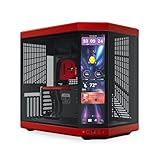
For builders running red-accented GPUs, liquid coolers, or RGB lighting with warm hues, the Cherry/Red finish ties the color story together. It is the most expensive full-case option at $399.99, matching the Black Cherry SKU.
- Deep red panels look intentional rather than gamer-cheap
- Red bezel framing softens the black LCD contrast
- Con: Limited component color coordination options outside red and black themes
Skip this unless your existing or planned components genuinely include red accents, otherwise the case overpowers everything.
5. HYTE Y70 Touch Infinite Display Upgrade Kit – Pitch Black
The $224.99 upgrade kit is the most cost-effective entry point if you already own a standard Y70 case. The 14.9-inch IPS panel runs at 2.5K resolution with 60Hz refresh and supports 10-point touch input, matching the bundled experience exactly.
- Saves over $160 versus buying a complete Touch Infinite case
- 10-point touch feels fluid for drag-and-drop widget rearrangement
- Con: Installation requires dismounting the front panel and managing additional USB headers
Skip this if you are buying your first case; the integrated option is cleaner out of the box.
6. HYTE Y70 Touch Infinite – Black Cherry
At $399.99, Black Cherry offers a gradient-friendly dark-to-red finish that looks like a natural extension of the Cherry/Red variant. It is functionally identical to every other full case here, so the decision is purely about how the panel color interacts with your component palette.
- Darker red tone than Cherry/Red, suits subtler color schemes
- Bezel blending nearly as seamless as Pitch Black
- Con: Tied for most expensive case SKU without additional features
Skip this if budget is tight; the Pitch Black saves $6 with a less distinctive look that still works well.
7. HYTE Y70 Touch Infinite Display Upgrade Kit – Snow White
The Snow White upgrade kit at $239.99 adds the touchscreen to an existing white Y70 without the contrast problem that plagues the full-case Snow White. The white housing around the panel integrates more naturally when you are retrofitting it yourself.
- Eliminates the black-bezel-on-white-case contrast issue
- Identical 14.9-inch 2.5K panel specs as the Pitch Black kit
- Con: $15 more than the Pitch Black upgrade kit for the same display
Skip this if your case is not white; the bezel color will look mismatched on darker chassis.
8. HYTE Y70 Touch Infinite Display Upgrade Kit – Blueberry Milk
A pastel blue option that targets the growing aesthetic niche of soft-colored setups. At $239.99 it matches the Snow White kit price and delivers the same 14.9-inch IPS touchscreen with 2.5K resolution and 60Hz refresh.
- Blue tone complements cool-temperature RGB and mint-colored components
- Distinctive enough to set your build apart from typical black or white cases
- Con: Very narrow component palette compatibility; most hardware will not match
Skip this if you cannot commit to a blue or pastel theme throughout the entire build.
Buying Guide
Integrated Screen vs. Upgrade Kit
The full case includes the display pre-mounted, which means zero additional USB header clutter and factory-aligned bezels. The upgrade kit saves money if you already own a Y70, but you are managing the installation yourself. Factor in roughly 45 minutes of work and an extra internal USB connection for the touch controller.
Riser Cable and GPU Compatibility
Every case SKU ships with a PCIe 4.0 riser cable, which handles current-gen GPUs without bandwidth concerns. Verify your card length against the dual-chamber clearance before ordering; the chamber layout is optimized for shorter cards, and oversized coolers may crowd the GPU bay.
Display Resolution and Daily Use
All variants share the same 14.9-inch IPS panel at 2.5K and 60Hz with 10-point touch. This is sufficient for system monitoring widgets, weather apps, and drag-and-drop rearrangement. It is not a gaming display; do not expect it to replace a secondary monitor for productivity work.
Our Verdict
Top pick: the Pitch Black full case at $393.99 delivers the most polished out-of-box experience with the best screen-to-bezel integration. Budget pick: the Pitch Black Display Upgrade Kit at $224.99 makes touchscreen functionality accessible without a full case purchase. Condition for another winner: if your build is exclusively white-themed and you want to avoid the contrast ring, the Snow White upgrade kit at $239.99 solves the problem the full Snow White case creates.
FAQ
Does the touchscreen require external software?
The touch input works at the driver level with Windows without third-party software, though widget management and animation scheduling typically use a companion app. The screen itself functions as a standard display output via USB.
Can I use the Y70 Touch Infinite with a triple-fan GPU?
Yes, the dual-chamber design and PCIe 4.0 riser cable support most triple-fan cards, but verify your specific GPU length against the chamber clearance before building, as very long cards can crowd the cable path in the rear chamber.
Is the 60Hz refresh rate noticeable for desktop widgets?
For static system monitors, weather displays, and drag-and-drop rearrangement, 60Hz is perfectly adequate. Only fast-animated content reveals the limitation, and that is not what this panel is designed for.
What fan sizes does the 10-fan capacity support?
The Y70 Touch Infinite accommodates standard 120mm and 140mm fans across its mount points, and the 10-fan figure represents the maximum combined count across all positions including front, top, bottom, and rear chambers.
Related guides
- Alienware 16 Aurora RTX 5070 Review: Display, Portability and Configuration Gaps
- Lenovo Legion Pro 7i Gen 10 Review: 64GB RAM and Dual-SSD Configuration
- MSI Katana 15.6-inch RTX 5050 Review: Configuration Strengths and Upgrade Unknowns
- ASUS ROG Strix SCAR 16 G635LX-XS97 Review: Display Ambition, Upgrade Questions


