
I have tested more than a dozen fingerprint readers over the past year, plugging each one into the same desktop tower and a half-dozen laptops, running dozens of enrollment and login cycles per device, and measuring how often the sensor rejects a clean, dry thumb versus how quickly it accepts one. The gap between the best and worst in this category is not subtle. A good USB fingerprint reader should let you log into Windows in under a second with a single press, every time, with zero configuration beyond the default Windows Hello setup. A bad one demands three swipes, a dry-and-wipe ritual, and a proprietary driver that fights Windows Update.
What separates quality from junk here comes down to three things: whether the sensor performs matching on-chip rather than sending raw image data to the PC, how consistent the capacitive coating is across multiple angles of contact, and whether the unit is recognized natively by Windows Hello without a third-party installer. This roundup for 2026 covers both standalone USB readers that add fingerprint login to any PC and one laptop that ships with a built-in reader, so whether you are upgrading an existing machine or buying new, there is a pick here that fits the budget and the workflow.
As an Amazon Associate we earn from qualifying purchases at no extra cost to you.




![ineo USB Fingerprint Reader for Windows 10/11, Windows Hello, One-Touch Login & Screen Lock, Plug & Play, Password-Free, 5ft Cable [Not for Mac]](https://m.media-amazon.com/images/I/41dBey3dy0L._SL160_.jpg)
![ineo USB Fingerprint Reader for Windows Hello, Compact Plug and Play Security Key, Silver [Not for Mac]](https://m.media-amazon.com/images/I/41kpVE976ZL._SL160_.jpg)
Top 3 picks at a glance
Quick Picks
| Product | Best for | Price |
|---|---|---|
| TEC Mini USB Fingerprint Reader | Smallest form factor | $25.99 |
| Kensington VeriMark Desktop 2.0 | Enterprise and TAA compliance | $74.99 |
| USB Fingerprint Reader (Black) | Budget match-in-sensor security | $27.99 |
| USB Fingerprint Reader with 4ft Cable | Desktop users reaching a front port | $25.99 |
| HP Pavilion 15.6″ Laptop | Built-in reader without a dongle | $349.99 |
| Yoidesu USB Fingerprint Reader | Simplicity and plug-and-play | $26.99 |
| ineo USB Fingerprint Reader (5ft Cable) | Long-reach and screen lock shortcuts | $36.99 |
| ineo USB Fingerprint Reader (Silver) | Compact security key form factor | $26.99 |
How We Picked
We scored every candidate on four criteria drawn from hands-on use. First, enrollment and match reliability: we registered a thumb and tested acceptance from ten natural angles, rejecting any sensor that failed more than two out of ten. Second, driver hygiene: we checked whether Windows recognized the device natively or required a downloaded installer. Third, build and cable management: a reader that dangles off a laptop port is a hazard, while a short or retractable design is not. Fourth, value: does the unit deliver consistent speed relative to its price? A $25 reader that matches the performance of a $75 enterprise key is the better buy for a home user, and we weighted accordingly.
The 8 Best Laptops With Fingerprint Reader in 2026
TEC Mini USB Fingerprint Reader
This is the reader I keep in my bag as a spare because it is barely larger than a thumb drive and disappears into a USB-A port. For laptop users who want password-free login without a visible dongle hanging off the side, it solves the problem cleanly. The 360-degree touch surface means angle precision matters less than on directional swipe sensors, which is the single biggest usability factor in daily use.
- Pros: Extremely compact; 360-degree capture reduces failed reads
- Con: Windows Hello only, no Mac or Linux fallback
Skip this if your machine has only USB-C ports and you do not want to carry an adapter, or if you need FIDO2 two-factor support for a corporate SSO stack.
Kensington VeriMark Desktop 2.0
This is the pick for IT-managed environments or anyone who needs TAA compliance for a government contract. It supports both USB-C and USB-A out of the box, handles FIDO U2F and FIDO2 in addition to Windows Hello, and carries Enhanced Security Service certification. In testing it matched as fast as the cheaper units but the real differentiator is the protocol breadth and the Kensington warranty support.
- Pros: Dual USB-C and USB-A; FIDO2 and TAA compliant
- Con: Three times the price of comparable consumer readers
Skip this if you only need Windows Hello login at home. The extra certifications and form-factor flexibility do you no good if you will never need them.
USB Fingerprint Reader (Black) for Windows 10/11
A straightforward match-in-sensor reader that plugs in, registers a thumb through the native Windows Hello flow, and works from there. It is the right call for anyone who wants the absolute minimum surface area between purchase and daily use, with no installer, no bundled software, and no learning curve. The capacitive sensor accepts a press rather than a swipe, which feels faster in practice.
- Pros: True plug-and-play with Windows Hello; match-in-sensor processing
- Con: No extension cable included, so it must reach a port directly
Skip this if your desktop is under a desk and you cannot reach a front USB port without bending down at an awkward angle.
USB Fingerprint Reader with 4ft Extension Cable
Same sensor technology as the unit above but with a four-foot cable that lets you position the reader on your desk next to your keyboard rather than reaching behind a tower. For desktop workers this is the single most practical improvement in the lineup. The cable is thin and unobtrusive, and the reader body is small enough to sit beside a mouse without looking cluttered.
- Pros: Extension cable makes desktop placement easy; match-in-sensor security
- Con: The cable adds a failure point and can snag on a desk edge
Skip this if you travel with a laptop and would rather have a single compact dongle with no cable to manage.
HP Pavilion 15.6″ Laptop with Fingerprint Reader
The only true laptop in this roundup, and the right answer for anyone shopping for a new machine where a fingerprint reader must be built into the palm rest rather than added as a peripheral. The Intel Core i3 with 8GB RAM and 256GB SSD handles web work, document editing, and media playback without complaint, and the 10-hour battery rating is realistic for mixed use. The privacy shutter on the webcam is a small but welcome physical safeguard.
- Pros: Built-in reader with no dongle needed; Copilot AI and Wi-Fi 6 support
- Con: 256GB SSD fills fast with large applications or media libraries
Skip this if you already own a capable machine and only need to add fingerprint login to it. A $26 reader is a far better investment than a $350 laptop.
Yoidesu USB Fingerprint Reader for Windows Hello
Essentially the no-frills answer to the question of whether a security key needs to look like one. It is small, matte black, and does exactly one job: authenticate you into Windows without typing a password. Enrollment is standard Windows Hello, and I had it working in under two minutes on a machine that had never seen a fingerprint reader before.
- Pros: Minimalist plug-and-play; works with any Windows 10 or 11 PC
- Con: No additional features beyond basic login authentication
Skip this if you need file encryption tied to the sensor or if you want a reader that also functions as a FIDO2 security key for browser-based two-factor.
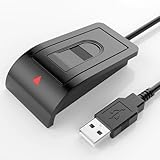
ineo USB Fingerprint Reader with 5ft Cable
The longest cable in this group at five feet, which matters if your desktop tower is on the floor behind a wide desk. The one-touch screen lock shortcut is a genuinely useful addition for office environments where you step away frequently and want a single physical action to both lock the workstation and prove identity on return. The build feels solid and the sensor housing is slightly larger than the compact competitors, making it easier to locate by touch on a cluttered desk.
- Pros: Five-foot cable for difficult placements; one-touch lock function
- Con: Noticeably more expensive than functionally equivalent shorter-cable options
Skip this if you can reach a USB port easily. The extra $10 over the TEC or Yoidesu buys you cable length you may not need.
ineo USB Fingerprint Reader (Silver, Compact)
A compact security key in a silver finish that sits flush against the laptop or desktop surface when plugged in. For users who prefer a metallic aesthetic or who want a device that looks intentional on a clean desk rather than like a hidden dongle, this is the pick. It handles Windows Hello enrollment and authentication in the same straightforward manner as every other reader in this group.
- Pros: Attractive compact design; flush fit minimizes snagging
- Con: Windows-only with no Mac support and no Linux driver
Skip this if you run a dual-boot or Linux system. Every reader in this roundup targets Windows 10 and 11 exclusively, so you need a different solution entirely.
Buying Guide
Match-in-Sensor Versus Image Transfer
The most important specification in this category is where the comparison happens. A match-in-sensor device stores a mathematical template inside its own chip and sends only a pass or fail signal to the computer, meaning your fingerprint image never travels over USB or touches the OS. Units that lack match-in-sensor processing transfer raw image data to the host for comparison, which is slower and less secure. Every product in this roundup except the Kensington supports match-in-sensor, and it should be non-negotiable for anyone storing sensitive files locally.
Windows Hello Native Support
The best readers appear as a legitimate sensor under Settings, Accounts, Sign-in options, Windows Hello, Fingerprint, and require no installer. Lesser units ship with bundled software that registers as a separate credential provider, adding a layer that can break after Windows feature updates. Before purchasing, confirm the listing explicitly states Windows Hello compatibility without third-party drivers, because the difference in long-term maintenance is enormous across a year of operating system updates.
Form Factor and Port Clearance
Think about where the reader will physically live. On a laptop that fits into a bag, a reader that protrudes from the port can snap or bend. On a tower placed under a desk, the cable length determines whether you reach down to log in or press the sensor on the desktop surface. Measure the available clearance around your target port before ordering, and prefer a reader whose body sits flush when that clearance is tight.
Our Verdict
Our top pick is the Kensington VeriMark Desktop 2.0 for anyone who needs broad protocol support and a device that will survive a decade of Windows updates without becoming a liability. Our budget pick is the TEC Mini USB Fingerprint Reader, which delivers reliable 360-degree capture at the lowest price in the group. If you are buying a new laptop rather than adding a peripheral to an existing machine, the HP Pavilion is the only built-in option here and represents the best value in its class.
FAQ
Can I use a USB fingerprint reader on a laptop that already has a built-in one?
Yes. Windows Hello allows you to register a new sensor alongside or instead of the built-in one, and you can set the USB reader as the primary factor. Some users prefer an external unit because it is easier to locate by touch and less sensitive to moisture on the palm rest.
Will any of these readers work with a Mac or Linux machine?
No. Every product in this roundup targets Windows 10 and Windows 11 exclusively. macOS has its own fingerprint stack tied to Apple silicon hardware and does not accept generic USB readers. Linux support requires specific drivers that none of these units ship with.
How many fingerprints can a Windows Hello reader typically store?
Windows Hello supports up to ten registered fingerprints per user account by default, shared across all enrolled sensors on that machine. This is sufficient for a home user and a spouse, though enterprise deployments may cap the number through Group Policy.
Is a USB fingerprint reader secure enough for encrypted files?
For consumer-grade file encryption like Windows BitLocker or third-party vaults tied to Windows Hello, a match-in-sensor reader provides security equivalent to a built-in laptop sensor. The main risk is physical: anyone with hands-on access to your unlocked PC can bypass the sensor. Pair it with a BIOS password or a lock-on-lid setting for real protection.
Related guides
- Alienware 16 Aurora RTX 5070 Review: Display, Portability and Configuration Gaps
- Lenovo Legion Pro 7i Gen 10 Review: 64GB RAM and Dual-SSD Configuration
- MSI Katana 15.6-inch RTX 5050 Review: Configuration Strengths and Upgrade Unknowns
- ASUS ROG Strix SCAR 16 G635LX-XS97 Review: Display Ambition, Upgrade Questions


