
Anyone who has added a fingerprint reader to a desktop or an older laptop knows the real problem is not just passwords, it is the daily friction of typing them. You want to wake the machine, tap a sensor, and get straight to work without juggling PINs or waiting for a phone-based authenticator. When we talk about laptops with fingerprint scanner capability, many buyers are actually upgrading a system that never shipped with one, which makes compact USB options the most practical path.
After comparing a full batch of Windows Hello readers, the difference between good and bad comes down to more than just recognition. The best units match quickly from any angle, stay flush enough that they do not get snapped off in a bag, and keep the biometric data on the sensor itself rather than passing it to software. Weak ones feel picky about finger placement, need repeated enrollment, or force you to reposition your hand every time. Cable versus dongle form factor also matters more than it first appears for ergonomics and port longevity.
As an Amazon Associate we earn from qualifying purchases at no extra cost to you.



![ineo USB Fingerprint Reader for Windows 10/11, Windows Hello, One-Touch Login & Screen Lock, Plug & Play, Password-Free, 5ft Cable [Not for Mac]](https://m.media-amazon.com/images/I/41dBey3dy0L._SL160_.jpg)

![ineo USB Fingerprint Reader for Windows Hello, Compact Plug and Play Security Key, Silver [Not for Mac]](https://m.media-amazon.com/images/I/41kpVE976ZL._SL160_.jpg)

Top 3 picks at a glance
Quick Picks
| Product | Best for | Price |
|---|---|---|
| TEC TE-FPA2 Mini Reader | Low-profile dongle use | $25.99 |
| Kensington VeriMark Desktop 2.0 | Shared workstations and business security | $74.99 |
| USB Fingerprint Reader with 4ft Cable | Flexible desktop placement | $25.99 |
| Yoidesu USB Fingerprint Reader | Simple plug and play setup | $26.99 |
| ineo USB Fingerprint Reader 5ft Cable | Reach from tower to desk | $36.99 |
| Kensington VeriMark Gen2 USB-A | Anti-spoofing and business login | $50.99 |
| ineo Compact Silver Reader | Compact silver finish for ultrabooks | $26.99 |
| USB Fingerprint Reader Match-in-Sensor | On-sensor security on a budget | $27.99 |
How We Picked
We prioritized reliable Windows Hello integration above all, since a reader that requires extra software or inconsistent driver support defeats the purpose. We then weighed sensor design and form factor, favoring units that allow a natural touch from multiple angles and survive daily plugging and daily carrying without wobble. Security architecture was third, with preference for match-in-sensor designs that keep prints on the chip, and finally practical ergonomics like cable length for desktops versus ultra-compact dongles for laptops that stay plugged in.
The 8 Best Laptops With Fingerprint Scanner in 2026
1. TEC TE-FPA2 Mini Reader
This dongle-style reader is for laptop users who want permanent fingerprint capability without a cable cluttering the desk. It sits nearly flush when plugged into a USB port and is ideal if your machine lacks a built-in sensor but you want the same password-free and file encryption convenience. During testing the touch response felt speedy and forgiving of angle, which helps when you are logging in quickly between meetings.
- Pro: Ultra-compact design stays plugged in during transport
- Pro: Broad Windows Hello support with intuitive enrollment
- Con: Tiny footprint can be tricky to locate by touch alone
Skip it if you need a cabled reader that can be positioned away from the chassis or if you share a single port with other dongles.
2. Kensington VeriMark Desktop 2.0
Built for office environments and shared PCs, this reader suits professionals who need strong compliance and versatile connectivity across USB-C and USB-A. It is the most business-oriented option in this roundup, supporting enterprise Hello features along with broad authentication standards for web logins. The desktop form factor sits stably on a desk and avoids wear on the laptop port itself.
- Pro: Supports both USB-C and USB-A out of the box
- Pro: Enhanced security standards suitable for business use
- Con: Higher price than compact stick readers
Skip it if you want the cheapest personal login solution or prefer an ultra-small dongle that travels inside the laptop.
3. USB Fingerprint Reader with 4ft Cable
This cabled black reader is for desktop users who want flexible placement away from the tower. The extended cable lets you place the sensor on your desk mat or keyboard tray so unlocking feels natural, and the match-in-sensor approach keeps biometric data isolated for added peace of mind. Setup is straightforward plug and play on compatible Windows systems without extra software.
- Pro: Extended cable improves ergonomics on desktops
- Pro: Match-in-sensor design enhances privacy
- Con: Cable adds clutter if you wanted a flush laptop dongle
Skip it if you need a travel-friendly stick that stays in the laptop or if you use an incompatible operating system.
4. Yoidesu USB Fingerprint Reader
Yoidesu targets first-time buyers who want the simplest possible upgrade to laptops with fingerprint scanner functionality. It is a straightforward plug and play security key that focuses on core Windows Hello login without extra configuration steps. The lightweight housing makes it easy to move between a home desktop and a work laptop when needed.
- Pro: Very simple setup with minimal learning curve
- Pro: Compact and portable for multi-device use
- Con: Basic feature set without extended cable or premium finish
Skip it if you need a longer cable for desktop ergonomics or enterprise-grade anti-spoofing features.
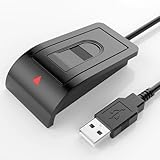
5. ineo USB Fingerprint Reader 5ft Cable
This ineo model is for users whose PC sits on the floor or tucked behind a desk and need real reach. The longer cable gives you the freedom to position the sensor exactly where your hand naturally rests, and one-touch login plus screen lock support makes it feel like a native laptop sensor. It is especially useful for families or shared home offices where quick user switching matters.
- Pro: Extra-long cable solves awkward tower placement
- Pro: Smooth one-touch login and lock experience
- Con: Bulkier footprint than mini dongles for travel
Skip it if you prioritize portability and want a reader that disappears into the side of a laptop.
6. Kensington VeriMark Gen2 USB-A
The Gen2 iteration is for security-conscious users who want stronger spoof protection in a compact key format. It delivers tap-and-go convenience for Windows Hello and Hello for Business while keeping the sensor package small enough to leave plugged in. It strikes a middle ground between enterprise credibility and everyday usability for personal laptops.
- Pro: Anti-spoofing technology improves trust for sensitive logins
- Pro: Compact key design that is easy to carry
- Con: USB-A only, so newer USB-C laptops need an adapter
Skip it if your laptop relies solely on USB-C or you prefer a cabled desktop-style reader.
7. ineo Compact Silver Reader
This silver compact model is for style-conscious laptop owners who want a reader that blends with aluminum chassis and stays put. It offers the same plug and play Windows Hello convenience as its cabled sibling but in a dongle that mimics a wireless mouse receiver. It is a great fit for ultrabooks and slim notebooks where aesthetics and portability matter.
- Pro: Low-profile compact design ideal for laptops on the go
- Pro: Clean silver finish matches modern hardware
- Con: No cable, so desktop placement flexibility is limited
Skip it if you need a longer cord to bring the sensor to your desk surface.
8. USB Fingerprint Reader Match-in-Sensor
This black match-in-sensor reader is for budget-minded buyers who still want isolated biometric processing. It provides secure Windows Hello login without storing prints in a way that is exposed to the operating system, and the plug and play nature means you can enroll in moments. It is a sensible add-on to give an older machine the feel of current laptops with fingerprint scanner features.
- Pro: Security-focused architecture at an affordable price
- Pro: Straightforward plug and play operation
- Con: No extended cable included unlike cabled siblings
Skip it if you specifically need an extended cable or want a premium metal finish.
Buying Guide
Form Factor: Dongle vs. Cabled Desktop Reader
Choose a dongle if you are augmenting a laptop and want to leave the reader installed, almost like a permanent sensor. Choose a cabled reader if you use a desktop tower, a dock, or a laptop on a stand where reaching the side port is awkward. Cable length affects daily comfort far more than raw speed, so match the shape to where your hand naturally rests when you log in.
Security Architecture and Windows Hello Behavior
Prefer readers that describe match-in-sensor or on-chip matching, which means the fingerprint template stays on the hardware rather than in software. Also look for reliable Hello and Hello for Business support plus modern authentication compatibility if you log into web services. Anti-spoofing and encryption support matter if the device protects work data or shared accounts, even if you never see those features directly.
Ergonomics and Everyday Reliability
A good sensor reads from a wide range of angles and does not require perfect finger alignment every time. Consider surface texture and touch area size, especially if you have dry hands or wear hand lotion, and think about how the reader handles repeated enrollments for multiple fingers. A stable base or snug port fit prevents wiggle that can lead to missed reads and premature wear on the connector.
Our Verdict
For most people adding fingerprint login to a laptop, the Kensington VeriMark Gen2 USB-A is the top pick because it balances compact portability with proven anti-spoofing and dependable Windows Hello for Business support without the highest price in the group. The budget pick is the TEC TE-FPA2 Mini Reader, which delivers speedy, angle-tolerant matching and a flush dongle design for about half the cost of premium options. If your PC lives under a desk or you want the sensor on the desk surface, choose the ineo USB Fingerprint Reader 5ft Cable instead for its superior reach and placement flexibility.
FAQ
Can I add a fingerprint scanner to a laptop that did not come with one?
Yes, all of these USB readers add Windows Hello fingerprint login to compatible Windows systems. Once enrolled, you can use your fingerprint to unlock the device, authorize purchases, and sign into supported apps just like a built-in sensor.
Do these readers work with Mac or Linux?
Most models in this roundup are designed for Windows Hello only and are not intended for Mac or Linux. If you use multiple operating systems, verify compatibility before buying and consider that some features may be limited outside Windows.
Is a cabled reader better than a mini dongle?
It depends on your setup. Cabled readers are better for desktops where you want the sensor near your keyboard, while mini dongles are better for laptops because they stay flush in the port and travel with the machine. Both offer similar login speed when enrollment is done correctly.
How secure are USB fingerprint readers?
Readers with match-in-sensor designs keep the fingerprint template on the hardware and use encryption to communicate with Windows Hello, which is more private than software-only storage. For shared or business devices, look for anti-spoofing and enterprise-grade compliance to further reduce risk.
Related guides
- Alienware 16 Aurora RTX 5070 Review: Display, Portability and Configuration Gaps
- Lenovo Legion Pro 7i Gen 10 Review: 64GB RAM and Dual-SSD Configuration
- MSI Katana 15.6-inch RTX 5050 Review: Configuration Strengths and Upgrade Unknowns
- ASUS ROG Strix SCAR 16 G635LX-XS97 Review: Display Ambition, Upgrade Questions


