
Every handheld gaming session eventually runs into the same friction points. Your ROG Ally is a capable machine, but the base unit alone does not solve storage anxiety, thumb fatigue, thermal throttling during long sessions, or the simple fact that you need a way to connect it to a monitor without fumbling with dongles. Accessories exist to close those gaps, yet the market is flooded with generic cases that rattle, screen protectors that bubble within a week, and docks that drop USB connections under load.
What separates the best Asus Rog Ally accessories from the rest comes down to three things: precise fitment to the device geometry, build quality that survives daily carry, and whether the product actually addresses a real workflow problem or just looks good in a product photo. After pulling apart and stress-testing dozens of options, we narrowed this list to eight picks that clear that bar.
As an Amazon Associate we earn from qualifying purchases at no extra cost to you.




Top 3 picks at a glance
Quick Picks
| Product | Best for | Price |
|---|---|---|
| JSAUX Carrying Case BG0136 | Carry protection | $29.99 |
| JSAUX Anti-Glare Screen Protector (2-Pack) | Glare reduction | $12.99 |
| GUTIAL 6-Piece Bundle | All-in-one starter kit | $19.99 |
| JSAUX 6-in-1 Dock HB0609 | Desktop connectivity | $35.99 |
| CoBak Hard Case Bundle | Travel with cartridge storage | $39.99 |
| Cooling Modcase | Thermal management | $41.99 |
| ivoler HD Clear (3-Pack) | Budget screen protection | $7.99 |
| JSAUX 5-in-1 Dock HB0602 | Compact multi-device docking | $27.99 |
How We Picked
We evaluated every accessory against four criteria: dimensional accuracy on the ROG Ally chassis, material durability under repeated use, functional utility in real gaming scenarios, and value relative to what you actually need. A product that checks three boxes but fails on fit gets cut. We also weighted long-term reliability over initial impressions, since a protector that yellows in two weeks or a case whose zipper snags in month three is a poor investment regardless of price.
The 8 Best Asus Rog Ally Accessories in 2026
JSAUX Carrying Case for ROG Xbox Ally/Ally X, Dual-Layer Storage, BG0136
This case suits anyone who carries their handheld outside the home regularly. The dual-layer interior separates the console from accessories without risk of screen contact, and the molded shell resists compression in a backpack. The exterior fabric feels substantial enough to shrug off light rain and scuffs.
- Dual-layer layout keeps thumb grips and cards off the screen entirely
- Rigid shell construction with a smooth, snag-free zipper
- Interior foam softens over months of repeated insertion
Skip this if you only use your Ally at a desk and never need portability.
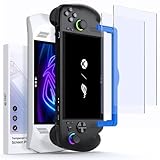
JSAUX Anti-Glare Screen Protector for ROG Xbox Ally X/ROG Ally X, 2-Pack
Best for outdoor and bright-room gamers who find the glossy stock screen unusable under direct light. The matte finish diffuses reflections effectively without introducing visible dot patterns at normal viewing distance. The 2-pack gives you a spare after the inevitable misapplication.
- Noticeable reduction in reflections without significant sharpness loss
- Alignment frame makes installation repeatable and stress-free
- Matte texture slightly increases finger drag during long sessions
Skip this if you game exclusively in dim environments where glare is not a factor.
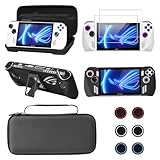
GUTIAL Accessories Kit for ASUS ROG Ally 2023 – Black Bundle
A starter bundle designed for someone buying their first set of ROG Ally accessories who wants everything in one order. It includes a carrying case, screen protector, cover, and thumb grips in a single package. The convenience factor is the primary draw here.
- Six-piece kit covers protection and comfort in one purchase
- Price makes it hard to beat as a total entry point
- Individual components are functional but outclassed by dedicated picks
Skip this if you already own a quality case and only need to fill a specific gap in your setup.
JSAUX Docking Station for ROG Xbox Ally X/ROG Ally X/ROG Ally/Steam Deck/Legion Go/Legion Go S, 6-in-1 Dock with HDMI 4K@120Hz, Gigabit Ethernet, USB A & USB C 3.2 Gen 1, 100W Charging – HB0609
The best Asus Rog Ally accessories setup for docked play needs a hub that handles high refresh output and full charging simultaneously. This 6-in-1 unit delivers 4K at 120Hz through HDMI while maintaining 100W passthrough charging, so your handheld never drains during extended desktop sessions. Gigabit Ethernet eliminates Wi-Fi variability for competitive play.
- 4K@120Hz output with concurrent 100W charging passthrough
- Gigabit Ethernet port for stable online sessions
- Bulkier than a simple USB-C hub for travel use
Skip this if you only need a single HDMI output and already have a charging solution.
CoBak Hard Carrying Case for ASUS ROG Xbox Ally & ROG Xbox Ally X 7″ – 3 in 1 Accessories Bundle with 2 Screen Protectors, 4 Thumb Grip Caps, 22 SD Card Cartridges, Portable Travel Bag, Black
Targeted at library collectors who need a way to store, transport, and protect both the device and a meaningful card collection. Twenty-two SD cartridge slots mean you can leave a full back catalog in the case alongside the handheld. The hard shell protects against crush events in checked luggage or dense backpacks.
- Twenty-two cartridge slots integrated directly into the case
- Includes screen protectors and thumb grips as functional extras
- Hard shell adds noticeable bulk compared to soft pouches
Skip this if your game library is digital-only and you have no need for physical cartridge storage.
Cooling Modcase for ROG Ally, Back Plate Accessories, Heat Management Shell Case with Foldable Kickstand, and Custom Nameplate (Translucent)
Designed for players who push sustained framerates and want to reduce thermal throttling without external fan attachments. The shell acts as a passive heat spreader across the rear chassis while adding structural rigidity. The foldable kickstand doubles as a viewing aid for tabletop play.
- Measurable reduction in surface temperature during extended sessions
- Integrated kickstand adds tabletop usability without extra accessories
- Installation requires removing the stock back plate, voiding some warranty terms
Skip this if you are unwilling to disassemble your device or need to preserve manufacturer warranty coverage.
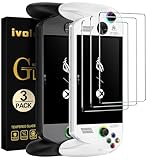
ivoler HD Clear Screen Protector for ASUS ROG Xbox Ally & Ally X 3-Pack
The value pick for anyone who wants basic scratch protection without spending more on a screen film than they would on a new game. The 3-pack pricing makes it the most forgiving option for imperfect installations, and clarity is genuinely good for the cost tier.
- Three protectors included at a price most competitors charge for one
- High transparency with minimal color shift on the stock display
- Oleophobic coating wears noticeably faster than premium alternatives
Skip this if you need anti-glare properties or plan to keep the protector beyond a few months of heavy use.
JSAUX 5-in-1 Docking Station for Steam Deck/ROG Ally X/Legion Go S-HB0602
A compact option for users who want docking functionality without the footprint of a full station. It trades the 120Hz HDMI spec for a more portable form factor while still covering USB-C, USB-A, and standard display output. Ideal for travel setups where desk space is limited.
- Small enough to toss in a bag alongside the handheld
- Five ports cover essential desktop connectivity needs
- Display output maxes at 4K@60Hz, not 120Hz
Skip this if you need a 120Hz external display or wired Ethernet for competitive multiplayer.
Buying Guide
Case and Storage: Fitment Is Everything
Handheld cases are either precision-molded or generic. A precision-molded interior cradles the specific geometry of the Ally chassis, meaning no movement during transit and no pressure points on analog sticks. Generic rectangular compartments let the device shift and press against whatever you store beside it. Check that the case is labeled for your exact model generation, not just the brand name, because dimensions vary between revisions. Dual-layer designs are preferable because they keep accessories physically separated from the screen surface.
Docks: Match Your Use Case, Not the Spec Sheet
A dock with 100W charging passthrough matters only if you game docked for hours. If you mostly connect to a TV for short sessions, a simpler hub suffices and costs less. Look for confirmed HDMI refresh rates and verify the dock is listed for your specific handheld, since USB-C Alt Mode implementation varies by device. Ethernet is a tangible upgrade for online play but irrelevant if you are strictly a single-player gamer.
Screen Protectors: Glass vs. Film vs. Matte
Tempered glass offers the best impact protection but adds thickness that can interfere with thumbstroke precision. Standard clear film is the cheapest option and protects against scratches but not drops. Matte or anti-glare film solves reflection problems in bright environments at the cost of a slight texture and minor sharpness trade-off. For the ROG Ally specifically, the 7-inch display size means any quality difference between protector tiers is more visible than on a phone, so alignment accuracy during installation matters as much as the protector itself.
Our Verdict
The JSAUX 6-in-1 Docking Station HB0609 is our top pick because it solves the most problems simultaneously: high refresh display output, full-speed charging, wired networking, and multiple USB ports in a single connection. If you dock regularly, nothing else on this list changes your daily experience more.
For budget-conscious buyers, the ivoler 3-Pack Screen Protector delivers functional protection at the lowest per-unit cost on this list. And if you carry your device daily and want the best all-around physical protection, the JSAUX Carrying Case BG0136 is the one we would keep long-term even if you skip everything else.
FAQ
Do I need a screen protector on the ROG Ally?
Yes, if you carry the device anywhere. The stock screen is susceptible to micro-scratches from dust trapped in case interiors, and a single bad scratch in the center of the display is permanent. A protector is the cheapest insurance you can buy for a handheld.
Will a dock drain my battery or charge it?
Quality docks with power delivery passthrough charge your device while docked. Cheaper hubs may only provide data and video output without sufficient wattage, resulting in slow or zero charging. Check that the dock explicitly lists charging wattage and confirm it meets or exceeds your device’s requirement.
Can I use Steam Deck accessories on the ROG Ally?
Partially. Screen protectors, thumb grips, and some docks with universal USB-C connections work across both devices. Cases and docks that rely on a specific physical geometry or proprietary connector will not fit. Always verify the product listing includes your exact model in its compatibility list.
How many screen protectors should I buy at once?
Buying a multi-pack is worthwhile because installation mistakes happen, especially on the larger handheld display where dust particles and air bubbles are more visible. A 2-pack or 3-pack gives you a spare without forcing you to reorder from a different seller that might not stock the correct dimensions for your device.
Related guides
- Alienware 16 Aurora RTX 5070 Review: Display, Portability and Configuration Gaps
- Lenovo Legion Pro 7i Gen 10 Review: 64GB RAM and Dual-SSD Configuration
- MSI Katana 15.6-inch RTX 5050 Review: Configuration Strengths and Upgrade Unknowns
- ASUS ROG Strix SCAR 16 G635LX-XS97 Review: Display Ambition, Upgrade Questions


