Our Top Picks
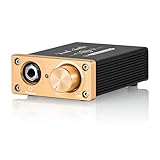
 FiiO JadeAudio GIGAS 1 High-Power Desktop Headphone Amplifier5.2 x 2.4 x 1.6 inches0.5 PoundsCheck on Amazon



Top 3 picks at a glance
Best Desktop Headphone Amplifiers for Clear Audio
The best desktop headphone amplifier for most gaming and music setups is the Topping DX3 Pro+, because it combines a capable DAC, ample power for common headphones, USB and Bluetooth connectivity, and a small footprint; choose the Schiit Magni Unity if you want a simpler, upgradeable desktop setup, or the FiiO K7 if you need more inputs and balanced headphone output.
These are different kinds of devices: the DX3 Pro+ and K7 combine a digital-to-analog converter (DAC) with an amplifier, while the Magni Unity is primarily an amplifier unless fitted with its optional DAC module. That distinction matters if your computer already has a good DAC or you want to connect consoles and other sources.
As an Amazon Associate we earn from qualifying purchases at no extra cost to you.



Head-to-head: which one fits your desk?
| Model | Type and headline output | Useful connections | Best fit |
|---|---|---|---|
| Topping DX3 Pro+ | DAC/amp; up to about 1,000 mW per channel into 32 ohms from its single-ended output | USB, optical, coaxial, Bluetooth; 6.35 mm headphone output | Compact all-in-one for PC and wireless listening |
| FiiO K7 | Balanced DAC/amp; about 2,000 mW per channel into 32 ohms balanced, less from its single-ended output | USB, optical, coaxial, RCA line input; 4.4 mm balanced and 6.35 mm headphone outputs | Multiple sources and headphones that benefit from more output headroom |
| Schiit Magni Unity | Headphone amplifier; up to around 2,500 mW per channel into 32 ohms, depending on configuration | RCA analog input; optional internal DAC module on compatible configurations | Analog sources, a separate DAC, or a modular upgrade path |
Published output figures depend on load, output type, and measurement conditions, so they are not directly interchangeable. Balanced power is available only with a compatible balanced cable and headphone; it does not make a headphone sound better by itself. Check the manufacturer’s current specifications before buying, especially if a particular input or module is essential.
Choose by your headphones and sources
| Your situation | Good starting point | Why |
|---|---|---|
| PC gaming, one wired headphone, limited desk space | Topping DX3 Pro+ | DAC and amp in one compact unit; USB handles computer audio, while optical can serve another digital source. |
| Several digital sources or a future balanced headphone | FiiO K7 | Offers multiple inputs and both balanced and single-ended headphone outputs. |
| You already own a DAC or use an analog source | Schiit Magni Unity | Can act as a dedicated amplifier; an optional DAC module may reduce the number of boxes. |
| Very sensitive in-ear monitors | Any suitable low-noise model, with a preference for usable low gain | Maximum power is less important than quiet operation and fine volume control. |
| High-impedance or low-sensitivity headphones | Compare output voltage and power at your headphone’s load | Impedance alone does not tell you how hard a headphone is to drive. |
How much power do your headphones actually need?
A useful buying check is to estimate the power required for your listening level, rather than assuming that a high impedance automatically demands a powerful amp. If a headphone’s sensitivity is stated in decibels per milliwatt (dB/mW), the approximate power for a target level is:
Required power in mW = 10(target dB − sensitivity dB/mW) / 10
For example, consider a headphone rated at 100 dB/mW. A 110 dB peak requires about 10 mW; a 115 dB peak requires about 32 mW. The second figure adds headroom for brief peaks, not a recommendation to listen continuously at that level. Actual listening levels vary, and sustained loud playback can damage hearing.
For a voltage-based sensitivity rating in dB/V, use voltage instead: required volts = 10(target dB − sensitivity dB/V) / 20. Then check whether the amp can supply that voltage into the headphone’s impedance. This is why a headphone’s impedance and sensitivity must be considered together. A high-impedance model may call for more voltage; a low-impedance, low-sensitivity model may call for more current.
What matters beyond the headline wattage?
Impedance support and gain
Look for output power or voltage figures at loads close to your headphone’s impedance—not just the most impressive number in the product listing. Low and high gain settings are useful: low gain gives sensitive headphones a more manageable volume range, while high gain can help harder-to-drive models reach sufficient levels. If the volume becomes loud with only a small turn of the knob, low gain is usually the better starting point.
DAC features and gaming connections
A USB DAC/amp can bypass a computer’s built-in audio output and simplify a desktop setup. Optical input can be convenient for a compatible console or TV, but console support depends on the device and the console’s audio-output settings. Bluetooth is handy for casual listening, but it is generally not the first choice for latency-sensitive gaming. For chat, also check how your microphone connects: many headphone amplifiers do not provide a microphone input or headset mic pass-through.
Footprint and controls
Measure the space around your monitor and check where cables exit. A compact unit can still be awkward if its connectors face the back and the desk sits against a wall. Front-panel volume control and an easily reached headphone jack are useful during games; a remote can help when the unit doubles as a music system. A larger chassis may offer more connectors, but it also claims more desk space.
Value
Typical street prices vary by region and sale, but these models commonly sit in the broad range of roughly $100–$250. Compare the complete setup cost: a standalone amplifier may need a separate DAC, while an all-in-one can reduce cables and clutter. Avoid paying extra for balanced output unless your headphones use a compatible cable or the added connections solve a real setup need.
Practical setup for PC gaming and music
- Connect by USB when using a PC as the main source. Select the DAC/amp as the operating system’s output device.
- Start on low gain and set the amp volume low before playback. Raise it gradually to a comfortable level; this helps prevent an unexpectedly loud signal.
- Keep digital volume near its normal full-scale setting and use the amp’s knob for everyday listening, unless your operating system or application requires a different level. Avoid stacking multiple boosts that can cause clipping.
- Use the right console output path. If connecting by optical, confirm that the console or display actually sends audio through that port and that the selected format is supported. If using USB, verify console compatibility before purchase.
- For multiplayer chat, plan the microphone separately unless the chosen unit explicitly supports a mic input. A USB microphone or a suitable headset interface may be needed.
Frequently asked questions
Can I use these amplifiers with a console?
Yes, but the connection depends on the amplifier and console. Optical input can work with a compatible console or TV when the console or display sends audio through that port and supports the selected format. USB compatibility should be verified before purchase. The article also notes that console use may require checking the device’s current specifications and audio-output settings.
Do these headphone amplifiers support microphone input for chat?
Not necessarily; many headphone amplifiers do not provide a microphone input or headset mic pass-through. For multiplayer chat, plan the microphone separately unless the chosen unit explicitly supports a mic input. A USB microphone or a suitable headset interface may be needed, particularly when using an amplifier designed mainly for headphone playback rather than combined headset connectivity.
What is the difference between a headphone amplifier and a DAC/amp?
A headphone amplifier increases the signal available to drive headphones, while a DAC converts digital audio into an analog signal before amplification. The Topping DX3 Pro+ and FiiO K7 combine both functions. The Schiit Magni Unity is primarily an amplifier, although compatible configurations can use its optional internal DAC module, potentially reducing the number of separate boxes.
Is balanced headphone output automatically better?
No. Balanced output does not make a headphone sound better by itself. It is available only with a compatible balanced cable and headphone, and its main practical benefit in this article is providing another connection and, on the FiiO K7, more output headroom. Avoid prioritizing balanced output unless your headphones use a compatible cable or the connection solves a real setup need.
How should I prevent the volume from becoming unexpectedly loud?
Start on low gain and set the amplifier volume low before playback, then raise it gradually to a comfortable level. Low gain is usually preferable when a headphone becomes loud with only a small turn of the knob. Keep digital volume near its normal full-scale setting and use the amplifier’s control for everyday listening, while avoiding multiple boosts that can cause clipping.
Bottom line
For a compact PC-and-music system, the Topping DX3 Pro+ is a strong all-in-one starting choice. Pick the FiiO K7 when its extra inputs and balanced output match your headphones and sources. Choose the Schiit Magni Unity when you want an analog amplifier, already have a DAC, or prefer a modular arrangement. In every case, match the amp to headphone sensitivity and impedance, then prioritize clean low-volume control, the connections you will actually use, and a comfortable desk layout over the largest power number.