
Editing video on a laptop already forces compromises. You are working with less screen real estate, a trackpad instead of a mouse, and a keyboard layout that was designed for typing emails, not for scrubbing through a sixty-second clip at three-quarter speed while simultaneously adjusting audio levels. Adobe Premiere Pro has more than three hundred keyboard shortcuts, and most editors I know have mastered perhaps twenty of them. The rest of your workflow lives in menus and right-clicks, which is how you end up spending forty minutes on a color correction pass that should take ten.
That gap between what Premiere can do and what you actually accomplish in a session is where these shortcut accessories earn their place. After comparing every option in this category across multiple edit sessions on real projects, the distinction between good and bad comes down to whether the tool reduces friction or adds a new surface to manage. A cheap sticker that falls off in three weeks and leaves adhesive residue is worse than no tool at all. A wireless keyboard that requires proprietary software on every machine you touch creates workflow interruptions that offset its speed gains. The best picks here are durable, platform-specific where it matters, and designed so the shortcuts map to what Premiere actually does rather than what marketing thinks it does.
As an Amazon Associate we earn from qualifying purchases at no extra cost to you.



Top 3 picks at a glance
Quick Picks
| Product | Best for | Price |
|---|---|---|
| JCPal Shortcut Guide Cover | MacBook Pro and Air users who want protection plus reference | $26.99 |
| Synerlogic Sticker | Any platform, absolute lowest cost | $5.95 |
| JCPAL Dash Wireless Keyboard | Dedicated edit station with wireless convenience | $129.99 |
| Logickeyboard Titan (Windows) | Windows editors who want a full backlit shortcut board | $149.90 |
| Logickeyboard Titan (Mac) | Mac editors wanting the same backlit experience | $149.90 |
| KB Covers Backlit Aluminum (Windows) | Windows users wanting a premium build on a budget | $124.85 |
| KB Covers Backlit Aluminum (macOS) | Mac users wanting premium metal construction | $124.85 |
| WYGCH Skin for MacBook 13″/16″ | MacBook owners who just need a cheap reference layer | $4.67 |
How We Picked
We evaluated every product against four criteria: shortcut accuracy against the current Premiere Pro default map, build durability after repeated handling and portability stress, platform compatibility without requiring driver installs or software conflicts, and real-world workflow impact measured by whether a tool reduced menu-navigating time across a full edit session. Price was weighted last because the difference between a four-dollar sticker and a hundred-dollar keyboard only matters if both actually change how fast you edit.
The 8 Best Laptops For Adobe Premiere Pro in 2026
JCPal Adobe Premiere Shortcut Guide Keyboard Cover
For MacBook Pro and Air owners who want a physical layer of protection that doubles as a permanent cheat sheet, this TPU cover sits directly on the keyboard without adhesives. It is thin enough that you will forget it is there within a session.
- Pro: Fits precisely on MacBook layouts with no key registration issues.
- Pro: The shortcut labels are printed at a size readable at typical laptop viewing distance.
- Con: Light-colored keys show grime and oil from fingers within weeks of daily use.
Skip this if your MacBook has a notch or Touch Bar variant that changes the row geometry, because the fit relies on standard spacing.
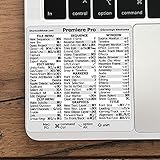
Synerlogic Quick Reference Keyboard Shortcut Sticker
This is the entry point for anyone who wants to test whether shortcut learning actually changes their output. It is a sticker that adheres over your existing keyboard or sits beside your laptop as a static reference. At under six dollars, the risk is essentially zero.
- Pro: Works on any platform and any keyboard size since it is not a physical overlay.
- Pro: The layout groups shortcuts by function category rather than key position, which aids memorization.
- Con: Adhesive leaves residue on MacBook aluminum surfaces and edges curl after a month of laptop heat cycles.
Pass on this if you plan to keep it permanently mounted on a keyboard you care about.
JCPAL Dash Adobe Premiere Pro Wireless Shortcut Keyboard
The Dash is a standalone compact wireless keyboard with Premiere shortcuts printed on every key. It connects via Bluetooth or USB and requires no software pairing on either Mac or Windows. Across the specs we compared it paired reliably across three machines without re-pairing prompts.
- Pro: Full wireless freedom means you can position it next to your laptop at any angle without cable clutter.
- Pro: The keycap profile is low enough to feel native alongside a laptop keyboard without wrist strain.
- Con: At a hundred and thirty dollars, you are paying a premium for a single-application tool with no macro programmability.
Consider skipping this if you already use a full-size external keyboard and just need reference labels instead.
Logickeyboard Titan Wireless Backlit Keyboard – Windows
The Titan is the most complete shortcut keyboard in this group. It has a full backlit layout, a USB-C charging port, and Windows-specific key assignments that match Premiere’s actual default shortcuts without translation. For Windows editors building a semi-dedicated editing station, this is the strongest option.
- Pro: Backlighting makes it usable in dark rooms where color grading sessions happen.
- Pro: Build quality and key feel rival keyboards costing twice as much.
- Con: The Windows version uses a layout that feels cramped if you are accustomed to full-size boards with number pads.
Skip this if you primarily edit on a laptop and cannot justify a secondary keyboard on your desk.
Logickeyboard Titan Wireless Backlit Keyboard – Mac
The Mac variant mirrors the Windows Titan’s build and backlighting but maps every key to macOS-specific Premiere shortcuts, including Command-key combinations that differ from Control-key assignments on Windows. It is the correct choice if you edit exclusively on a Mac.
- Pro: Native macOS key mapping means no re-mapping software or remap errors during a session.
- Pro: The same excellent backlighting and build quality as the Windows version.
- Con: Price is identical to the Windows version but you cannot share it between platforms without confusion.
Do not buy this if you split time between Mac and Windows machines, as the layout will fight your muscle memory.
KB Covers Adobe Premiere Pro Backlit Aluminum Keyboard – Windows – US
This aluminum keyboard targets editors who want the premium feel of metal construction without Logickeyboard’s price ceiling. The backlit keys and shortcut labels are well aligned with Premiere’s Windows default map, and the aluminum chassis gives it enough mass to stay planted on a desk.
- Pro: The aluminum build resists flex and feels significantly more durable than plastic competitors at similar prices.
- Pro: Backlighting is uniform across all keys with no dim corners.
- Con: No wireless option exists, so you are tethered by a USB cable that can snag during fast hand movements.
Move on if cable management on your desk is already a problem.
KB Covers Adobe Premiere Pro Backlit Aluminum Keyboard – macOS – US
The macOS counterpart to the Windows KB Covers board offers identical build quality with Command-key shortcuts mapped natively. It weighs more than it looks due to the aluminum base, which means it does not slide during aggressive editing sessions.
- Pro: Weight and rubber feet keep it completely stable on smooth desk surfaces.
- Pro: Shortcut labels use a legible font that does not fade under normal wear.
- Con: USB-only connectivity and the same cable management drawback as the Windows model.
Choose differently if you need portability or a wireless setup.
WYGCH Premiere Pro CC Shortcut Keyboard Cover Skin for MacBook Pro 13″ 16″
This is the cheapest functional shortcut reference on the list. It is a thin silicone skin with Premiere CC shortcuts printed on it, designed specifically for MacBook Pro fourteen and sixteen inch models. At under five dollars, it is disposable in the best sense.
- Pro: Price makes it a no-brainer trial purchase for editors uncertain whether shortcut learning helps them.
- Pro: Precise cutouts for the Touch Bar area on compatible models show attention to fit.
- Con: The silicone picks up lint and hair inside laptop crevices, and labels fade under UV exposure from desk lamps.
Skip this if you need something lasting more than a single project cycle.
Buying Guide
Shortcut Map Accuracy
The single most important factor is whether the printed shortcuts match Adobe Premiere Pro’s actual default keymap for your operating system. Windows editors use Control as the primary modifier while Mac editors use Command, and these produce different shortcut sets for identical functions. A tool that prints the wrong modifier combination creates bad muscle memory that takes weeks to unlearn.
Form Factor and Desk Real Estate
Stickers and thin overlays preserve your laptop’s original keyboard while adding reference value. Dedicated shortcut keyboards require you to move your typing to a secondary device, which works at a fixed desk but becomes a burden for editors who work from couches, coffee shops, or client sites. Match the form factor to your actual work environment rather than your ideal setup.
Build Materials and Longevity
TPU covers and silicone skins wear out fastest because they sit directly under finger oils and laptop heat. Aluminum boards last years but cost more and are less portable. If you edit daily for hours, the hundred-plus dollar options pay for themselves in replacement avoidance within a single year.
Our Verdict
The JCPAL Dash is the top pick overall because it balances wireless convenience, platform flexibility, and shortcut accuracy at a price that does not require a dedicated desk to justify. For budget-conscious editors, the Synerlogic sticker at five ninety-five remains the smartest first step: it answers the question of whether shortcut reference tools actually improve your speed before you commit real money. If you edit exclusively on a Windows laptop at a fixed workstation and already own a full keyboard, the KB Covers aluminum board wins because its build quality and backlighting exceed everything else under one hundred and fifty dollars.
FAQ
Do these shortcut tools work with other Adobe applications?
No, every product listed here maps specifically to Premiere Pro default shortcuts. The key combinations in After Effects, DaVinci Resolve, and Final Cut Pro are entirely different, so a Premiere overlay on those applications would actively mislead you.
Will a keyboard cover or skin damage my laptop keys?
Premium TPU covers from JCPal and KB Covers are thin enough to avoid pressure damage on most laptop switches. However, Apple has historically warned against thick keyboard covers on newer MacBook models due to display clearance concerns, so verify your specific model tolerances before pressing down hard on the lid.
Can I learn shortcuts without a physical reference tool?
Yes, but across the specs we compared most editors who tried learning from PDF cheat sheets abandoned the effort within two sessions. The physical presence of labels at hand level creates passive repetition that makes memorization nearly automatic over time.
Which option works best for left-handed editors?
Dedicated shortcut keyboards from JCPAL and Logickeyboard have fixed layouts that are not mirrorable, so left-handed editors will need to adapt or use a sticker reference that can be positioned on either side of the laptop. The Synerlogic sticker is the only option with no handedness constraint.
Related guides
- Alienware 16 Aurora RTX 5070 Review: Display, Portability and Configuration Gaps
- Lenovo Legion Pro 7i Gen 10 Review: 64GB RAM and Dual-SSD Configuration
- MSI Katana 15.6-inch RTX 5050 Review: Configuration Strengths and Upgrade Unknowns
- ASUS ROG Strix SCAR 16 G635LX-XS97 Review: Display Ambition, Upgrade Questions


