
Thin gaming laptops are wonderfully portable until a demanding game turns a quiet room into a small heat chamber. Their slim chassis leaves less room for airflow, and a warm desk, blanket, or cramped side table can make the problem worse. A conventional cooling pad can help by lifting the laptop, but a vacuum cooler takes a different approach: it attaches near the exhaust and pulls hot air directly away from the machine.
That design is not automatically better for every laptop. Exhaust placement, seal quality, noise, portability, and fan control all matter. We compared the options below for different room setups, from a desk-bound gaming station to a shared bedroom where fan noise matters. The result is a ranked list of the best vacuum cooler for thin gaming laptops, plus several conventional pads worth considering when a clip-on exhaust fan is not a good fit.
As an Amazon Associate we earn from qualifying purchases at no extra cost to you.

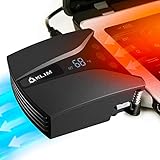

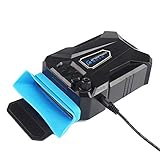




Top 3 picks at a glance
Quick Picks
| Product | Best for | Price |
|---|---|---|
| IETS GT202UB Vacuum Laptop Fan Cooler | Most thin gaming laptops | $32.99 |
| Tempest Laptop Cooler with Vacuum Fan | Affordable rapid cooling | $26.97 |
| havit HV-F2056 Laptop Cooling Pad | Simple conventional cooling | $27.99 |
| Ejoyous Laptop Cooler with Vacuum Fan | Lowest-cost portable option | $16.27 |
| ChillCore Laptop Cooling Pad | RGB-heavy gaming desks | $34.98 |
| Kootek Laptop Cooling Pad Cooler Stand | Quiet multi-fan support | $29.99 |
| IETS GT500 Powerful Turbo-Fan | Maximum vacuum-style airflow | $78.99 |
| Razer Laptop Cooling Pad | Premium adaptive fan control | $125.99 |
How We Picked
We prioritized products that make sense for a thin gaming laptop in a real room: a bedroom desk, a compact home office, or a gaming setup where cable clutter and noise can become distractions. Vacuum models received extra attention for their direct exhaust approach, while cooling pads were judged as broader alternatives for laptops that do not have a compatible exhaust opening.
We also considered control, portability, laptop-size coverage, stand adjustability, USB features, and price. The listed prices run from $16.27 to $125.99, so this ranking is not simply a contest between the most expensive and least expensive models. Because performance can vary with laptop design, placement, dust, and room conditions, we do not claim universal temperature reductions or invented laboratory results.
The 8 Best Picks
1. IETS GT202UB Vacuum Laptop Fan Cooler
The IETS GT202UB is the strongest all-around match for a thin gaming laptop with a clearly accessible exhaust. Its temperature display and intelligent temperature measurement are useful in a warm room because they give you more feedback than a basic fan switch. The 13 wind-speed settings and 2600-5000RPM turbo fan also make it easier to choose between a gentler setting for everyday work and more aggressive cooling during a game. At $32.99, it stays in a sensible midrange. It is best for gamers who want direct exhaust cooling without stepping up to a premium model.
- Pros: Temperature display and intelligent temperature measurement.
- Pros: 13 wind speeds and a 2600-5000RPM turbo fan.
- Con: It needs a suitable exhaust location and a secure seal.
Skip it when: your laptop’s exhaust is inaccessible, irregularly shaped, or positioned where a vacuum attachment cannot sit flat.
2. Tempest Laptop Cooler with Vacuum Fan
The Tempest Laptop Cooler is a straightforward choice for shoppers who want rapid cooling without paying for a long feature list. Its vacuum-fan design targets hot exhaust air directly, while temperature detection gives you a basic way to monitor how the cooler is behaving. The $26.97 price makes it especially appealing for a secondary gaming laptop, a dorm-room setup, or a budget-conscious upgrade from a passive stand. Its compact approach is more focused than a large pad, which can be helpful on a crowded desk. It is a practical pick when direct extraction is the priority and you do not need elaborate lighting or extra connectivity.
- Pros: Direct vacuum-fan cooling with temperature detection.
- Pros: Lower price than most feature-heavy alternatives.
- Con: It offers less broad desk support than a full cooling pad.
Skip it when: you want a stable elevated platform, multiple fans, or built-in desk accessories.
3. havit HV-F2056 Laptop Cooling Pad
The havit HV-F2056 is the conventional option for buyers who would rather cool the underside of a laptop than attach a fan to its exhaust. It supports 15.6-17-inch laptops, making it a useful match for many larger gaming notebooks. The black design is restrained, so it fits a bedroom or office without turning the cooling setup into a visual centerpiece. At $27.99, it also offers an approachable way to add airflow and lift without committing to a specialized vacuum cooler. Its biggest strength is versatility: it does not depend on one particular exhaust shape or location.
- Pros: Supports 15.6-17-inch laptops.
- Pros: Conventional pad design is easier to position than an exhaust attachment.
- Con: It does not directly extract air from the exhaust.
Skip it when: your main goal is the most focused, rapid exhaust cooling possible.
4. Ejoyous Laptop Cooler with Vacuum Fan
The Ejoyous Laptop Cooler is the value pick for shoppers who want to try vacuum-style cooling at the lowest listed price. At $16.27, it is inexpensive enough for a spare setup, travel bag, or first experiment with direct exhaust extraction. Its portable notebook design and USB air-extracting vacuum fan suit users who have limited desk space and do not want to carry a full cooling pad. The silent-design positioning is also attractive in a shared room, although perceived noise will still depend on the laptop, attachment, and fan setting. It is best approached as a simple utility rather than a feature-rich control center.
- Pros: Lowest price in the roundup at $16.27.
- Pros: Portable vacuum-fan format saves desk space.
- Con: It has fewer stated controls and features than the leading IETS models.
Skip it when: you want detailed temperature feedback or a wide selection of fan speeds.
5. ChillCore Laptop Cooling Pad
The ChillCore is built for a gaming desk that values visual flair as much as airflow. Its nine-fan layout, RGB lights, eight height stands, and two USB ports give it the most elaborate conventional-pad feature set in this group. It supports laptops from 15.6-19.3 inches, so it is also one of the more accommodating choices for a large gaming machine. At $34.98, the price remains reasonable for the added adjustability and connectivity. This is a better fit for a stationary setup than a minimalist workspace, especially when you want to raise the screen and keep peripherals connected through the pad.
- Pros: Nine fans and support for 15.6-19.3-inch laptops.
- Pros: Eight height stands, RGB lights, and two USB ports.
- Con: Its larger feature set may be excessive for a simple, quiet workstation.
Skip it when: you need a compact vacuum cooler that attaches directly to the laptop exhaust.
6. Kootek Laptop Cooling Pad Cooler Stand
The Kootek is a sensible middle ground for users who prefer a traditional stand and want multiple fans without moving into premium pricing. It uses five quiet fans and supports 12-17-inch laptops, giving it a broader fit range than some pads aimed only at large gaming notebooks. The $29.99 price places it close to the havit while adding a stronger multi-fan emphasis. It is a good match for a home office that becomes a gaming station after work, particularly if you want a raised platform rather than a clip-on accessory. Its conventional design also avoids the exhaust-placement concerns that affect vacuum coolers.
- Pros: Five quiet fans for broad underside airflow.
- Pros: Supports 12-17-inch laptops.
- Con: It does not provide the direct extraction of a vacuum fan.
Skip it when: your laptop already has poor underside clearance and needs exhaust-focused cooling instead.
7. IETS GT500 Powerful Turbo-Fan
The IETS GT500 is the high-power vacuum-style choice for gamers who want more control and are willing to spend more. Its 5000RPM turbo fan, infinitely variable speed, and seal foam are designed around rapid cooling, while the three-port USB hub adds practical value at a desk. It supports 13-17.3-inch laptops, covering many mainstream gaming models. At $78.99, it is a substantial jump from the GT202UB, but the stronger feature package makes sense for a stationary gaming setup where cooling and connectivity matter more than minimal cost. The seal foam also emphasizes fit, so compatibility should be checked carefully before buying.
- Pros: 5000RPM turbo fan with infinitely variable speed.
- Pros: Seal foam and a three-port USB hub.
- Con: It costs considerably more than the other vacuum models here.
Skip it when: you want a small travel accessory or your laptop falls outside the 13-17.3-inch support range.
8. Razer Laptop Cooling Pad
The Razer Laptop Cooling Pad is the premium pick for a polished gaming station. Its adaptive smart design and intelligent fan control aim to make cooling feel more automatic, which suits users who would rather avoid constant manual adjustments. At $125.99, it is by far the most expensive product in this roundup, so its appeal depends on wanting a refined, premium accessory rather than simply adding airflow for the least money. It is best for Razer fans and desk setups where presentation and automated control carry real weight. Buyers focused strictly on value should look at the IETS or budget pad options first.
- Pros: Adaptive smart design with intelligent fan control.
- Pros: Premium fit for a dedicated gaming setup.
- Con: The $125.99 price is difficult to justify for a basic cooling need.
Skip it when: you want the cheapest effective upgrade or specifically need a direct vacuum attachment.
Buying Guide
Vacuum cooler or cooling pad?
Choose a vacuum cooler when your laptop has a clear, accessible exhaust and you want to pull hot air away from that opening. Choose a conventional pad when exhaust placement is uncertain, the laptop needs broad underside airflow, or you also want a stand. Vacuum models are more dependent on fit; pads are generally easier to place but less targeted.
Match the cooler to your room
For a bedroom or shared office, prioritize adjustable control and a quieter design over decorative extras. The Ejoyous and Tempest are compact choices, while the Kootek emphasizes quiet multi-fan operation. For a permanent gaming desk, the ChillCore’s RGB lights, eight height stands, and two USB ports may be more useful than portability.
Check laptop compatibility first
Measure the laptop against the stated support range and inspect where its exhaust sits. The havit supports 15.6-17-inch laptops, the Kootek supports 12-17-inch models, and the GT500 supports 13-17.3-inch models. A strong fan cannot compensate for a poor seal or an exhaust opening that the cooler cannot reach.
Our Verdict
The IETS GT202UB is the best overall choice for thin gaming laptops because it combines direct vacuum cooling, temperature feedback, 13 wind speeds, and a moderate $32.99 price. Pick the Tempest for a cheaper focused solution, or the havit HV-F2056 when a conventional pad makes more sense. The IETS GT500 is the upgrade for a more powerful desk setup, while the Razer is reserved for buyers who want premium adaptive control in 2026.
FAQ
Is a vacuum cooler better for a thin gaming laptop?
It can be, especially when the laptop has a clearly accessible exhaust. A vacuum cooler targets hot air at the exit rather than relying only on airflow beneath the chassis. Fit is essential, so a conventional pad may be the safer choice for an unusual exhaust layout.
Are cooling pads compatible with every gaming laptop?
No cooling pad is universally ideal. Check its stated laptop-size range, the position of the laptop’s intake vents, and whether the chassis sits securely on the pad. The listed models range from support for 12-17 inches to 15.6-19.3 inches.
Do more fans always mean better cooling?
Not necessarily. Fan count is only one part of the design. Airflow direction, laptop vent placement, clearance, control, and room conditions also matter. A well-fitting vacuum cooler can be more targeted than a larger pad with more fans.
Which cooler is best for a shared room?
The Ejoyous is positioned around a silent design, while the Kootek uses five quiet fans. For the most control, consider the IETS GT202UB or GT500, since adjustable speed lets you balance cooling against noise for the room.


