Our Top Picks
 Logitech K120 Full Size Wired Keyboard USB Plug-and-Play1-Pack0.92 x 17.7 x 6.1 inches1 PoundsCheck on Amazon
 Logitech MK120 Full Size Wired Keyboard and MouseOne Size6.1 x 17.71 x 0.92 inches0.2 poundsCheck on Amazon
 Rii RK907 Ultra-Slim Compact USB Wired Keyboard for17.52 x 5.71 x 0.79 Inches0.9 poundsCheck on Amazon


Top 3 picks at a glance

Quick Comparison
The table below maps every keyboard in this roundup to the job it does best. Prices are given as tiers rather than figures, because wired keyboard pricing swings constantly and a “budget” board on a good day can undercut a “mid-range” one from last season.
| Product | Best for | Key specs | Price tier |
|---|---|---|---|
| Amazon Basics Wired QWERTY Keyboard | Cheapest working keyboard for a spare or POS-style desk | Full-size 104-key layout, USB-A wired, plug-and-play, media control keys | Budget |
| Logitech K120 | Long-life office typing on a tight budget | Full-size, membrane dome switches, USB-A wired, spill-resistant tray design | Budget |
| Logitech MK120 Combo | A matched keyboard + mouse set for a new workstation | Full-size keyboard plus basic optical mouse, two USB-A plugs, wired | Premium |
| Redragon K521 | Budget gaming aesthetics with a mechanical-feel membrane | 104 keys, rainbow LED backlight, multimedia keys, mechanical-feeling membrane | Mid-range |
| EDJO Wired Keyboard and Mouse Combo | All-day comfort typing on a desktop | Full-size, ergonomic shape, integrated palm rest, paired mouse, wired USB | Premium |
| Dell KB216 | Quiet, tidy office deployment at scale | Full-size, chiclet keys, multimedia shortcuts, USB-A wired | Mid-range |
| HP 150 | Silent typing in shared rooms | Full-size with numeric keypad, chiclet keys, silent-touch design | Mid-range |
| Rii RK907 | Minimal desk footprint on Mac or PC | Ultra-slim compact body, USB-A wired, Mac and PC compatibility | Budget |
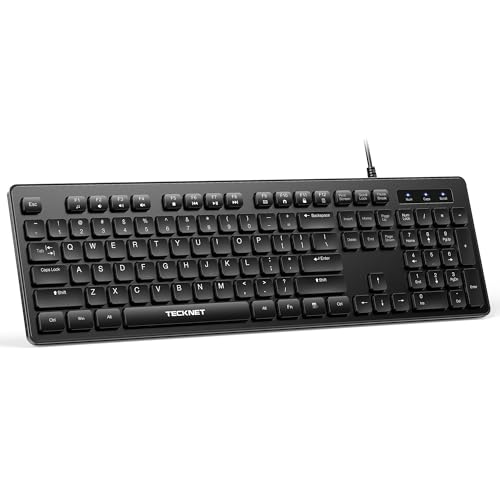
| TECKNET Wired Keyboard | Near-silent typing with a full layout | Full-size layout, quiet key mechanism, USB-A wired, black finish | Mid-range |
| Logitech MK200 Combo | Media-key productivity with a mouse included | Full-size keyboard plus mouse, dedicated media keys, wired USB | Premium |
| Logitech G213 Prodigy | Wired gaming with RGB and per-key lighting zones | Full-size, membrane gaming switches, RGB lighting, spill-resistant, media controls | Premium |
| Manhattan Wired Computer Keyboard | Bare-bones reliability with a shorter cable | 104 keys, 4.5 ft USB-A cable, foldable stands, basic black body | Budget |
How We Chose
This list was assembled from published specifications, manufacturer documentation, and the general reputation of each product family in its category. No keyboards were purchased, benchmarked, or handled for this article — everything below is a desk-research comparison of what the listings actually claim and what the category reliably delivers.
Four criteria drove inclusion. First, category fit: a keyboard that markets itself on silent typing should be judged against other silent boards, not against a gaming keyboard with RGB. Second, specification honesty: we favoured boards with a clear, checkable spec list — layout, connection type, cable length where stated, and switch class — over vague marketing slogans. Third, use case: office deployment, shared-room typing, budget gaming, and laptop-replacement all need different tradeoffs, and a board that wins one category may be a poor pick in another. Fourth, upgrade path: whether the product leaves the buyer room to add a wrist rest, swap to a mechanical board later, or hand the unit down to a second machine rather than throwing it out.
Price appears only as a tier because wired keyboard pricing is volatile and region-dependent. A budget board can cost less than a single replacement keycap set for a premium mechanical unit, and that gap matters more to buyers than any specific number.
One deliberate omission: we do not rank by “gaming performance” across the whole list. A membrane gaming board and an office chiclet board are not competing on the same axis, and pretending otherwise would mislead anyone shopping for the right tool rather than the loudest one.
1. Amazon Basics Wired QWERTY Keyboard – Best for a Spare or Backup Desk
As an Amazon Associate we earn from qualifying purchases at no extra cost to you.

The Amazon Basics Wired QWERTY Keyboard is the simplest thing on this list, and that is the entire point. It is a full-size 104-key board with a standard QWERTY layout, a USB-A cable, plug-and-play operation on Windows, and media control keys for volume and playback. If you need a keyboard that works the moment you plug it in and you do not want to think about it again, this is the pick.
Who it suits: Anyone building a secondary machine — a test bench, a home server with a monitor attached, a workshop PC, a point-of-sale station, or a spare desk for guests. It also suits buyers who want a keyboard for a child’s first computer and would rather not spend mid-range money on something that may get juice spilled on it.
Key specs (as stated in the listing):
- Full-size 104-key QWERTY layout
- Wired USB-A connection, plug-and-play
- Media control keys for volume and playback
- Compatible with Windows
- Membrane dome key mechanism (standard for this class)
- Low-profile, flat body with no wrist rest
Strengths. The board’s biggest strength is that nothing about it needs configuration. There is no driver, no companion software, and no lighting layer to fuss with. Plug it into a USB-A port and Windows recognises it within a second or two. The media keys sit in the top row and give you volume control without reaching for a mouse or a system tray slider — genuinely useful on a media centre PC or a bedroom workstation.
The layout is standard full-size, which means the numeric keypad is present and the arrow cluster sits in the usual place. People who touch-type on a numeric keypad every day will find nothing to relearn here. The membrane mechanism is quiet enough for an office or a shared room, and the low-profile body means it slides under a monitor stand or a shelf without complaint.
Pros
- Genuinely plug-and-play on Windows with no software
- Full-size layout including numeric keypad
- Media keys for volume and playback
- Quiet membrane mechanism suits shared spaces
- Low cost of replacement if it fails or gets damaged
Cons
- No backlight, so it is hard to read in a dark room
- No ergonomic shaping or palm rest
- No gaming-focused features such as N-key rollover or anti-ghosting
- Membrane feel is soft and imprecise compared with mechanical switches
- Build is light and plastic, with no real weight to keep it planted
How it compares with the nearest alternative. The nearest competitor is the Logitech K120. Both are budget full-size membrane boards, but they diverge on priorities: the Amazon Basics unit leans on convenience — media keys, dead-simple setup — while the K120 leans on durability, with a spill-resistant tray design and a reputation built over many years of office deployment. If you want a keyboard for a bench or a spare desk and you value the media keys, the Amazon Basics board is the more convenient choice. If the keyboard will see heavy daily use in a workplace and spills are a realistic risk, the K120 is the safer pick. Neither is a gaming keyboard, and neither pretends to be.
2. Logitech K120 – Best for Long-Life Office Typing on a Budget

The Logitech K120 is the closest thing the wired keyboard market has to a default. It is a full-size membrane board aimed squarely at offices, schools, and anyone who types for a living on a machine that is not theirs. The listing calls out plug-and-play USB operation and Windows compatibility, and the product family is well known for a spill-resistant design with a tray that channels liquid away from the electronics.
Who it suits: Office workers, school IT administrators buying in bulk, call centre operators, and home users who want a keyboard that will still be working in five years. It is also a sensible first keyboard for someone who types a lot but has no interest in mechanical switches.
Key specs (as stated in the listing):
- Full-size layout with numeric keypad
- Membrane dome key mechanism
- USB-A wired connection, plug-and-play
- Spill-resistant tray design
- Windows compatible
- Adjustable tilt legs for typing angle
Strengths. Durability is the headline. The spill-resistant tray is not marketing fluff — it is a design feature specifically intended to route liquid away from the membrane sheet, which is the part that dies first when a drink goes over a keyboard. In an office where coffee cups outnumber desks, that single feature pays for itself the first time someone knocks a mug sideways.
The key feel is classic office membrane: soft, fairly quiet, with a moderate travel distance. It is not satisfying in the way a mechanical switch is, but it is unobtrusive, and that is exactly what a shared office wants. The full-size layout includes a numeric keypad and a standard function row, and the tilt legs let you set a typing angle that reduces wrist strain over a long day.
Setup is trivial. There is no driver to install, no software to run, and no firmware update prompt. Windows sees the board immediately. For IT staff imaging dozens of machines, that matters more than any feature list.
Pros
- Spill-resistant design that protects the membrane from accidents
- Long track record in office and education deployments
- Quiet, unobjectionable key feel for shared spaces
- Full-size layout with numeric keypad and tilt legs
- Zero setup friction — true plug-and-play
Cons
- No backlight for dim rooms
- Membrane mechanism offers no tactile feedback for fast typists
- No media control keys beyond the standard function row
- Not suitable for competitive gaming where rollover matters
- Plastic body has little weight, so it can shift under fast typing
How it compares with the nearest alternative. The natural comparison is the Amazon Basics Wired QWERTY Keyboard. Both are budget membrane full-size boards, but they optimise for different things. The Amazon Basics keyboard gives you dedicated media keys and the simplest possible setup at the lowest possible cost. The K120 gives you spill resistance, a longer service life, and a design that has survived years of institutional abuse. Choose the Amazon Basics board if media keys and price are your priorities; choose the K120 if the keyboard lives near a coffee cup or a classroom sink.
3. Logitech MK120 Combo – Best for a Complete New Workstation
The Logitech MK120 is a keyboard-and-mouse bundle rather than a standalone board. The keyboard is a full-size wired membrane unit; the mouse is a basic wired optical model. Both connect over USB-A, and both share the same no-frills, plug-and-play philosophy as the standalone K120. This is the pick when you are setting up a machine from scratch and want one box to cover both input devices.
Who it suits: Anyone building a new desktop PC, refreshing a family computer, or equipping a small office where buying matched peripherals saves time and avoids the mismatch of a glossy gaming mouse next to an office keyboard. It is also a good choice for a front-desk or reception machine where a consistent look matters.
Key specs (as stated in the listing):
- Full-size wired keyboard with numeric keypad
- Membrane keyboard mechanism
- Basic wired optical mouse included
- Two USB-A connections (one per device)
- Plug-and-play operation
- Black finish across both devices
Strengths. The main advantage is completeness. Buying a combo removes a decision: the mouse and keyboard are designed to sit next to each other, use the same connection standard, and match visually. For a reception desk or a computer lab, that uniformity is worth more than any single specification.
The keyboard inherits the same dependable membrane feel as the standalone K120, and the setup is equally frictionless — plug two USB-A cables into the machine and you are done. The mouse is simple, ambidextrous in shape, and adequate for office work, web browsing, and light photo editing. Neither device pretends to be a gaming peripheral, and neither will embarrass you in an office.
The bundle also simplifies support. If something fails, you are dealing with one product line and one warranty process rather than two unrelated brands with different support channels. For a small business without a dedicated IT person, that is a real, if unglamorous, benefit.
Pros
- Keyboard and mouse in one purchase with matching aesthetics
- Reliable membrane typing feel inherited from the K120 family
- Simple two-cable USB-A setup with no software
- Good fit for offices, reception desks, and family computers
- Single support and warranty path for both devices
Cons
- Mouse is basic — no side buttons, no adjustable DPI worth mentioning
- No keyboard backlight
- No media control keys beyond the function row
- Two USB-A ports consumed rather than one
- Not a gaming-grade combo in any respect
How it compares with the nearest alternative. The closest rival is the Logitech MK200 Combo, which adds dedicated media keys to the keyboard. That single difference defines the choice: if you regularly control music or video from the keyboard, the MK200’s media keys justify the step up. If you mostly type documents and browse, the MK120’s lower tier and simpler layout are perfectly adequate. Against the EDJO combo, the MK120 is the more conservative, office-oriented option, while the EDJO bundle leans into ergonomics with a palm rest and a shaped body — a different answer to the same question of “what do I plug into a new PC?”
4. Redragon K521 – Best for Budget Gaming Aesthetics

The Redragon K521 is a 104-key full-size keyboard with a rainbow LED backlight and a “mechanical feeling” membrane mechanism. The listing also mentions multimedia keys. It is the entry point to gaming-flavoured keyboards without the cost of true mechanical switches, and it is aimed at people who want the look and the lighting without the mechanical price.
Who it suits: Younger gamers building a first setup, anyone who wants a lit keyboard for a dim room, and buyers who like the aesthetic of a gaming board but do not want the noise or the cost of real mechanical switches. It also works for a home office that happens to double as a gaming station.
Key specs (as stated in the listing):
- 104-key full-size layout
- “Mechanical feeling” membrane key mechanism
- Rainbow LED backlight
- Multimedia keys
- Wired USB connection
- Gaming-oriented styling
Strengths. The rainbow LED backlight is the feature that sells this board, and honestly, it is a fair reason to buy it. A lit keyboard is genuinely easier to use at night, and the rainbow effect gives a gaming desk its character without requiring software profiles or per-key configuration. The multimedia keys handle volume and playback, which covers the everyday controls most people actually use.
The “mechanical feeling” membrane is a sensible compromise. It gives you a firmer, more defined keypress than a standard office dome without the loud click of a mechanical switch that would annoy anyone sharing a room or on a voice call. For a first gaming keyboard, that is a reasonable middle ground between feel and neighbourliness.
The full-size layout keeps the numeric keypad, so the board works for spreadsheets and data entry as well as games. If you are on a budget and you want one keyboard for both homework and gaming, that versatility matters.
Pros
- Rainbow LED backlight for dark-room visibility and gaming style
- Mechanical-feeling membrane gives firmer feedback than plain office domes
- Full-size layout with numeric keypad and multimedia keys
- Quieter than a true mechanical board in shared spaces
- Budget-friendly entry to the gaming keyboard category
Cons
- Membrane mechanism, not true mechanical switches
- Rainbow lighting is typically fixed rather than individually customisable per key
- No mention of N-key rollover or advanced anti-ghosting in the listing
- Gaming styling may look out of place in a formal office
- No wrist rest or ergonomic shaping
How it compares with the nearest alternative. The obvious step up from the K521 is the Logitech G213 Prodigy. Both are membrane gaming keyboards with lighting and media controls, but the G213 offers a more refined software ecosystem and a spill-resistant body, while the K521 undercuts it in price and keeps the layout simpler. If you want the cheapest route to a lit gaming keyboard, the K521 is the answer. If you want the lighting to be configurable and the body to resist a spilled energy drink, the G213 is worth the step up. Neither offers true mechanical switches, so anyone chasing genuine mechanical feel should look beyond both.
5. EDJO Wired Keyboard and Mouse Combo – Best for All-Day Comfort Typing

The EDJO Wired Keyboard and Mouse Combo is a full-size keyboard-and-mouse bundle with an ergonomic shape and an integrated palm rest. It is positioned for comfort rather than gaming, and the palm rest is the feature that separates it from the rest of the office-oriented boards in this roundup.
Who it suits: People who type for hours a day and feel it in their wrists — writers, administrators, programmers, and anyone working from a home desk that was never designed for eight-hour sessions. It also suits buyers who want a matched keyboard and mouse without assembling a set piece by piece.
Key specs (as stated in the listing):
- Full-size keyboard layout with numeric keypad
- Ergonomic shaping with integrated palm rest
- Included wired mouse
- USB wired connection
- Black finish
- Office-oriented design (no RGB lighting)
Strengths. The palm rest is the star. On a flat keyboard, your wrists either hover or rest on the desk edge at an angle — both are tiring over a long day. An integrated rest supports the heel of the hand and encourages a flatter wrist position, which is the single most common ergonomic fix recommended for desk workers. If you have ever finished a long writing session with aching forearms, this is the feature to look for.
The full-size layout includes a numeric keypad, so it handles spreadsheets, accounting work, and data entry without a separate pad. The bundled mouse completes the set, which is convenient for a home office build. Because the board is wired, there is no battery to charge and no pairing to re-establish — you plug it in and it works.
The design is deliberately understated: no RGB, no aggressive angles, no gaming branding. In a professional office or a client-facing home setup, that restraint is an advantage rather than a shortcoming.
Pros
- Integrated palm rest supports wrists during long sessions
- Ergonomic shaping for a more natural hand position
- Full-size layout with numeric keypad
- Matched mouse included, so no separate purchase
- Restrained office-friendly design with no distracting lighting
Cons
- Palm rest adds depth, which demands more desk space
- No backlight for dim rooms
- Ergonomic shaping takes a few days to adjust to if you are used to a flat board
- Not a gaming keyboard — no rollover or anti-ghosting claims
- Membrane mechanism, so no mechanical tactile feedback
How it compares with the nearest alternative. The nearest alternative is the Logitech MK200 Combo. Both pair a full-size keyboard with a mouse, but they solve different problems. The EDJO combo targets comfort: the palm rest and ergonomic shaping are its reason to exist. The MK200 targets convenience: dedicated media keys and Logitech’s office reliability. If wrist comfort during long typing sessions is your priority, the EDJO is the better fit. If you want quick access to volume and playback without leaving the keyboard, the MK200 wins. Both are wired, both are membrane, and neither is aimed at gamers.
6. Dell KB216 – Best for Quiet Office Deployment at Scale

The Dell KB216 is a full-size chiclet keyboard with multimedia shortcuts, designed for office use. It is the kind of board that ships with business desktops and then quietly outlives several of them. The chiclet key style gives it a flatter, laptop-like profile than a traditional dome board.
Who it suits: Businesses and schools buying keyboards in volume, anyone who prefers a chiclet feel, and home users who want a tidy, quiet board that looks at home in a professional environment. It is also a sensible replacement keyboard for a Dell desktop whose original board has finally given up.
Key specs (as stated in the listing):
- Full-size layout with numeric keypad
- Chiclet-style keys
- Multimedia shortcut keys
- USB-A wired connection
- Black finish
- Low-profile, office-oriented design
Strengths. Chiclet keys are the defining feature. Each key is a separate, low-profile square with a small gap around it, which achieves two things: it looks cleaner than a traditional raised-key board, and it is easier to keep clean because dust and crumbs do not fall between tall keycaps in the same way. The lower profile also means a shorter travel distance, which some typists find faster once they adjust.
The keyboard is quiet in use, which makes it a good fit for open-plan offices and shared rooms. The multimedia shortcuts cover the usual volume and playback functions via the function row, so everyday media control is available without a separate app. The full-size layout includes the numeric keypad, which is non-negotiable for finance and data-entry work.
For volume buyers, the KB216’s main virtue is predictability. It is a standard, widely deployed board with a consistent feel, so a new unit ordered next year types the same as the one it replaces. That consistency is worth a lot when you are rolling out fifty desks.
Pros
- Chiclet keys are quiet, low-profile, and easy to clean
- Full-size layout with numeric keypad
- Multimedia shortcuts built into the function row
- Consistent feel across units — good for bulk deployment
- Tidy, professional appearance suited to office environments
Cons
- No backlight
- Chiclet travel is shallow, which some typists dislike
- No gaming features such as rollover or lighting
- No palm rest or ergonomic shaping
- Plastic build with modest weight
How it compares with the nearest alternative. The closest competitor is the HP 150, which also uses a chiclet design and targets silent office typing. The two are near-twins in category, and the decision usually comes down to which brand matches the rest of the machine — Dell keyboard with a Dell desktop, HP keyboard with an HP one — and which specific key feel you prefer. The HP 150’s “silent-touch” marketing leans harder into noise reduction, while the Dell KB216 leans on consistency and cleanability. If you are buying one board for a quiet home office, either works; if you are buying fifty and your fleet is mixed, pick the one whose layout your staff already know.
7. HP 150 Wired Keyboard – Best for Silent Typing in Shared Rooms

The HP 150 is a full-size wired keyboard with a numeric keypad and a chiclet-style, silent-touch mechanism. HP positions it as an ergonomic office board, and the listing emphasises quiet operation alongside the standard full-size layout.
Who it suits: Anyone typing in a shared space — an open-plan office, a dorm room, a bedroom where someone else is sleeping, or a recording setup where keyboard noise leaks into a microphone. It also suits users who simply dislike loud keyboards and want a full-size board with a numeric keypad.
Key specs (as stated in the listing):
- Full-size layout with numeric keypad
- Chiclet keys with silent-touch mechanism
- Ergonomic low-profile design
- USB-A wired connection
- Black finish
- Office-oriented, no RGB lighting
Strengths. Noise is the core selling point, and for a lot of people it is the deciding factor. Mechanical keyboards are satisfying to type on but loud enough to be heard across a room and loud enough to bleed into a microphone during a call or a recording. The HP 150’s silent-touch chiclet mechanism dramatically reduces that, which makes it a practical choice for podcasters, streamers who do not use a noise gate, and anyone working late in a shared home.
The chiclet design keeps the board low-profile and easy to clean, and the full-size layout retains the numeric keypad for spreadsheet and finance work. The ergonomic shaping is modest but present — the board sits at a comfortable angle without requiring tilt legs. Being wired, it needs no batteries and no pairing, and it draws a trivial amount of power over USB.
For a business standardising on HP equipment, the KB-style compatibility is also a convenience: the board matches the machines, the support channel, and the visual language of the rest of the desk.
Pros
- Silent-touch chiclet mechanism keeps typing noise minimal
- Full-size layout with numeric keypad
- Low-profile ergonomic shape that needs no tilt adjustment
- Simple USB-A wired connection with no software
- Good match for HP business desktops and laptops on a dock
Cons
- No backlight for dark rooms
- Shallow chiclet travel can feel imprecise to mechanical-keyboard users
- No gaming features or lighting
- No palm rest
- Silent mechanism offers little tactile feedback
How it compares with the nearest alternative. Against the Dell KB216, the HP 150 is the more emphatically quiet board. Both are full-size chiclet keyboards with multimedia function keys, but HP’s silent-touch mechanism is the specific reason to choose it if noise is your primary concern — for example, if your microphone sits close to the keyboard. Against the TECKNET Wired Keyboard, which also markets silent typing but in a more traditional full-size format, the HP 150’s chiclet design is cleaner and flatter while the TECKNET board offers a taller, more conventional key profile. Pick the HP if you want the flattest, quietest typing experience; pick the TECKNET if you prefer a taller key with a more familiar feel.
8. Rii RK907 – Best for a Minimal Desk Footprint

The Rii RK907 is an ultra-slim compact wired keyboard that the listing says works with both Mac and PC. It is a smaller, flatter board than the full-size options above, designed to take up as little desk space as possible while still being a proper physical keyboard rather than a tablet accessory.
Who it suits: Laptop users who dock to a monitor and want a keyboard that matches the slim look of their machine, small-desk setups in apartments or dorms, and anyone switching between macOS and Windows who wants one board for both. It also suits media centre PCs where a compact keyboard is easier to tuck away.
Key specs (as stated in the listing):
- Ultra-slim compact body
- USB-A wired connection
- Compatible with both Mac and PC
- Low-profile keys
- Black finish
- Reduced footprint compared with a full-size board
Strengths. The slim body is the entire proposition. On a narrow desk, a full-size keyboard eats the space where your mouse needs to move, and a compact board solves that directly. The low-profile design also makes the RK907 easy to slide into a bag or a drawer, which suits a setup that gets packed away at the end of the day.
Cross-platform compatibility is the second advantage. The listing states it works with both Mac and PC, which means you can move the same keyboard between a MacBook dock and a Windows desktop without hunting for a different board or wrestling with remapping. For anyone who works across both operating systems, that flexibility is genuinely useful.
Because it is wired, there is no pairing step and no battery to monitor. The board draws its power from the USB port, so it is one less device to keep charged — a small thing that becomes significant when you have a mouse, headset, and phone all competing for charge cycles.
Pros
- Ultra-slim, compact body saves desk space
- Works with both Mac and PC per the listing
- Low-profile keys for a quiet, laptop-like feel
- Wired USB connection — no charging or pairing
- Easy to store or carry when not in use
Cons
- Compact layout means a reduced key set compared with full-size boards
- No backlight
- Very low key travel, which some typists find fatiguing
- No gaming features
- Modest build weight means it can shift on a smooth desk
How it compares with the nearest alternative. The nearest alternative is the Manhattan Wired Computer Keyboard, which is a full-size 104-key board with a 4.5 ft cable and foldable stands. They sit at opposite ends of the same budget tier: the Rii RK907 trades the numeric keypad and full-size layout for slimness and cross-platform flexibility, while the Manhattan board gives you the complete key set and adjustable tilt at the cost of desk space and a shorter cable. If you work on a small desk or move between Mac and PC, the Rii is the more practical pick. If you need the numeric keypad and a conventional full-size layout on a tight budget, the Manhattan is the better fit.
9. TECKNET Wired Keyboard – Best for Quiet Full-Size Typing

The TECKNET Wired Keyboard is a full-size board with a silent typing mechanism and a traditional black layout. Unlike the chiclet boards from Dell and HP, it keeps a more conventional key profile while still targeting low noise, which makes it a useful middle option for people who find flat chiclet keys uncomfortable but still want a quiet keyboard.
Who it suits: Office workers and home users who want a quiet keyboard but prefer the taller, more familiar key profile of a standard board. It also suits anyone replacing an old full-size keyboard who wants the new one to feel similar to the old one while making less noise.
Key specs (as stated in the listing):
- Full-size layout
- Silent typing mechanism
- USB-A wired connection
- Black finish
- Traditional raised key profile (not chiclet)
- Office-oriented design with no RGB
Strengths. The combination of a full-size layout and a quiet mechanism is the board’s identity. Quiet keyboards usually come in two flavours: flat chiclet boards, which reduce noise partly through short travel, and damped traditional boards like this one, which keep a familiar key height but soften the impact. For typists who have spent years on standard keyboards, that familiarity reduces the adjustment period significantly.
The full-size layout includes the numeric keypad, so the board handles data entry and spreadsheets without a separate pad. Being wired, it connects over USB-A with no software and no battery. There is no RGB lighting to configure and no companion app to install, which keeps the setup simple and the board’s power draw negligible.
For a home office or a shared workspace, the low noise is the practical benefit. If you take calls at your desk or share a room, a keyboard that does not broadcast every keystroke is a courtesy and, in a recording context, a genuine technical improvement to your audio.
Pros
- Silent mechanism reduces typing noise noticeably
- Full-size layout with numeric keypad
- Traditional key profile, so little adjustment needed
- Simple wired USB-A connection with no software
- No lighting to distract or configure
Cons
- No backlight
- No media control keys beyond standard function shortcuts
- No gaming features such as rollover or RGB
- No palm rest or ergonomic shaping
- Membrane mechanism with limited tactile feedback
How it compares with the nearest alternative. The nearest alternative is the HP 150. Both promise quiet typing, but they get there differently: the TECKNET keeps a taller, traditional key profile and damps the sound, while the HP 150 uses a flat chiclet design with short travel. If you have typed on standard keyboards your whole life and want the quiet to be invisible, the TECKNET is the easier transition. If you want the flattest, most modern-looking board with the shortest travel, the HP 150 is the better match. Against the Dell KB216, the TECKNET is the quieter option and the Dell is the more easily cleaned one, which matters if the keyboard lives near a lunch desk.
10. Logitech MK200 Combo – Best for Media-Key Productivity

The Logitech MK200 is a full-size wired keyboard-and-mouse combo with dedicated media keys. It sits above the MK120 in Logitech’s lineup specifically because of those media keys, which control volume and playback without requiring you to hold a function modifier or open a system menu.
Who it suits: Home office users who listen to music or watch video while working, small businesses equipping general-purpose desks, and anyone who wants a matched keyboard-and-mouse set with a bit more convenience than the absolute entry level offers. It is also a good choice for a media centre PC where quick volume control matters.
Key specs (as stated in the listing):
- Full-size wired keyboard with numeric keypad
- Dedicated media keys for volume and playback
- Wired optical mouse included
- USB-A connections
- Membrane key mechanism
- Black finish
Strengths. The dedicated media keys are the difference between this combo and the cheaper MK120. Dedicated keys mean one press rather than a chorded shortcut, and on a keyboard used for music or video all day, that small efficiency adds up. Volume up, volume down, play, pause, and track skip are all directly reachable.
The bundle includes a wired mouse, so a new workstation is covered in one purchase. Both devices are plug-and-play, both connect over USB-A, and neither requires Logitech’s software to function — the software adds convenience if you install it, but the hardware works without it. That matters on locked-down work machines where installing drivers is not an option.
The full-size layout with numeric keypad keeps the board suitable for spreadsheets and data entry, and the membrane mechanism is quiet enough for an office. As a matched set, the MK200 also presents neatly on a desk, which is a minor point that nevertheless matters for reception areas and client-facing rooms.
Pros
- Dedicated media keys for one-press volume and playback control
- Keyboard and mouse bundled together, matched in style
- Full-size layout with numeric keypad
- Works without installing any software
- Quiet membrane mechanism suited to shared offices
Cons
- Mouse is basic, with no side buttons or advanced sensor settings
- No backlight on the keyboard
- Two USB-A ports required rather than one
- No gaming features or lighting
- Membrane feel offers no mechanical feedback
How it compares with the nearest alternative. The direct comparison is the Logitech MK120. The two are almost identical except for the media keys, and that is the whole decision: pay a step up for one-press media control, or save the difference and use the function row. Against the EDJO combo, the MK200 is the more conventional office product while the EDJO is the comfort-focused one with its palm rest and ergonomic shaping. If you want media keys and a known brand’s office reliability, take the MK200. If your wrists are the limiting factor at the end of the day, take the EDJO.
11. Logitech G213 Prodigy – Best for Wired Gaming With RGB

The Logitech G213 Prodigy is a full-size wired gaming keyboard with RGB lighting, membrane gaming switches, a spill-resistant body, and integrated media controls. It is the gaming-oriented counterpart to Logitech’s office boards: same dependable plug-and-play ethos, different priorities — lighting, durability, and a key feel tuned for gaming rather than document typing.
Who it suits: Gamers who want a lit, durable wired keyboard without paying mechanical prices; streamers who want RGB that can be synced with other lighting; and anyone whose keyboard shares a desk with a drink and a snack bowl. It also suits people who want one keyboard for both gaming and everyday typing, since the full-size layout keeps the numeric keypad.
Key specs (as stated in the listing):
- Full-size layout with numeric keypad
- Membrane gaming key switches
- RGB lighting with per-key zone illumination (configurable via Logitech software)
- Spill-resistant body
- Integrated media controls
- Wired USB-A connection
Strengths. The RGB lighting on the G213 is configurable rather than fixed, which separates it from budget rainbow boards. You can set static colours, breathing effects, or lighting zones, and sync the effect with other compatible Logitech gear — a real advantage if your desk already has a Logitech mouse or headset with lighting.
The spill-resistant body is a practical feature that gaming boards often skip. Energy drinks, water bottles, and coffee all live near gaming desks, and a drain-through design protects the electronics underneath. For a keyboard that may see years of late-night sessions, that resistance is worth more than an extra lighting mode.
The membrane gaming switches have a firmer actuation than standard office domes but remain quieter than true mechanical switches. That makes the G213 a reasonable choice for a shared home where a loud mechanical board would be unwelcome. The integrated media controls handle volume and playback directly, and the full-size layout keeps the numeric keypad for non-gaming work.
Pros
- Configurable RGB lighting with per-zone effects and sync support
- Spill-resistant body protects against desk accidents
- Integrated media controls for volume and playback
- Full-size layout with numeric keypad suits work and play
- Firmer gaming-tuned key feel without mechanical noise
Cons
- Membrane switches, not true mechanical — no hot-swap or switch replacement
- Full RGB configuration requires installing the manufacturer’s software
- No backlight-free option for buyers who dislike lighting
- Larger and heavier than a compact board, taking more desk space
- Premium tier pricing despite the membrane mechanism
How it compares with the nearest alternative. The nearest alternative is the Redragon K521. Both are wired, full-size, membrane gaming keyboards with lighting and media controls. The G213 justifies its higher tier with configurable RGB rather than a fixed rainbow effect, a spill-resistant body, and a software ecosystem that can sync with other Logitech peripherals. The K521 wins on price and simplicity — plug it in and the lighting works with no software at all. If your budget is tight and you want a lit keyboard today, take the K521. If you want lighting you can actually tune and a body that survives a spill, the G213 is the better long-term buy.
12. Manhattan Wired Computer Keyboard – Best for Bare-Bones Reliability

The Manhattan Wired Computer Keyboard is a basic black 104-key board with a 4.5 ft USB-A cable and foldable stands. The listing is refreshingly short: no lighting claims, no gaming features, no ergonomic geometry — just a standard full-size keyboard with adjustable tilt.
Who it suits: Buyers who need a plain, working keyboard at the lowest reasonable cost and do not want to pay for features they will never use. It suits spare machines, workshop and garage computers, kiosks, and simple office desks where the keyboard is a tool rather than an object of desire.
Key specs (as stated in the listing):
- 104-key full-size layout
- 4.5 ft USB-A cable
- Foldable stands for adjustable typing angle
- Basic black body
- Wired connection, plug-and-play
- Membrane mechanism (standard for this class)
Strengths. The foldable stands are a small but real benefit. Setting the keyboard at a slight angle changes the wrist position and can reduce strain during long typing sessions, and tilt legs are one of those features that cheaper boards sometimes omit. Having them here at the budget tier is a point in the board’s favour.
The 4.5 ft cable is worth noting as a design choice rather than a limitation. It is shorter than the cable on many full-size boards, which reduces cable clutter on a compact desk and makes the keyboard easier to route behind a monitor without looping excess wire. If your PC sits directly under or beside the desk, a shorter cable is tidier and easier to manage.
The 104-key layout is standard, so everything is where you expect it: numeric keypad, arrow cluster, function row. There is nothing to learn and nothing to configure, and the board requires no software or drivers. For a machine that only needs to accept input reliably, that simplicity is the feature.
Pros
- Full-size 104-key layout with numeric keypad
- Foldable stands allow an adjustable typing angle
- Short 4.5 ft cable keeps desk routing tidy
- No software, no drivers, no configuration
- Low cost makes it easy to replace or buy in multiples
Cons
- Short cable may not reach a PC placed far from the desk
- No backlight
- No media keys or shortcuts beyond the standard layout
- No gaming features such as rollover or anti-ghosting
- No palm rest or ergonomic shaping
How it compares with the nearest alternative. The nearest alternative is the Rii RK907. Both sit in the budget tier, but they solve different problems. The Manhattan board gives you the full 104-key layout, adjustable tilt, and a short cable that suits a compact desk setup. The Rii RK907 gives you an ultra-slim body, a smaller footprint, and Mac-and-PC compatibility at the cost of the full key set. If you need the numeric keypad and a conventional layout, the Manhattan is the straightforward choice. If you want maximum desk space and cross-platform flexibility, the Rii is the better fit. Against the Amazon Basics keyboard, the Manhattan board trades media keys for tilt legs and a shorter cable.
How to Choose
Choosing a wired keyboard comes down to five variables: switch feel, layout, cable and connection, build quality, and compatibility. Each one has concrete values worth checking before you buy, and getting them wrong is the usual reason a keyboard ends up in a drawer.
Switch feel: membrane, mechanical-feeling, or true mechanical
Every keyboard on this list uses a membrane mechanism, but they are not identical. Standard membrane domes — the Amazon Basics, K120, MK120, Manhattan, and Rii boards — use a rubber dome under each key that collapses when pressed. Actuation force is typically light, travel is moderate, and tactile feedback is minimal. They are quiet and cheap to make, which is why they dominate the office tier.
“Mechanical feeling” membrane boards, like the Redragon K521, use a dome with a shaped collar or a spring element that produces a sharper, more defined break at the actuation point. They feel firmer than plain domes and give more feedback, but they are still membrane underneath. The Logitech G213 uses a similar approach with a gaming-tuned dome.
True mechanical switches — not present on this list — use a spring and a metal contact or an optical beam per key. They offer consistent actuation (typically 45 g to 60 g for linear and tactile types), much longer rated lifespans measured in tens of millions of presses, and the ability to replace individual keycaps. The tradeoffs are cost, noise, and weight. If you type 8 hours a day and want the most consistent feel over years, a mechanical board is the upgrade path from everything here. If you want quiet and cheap, membrane remains the sensible choice.
Practical guidance: if you have never used a mechanical keyboard, a “mechanical feeling” membrane board is a low-risk way to test whether you like firmer feedback before committing to mechanical pricing. If you already know you dislike flat, mushy keys, skip straight past the chiclet options.
Layout: full-size, compact, and what the numeric keypad costs you
A full-size keyboard is 104 keys in the standard US layout: the main alphanumeric block, a function row, a navigation cluster (Insert, Home, Page Up/Down, Delete, End), and a numeric keypad. Eleven of the twelve boards here are full-size. The Rii RK907 is the compact exception.
The numeric keypad occupies roughly 3 inches of width on a standard board. On a desk 48 inches wide or more, that space rarely matters. On a 30-inch desk — common in apartments, dorms, and small home offices — giving up the keypad frees meaningful room for mouse movement. If you play games with low mouse sensitivity, where a single swipe can cross 10 inches or more of mousepad, a compact board can be the difference between hitting your keyboard mid-swipe and not.
Think about whether you actually use the numeric keypad. If you enter figures regularly — accounting, data entry, spreadsheet work, or any job where you type numbers in columns — keep the full-size layout. If you type numbers only occasionally, a compact board saves desk space with little practical cost. There is no middle option on this list; compact tenkeyless boards exist but are not among these twelve.
Cable and connection: length, routing, and USB budget
All twelve boards are wired over USB-A, which means no batteries, no wireless pairing, no dongle, and no latency added by a radio link. The differences are in cable length and port consumption.
The Manhattan board’s 4.5 ft cable is the shortest here and is stated in the listing. That is fine if your PC sits on or under the desk within about four feet of the keyboard’s rear edge. If your tower sits on the floor to the side, or the keyboard lives at the far end of an L-shaped desk, measure the run before buying — a short cable plus a USB extension is a workable fix, but it is an extra cable you may not want.
Port consumption matters more than people expect. A combo like the MK120, MK200, or EDJO takes two USB-A ports: one for the keyboard and one for the mouse. A standalone keyboard takes one. On a desktop with six or more rear ports that is a non-issue, but on a laptop dock with four ports, two input devices plus a headset dongle and a webcam can exhaust the available connections. If your port count is tight, a standalone keyboard with a BT-or-USB mouse, or a combo that shares a single receiver, is worth considering.
Wired also means the keyboard draws its power from the port. In USB 2.0 terms, a standard port supplies up to 500 mA at 5 V, which is 2.5 W. A membrane keyboard with no backlight typically draws well under 100 mA — a tiny fraction of that budget. An RGB keyboard like the G213 draws more when the lighting is at full brightness, but comfortably within a standard port’s allowance. The practical takeaway: even a fully lit gaming keyboard will not strain your USB power, but a passive, unpowered USB hub may struggle if you attach several high-draw devices to it. Connect a lit keyboard directly to the machine, or to a powered hub, rather than daisy-chaining it behind three other peripherals.
Build quality: what the listed specs can and cannot tell you
The spec sheets cannot tell you how a keyboard feels, but they can tell you a few things worth checking. Weight is a proxy for internal structure and stability: heavier boards resist sliding during fast typing, while light plastic bodies can wander. None of the listings here publish weight figures, so treat this as a category expectation rather than a per-product number — budget boards tend to be light, and premium boards tend to add weight through internal plates or thicker housings.
Spill resistance is a specific, checkable feature. The Logitech K120 and the Logitech G213 both advertise spill-resistant designs. If your keyboard lives near a drink — and statistically it does — that is a concrete reason to prioritise those two over boards that make no such claim.
Palm rests and ergonomic shaping appear on exactly one board here, the EDJO combo. If you have existing wrist discomfort, that shaping is a meaningful differentiator rather than a cosmetic one. On flat boards, consider whether you will add a separate wrist rest; a rolled towel works, but a purpose-made rest at the correct height is better.
Keycap material is not stated for any product in this roundup. Across the category, budget boards typically use ABS plastic keycaps, which develop a shine over time as skin oils polish the surface, while higher-tier boards often use PBT, which resists that shine. Without published materials data, judge this by price tier rather than by claim.
Compatibility: Windows, macOS, and everything else
Most boards here are listed as Windows-compatible. The Rii RK907 is the exception, listing compatibility with both Mac and PC.
In practice, a standard USB keyboard will enumerate as a basic HID (human interface device) on almost any modern operating system, including macOS, Linux, and even some smart TVs. The differences show up in the modifier keys. On a Windows keyboard connected to a Mac, the Windows key typically maps to Command and Alt maps to Option — usable, but the key legends will not match the labels on your screen. The Rii board’s dual-platform claim addresses this directly, which is why it is the pick for anyone switching between a MacBook and a Windows desktop.
Media keys are the second compatibility variable. Dedicated media keys on the Amazon Basics board, the MK200, and the G213 generally work out of the box on Windows. On macOS they may require configuration or may not function at all, depending on how the keyboard reports them. If cross-platform media control matters to you, check before buying rather than assuming.
Finally, console compatibility: none of these boards is presented as a console peripheral. Some USB keyboards work with consoles for text entry, but feature sets and button mapping do not carry over, so do not buy any of these expecting a console gaming experience. They are computer keyboards first.
Matching the board to your situation
| Your situation | What matters most | Recommended pick |
|---|---|---|
| Typing all day in an office, coffee nearby | Spill resistance, quiet keys, long service life | Logitech K120 |
| Shared room, late-night typing, no noise allowed | Silent mechanism, full-size layout | HP 150 or TECKNET |
| Small desk, laptop dock, switch between Mac and PC | Compact footprint, cross-platform, slim profile | Rii RK907 |
| First gaming setup on a tight budget | Backlight, firm key feel, full-size layout | Redragon K521 |
| Gaming with RGB synced to other peripherals | Configurable lighting, spill resistance, media keys | Logitech G213 Prodigy |
| Wrist pain or long writing sessions | Palm rest, ergonomic shaping, matched mouse | EDJO Combo |
| Setting up a new desktop from scratch | Keyboard plus mouse, matched style, one purchase | Logitech MK120 or MK200 |
| Bulk office or school deployment | Consistent feel, easy cleaning, quiet | Dell KB216 |
| Spare machine, test bench, workshop PC | Lowest cost, no configuration, basic reliability | Amazon Basics or Manhattan |
| Media centre PC | Short cable, tilt legs, dedicated media keys | Manhattan or Logitech MK200 |
Frequently Asked Questions
Are wired keyboards better than wireless ones?
For pure reliability and zero setup friction, wired wins. There is no battery to charge, no pairing step, no dongle to lose, and no interference from other wireless devices in the room. Wireless boards have caught up on latency to the point where the difference is imperceptible for typing and negligible for most gaming, so the honest answer is that wired is better on simplicity and cable management headache, while wireless is better on desk tidiness. If you dislike charging peripherals or you support machines you do not own, buy wired.
Is a membrane keyboard good enough for gaming?
For casual and most single-player gaming, yes. The limitation is rollover — how many simultaneous keypresses the board can register reliably. Membrane boards often struggle past a few keys pressed at once, which can matter in games that require holding multiple movement or ability keys simultaneously. If you play competitive games that rely on fast, overlapping inputs, a keyboard with a stated anti-ghosting or N-key rollover specification is the safer choice, and that specification generally appears on mechanical boards rather than the office-tier ones in this roundup.
Why do some full-size keyboards cost far more than others when the specs look similar?
The visible specs — layout, connection, key count — are usually identical across tiers. What changes is what you cannot see on a listing: switch construction, internal mounting plates, keycap material, cable quality, and warranty support. A board with a metal top plate and PBT keycaps will feel and age differently from a plastic board with ABS caps, even if both are 104-key wired membrane units on paper. Price also reflects brand support infrastructure and volume, so tier is a rough proxy for internals rather than a guarantee.
Can I use a Windows keyboard with a Mac?
Usually yes, with caveats. A standard USB keyboard will work on a Mac as a basic input device, but the modifier positions are swapped: the Windows key typically acts as Command, and Alt acts as Option. Dedicated media keys may or may not function. If you work across both platforms regularly, a keyboard that explicitly lists Mac and PC compatibility — like the Rii RK907 in this roundup — avoids those mismatches and keeps the printed legends accurate for both systems.
Does a backlight matter if I mostly type during the day?
It matters less than marketing suggests, but it is not useless. A backlight helps in the evening, in a room with dim ambient light, or when you look down at the board less often than you think. It also improves readability of secondary legends printed on the key faces — the small numbers and symbols on the function row, which are often hard to read without illumination. If you type in a well-lit room and rarely glance at the keys, skip the backlight and save the money. If you game or work at night, it is a genuine convenience.
How long should a wired keyboard last?
Membrane boards in normal office use commonly last several years before individual keys lose their crispness or fail entirely, and the failure point is usually the dome under a heavily used key rather than the electronics. Mechanical boards, when rated at all, are commonly specified in the tens of millions of presses per switch, which extends service life considerably but does not make them immortal — spills and cable damage still end keyboards early. The two biggest lifespan factors you control are keeping liquids away and not yanking the cable when moving the board.
Do I need a palm rest?
Only if your wrists tell you so. A palm rest supports the heel of the hand and encourages a flatter wrist position, which reduces the angle at which your wrist bends upward while typing. If you type for hours and finish the day with forearm or wrist discomfort, a palm rest — integrated like the EDJO combo’s or added separately — is a sensible change. If you type in short bursts and have no discomfort, it is optional, and it does add depth to the keyboard footprint.
Will a keyboard with a short cable reach my PC?
Measure before you buy. The Manhattan board here lists a 4.5 ft cable, which comfortably covers a keyboard on a desk with the PC directly beneath it, and not much more. If your tower sits on the floor to the side of the desk, or the keyboard is at the far end of a long desk, you may need a USB extension cable. Buying a keyboard with a longer cable, or adding a 3 ft or 6 ft USB-A extension, solves it — just avoid daisy-chaining multiple extensions, which increases the chance of intermittent connection issues.
The Bottom Line by Situation
If you want the single best all-round wired keyboard for reliability and long service, the Logitech K120 remains the safe answer for office and everyday typing, thanks to its spill-resistant design and years of institutional track record. Set up next to a coffee cup, it is the board least likely to die on you.
If your priority is silence — a shared room, a dorm, a recording desk — the HP 150 is the quietest option here, with the TECKNET Wired Keyboard as the alternative for typists who prefer a taller, more traditional key profile.
If you are building a complete workstation and want keyboard and mouse in one purchase, choose the Logitech MK200 Combo when media keys matter and the Logitech MK120 Combo when they do not. If wrist comfort is the deciding factor, the EDJO Combo and its palm rest is the comfort-first pick.
For gamers, the Logitech G213 Prodigy is the best wired gaming keyboard in this group, with configurable RGB, a spill-resistant body, and integrated media controls. On a tighter budget, the Redragon K521 delivers the lit, full-size gaming look for less, and the Dell KB216 is the sensible bulk-deployment choice for offices needing quiet, consistent, easily cleaned boards.
Finally, if you just need a working keyboard for a spare machine, a workshop PC, or a media centre, the Amazon Basics Wired QWERTY Keyboard and the Manhattan Wired Computer Keyboard cover that ground cheaply — the former with media keys, the latter with tilt stands and a short, tidy cable — while the Rii RK907 is the pick for anyone working across both Mac and PC on a small desk.