
Designing a productive, aesthetically pleasing home workspace requires balancing desktop furniture, task lighting, and high-performance technology. For digital designers, video editors, and photographers, the central hub of this setup is the laptop display. Choosing between oled vs mini led creator laptops isn’t merely a spec-sheet debate—it directly impacts your physical environment, power consumption, eye comfort, and room aesthetics.
When selecting a workstation for your home, screen technology dictates how your setup copes with ambient daylight, warm evening lamps, and long editing sessions. While OLED displays offer stunning contrast in controlled lighting, Mini-LED panels deliver intense brightness that cuts through sunlit rooms. Here is how these two display powerhouses compare when integrated into your living space.
As an Amazon Associate we earn from qualifying purchases at no extra cost to you.



Top 3 picks at a glance
Quick Verdict
If your home studio is a dedicated darkroom, basement office, or cozy corner with controlled warm lighting, an OLED creator laptop provides unmatched color depth, perfect true blacks, and a sleek, ultra-thin chassis profile (often under 0.7 inches thick). It excels at photo retouching, cinema color grading, and nighttime work.
Conversely, if your desk sits in a sun-drenched living room, open-concept studio, or high-traffic area with unpredictable daylight, a Mini-LED creator laptop is the superior choice. With peak brightness exceeding 1,200 nits, robust resistance to static image burn-in, and reliable longevity, Mini-LED laptops are built for high-ambient-light productivity and heavy daily workloads.
Side by Side
| Feature | OLED Creator Laptops | Mini-LED Creator Laptops |
|---|---|---|
| Visual Ergonomics & Comfort | Gentler on eyes in dim environments; low blue light; perfect dark-mode contrast. | Superior visibility in brightly lit rooms; reduces eye strain against direct sunlight. |
| Durability & Static Image Safety | Requires screen-savers and pixel shifts to prevent long-term static burn-in. | Zero risk of permanent image retention or burn-in over long usage periods. |
| Price Range | $1,500 to $3,200 depending on panel size and color gamut coverage. | $1,800 to $3,800 due to complex full-array local dimming backlights. |
| Display Maintenance | Requires delicate micro-fiber wiping; susceptible to glare on glossy surfaces. | Easy surface cleaning; matte or anti-reflective coatings handle dust well. |
| Space & Desk Integration | Sleeker, thinner display lids (4mm–6mm panel thickness); lightweight setup. | Slightly thicker display lids (6mm–9mm); heavier overall chassis weight. |
| Home Interior Aesthetics | Ultra-modern, minimalist, near-zero border bezels; sleek dark-mode appeal. | Substantial, professional industrial look; bright display fills sunny rooms nicely. |
| Resale Value Retention | Moderate retention; buyers often check panel runtime hours for wear. | High retention; buyers trust backlight longevity and zero burn-in risk. |
| Best Overall For | Color-critical night editing, film production, and dark home offices. | Daylight editing, multi-window productivity, bright living room desks. |
Where Oled Wins
OLED (Organic Light-Emitting Diode) technology shines in controlled lighting environments due to its self-emissive pixels. Because every pixel generates its own light and can turn off completely, OLED panels achieve infinite contrast ratios and zero backlight bleed. This creates a refined, high-end visual experience that complements minimal, modern interior decor.
- Unmatched Contrast and Color Depth: OLED displays deliver true 0.00-nit blacks. Color grading dark scenes or reviewing high-contrast photography feels cinematic, with 100% DCI-P3 color gamut coverage standard across most models.
- Ultra-Thin Desk Footprint: Without a dedicated backlight layer, OLED panels allow laptop lids to be incredibly thin. This lightweight profile reduces the overall physical bulk on your desk, ideal for clean, uncluttered workspaces.
- Superior Motion Response: Near-instantaneous response times (under 0.2ms) eliminate ghosting during high-speed video editing or animation previews.
- Wide Viewing Angles: Colors remain accurate even when viewed from acute angles, making it easy to show clients or family members your creative projects while sitting side by side at a dining table or kitchen island.
For creators who want an expansive multi-display ecosystem at home, pairing an OLED laptop with a desktop monitor creates an exceptional workspace. For example, connecting to an external display like the AOC 27″ Gaming Monitor QHD 240Hz QD OLED NVIDIA G-SYNC Compatible Q27GAZDV ($309.99) or the AOC 27″ Gaming Monitor QHD 240Hz QD OLED NVIDIA G-SYNC Compatible Q27GAZD ($329.99) expands your canvas with matched color precision for static editing windows while keeping your main timeline clear.
Where Mini Led Creator Laptops Wins
Mini-LED technology uses thousands of miniature light-emitting diodes grouped into hundreds or thousands of Local Dimming Zones behind a traditional LCD panel. This yields extreme luminance that brightens up sunlit home offices without losing control over shadow detail.
- Blinding Peak Brightness: Mini-LED creator laptops routinely hit 1,000 to 1,600 nits of peak HDR brightness (and 600–1,000 nits full-screen sustained SDR brightness). You can work comfortably next to floor-to-ceiling windows without draw-down shades.
- Zero Burn-in Worries: Because Mini-LED panels use inorganic LED backlights, video timeline tracks, taskbars, and fixed software interfaces can remain onscreen for 10 hours a day without risking permanent image ghosting.
- Energy Efficiency in Bright Themes: While OLED consumes significant wattage when displaying bright, all-white backgrounds (like spreadsheets or word processors), Mini-LED handles bright application themes efficiently.
- Consistent Extended Lifespan: Mini-LED backlights maintain consistent color balance and brightness levels over many years of continuous daily operation.
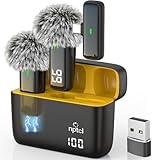
When producing video content at home, intense display brightness helps you match screen imagery with live studio lighting. If you use desktop accessories like the compact CYNOVA Magnetic RGB Video Light with Mini Desktop Tripod ($13.97) for key lighting and record crisp audio using the NPTCL Wireless Microphone for iPhone 17/16/15 PC Laptop Computer Android ($49.99), a bright Mini-LED panel ensures you can view your live video feeds clearly despite ambient fill lights on your desk.
Cost Over 5 Years
Evaluating oled vs mini led creator laptops requires looking beyond the initial retail price to assess long-term ownership costs in a home office environment.
A typical OLED creator laptop ranges between $1,500 and $3,200 up front. Over five years, electricity draw averages 15 to 35 watts for the display depending on whether you utilize system-wide dark modes. However, because OLED panels carry a small risk of image retention when used extensively for static UI applications, panel replacement out of warranty can cost between $400 and $800. Resale value after 3 to 4 years generally reflects a 50% to 60% depreciation due to buyer concerns over screen usage hours.
A Mini-LED creator laptop generally commands a higher initial price tag, ranging from $1,800 to $3,800 due to complex backlighting hardware. Display power draw stays stable between 20 and 45 watts regardless of light or dark themes. Because Mini-LED displays do not suffer from burn-in, maintenance costs over five years are virtually zero. Resale values hold stronger—typically retaining 45% to 55% of original value after four years—making it a financially sound choice for heavy daily professional use.
Which One for Your Home
Small Apartment or Studio Workspace
In a compact living space where your desk doubles as a dining table or multi-purpose counter, an OLED creator laptop is a fantastic fit. Its thin frame (under 4.5 lbs) stores easily in a sideboard or floating shelf. The deep blacks and low light bleed mean you can work late into the evening without flooding your studio apartment with bright backlight glow, preserving a cozy, ambient environment.
Busy Family Home with Kids or Pets
In high-traffic living areas subject to bright sunlight, unpredictable activity, and continuous daily use, Mini-LED laptops are the practical winner. The high-nit output cuts through room reflections, and the lack of burn-in risk means if a family member leaves a static screen paused for hours, the panel remains completely undamaged. Furthermore, Mini-LED lids tend to feature slightly sturdier panel frames that withstand accidental bumps.
Rental or Flexible Setup
If you live in a rental property where you cannot install blackout curtains or adjust fixed overhead lighting, a Mini-LED creator laptop gives you total lighting independence. Whether your desk faces an unshaded south-facing window or sits under bright neutral-white ceiling LEDs, Mini-LED panels maintain rich color contrast without requiring you to alter your home’s window treatments or light fixtures.
Long-Term Home Office Dedicated Suite
For dedicated home office suites with carefully placed warm task lighting, dark acoustic wall paneling, and controlled daylight, an OLED creator laptop creates an inspiring visual experience. As creator laptop design standards evolve in 2026, thin-bezel OLED screens blend effortlessly with warm wood desks, brass desk lamps, and curated bookshelf backdrops, turning your workstation into a polished interior feature.
FAQ
Do OLED laptops suffer from screen burn-in during everyday creative work?
Modern OLED laptops include background software safeguards such as pixel shifting, automatic dimming, and screen saver prompts. However, if static software interfaces—like editing timelines or toolbars—are displayed at 100% brightness for 8 to 12 hours a day over several years, minor static image retention can occur. Keeping brightness at moderate levels significantly extends panel health.
Is Mini-LED noticeably thicker or heavier than OLED on a desk setup?
Yes. Mini-LED displays require a multi-layered backlight assembly containing thousands of individual LEDs, making the display lid roughly 2mm to 3mm thicker than an equivalent OLED screen. Overall laptop weight may increase by 0.2 to 0.5 pounds, though this difference is rarely noticeable once set up on a permanent desk surface.
Which screen type causes less eye fatigue for late-night editing?
OLED displays are generally gentler on the eyes in dark rooms because pixels emit lower blue light levels naturally and achieve true blacks without leaking backlight glow. Mini-LED screens can feel overpowering in pitch-black rooms unless you dial down overall system brightness significantly.
What is “blooming” on a Mini-LED display and does it affect photo editing?
Blooming (or haloing) occurs on Mini-LED screens when a bright object—like a white mouse cursor or star in a night sky—is displayed against a dark background. The backlight zones around the bright object illuminate, creating a subtle light halo. While visible in dark rooms, it rarely impacts color accuracy during standard daylight photo and video editing workflows.
Related guides
- Alienware 16 Aurora RTX 5070 Review: Display, Portability and Configuration Gaps
- Lenovo Legion Pro 7i Gen 10 Review: 64GB RAM and Dual-SSD Configuration
- MSI Katana 15.6-inch RTX 5050 Review: Configuration Strengths and Upgrade Unknowns
- ASUS ROG Strix SCAR 16 G635LX-XS97 Review: Display Ambition, Upgrade Questions


