
Top 3 picks at a glance

The Short Answer
For a 17-inch gaming laptop, buy a cooling pad with a surface area of roughly 15.5 to 18.5 inches wide by 11 to 13.5 inches deep (about 39–47 cm × 28–34 cm). In practice, that means a pad marketed for 15.6–17 inch laptops at minimum, though we generally recommend stepping up to a model rated for 17–19 inch laptops. The extra deck space keeps wide chassis designs — most 17-inch gaming laptops are 15.5 to 16.5 inches wide — fully supported, and larger pads usually carry bigger or more numerous fans that can actually move enough air for a 100–230 watt gaming machine.
Two quick rules of thumb:
As an Amazon Associate we earn from qualifying purchases at no extra cost to you.
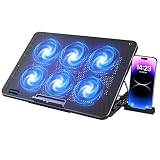


- Pad width should exceed your laptop’s width by at least half an inch so the rear edge and rear exhaust vents aren’t hanging off.
- The fan area should sit under the laptop’s intake vents, which on most gaming laptops are on the bottom panel toward the middle and rear — not under the keyboard.
Standard Sizes
Cooling pads are sold by laptop screen size compatibility, but the deck dimensions are what actually matter. Here’s how the common categories break down:
| Pad Category | Deck Dimensions (W × D) | Deck in cm | Fits 17″ Gaming Laptop? |
|---|---|---|---|
| Small (10–14 inch rated) | ~13 × 9.5 in | ~33 × 24 cm | No — laptop overhangs the deck |
| Medium (15–15.6 inch rated) | ~14.5 × 10.5 in | ~37 × 27 cm | Not recommended — rear edge unsupported |
| Large (15.6–17 inch rated) | ~15.7–16.3 × 11–11.8 in | ~40–41.5 × 28–30 cm | Yes — the minimum size we’d suggest |
| Extra-large (17–19 inch rated) | ~16.5–18.5 × 12–13.5 in | ~42–47 × 30.5–34 cm | Yes — best fit for wide chassis models |
A few real-world reference points from pads we’re familiar with:
- LIANGSTAR 6-fan pad (~$21): rated 12–17 inches, deck approximately 16.9 × 12 inches (43 × 30.5 cm), with seven height settings and adjustable fan speed. Comfortably covers most 17-inch chassis.
- havit HV-F2056 (~$28): rated 15.6–17 inches, deck approximately 16.1 × 11 inches (41 × 28 cm). A classic large-size pad; fine for most 17-inch laptops, but verify your laptop’s width if it’s a wide-body model.
- ChillCore 9-fan RGB pad (~$35): rated 15.6–19.3 inches, deck approximately 17.3 × 12.4 inches (44 × 31.5 cm). The extra deck real estate suits large desktop-replacement laptops, with eight height positions.
- Targus Dual Fan Lap Chill Mat (~$32): a soft neoprene lap-style pad for up to 17-inch laptops, roughly 17.3 × 11.9 inches (44 × 30 cm) including its bordered edge. Better for couch use than a rigid stand.
Note the pattern: a 17-inch screen diagonal does not mean a 17-inch-wide laptop. The laptop’s actual footprint — including bezels and feet — is the number that matters, and that’s what you’ll measure below.
How to Measure Your Space
- Measure your laptop’s width. With the lid closed, measure left edge to right edge across the widest point (including any protruding rubber feet or cooling fins). Most 17-inch gaming laptops land between 15.4 and 16.6 inches (39–42 cm).
- Measure the depth. Front edge to back edge, again at the widest point. Typical range is 10.5 to 12.5 inches (27–32 cm).
- Flip the laptop and locate the intake vents. Note where they sit — center, rear-half, or edge-to-edge. The pad’s fan cluster needs to line up with them.
- Check the exhaust location. Rear-exhaust designs benefit from a pad with open clearance at the back; side-exhaust models have more flexibility.
- Weigh your laptop. Most 17-inch gaming laptops run 5 to 7.5 pounds (2.3–3.4 kg). Check the pad’s maximum load rating — most rigid pads handle 8 to 12 pounds, but budget stands can flex under heavier machines at elevated heights.
- Measure your desk space if you’re tight on room. Add 1–2 inches of depth for the pad’s raised rear lip at its highest tilt, and remember USB-powered pads need a free USB-A port or an adapter.
Then match your numbers: pick a pad whose deck is at least as wide and deep as your laptop’s measurements, ideally with 0.5 to 1 inch of margin on each side.
By Room or Use Case
Dedicated Desk Setup
If the laptop lives on a desk, prioritize a rigid pad with adjustable height — you’ll want a rear elevation of roughly 1.5 to 3 inches for a more neutral wrist angle and better airflow underneath. Look for extras like the LIANGSTAR’s seven height stops and dual USB pass-through ports so you don’t sacrifice your only port. Anything in the $20–35 range with a 16 × 12 inch (41 × 30 cm) or larger deck works well here.
Lap and Couch Use
On your lap, a rigid pad is awkward and can block the laptop’s own bottom vents. A soft neoprene mat like the Targus AWE55US (~$32) distributes weight, cushions your legs, and adds a thin insulating layer between a hot chassis and your skin. Just check weight: lap mats add roughly 1 to 1.5 pounds, and combined with a 6-pound laptop you’re at 7+ pounds on your knees. Lap pads are flat, so they help with heat comfort more than with raw cooling performance.
Hot-Room Gaming or Long Sessions
If your room runs warm — above roughly 77°F (25°C) — fan count and airflow matter more. Look for pads with five or more fans, adjustable speed, and total airflow ratings where the manufacturer provides them. Multi-fan pads in the $30–40 tier, such as the ChillCore with nine fans, spread airflow across the whole underside, which helps wide 17-inch chassis whose vents stretch nearly edge to edge. Budget roughly 1.5 to 3 watts of USB power draw for these models; a two-port pass-through hub is practically mandatory so you keep a port for a mouse dongle.
Small Desk or Dorm Room
If desk depth is under 24 inches (61 cm), a folding pad makes sense. Several 15.6–17 inch models fold flat to under 1.5 inches thick and weigh 1.5 to 2.5 pounds, so they tuck into a drawer or backpack. Avoid the biggest 19-inch-class decks here — the extra inch or two of width genuinely crowds a compact workspace.
Travel and LAN Events
Weight and foldability dominate. Target pads under 2 pounds that fold to laptop thickness, and skip RGB lighting if battery life on portable power banks matters — powered hubs draw from USB. A large-size flat pad with three to four fans is usually the sweet spot for portability.
Common Sizing Mistakes
- Trusting the screen-size label alone. Two “17-inch” pads can differ by over 2 inches of deck width. Always compare the printed deck dimensions to your laptop’s measured footprint.
- Ignoring laptop thickness. Some 17-inch gaming laptops are 0.9 to 1.2 inches thick. Pads with raised anti-slip lips or clips designed for thin ultrabooks may not grip a chunky chassis, and height-adjustable arms can interfere with side exhausts.
- Placing fans under the keyboard. Cooling pads only help if their fans blow into the laptop’s bottom intake vents. A fan cluster centered at the pad’s rear usually matches gaming laptop intakes best.
- Forgetting rear overhang. If your laptop is deeper than the pad, the rear exhaust vents sit off the pad — which is tolerable — but if the front lip clips the keyboard deck’s edge, the laptop can slide at tilt.
- Exceeding the load rating. A 7-pound laptop on a pad rated to 5 pounds can cause plastic decks to bow or height-lock mechanisms to slip.
- Assuming bigger fans always mean better cooling. A single 160 mm fan can outperform several small fans, but fitment still rules: airflow that misses your intake vents cools nothing.
- Buying one USB port short. Many large pads need a dedicated USB-A connection. If your laptop only has USB-C, factor in a small adapter.
FAQ
Will a 15.6-inch cooling pad work for a 17-inch laptop?
Usually not well. A pad rated for 15.6-inch laptops typically has a deck around 14.5 × 10.5 inches, and most 17-inch gaming laptops measure 15.5+ inches wide and 11+ inches deep. Your laptop would overhang on all sides, the fans wouldn’t align with the intake vents, and the rear of the machine would be unsupported. Spend a few extra dollars on a 15.6–17 inch or larger model.
Do bigger cooling pads actually lower temperatures more?
A properly fitted larger pad helps because its fan area covers more of a big laptop’s underside, but fit and vent alignment matter more than raw size. A well-matched large pad might shave a few degrees under sustained load versus no pad at all; we won’t quote specific temperature drops because they vary enormously by laptop, fan speed, and room temperature. The key is that the pad’s fans sit directly beneath your intake vents.
How do I know if a pad will fit my specific laptop model?
Measure your laptop closed — width, depth, and thickness — and compare against the pad’s listed deck dimensions and load rating. If your laptop is 16.2 inches wide, a pad with a 16.9-inch deck (like the LIANGSTAR) gives safe margin; a 16.1-inch deck (like the havit HV-F2056) is borderline. When specs aren’t published, treat the “up to 19.3 inch” style ratings as a rough proxy and read the dimensions if listed anywhere in the product details.
Are cooling pads still worth buying in 2026?
Yes, with realistic expectations. Modern 17-inch gaming laptops run 150–230 watt GPUs and CPUs that generate serious heat in long sessions, and a $20–35 pad improves comfort — cooler surfaces, better ergonomics via height adjustment, and extra USB ports — while supporting airflow through your laptop’s intakes. What a pad won’t do is replace cleaning your laptop’s internal fans or repasting, which remain the biggest wins for sustained performance.


