Our Top Picks

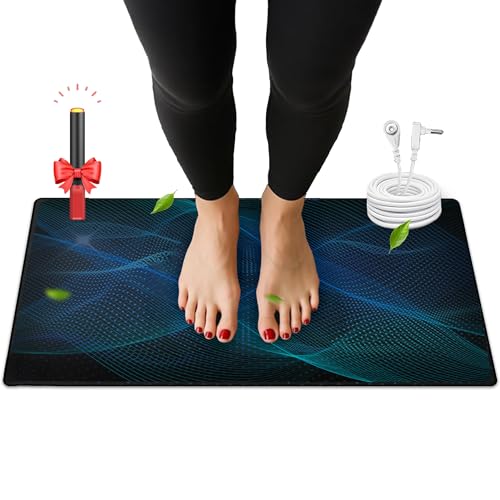


Top 3 picks at a glance
Best Grounding Mats for Standing Desks Compared
The best grounding mat for a standing desk is usually a wide, low-resistance carbon or conductive-rubber mat with a cord long enough to reach a verified earth connection without stretching, plus enough cushioning to reduce foot and calf fatigue.
Unlike a standard anti-fatigue mat, a grounding mat is connected by a lead to the grounding contact of a properly wired electrical outlet or another approved earth point. It should not be connected to the live or neutral contacts. Grounding products are not substitutes for electrical safety equipment, and people with medical devices or concerns about electrical grounding should ask a qualified electrician or clinician before using one.
As an Amazon Associate we earn from qualifying purchases at no extra cost to you.


Quick comparison
| Mat type | Typical size | Conductive material | Typical cord | Anti-fatigue support | Best for |
|---|---|---|---|---|---|
| Compact grounding pad | 11–24 x 8–12 in | Conductive carbon, vinyl, or rubber | 10–15 ft | Low | One foot, chair use, or a small desk |
| Standing-desk grounding mat | 24–36 x 16–24 in | Conductive rubber or carbon-loaded PVC | 15 ft | Medium | Alternating stance and normal desk work |
| Large conductive desk mat | 36–60 x 20–24 in | Carbon-loaded rubber or conductive PU | 15–20 ft | Medium to high | Both feet, broad stance, and movement |
| Layered grounding and anti-fatigue setup | 24–48 x 18–30 in | Conductive upper mat over cushioning | 15–20 ft | High | Long standing sessions on hard floors |
What matters most when choosing a grounding mat
1. Size and under-desk fit
Size is the first practical decision. A mat that is electrically conductive but too small for your normal stance will force you to stand in one position or step off the conductive surface whenever you adjust your posture.
Measure the usable floor area between the desk legs, not just the width of the desktop. Leave approximately 2 inches of clearance on each side so the mat does not catch on a leg, cable channel, or drawer. For most standing desks, a 24 x 16 inch mat is the minimum comfortable size for one person who stands relatively still. A 36 x 20 inch mat is better if you move between keyboard, mouse, and a second monitor.
For a 60-inch-wide desk, a 36-inch mat normally covers the central working zone while leaving room to step off. A 48- to 60-inch mat gives more freedom but may conflict with a desk crossbar or the wheels of a chair. Check the mat’s thickness as well: 3–6 mm is common, while thicker foam-backed designs can interfere with chair casters and height-adjustable desk feet.
2. Conductivity and surface construction
Grounding mats commonly use conductive rubber, carbon-loaded PVC, polyurethane, or a conductive fabric layer. Conductivity is not the same as comfort. A very thin vinyl mat may provide a conductive path but feel cold and hard after an hour. A thick foam mat may feel comfortable but can insulate your feet from the conductive layer unless the upper surface is designed to remain electrically connected.
Look for a stated resistance specification, usually expressed in ohms. Many grounding products advertise resistance in the low-megohm range, such as 100,000 to 1,000,000 ohms. The exact number is less important than a consistent, documented connection between the surface, snap, cord, and grounding point. Avoid products that merely claim to be “anti-static” without explaining whether the entire standing surface is conductive.
Conductive rubber tends to be more durable and stable under repeated foot traffic. Carbon-loaded PVC is often thinner and easier to clean, but it may curl at the edges or become slippery when dusty. Conductive polyurethane can offer a softer surface, although its long-term durability depends heavily on the formulation and finish.
3. Cord length and routing
A short cord can make a good mat unusable. Measure the route from the mat’s snap connector to the grounding point, following the desk edge and allowing slack for desk-height changes.
For example, suppose the outlet is 6 feet horizontally from the nearest desk leg, the cable must rise 3 feet to pass around the frame, and the height-adjustable desk needs another 2 feet of movement. The minimum route is:
6 ft + 3 ft + 2 ft = 11 ft.
Adding about 25% slack gives 13.75 feet, so a 15-foot cord is the sensible minimum. A 10-foot lead might work with a fixed-height desk, but it can pull on the snap or unplug when the desk is raised.
Route the cord loosely along the rear or side of the desk. Do not run it where your feet, chair wheels, or the lifting columns can pinch it. A replaceable cord with a standard snap connection is preferable to a permanently attached lead because it is easier to replace and reposition.
4. Anti-fatigue support
Grounding and anti-fatigue performance are separate features. Anti-fatigue mats usually work through resilient foam or rubber that encourages small ankle and calf movements. Those materials reduce pressure from hard floors, but excessive softness can make a standing desk feel unstable and increase fatigue.
For daily computer work, a medium-firm mat around 10–20 mm thick is often a better balance than an extremely soft mat. If the conductive surface is thin, place it only on top of a compatible cushioning layer when the manufacturer confirms that the conductive connection remains effective. Do not assume that any ordinary foam mat will preserve conductivity.
Be cautious with beveled edges. A bevel helps prevent tripping, but a narrow mat with steep edges can still catch toes when you step backward. A broad, low-profile edge is especially useful under a desk where you frequently move between standing and sitting.
Head-to-head: which type is best for your setup?
| Your situation | Recommended choice | Why | What to avoid |
|---|---|---|---|
| Small desk or limited floor space | 24 x 16 in conductive mat | Fits between most desk legs while covering both feet | Oversized mats that block chair movement |
| Hard tile, concrete, or wood floor | Medium-firm mat with 10–20 mm cushioning | Reduces pressure without excessive instability | Thin vinyl-only pads for multi-hour standing |
| Frequent desk-height changes | 15–20 ft replaceable cord | Provides routing and lifting slack | Short fixed cords under 10 ft |
| Wide stance or frequent repositioning | 36 x 20 in or larger mat | Maintains coverage as you move | Compact foot pads |
| Warm, humid room or frequent cleaning | Sealed conductive rubber or coated PVC | Easier to wipe and less vulnerable to moisture | Absorbent fabric surfaces without cleaning guidance |
Recommended buying priorities
For most gaming and productivity desks, prioritize the features in this order:
- Correct fit: Choose a mat that fits between the desk legs and covers your normal stance.
- Verified electrical connection: Prefer a product with a stated resistance range, a secure snap, and a cord designed for an earth connection.
- Safe cord length: Select 15 feet for most adjustable desks and 20 feet when the outlet is across the room or behind furniture.
- Comfort: Choose medium-firm cushioning for routine standing, especially on hard floors.
- Edge and underside design: Look for beveled edges and a non-slip underside.
- Maintenance: A sealed surface that can be wiped with mild soap and water is easier to keep conductive and hygienic than an absorbent textile.
How to install and check one safely
First, place the mat away from desk feet, chair casters, and walking paths. Connect the cord to the mat’s snap, then route it with enough slack for the full range of desk movement. Connect the other end only to the grounding contact specified by the manufacturer.
Before relying on the setup, use an outlet tester to check that the receptacle is wired correctly. An outlet tester can identify common wiring faults, but it does not prove that every grounding product is functioning within its stated resistance range. If the outlet shows an error, stop and have the circuit checked by a qualified electrician.
Clean the surface as directed. Dust, skin oils, floor polish, and protective plastic films can reduce contact consistency. Never soak the mat or use solvents unless the manufacturer explicitly permits them.
Frequently asked questions
Can a grounding mat replace a regular anti-fatigue mat?
Not necessarily; grounding and anti-fatigue performance are separate features. A thin conductive mat may feel hard during long standing sessions, while ordinary cushioning may insulate your feet from the conductive surface. A layered setup is suitable only when the manufacturer confirms that the conductive connection remains effective through the cushioning.
Can I use a grounding mat with an adjustable desk?
Yes, if the cord reaches the grounding point with enough slack for the desk’s full range of movement. The article recommends a 15-foot cord for most adjustable desks and a 20-foot cord when the outlet is farther away or behind furniture. Route it where desk parts and chair wheels cannot pinch it.
How can I tell whether the mat is actually conductive?
Look for a stated resistance specification and a documented connection between the mat’s surface, snap, cord, and grounding point. The article notes that many products advertise resistance in the low-megohm range, including 100,000 to 1,000,000 ohms. An outlet tester checks for common wiring faults, but does not verify the product’s resistance.
Can I place the grounding mat on top of a foam anti-fatigue mat?
Only if the manufacturer confirms that the conductive connection remains effective with that cushioning layer. Ordinary foam can insulate your feet from the conductive surface, so comfort alone does not establish that the setup will work. The article recommends medium-firm cushioning rather than assuming any foam mat is compatible.
What should I do if an outlet tester shows a wiring error?
Stop using that outlet for the grounding setup and have the circuit checked by a qualified electrician. The article says to connect the mat only to the grounding contact specified by the manufacturer, never to live or neutral contacts. An outlet tester can identify common wiring faults but does not confirm the mat’s resistance.
Bottom line
The best grounding mats for standing desks are not necessarily the largest or thickest models. A 24 x 16 inch medium-firm mat suits a compact desk, while a 36 x 20 inch conductive rubber mat is the stronger all-around choice for a wide standing workstation. Add a 15-foot or longer cord when using an adjustable desk, and treat conductivity, outlet safety, and anti-fatigue cushioning as separate specifications. The right combination gives you reliable under-desk coverage without sacrificing stability, cable safety, or comfort during long gaming and work sessions.









