The best keyboard stands for stable, flexible setups are Z-stands for heavy 88-key workstations, column-style stands for frequent height changes and maximum stability, and double-braced X-stands for portable 61 to 76-key rigs where foldability matters most.
As an Amazon Associate we earn from qualifying purchases at no extra cost to you.


Our Top Picks


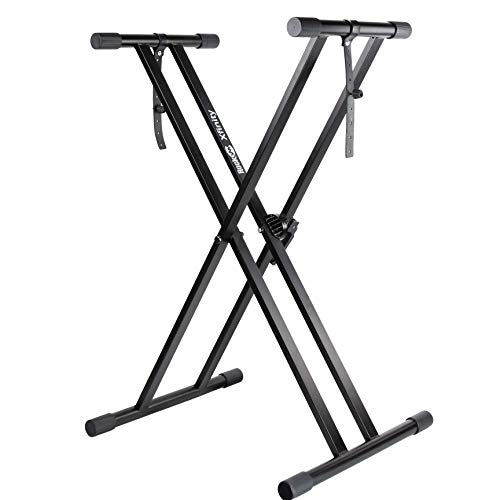
Top 3 picks at a glance
X vs Z vs Column: How They Actually Differ
All three types hold a keyboard, but they distribute weight and handle adjustments completely differently. Your choice should be driven by your keyboard’s weight and length, how often you change height, and whether you need space for pedals and a bench.
X-Stand
The classic scissor frame with two tubes crossing in the middle. Height is adjusted by changing the angle of the X, which also changes the width and depth of the base.
- Best for: 49 to 76-key keyboards under 35 lbs, rehearsals, mobile gaming/streaming stations, and second-tier setups
- Height range: Usually 22 to 38 inches, adjusted in fixed notches or with a pull-knob and clutch
- Footprint: Large when low, small when high — stability varies with height
- Foldability: Flattest fold of the three, usually under 5 inches thick when collapsed
- Assembly: Typically 2 to 5 minutes, no tools for single-braced models, one knob for double-braced models like the On-Stage KS8191 or On-Stage KS7190
Z-Stand
Two vertical Z-shaped side frames connected by horizontal support bars. Height is adjusted by moving the crossbars up or down the vertical posts, so the footprint stays the same.
- Best for: 88-key digital pianos and workstations from 30 to 65 lbs, including heavier models like the Yamaha P-525, Roland FP-90X, and Kawai ES-series
- Height range: Usually 23 to 32 inches with infinite adjustment within that range via clamp handles
- Footprint: Fixed and wide, which keeps the center of gravity inside the base at any height
- Foldability: Folds flat but remains wide; less compact than an X-stand but still fits in a closet or against a wall
- Assembly: 10 to 15 minutes with included Allen keys, for example with the On-Stage KS7350 or Ultimate Support IQ-3000
Column / Table-Style Stand
A single central column with four legs or a T-base and a wide rectangular top frame. Often includes a hand-crank, electric motor, or telescoping column for height.
- Best for: Studio desks, hybrid gaming and production setups, and players who sit and stand during the same session
- Height range: The widest, typically 22 to 42 inches, with premium models like the Ultimate Support AX-48 Pro or Roland KS-G8B offering one-handed adjustment
- Footprint: Minimal floor obstruction with maximum top stability, legs stay out of the way of pedals and chairs
- Foldability: Least portable; legs fold but the column does not collapse as flat as X or Z designs
- Assembly: 15 to 25 minutes, requires tightening leg bolts and top brackets
Head-to-Head Comparison by What Matters
| Criteria | Double-Braced X-Stand (e.g., On-Stage KS8191) | Z-Stand (e.g., On-Stage KS7350) | Column Stand (e.g., Ultimate Support AX-48 Pro) |
|---|---|---|---|
| Recommended Keyboard Weight | Up to 35-40 lbs | Up to 60-65 lbs | Up to 120-180 lbs (manufacturer rated) |
| Recommended Keyboard Length | Up to 54 inches (76-key) | Up to 58 inches (full 88-key) | Up to 60 inches |
| Height Range | 22 – 38 inches (5-7 preset notches) | 23 – 32 inches (continuous) | 22 – 42 inches (continuous) |
| Stability at Max Load | Moderate; flex increases at highest notch | High; base width does not change | Very high; four-point base + rigid column |
| Assembly Time (First Time) | 2-5 minutes | 10-15 minutes | 15-25 minutes |
| Folded Size | ~38 x 18 x 4 inches | ~46 x 22 x 6 inches | ~42 x 24 x 10 inches |
| Pedal Clearance | Limited; center crossbar blocks sustain pedal and bench legs | Excellent; open center with 30+ inches between side frames | Excellent; no center bar, legs splay outward |
| Price Range in 2026 | Usually $30 – $80 | Usually $90 – $180 | Usually $180 – $350 |
Which Stand for Your Keyboard Size?
Length and weight, not just key count, decide stability. An inexpensive 88-key controller at 25 lbs behaves very differently from a weighted 88-key stage piano at 55 lbs.
- 49-61 keys (under 20 lbs): Any double-braced X-stand is stable. Single-braced X-stands will work but will wobble under hard playing. A Z or column stand is overkill unless you need pedal clearance.
- 76 keys (20-35 lbs): Double-braced X-stand is the minimum. If the keyboard is over 50 inches wide, move to a Z-stand to prevent end sag and side-to-side flex.
- 88 keys, semi-weighted (25-40 lbs): Double-braced X-stand can work for home use at seated height, but a Z-stand is noticeably more stable and leaves room for a piano bench and three-pedal unit.
- 88 keys, fully weighted (45-65+ lbs): Choose a Z-stand or column stand. The On-Stage KS7350 and similar Z-stands are rated for this class, and column stands like the Roland KS-G8B are designed specifically for 50+ lb instruments.
Decision Matrix: Match Your Situation to the Right Stand
Use this matrix instead of guessing by looks. Find the row that describes how you play and move your rig.
| If You… | Choose This | Why |
|---|---|---|
| Gig, rehearse, or pack up after each session and use a 61 or 76-key synth | Double-Braced X-Stand | Fastest setup/teardown and smallest folded size, adequate stability under 35 lbs |
| Play seated at home with an 88-key weighted keyboard and a sustain or triple pedal | Z-Stand | Fixed footprint keeps wobble low and the open center prevents pedal interference |
| Share the setup between sitting and standing, or use it as a production desk | Column Stand | Only type that adjusts smoothly from ~24 inches to ~40+ inches without changing stability |
| Stack two keyboards or add a laptop/mixer tier | Z-Stand with second tier or Column with add-on tier | X-stands cannot safely add a second tier above 15 lbs without tipping risk |
| Need maximum stability on carpet or uneven floor | Column Stand with leveling feet or Z-Stand with adjustable feet | Four-point contact with levelers beats the two-point line contact of an X-stand on soft surfaces |
Stability, Height, and Pedal Clearance Explained
Why Stability Changes With Height on an X-Stand
An X-stand is a linkage. When you raise it, the feet move closer together. Stability is determined by whether the keyboard’s center of gravity stays inside the base rectangle.
Worked example: A common double-braced X-stand has a 32-inch base width at 24 inches high, but only a 14-inch base width at 36 inches high. Place a 50-inch wide, 40 lb keyboard on it at 36 inches high and play fortissimo near the highest octave. Your hands apply about 10-15 lbs of downward force 20 inches from center. The tipping moment is 15 lbs x 20 inches = 300 inch-lbs. The restoring moment from the stand’s base is 40 lbs x (14 / 2) inches = 280 inch-lbs. Since 300 > 280, the stand can rock or walk. This is why the same stand feels solid at seated height but shaky at standing height with a heavy board. Z and column stands keep the base width constant — typically 22 to 29 inches — so the restoring moment does not shrink when you raise them.
Setting the Correct Height
Height is not preference, it is ergonomics. For piano technique, your forearms should be nearly parallel to the floor with elbows at 85 to 100 degrees when fingers rest on the white keys.
- Measure from the floor to the top of the white keys while seated at your bench. For most adults, this is 28 to 30 inches. Set the stand so the key top lands there, not the arms of the stand.
- If you switch between sitting and standing, measure both. Seated is usually 28-30 inches, standing is usually 36-40 inches depending on your height. Only column stands and tall Z-stands cover both without swapping stands.
- Leave 1 inch of clearance between the bottom of the keyboard and your thighs when seated to allow for pedal movement.
Pedal Clearance Fixes
The most common complaint with X-stands is that the center X blocks the sustain pedal and forces you to sit off-center.
- If you must use an X-stand, set the pedal 3 to 4 inches in front of the center joint and angle it slightly. Use a pedal with a rubber base so it does not slide when you reach forward.
- For triple pedal units like the Roland RPU-3 or Yamaha LP-1, do not use an X-stand. The bar will prevent the unit from sitting flat. A Z-stand provides a clear 30 to 32 inch span between legs, and a column stand provides completely unobstructed floor space.
- On carpet, add a small pedal board or 12 x 12 inch piece of plywood under the pedals on any stand type to prevent the pedal from sinking and shifting.
Foldability and Assembly: What to Expect
Foldability is a tradeoff with rigidity. A stand that folds in one motion has more joints, and each joint is a potential flex point under load.
- X-stand: Pull the knob, fold flat. No tools needed after first assembly. Best if you transport weekly. Check the clutch teeth every few months — worn teeth cause slipping under heavy keyboards.
- Z-stand: Loosen two clamp levers, slide the crossbars off, fold the side frames. Takes two minutes once you know the sequence, but it never folds as thin as an X-stand. Tighten clamps to 10-12 Nm (hand-tight plus quarter turn) to avoid slipping without crushing the tube.
- Column stand: Fold legs inward and lower the top. Heaviest to move — usually 18 to 28 lbs vs 8 to 12 lbs for an X-stand — but no risk of the stand scissoring closed if a clamp fails.
For a stable, flexible home setup that rarely moves, prioritize rigidity over fold flatness. For a dorm, apartment, or shared gaming room where the keyboard is stored daily, prioritize fold flatness and weight, and keep the keyboard under 40 lbs.
Final Recommendations by Use Case
- Best for beginners and mobile 61-key setups: Double-braced X-stand such as the On-Stage KS7190. Usually $40-$70, folds in seconds, stable enough for controllers and synths.
- Best for 88-key weighted keyboards at home: Z-stand such as the On-Stage KS7350 or Ultimate Support IQ-3000. Usually $110-$170, handles 55+ lbs, open center for pedals and bench.
- Best for sit/stand and studio hybrid desks: Column stand such as the Ultimate Support AX-48 Pro or Roland KS-G8B. Usually $200-$330, widest height range, most stable under heavy playing.
If you can only buy one stand for the future, choose based on the heaviest keyboard you plan to own in the next three years, not the one you own today. Moving from a 25 lb controller to a 50 lb weighted 88-key instrument is the point where most players outgrow an X-stand and need the fixed footprint of a Z or column design.
FAQ
Will a single-braced X-stand hold an 88-key keyboard?
It will hold the weight on paper, but it will flex side-to-side and the narrow top arms (often 12-14 inches) will not support the full length of a 52 to 58 inch keyboard. The ends will bounce when you play near the extremes. Use double-braced at minimum, and preferably a Z or column for anything over 40 lbs.
Do I need a stand with adjustable feet?
If your floor is hard and level, no. If you are on carpet, thick rugs, or an uneven floor, adjustable leveling feet prevent rocking. Most Z and column stands include them; most X-stands do not.
Can I add a second tier for another keyboard or laptop?
Yes on most Z and column stands via manufacturer add-on tiers. Avoid stacking a second keyboard on an X-stand — the elevated weight raises the center of gravity above the narrow base and creates a tipping hazard. Keep the lower keyboard under 40 lbs and the upper tier under 15-20 lbs if you use an X-stand stacker.