The best professional color accurate monitors for designers are the EIZO ColorEdge CG2700X for critical print and prepress work, the BenQ SW321C for a practical wide-gamut 4K setup, the ASUS ProArt Display PA32UCG for HDR and video, and the Dell UltraSharp U3224KB for a high-resolution general design desk.
As an Amazon Associate we earn from qualifying purchases at no extra cost to you.


Our Top Picks
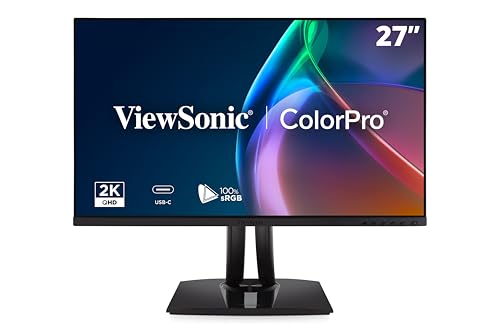 ViewSonic VP2756A-2K 27 Inch 1440p Monitor27 Inches8.46 x 24.15 x 21.27 inches16 PoundsCheck on Amazon

Quick comparison
| Monitor | Size and resolution | Color coverage and calibration | Best use | Typical market range |
|---|---|---|---|---|
| EIZO ColorEdge CG2700X | 27-inch, 3840 × 2160 | Wide-gamut IPS; built-in sensor; hardware calibration | Print, photography, prepress | Usually $2,000–$2,500 |
| BenQ SW321C | 32-inch, 3840 × 2160 | 99% Adobe RGB, 100% sRGB, 99% DCI-P3; hardware calibration | Photo editing and illustration | Usually $1,500–$2,000 |
| ASUS ProArt Display PA32UCG | 32-inch, 3840 × 2160 | Wide-gamut Mini LED HDR; hardware calibration; HDR reference modes | HDR video, motion design, finishing | Usually $2,000–$3,000 |
| Dell UltraSharp U3224KB | 32-inch, 6144 × 3456 | Wide-gamut IPS Black; factory color calibration; software calibration support | UI, layout, 3D and high-resolution creative work | Usually $2,000–$2,500 |
Which monitor should you choose?
- Choose the EIZO CG2700X when print consistency, long-term calibration stability, and uniformity matter more than screen size or gaming features.
- Choose the BenQ SW321C when you want a 32-inch 4K canvas, Adobe RGB coverage, and a built-in shading hood without moving into the most expensive reference-monitor class.
- Choose the ASUS PA32UCG when your workflow includes HDR video, bright highlights, wide-gamut delivery, or multiple mastering standards.
- Choose the Dell U3224KB when extra workspace is more valuable than strict print-reference behavior. Its 6K resolution is particularly useful for timelines, panels, large layouts, and detailed interface work.
Screen size and resolution: match pixels to the desk
A 27-inch 4K monitor provides a sharp, compact workspace and is often easier to view at a normal desk distance. A 32-inch 4K display gives larger interface controls and more comfortable side-by-side documents, but pixels are less dense. A 32-inch 6K display restores high pixel density while retaining the physical space of a large panel.
For a design desk, viewing distance changes the practical result. At roughly 60–80 cm, a 27-inch 4K screen works well at 125–150% operating-system scaling. A 32-inch 4K screen commonly feels comfortable around 125% scaling, while a 32-inch 6K screen can provide a detailed canvas at 150% scaling with substantially more usable desktop area.
Bandwidth check for high-resolution work
Resolution alone does not determine whether a computer can drive a display. For example, uncompressed 6K at 60 Hz requires:
6144 × 3456 × 60 × 24 bits = approximately 30.5 Gbit/s of active image data, before blanking intervals and protocol overhead.
That is why a 6K monitor needs an appropriate DisplayPort or Thunderbolt connection rather than an arbitrary USB-C cable. A USB-C connector may carry USB data, DisplayPort, or Thunderbolt; check the computer’s output standard and the cable’s rated bandwidth. For 4K at 60 Hz, a certified DisplayPort 1.4 or HDMI 2.0-class connection is generally sufficient, while 4K at high refresh rates or 6K at 60 Hz may require DisplayPort compression, DisplayPort 2.x, or Thunderbolt depending on the monitor.
Color-space coverage is only useful when the workflow supports it
For web design and most app interfaces, full sRGB coverage is the baseline. Adobe RGB is more useful for photographers and print designers because it includes more cyan and green tones than sRGB. DCI-P3 is important for contemporary video, digital cinema, and wide-gamut Apple-oriented workflows.
A monitor advertising 99% Adobe RGB is not automatically more accurate for every task. If a web image is edited in a wide-gamut space but exported without the correct profile, colors can appear oversaturated on ordinary screens. Keep the document profile embedded, use color-managed applications, and soft-proof before delivery.
| Workflow | Priority color space | Useful monitor feature | Recommended choice |
|---|---|---|---|
| Web, UX and branding | sRGB, with optional P3 | Accurate sRGB mode and reliable uniformity | Dell U3224KB or a calibrated 4K professional IPS display |
| Photography and fine-art print | Adobe RGB and sRGB | Hardware calibration, shading compensation, hood | BenQ SW321C or EIZO CG2700X |
| HDR video and motion design | DCI-P3, Rec. 709 and HDR standards | High sustained brightness, local dimming and HDR presets | ASUS PA32UCG |
| 3D, CAD and large layouts | sRGB or P3 depending on delivery | High resolution, screen area and strong connectivity | Dell U3224KB |
Calibration: factory accuracy versus hardware calibration
Factory calibration is valuable on day one, but it does not prevent drift from backlight aging, temperature, or changes in the working environment. Hardware calibration is better because the correction is written into the monitor’s internal lookup table rather than relying entirely on the graphics card.
For print or photography, use a colorimeter or spectrophotometer and target D65 white point, gamma 2.2, and approximately 100–120 cd/m² for a moderately lit room. A brighter studio may require 140–160 cd/m², but setting the display excessively bright is a common cause of prints appearing too dark.
For standard web work, use the monitor’s accurate sRGB mode or create an ICC profile with the calibration device. For video, select the required Rec. 709 or HDR mode instead of applying a generic desktop profile. Recalibrate monthly for demanding work, or whenever the lighting, monitor position, or visual appearance changes.
Panel uniformity matters more than headline gamut
Two monitors can cover the same color space yet produce different results because one has uneven brightness or a visible color shift from the center to the corners. Uniformity is especially important when judging gradients, full-bleed photography, flat UI backgrounds, and print simulations.
EIZO’s ColorEdge line is particularly strong when uniformity compensation and repeatable calibration are priorities. The BenQ SW321C adds a shading hood that reduces stray light and helps maintain consistent viewing conditions. The ASUS PA32UCG’s Mini LED backlight is advantageous for HDR contrast, but local dimming can create halos around bright objects against dark backgrounds; that is a mastering consideration, not necessarily a defect.
Connectivity and desk setup
Look for the connections that reduce friction in the actual studio. USB-C with power delivery can connect a laptop and charge it through one cable. A built-in USB hub is useful for a calibration device, card reader, keyboard, or external drive. KVM functionality helps share peripherals between a desktop workstation and a laptop. DisplayPort is usually the safest choice for a fixed desktop, while HDMI remains useful for cameras, game consoles, and video equipment.
- Single high-resolution workstation: prioritize the monitor’s native DisplayPort or Thunderbolt input and verify the graphics card supports the full resolution at 60 Hz.
- Laptop plus desktop: choose USB-C or Thunderbolt input, a USB hub, and KVM if available.
- Dual-monitor desk: check whether the computer supports two independent displays at the required resolution; do not assume a monitor’s USB-C port can daisy-chain every signal.
- Small or shallow desk: a 27-inch 4K display is easier to position correctly than a deep 32-inch panel. A monitor arm can improve viewing distance, but confirm its weight rating.
Frequently asked questions
What scaling should I use for a 4K or 6K monitor?
A 27-inch 4K monitor commonly works well at 125–150% operating-system scaling, while a 32-inch 4K display often feels comfortable around 125%. A 32-inch 6K display can provide a detailed canvas at 150% scaling while retaining substantially more usable desktop area. Viewing distance also matters, with roughly 60–80 cm being a practical reference for a design desk.
How can I tell whether my computer and cable support the monitor’s resolution?
Check both the computer’s output standard and the cable’s rated bandwidth. A USB-C connector may carry USB data, DisplayPort, or Thunderbolt, so the connector shape alone is not enough. For 4K at 60 Hz, certified DisplayPort 1.4 or HDMI 2.0-class connectivity is generally sufficient. 6K at 60 Hz may require DisplayPort compression, DisplayPort 2.x, or Thunderbolt.
What calibration settings are recommended for print and photography?
For print or photography, target a D65 white point, gamma 2.2, and approximately 100–120 cd/m² in a moderately lit room. A brighter studio may require 140–160 cd/m², but excessive brightness can cause prints to appear too dark. Recalibrate monthly for demanding work, or whenever lighting, monitor position, or visual appearance changes.
Do I need Adobe RGB or DCI-P3 for web and interface design?
Most web design and app-interface work needs full sRGB coverage as the baseline, with optional P3 depending on delivery. Adobe RGB is more useful for photography and print, while DCI-P3 matters for contemporary video, digital cinema, and wide-gamut Apple-oriented workflows. Whatever the space, keep the document profile embedded and use color-managed applications.
Which monitor features are useful when using both a laptop and desktop?
For a laptop-plus-desktop setup, USB-C or Thunderbolt input, a built-in USB hub, and KVM functionality can reduce desk friction. USB-C power delivery can connect and charge a laptop through one cable, while KVM helps share peripherals between computers. Verify that the computer supports the required resolution, and do not assume every USB-C port can daisy-chain signals.
Bottom line
The EIZO ColorEdge CG2700X is the strongest choice for color-critical print and photographic production. The BenQ SW321C is the balanced 32-inch Adobe RGB option for many designers. The ASUS PA32UCG is the specialist pick for HDR and video finishing. The Dell UltraSharp U3224KB makes the most sense for designers who need a spacious, exceptionally detailed desktop for layouts, interfaces, and mixed creative work. Whichever model you select, budget for calibration, controlled room lighting, and a connection that can actually deliver the monitor’s native resolution.









