The best routers for apartments are usually a compact Wi-Fi 6 or Wi-Fi 6E model for small spaces, a stronger single router for larger or wall-heavy apartments, and a two-unit mesh system only when the layout creates a genuine dead zone.
As an Amazon Associate we earn from qualifying purchases at no extra cost to you.


Our Top Picks
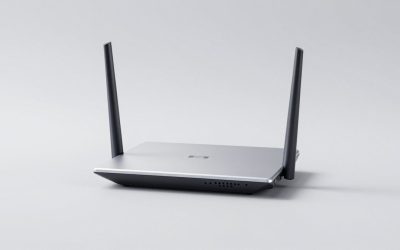
 TP-Link AC1200 Gigabit Dual Band WiFi RouterWi-Fi 5 AC12008.46 x 4.92 x 1.81 inches0.71 PoundsCheck on Amazon



Top 3 picks at a glance
Quick picks by apartment layout
| Apartment situation | Recommended class | Good examples | Why it fits |
|---|---|---|---|
| Studio or one-bedroom, up to about 800 square feet | Dual-band Wi-Fi 6 router | TP-Link Archer AX55 | Enough capacity for typical streaming, gaming, work calls, and smart-home devices without paying for unused mesh hardware. |
| One-bedroom with concrete, brick, or metal-reinforced walls | Powerful Wi-Fi 6 router with strong 5 GHz performance | ASUS RT-AX86U Pro | Useful range, gaming features, multi-gig support, and more configuration control than basic routers. |
| Long apartment, roughly 900–1,400 square feet, with one remote room | Two-node Wi-Fi 6E mesh | TP-Link Deco XE75 or eero Pro 6E | A second access point can bypass a difficult hallway or wall instead of forcing one router to transmit through the entire apartment. |
| Many nearby networks and congested 5 GHz channels | Wi-Fi 6E or Wi-Fi 7 router, if devices support it | Google Nest Wifi Pro or a suitable Wi-Fi 7 model | The 6 GHz band can provide cleaner short-range capacity, although it loses signal through walls faster than 5 GHz. |
| Large or L-shaped apartment with Ethernet between rooms | Two-node mesh with wired backhaul | ASUS ZenWiFi XT9 or TP-Link Deco XE75 | Ethernet carries traffic between nodes, preserving wireless bandwidth for phones, PCs, consoles, and TVs. |
What matters more than the advertised Wi-Fi number
Router labels such as AX3000, AX5400, or BE6500 describe the combined theoretical rates of multiple bands. They do not represent the speed one laptop will receive. A client device, wall materials, channel congestion, and the internet connection itself usually matter more.
For apartment shopping, prioritize these specifications:
- Wi-Fi 6 or newer: Wi-Fi 6 improves efficiency when many neighboring networks and client devices compete for airtime. Wi-Fi 6E adds 6 GHz, while Wi-Fi 7 can add wider channels and newer multi-link features.
- At least a 2.5Gbps Ethernet port for very fast service: A gigabit internet plan cannot exceed roughly 940Mbps in practical wired throughput, so a router with only gigabit ports may become the bottleneck on plans above 1Gbps.
- 160 MHz support: This can increase peak 5 GHz speed for compatible devices, but apartment interference may force the router to use narrower channels. Treat it as useful headroom, not a guaranteed speed.
- 6 GHz support: Wi-Fi 6E and Wi-Fi 7 devices can use 6 GHz, which is often less crowded. Its shorter range makes it best for the same room or nearby rooms, not for reaching through several walls.
- Wired backhaul: If you can run Ethernet, this is more valuable than buying a much faster wireless rating for a second mesh node.
- Control over channels and transmit behavior: Advanced users may benefit from manual channel selection, separate SSIDs, guest networks, VLAN options, and configurable DNS.
Best router choices for common apartment needs
Best value for a studio or small one-bedroom: TP-Link Archer AX55
The TP-Link Archer AX55 is a sensible fit for a compact apartment with a broadband plan up to about 1Gbps and a moderate number of devices. It is a dual-band Wi-Fi 6 router with enough capacity for 4K streaming, online gaming, video calls, and ordinary smart-home traffic.
Its main advantage is proportion. A studio does not normally need a three-unit mesh system, and extra nodes can create more radio traffic and additional management. Place the AX55 in an open central position rather than inside a media cabinet, and it can cover many small apartments effectively.
Choose something stronger if the router must sit at one end of a long floor plan, your walls are unusually dense, or more than 30–40 devices are active during busy periods.
Best single-router upgrade for gaming and heavy use: ASUS RT-AX86U Pro
The ASUS RT-AX86U Pro is a better single-router choice when you want stronger hardware, gaming-oriented traffic controls, and a 2.5Gbps port. It suits apartments where a central router can reach the important rooms but the household has several demanding devices.
It will not make a distant room immune to walls or interference. Its advantage is handling simultaneous traffic and maintaining low local-network latency when a computer is downloading, a console is updating, and other people are streaming. Connect a gaming PC or console by Ethernet whenever possible; wired connections avoid wireless contention entirely.
Best for a difficult floor plan: TP-Link Deco XE75
The TP-Link Deco XE75 is a tri-band Wi-Fi 6E mesh system intended for apartments where one access point cannot cover the whole layout reliably. A two-unit kit is usually the appropriate starting point; adding more units in an apartment can create unnecessary overlap.
Its 6 GHz band can serve as a wireless link between nodes or connect compatible devices. However, if the second node is separated by several dense walls, the 6 GHz connection may be weaker than expected. Put the satellite halfway toward the weak room, not inside the dead zone. If Ethernet is available, use it for backhaul and place the satellite where coverage is needed.
Best for simple management: eero Pro 6E
The eero Pro 6E is suited to shoppers who prefer automatic setup and centralized app management over extensive manual controls. It supports Wi-Fi 6E and can work well in a two-node apartment mesh, particularly when the nodes have a clear or moderately obstructed path.
It is less appealing if you need granular channel selection, extensive advanced network settings, or complete control without relying on a mobile app. Check the ongoing feature requirements of any subscription-based options before buying.
Best for a straightforward 6 GHz network: Google Nest Wifi Pro
Google Nest Wifi Pro is a tri-band Wi-Fi 6E mesh option for apartments with compatible newer phones, laptops, and tablets. It is easy to deploy and can provide clean short-range 6 GHz connections in a less crowded building.
Its value is lower when most of your devices support only 2.4 GHz and 5 GHz, because those devices cannot use the 6 GHz band. It also makes more sense as a complete replacement for an existing router than as an add-on to another mesh ecosystem.
Best for wired-backhaul apartments: ASUS ZenWiFi XT9
The ASUS ZenWiFi XT9 is a tri-band Wi-Fi 6 mesh system with features suited to users who want more network control. It is a strong match for an L-shaped apartment, a multi-room layout, or a home office separated from the internet entry point—especially when Ethernet can connect the nodes.
For a typical small apartment, it may be more hardware than necessary. Its advantages become clearer when several wired devices, multiple access points, or advanced configuration options matter.
Match the router to your internet plan
A faster internet plan does not automatically require a premium router. Estimate demand by adding simultaneous activity rather than multiplying every device’s maximum specification.
| Activity | Approximate sustained bandwidth | Notes |
|---|---|---|
| 4K video stream | 15–25Mbps | Allow extra capacity for variable bitrate and other traffic. |
| 1080p video stream | 5–8Mbps | Several streams are still manageable on a modest plan. |
| HD video call | 3–6Mbps per call | Upload quality and latency can matter more than download speed. |
| Online gaming | Usually under 5Mbps | Latency, jitter, and bufferbloat are more important than raw bandwidth. |
| Large download or cloud backup | Uses as much capacity as available | This is the traffic most likely to expose bufferbloat or saturate an uplink. |
For example, two 4K streams at 20Mbps each, two video calls at 5Mbps each, and a 10Mbps gaming or browsing allowance total about 60Mbps of sustained demand. A 300Mbps plan is therefore sufficient for that workload, but a router with effective queue management may feel better than a faster router with poor traffic handling. Leave additional headroom for downloads, updates, and upload activity.
Apartment placement and interference settings
Place the main router near the center of the usable apartment, elevated and in the open. Avoid a floor-level location, enclosed cabinet, metal shelving, or direct placement beside a microwave, cordless-phone base, or Bluetooth-heavy hub.
- Use 2.4 GHz for distant low-bandwidth devices and smart-home equipment. Set a 20 MHz channel width to reduce overlap in dense buildings.
- Use 5 GHz for laptops, consoles, televisions, and phones. Start with automatic channel selection; if performance varies, test a less congested non-DFS channel before changing several settings at once.
- Use 6 GHz for compatible devices near the router or mesh node. Do not judge its value by trying to push it through multiple walls.
- Give the main and mesh nodes a clear path. A satellite should receive a healthy signal from the main node, not merely sit in the room where Wi-Fi is already unusable.
- Enable WPA3 when all important devices support it, or use WPA2/WPA3 transition mode for older equipment.
- Enable automatic firmware updates and replace the default administrator password.
When mesh is the wrong purchase
Mesh is not a cure for a weak broadband line, poor router placement, or an overloaded wireless channel. If every room is close to one central location, one quality router is simpler and often faster. Mesh can also reduce peak speed when satellite nodes communicate wirelessly and have to relay traffic.
Choose mesh when the apartment has a persistent coverage gap, a long or irregular layout, or a second location where Ethernet or a well-positioned wireless node can be installed. Choose a single router when the issue is mainly speed on one nearby device or when your current router is hidden behind furniture.
Frequently asked questions
Do I need a mesh system for a small apartment?
Usually not. A compact apartment can often use a dual-band Wi-Fi 6 router, such as the TP-Link Archer AX55, for streaming, gaming, work calls, and smart-home devices. Mesh becomes more appropriate when the layout creates a genuine dead zone, includes a long hallway or difficult walls, or has a remote room that one centrally placed router cannot reach reliably.
Will a higher AX or BE rating make one device faster?
Not necessarily. Labels such as AX3000, AX5400, and BE6500 combine theoretical rates across multiple bands, rather than describing the speed one laptop will receive. Actual performance depends on the client device, walls, channel congestion, and internet connection. A higher rating is useful headroom, but it does not guarantee a matching connection speed.
Should I use 6 GHz if my apartment has several walls?
Use 6 GHz mainly for compatible devices in the same room or nearby rooms. It can offer cleaner short-range capacity, but its signal loses strength through walls faster than 5 GHz. If a mesh satellite is separated from the main router by several dense walls, its 6 GHz wireless connection may be weaker than expected.
Where should I put a mesh satellite?
Place the satellite halfway toward the weak room, rather than inside the dead zone. It needs a healthy signal from the main node so it can relay traffic effectively. Give the nodes a clear path when possible, and use Ethernet for backhaul if it is available. Wired backhaul preserves wireless bandwidth for other devices.
Can a router with gigabit ports handle an internet plan above one gigabit?
A router with only gigabit Ethernet ports may become the bottleneck on plans above one gigabit. A gigabit internet plan cannot exceed roughly 940Mbps in practical wired throughput. For very fast service, prioritize a router with at least a 2.5Gbps Ethernet port, while remembering that Wi-Fi performance also depends on devices and interference.
Bottom line
For most small apartments, start with the TP-Link Archer AX55 class. Move to the ASUS RT-AX86U Pro class for a demanding household that can place one router centrally. Choose a two-node system such as the TP-Link Deco XE75, eero Pro 6E, or ASUS ZenWiFi XT9 when walls and layout—not merely internet speed—cause the problem. The best router for apartments is the one that matches the radio bands your devices use, the walls between rooms, and whether you can provide Ethernet between access points.