
As someone who spends long hours editing video timelines on laptop setups ranging from sleek MacBooks to high-powered gaming rigs, mastering hotkeys in Adobe Premiere Pro is the absolute fastest way to streamline a post-production workflow. I have spent weeks switching between different shortcut aids during heavy editing sessions, testing how well they help speed up cuts, ripple deletes, and color grading adjustments. When you are deep into a complex project, having immediate visual access to key commands eliminates friction, but the physical form factor you choose dramatically affects how you interact with your machine every single day.
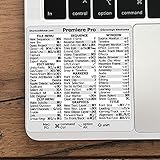
That brings us to two very different physical solutions currently sitting on my editing desk: the JCPal Adobe Premiere Shortcut Guide Keyboard Cover and the Synerlogic for Adobe Premiere Pro Quick Reference Keyboard Shortcut Sticker. The JCPal overlay sits directly on top of your physical keys, transforming the entire keyboard into a color-coded Premiere control center designed specifically for modern MacBooks. On the other hand, the Synerlogic sticker takes a minimalist approach, providing a compact reference decal designed to stick onto the palm rest of virtually any laptop chassis. Both promise to make hotkey mastery second nature, but their dramatically different designs, platform support, and price points mean they cater to entirely different styles of editor.
As an Amazon Associate we earn from qualifying purchases at no extra cost to you.

Quick Verdict
Buy the JCPal Adobe Premiere Shortcut Guide Keyboard Cover if you edit exclusively on a supported MacBook Pro, Air, or Neo and want an all-in-one visual key layout that also safeguards your physical switches from dust and minor spills. Buy the Synerlogic Quick Reference Sticker if you want a universal, budget-friendly reference guide that works across both Mac and Windows gaming laptops without altering your built-in keyboard’s original typing feel.
JCPal Keyboard Cover vs Synerlogic Sticker: Specs Side by Side
| Feature / Specification | JCPal Shortcut Keyboard Cover | Synerlogic Quick Reference Sticker |
|---|---|---|
| Retail Price | $26.99 | $5.95 |
| Product Type | Full Keyboard Cover Overlay | Palm Rest Quick Reference Decal |
| MacBook Pro Support | Supported | Supported |
| MacBook Air Support | Supported | Supported |
| MacBook Neo Support | Supported | Supported |
| Windows PC Support | Not stated | Supported |
| Target Software | Adobe Premiere | Adobe Premiere Pro |
| Primary Placement Area | Over physical keycaps | Palm rest or laptop chassis surface |
| Material Construction | Not stated | Not stated |
| Keyboard Spill / Dust Protection | Yes (covers key layout) | No (chassis placement only) |
Where JCPal Wins
- Direct On-Key Visualization: Because the JCPal overlay rests directly over each keycap, your eyes never have to leave the key area to figure out which hotkey executes a function. Each command is color-coded and printed on the exact key that triggers it, creating a intuitive bridge between muscle memory and sight.
- Built-In Physical Key Protection: As a full-coverage layer that drapes over the entire key layout, it provides a physical barrier against keycap wear, dust, debris, and minor liquid splashes while you work in messy environments or on the go.
- Custom Layout Alignment for Apple Laptops: It is molded specifically to fit the exact key footprint of the MacBook Pro, MacBook Air, and MacBook Neo series, providing a flush, cohesive look that turns a standard laptop keyboard into a dedicated editing console.
Where Synerlogic Wins
- Universal Cross-Platform Compatibility: Unlike fitted key covers that only mold to specific laptop key layouts, the Synerlogic sticker sits neatly on the palm rest surface. This allows it to work seamlessly on any MacBook model or Windows PC laptop regardless of key switch style or chassis generation.
- Zero Impact on Typing Feel: Because it sits on the body of your laptop rather than over the mechanical or membrane switches, it preserves the crisp tactile travel and key feedback of your laptop keyboard completely unchanged during normal typing tasks.
- Exceptional Cost Efficiency: At under six dollars, it delivers essential hotkey guidance at a small fraction of the cost of full keyboard overlays, making it an easy add-on for budget-conscious creators.
Real-World Use: Which One Fits You
The Dedicated MacBook Video Editor
If your editing work happens entirely on a MacBook Pro, MacBook Air, or MacBook Neo, the JCPal cover feels like a natural extension of your hardware. During long timeline assembly sessions, looking directly at the color-coded key caps makes jumping between edit tools, trimming modes, and playback controls instant. If you do not mind the slightly softened key dampening that comes with placing a protective layer over your keys, this gives you the closest experience to a dedicated post-production editing console.
The Cross-Platform Creator and PC Gamer
For creators who jump between a Windows gaming laptop at home and a MacBook on the road, or for those who simply refuse to put anything over their mechanical or low-profile laptop switches, the Synerlogic sticker is the ideal tool. By placing the reference cheat sheet on the lower palm rest area, you gain a constant quick-look guide for Adobe Premiere Pro shortcuts without interfering with your everyday typing, gaming, or general productivity tasks.
The Mobile Freelancer on the Go
Working in coffee shops, airport terminals, or busy client spaces introduces risks like stray coffee drops, food crumbs, and surface wear on your laptop keycaps. In these unpredictable environments, the JCPal keyboard cover pulls double duty. It acts as both a rapid reference guide for high-speed client revisions and a physical shield against workspace messes that could otherwise work their way under your laptop keys.
Price and Value
When evaluating price and overall value, there is a clear cost gap between these two editing accessories. The JCPal Adobe Premiere Shortcut Guide Keyboard Cover retails for $26.99, whereas the Synerlogic Quick Reference Sticker costs just $5.95. That represents an exact price difference of $21.04.
Whether that $21.04 price premium is justified depends entirely on what you expect from your workspace accessory. The higher price of the JCPal overlay covers custom physical molding, precise key cap alignment for specific Apple portables, and full debris protection for your keyboard deck. However, if you only need a quick mental jogger for obscure Premiere Pro command combinations and do not require physical key protection, the Synerlogic sticker offers unmatched value per dollar by supplying the exact information you need while keeping over twenty dollars in your pocket.
Final Recommendation
For most video editors and content creators who want a versatile, affordable cheat sheet that will never hinder their typing experience or break the bank, the **Synerlogic Quick Reference Keyboard Shortcut Sticker** is the smarter overall buy. Its universal compatibility across both Windows PC gaming laptops and MacBooks ensures it remains useful regardless of what hardware platform you move to next.
However, the **JCPal Keyboard Cover** is worth picking up instead if you work exclusively on a supported MacBook Pro, Air, or Neo model and specifically want direct, color-coded keycap mapping paired with physical keyboard protection against everyday wear and spills.
FAQ
Will the JCPal cover work on a Windows gaming laptop?
No, the JCPal keyboard cover is engineered specifically for the physical key layout of Apple laptops, including the MacBook Pro, MacBook Air, and MacBook Neo. Windows PC gaming laptops feature different key sizes, row spacing, and function key arrangements, meaning the JCPal cover will not line up properly. For Windows machines, the Synerlogic sticker is the recommended option.
Does the Synerlogic sticker leave a sticky residue if I remove it?
The Synerlogic sticker uses an adhesive designed for clean removal from metallic and plastic laptop chassis surfaces. If you decide to remove or reposition it later, it peels off smoothly without leaving tough residue behind on your palm rest. Simply wipe the surface clean with a microfiber cloth after removal.
Does the JCPal cover change how it feels to type on a MacBook?
Yes, adding any physical layer over laptop keys slightly alters key tactility. The JCPal cover softens the feel of key travel and reduces typing sound, which some users find comfortable during editing, while others who prefer sharp key clickiness may need an initial adjustment period.
Which of these shortcut accessories is better for a beginner learning Adobe Premiere Pro in 2026?
The Synerlogic sticker is often the best choice for beginners in 2026 because it presents the most vital Adobe Premiere Pro commands in a organized visual list right on the palm rest. Beginners can quickly scan the list without having to search across dozens of individual keycaps, making the initial hotkey learning curve much smoother across any laptop brand.
See also: our full roundup Best Laptops for Adobe Premiere Pro.
Related guides
- Alienware 16 Aurora RTX 5070 Review: Display, Portability and Configuration Gaps
- Lenovo Legion Pro 7i Gen 10 Review: 64GB RAM and Dual-SSD Configuration
- MSI Katana 15.6-inch RTX 5050 Review: Configuration Strengths and Upgrade Unknowns
- ASUS ROG Strix SCAR 16 G635LX-XS97 Review: Display Ambition, Upgrade Questions


