The best gaming headset depends on how you play: the SteelSeries Arctis Nova Pro Wireless suits PC and console players who want a premium all-rounder with a swappable battery base, the HyperX Cloud III suits buyers who want comfort and value on a wired connection, the Logitech G Pro X 2 Lightspeed and Razer BlackShark V2 Pro suit competitive players who value low-latency wireless, and the SteelSeries Arctis Nova 3 or Razer BlackShark V2 X cover tighter budgets. This guide explains the features that matter, what makers state about each model, and the trade-offs between them.
As an Amazon Associate we earn from qualifying purchases at no extra cost to you.



Our Top Picks
 Razer BlackShark V2 X Gaming Headset: 7.1 Surround3.5 mm7.6 x 6.76 x 3.86 inches0.5 poundsCheck on Amazon
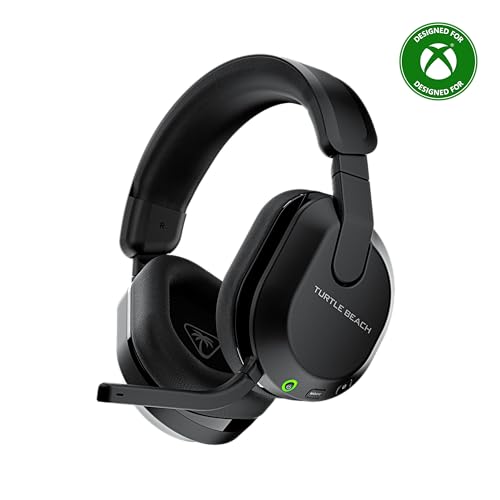 Turtle Beach Stealth 600 Wireless Gaming Headset forStandard8.58 x 7.81 x 3.74 inches0.7 PoundsCheck on Amazon


Top 3 picks at a glance
Gaming Headsets at a Glance
| Headset | Connection | Best for | Key stated features | Limits |
|---|---|---|---|---|
| SteelSeries Arctis Nova Pro Wireless | 2.4 GHz wireless, Bluetooth, base station | Premium all-round PC and console use | Hot-swappable batteries, active noise cancellation, dual-device base (maker) | Premium tier; heavier than some rivals |
| SteelSeries Arctis Nova 7 | 2.4 GHz wireless plus Bluetooth | Mid-range wireless with multi-platform support | Long battery life, simultaneous wireless and Bluetooth (maker) | No active noise cancellation |
| HyperX Cloud III | Wired (3.5 mm and USB) | Comfort-first value | Memory foam ear cushions, durable frame, detachable mic (maker) | Wired only; there is a separate wireless version |
| Logitech G Pro X 2 Lightspeed | Lightspeed wireless, Bluetooth, wired | Competitive play and streaming | Graphene drivers, detachable boom mic (maker) | Premium tier |
| Razer BlackShark V2 Pro | 2.4 GHz wireless | Esports-style lightweight comfort | Lightweight design, detachable mic (maker) | Less feature-rich than multi-device bases |
| Corsair HS80 Max Wireless | 2.4 GHz wireless, Bluetooth | Comfort and spatial audio | Dolby Atmos support, wide headband (maker) | Bulkier look |
| SteelSeries Arctis Nova 3 / Razer BlackShark V2 X | Wired | Entry-level gaming | Lightweight, clear mic (maker) | Fewer features and basic build |
Check each maker’s current page for the exact version, because wireless, wired and console-specific variants share names.
Features That Matter More Than Marketing
- Fit and weight: A heavy headset can tire you in long sessions. Look at stated weight, headband design and ear cup size. If you wear glasses, softer ear cushions help reduce pressure.
- Connection: A USB 2.4 GHz dongle gives the lowest latency for wireless play on PC. Bluetooth is convenient for phones but can add delay. Wired headsets avoid charging and are the simplest choice.
- Microphone: Boom mics generally capture voice better than hidden ones. Detachable mics are easier to store and replace.
- Battery: Makers list battery life per charge. A swappable battery, as on the Arctis Nova Pro Wireless, means no downtime.
- Software: Equalizers, game and chat balance, and surround modes depend on each brand’s app.
- Console compatibility: PlayStation, Xbox and Switch support differ by model. Read the compatibility notes of the version you buy.
SteelSeries Arctis Nova Pro Wireless: The Premium Allrounder
SteelSeries lists the Nova Pro Wireless with a base station, hot-swappable batteries and active noise cancellation. The base can connect to multiple devices, so you can switch between a PC and a console. Reviewers generally praise its comfort and software, and note that its price puts it in the premium tier. If you want one headset for desk, console and phone, this is the most complete option here.
SteelSeries Arctis Nova 7 and Nova 3: Mid-Range and Entry
The Nova 7 is a wireless model that supports both a 2.4 GHz dongle and Bluetooth at the same time, according to SteelSeries, so you can hear a phone call while gaming. It does not have noise cancellation. The Nova 3 is a wired option for those who want a clean, light headset at a lower price.
HyperX Cloud III: Comfort and Value
HyperX positions the Cloud III as a comfort-focused wired headset with memory foam cushions and a sturdy frame. It continues the Cloud line’s reputation for comfort among gamers. Reviewers often mention good value and a clear microphone. Its downside is the wired connection, though HyperX also sells a wireless variant.
Logitech G Pro X 2 Lightspeed and Razer BlackShark V2 Pro: Competitive Choices
The G Pro X 2 Lightspeed uses Logitech’s Lightspeed wireless link and graphene drivers, per the maker, and offers a detachable boom mic and Bluetooth for secondary devices. It is a favorite among players who want strong positional audio and streaming-friendly features.
The BlackShark V2 Pro is lighter and simpler. Razer markets it for esports play, and reviewers often note its comfortable fit. It offers fewer extras, which can be a plus if you only want reliable wireless audio and a good mic.
Corsair HS80 Max Wireless: Comfort-Focused Alternative
Corsair lists Dolby Atmos support and a wide, cushioned headband. It is a solid option if you want 2.4 GHz and Bluetooth in a comfortable shape and do not need a base station.
Budget Tiers
| Tier | What to expect | Examples |
|---|---|---|
| Budget | Wired, light build, clear mic, few extras | SteelSeries Arctis Nova 3, Razer BlackShark V2 X |
| Mid-range | Wireless or very comfortable wired, good software | HyperX Cloud III, SteelSeries Arctis Nova 7, Corsair HS80 Max Wireless |
| Premium | Low-latency wireless, multi-device support, noise cancellation | SteelSeries Arctis Nova Pro Wireless, Logitech G Pro X 2 Lightspeed, Razer BlackShark V2 Pro |
Pick X If You Want…
| Pick this | If you want… |
|---|---|
| Arctis Nova Pro Wireless | The most complete package for PC and console with swappable batteries |
| HyperX Cloud III | Comfort and value without charging |
| Logitech G Pro X 2 Lightspeed | |
| Razer BlackShark V2 Pro | A lightweight esports-style headset |
| Corsair HS80 Max Wireless | Wide headband comfort and Atmos support |
| Arctis Nova 3 or BlackShark V2 X | A low-cost wired headset |
Alternatives
- Open-back headphones plus a separate mic: Better soundstage for single-player games, but they leak sound and need a desk mic or clip-on mic.
- Audeze Maxwell: A premium planar-magnetic gaming headset aimed at audio-focused players.
- Earbuds with low-latency dongle: A lightweight option for those who dislike over-ear designs.
Fit, Comfort and Hearing Safety
Try to keep volume at a comfortable level, and take breaks during long sessions. If you notice ringing, pain or hearing changes, stop and speak to a health professional. For glasses wearers, check that the ear cushion material is soft and wide enough to avoid pressing on the frames. Clamping force is hard to judge from specs, so reading reviewer comments on long-session comfort is helpful.
Sound Tuning and Game Types
Different games reward different sound signatures. Competitive shooters benefit from clear mid-range and treble that make footsteps easier to place, while cinematic single-player games benefit from stronger bass and a wider soundstage. Most makers include an equalizer in their software, so you can adjust a headset to your taste. Presets can be a useful starting point, but trust your own ears and tune gently rather than pushing bands to the limit.
Microphone Quality and Noise Handling
Headset microphones are built for voice chat, not studio recording. Look for features such as a flip-to-mute boom, sidetone that lets you hear your own voice and a detachable mic that you can remove when not needed. Some headsets add software noise reduction, which can reduce keyboard sounds and fans, though aggressive filtering sometimes makes voices sound slightly processed. If voice quality is a priority, pair a headset with a desk mic for streaming.
Durability and Care
Ear pads wear first, so check whether the maker sells replacements. Metal sliders and reinforced hinges tend to last longer than thin plastic parts. Store the headset on a stand, avoid leaving it in a hot car or bag, and clean pads with a lightly damp cloth according to the maker’s guidance. For wireless models, avoid leaving the battery fully drained for long periods.
Frequently Asked Questions
Is wireless or wired better for gaming?
Modern 2.4 GHz wireless headsets have low latency and are fine for most games. Wired headsets avoid charging and are usually less expensive. Choose wireless for convenience and wired for simplicity.
Does surround sound help?
It can help with directional cues in some games, but results vary between players. Try the software modes and choose the one that sounds natural to you.
Will a PC headset work on PlayStation or Xbox?
Many headsets work on PlayStation through a USB dongle, while Xbox often requires a specific version or a licensed model. Check the maker’s compatibility chart before buying.
How long should a wireless headset battery last?
Makers list battery life per charge, usually in tens of hours for current models. Real-world results depend on volume and lighting. A swappable battery system removes downtime.
Can I use a gaming headset for calls and music?
Yes. Models with Bluetooth, such as the Nova 7 and G Pro X 2, can connect to a phone too. Sound tuning is often geared toward games, so music may sound different from dedicated headphones.
Do I need a separate microphone?
Not for casual play. A headset boom mic is usually clear enough for voice chat. Streamers who want broadcast-style sound can pair a headset with a desk microphone.