A 3 fan (360mm) AIO generally has more cooling headroom than a 2 fan (240mm) AIO because the radiator has more surface area, but the gap matters mostly for high-power CPUs and for quiet operation, and for many gaming CPUs a good 240mm unit is enough. The right choice depends on your CPU’s heat output, your case’s radiator support and your noise tolerance, not on fan count alone.
As an Amazon Associate we earn from qualifying purchases at no extra cost to you.



Our Top Picks

Top 3 picks at a glance
What the Two Sides Mean
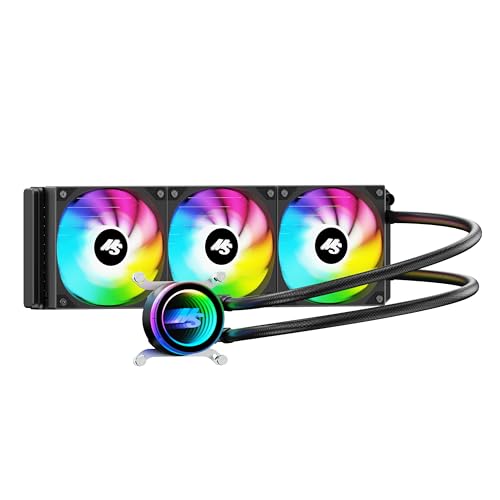
An all-in-one (AIO) liquid cooler pairs a pump block on the CPU with a radiator that dissipates heat into the case or out of it. Radiator sizes are named by the fan mounting they support. A 2 fan AIO usually has a 240mm radiator (two 120mm fans) or a 280mm radiator (two 140mm fans). A 3 fan AIO usually has a 360mm radiator (three 120mm fans), and some makers sell 420mm models with three 140mm fans. This article treats “2 fan” as 240 or 280mm and “3 fan” as 360 or 420mm.
Examples of current product families include Arctic’s Liquid Freezer series, Corsair iCUE Link and H-series units, NZXT Kraken models, Lian Li Galahad and DeepCool LT and LS series coolers, each offered in several radiator sizes.
Comparison Table
| Factor | 2 fan (240 or 280mm) | 3 fan (360 or 420mm) |
|---|---|---|
| Radiator surface area | Smaller | Larger, more heat dissipation capacity |
| Cooling for high-power CPUs | Adequate for many gaming CPUs, can run warmer under heavy all-core loads | More headroom for demanding chips and long sustained loads |
| Noise at a given load | Fans may spin faster to match temperatures | Can hold the same temperature at lower fan speed |
| Case compatibility | Fits a wide range of mid-tower cases | Needs a case with 360mm radiator support at the front, top or side |
| Memory and motherboard clearance | Easier, shorter radiator | Longer radiator can interfere with top-mounted memory or VRM heatsinks |
| Weight and mounting | Lighter | Heavier, needs a solid mount |
| Appearance | Compact look | Larger, more premium look, more fan lighting |
| Typical cost tier | Lower | Higher |
How Cooling Performance Actually Scales
Radiator surface area is the main factor limiting an AIO’s ability to dissipate heat. A 360mm radiator has roughly 50 percent more fin area than a 240mm radiator, which means it can hold the coolant at a lower temperature for a given heat load, or hold the same temperature at lower fan speeds. Reviewers who compare sizes report improvements that grow with CPU wattage. At modest power levels, differences between sizes are small. At sustained high wattage, such as heavy rendering on a high-core-count processor, the larger radiator pulls ahead more clearly.
The improvement is not linear. Fan quality, radiator thickness, pump design, cold plate design and thermal paste or paste application all influence results. A well-designed 240mm unit can outperform a poorly designed 360mm unit. Read reviews for the specific models you are comparing rather than assuming size alone settles the question.
Gaming vs Other Workloads
Games rarely load the CPU as heavily as rendering or compiling does. Gaming CPUs such as the Ryzen 7 9800X3D draw relatively modest power in games, and reviewers commonly describe them as easy to cool. Intel Core Ultra 200S processors have different power behavior, with some models able to draw more under heavy loads. For a gaming-focused build with a mid-power CPU, a quality 240mm AIO is often sufficient. For workstation-style use on chips with high power limits, a 360mm radiator makes more sense.
Check your CPU’s maker-listed power figures and the cooler maker’s compatibility and rated capacity information. Cooler makers sometimes list supported sockets and, for some products, a cooling capacity figure; treat those as marketing guidance and compare them with independent reviews.
Who Should Pick Which
Mainstream gaming builds
A 240mm or 280mm AIO suits most gaming builds with mainstream CPUs. It is easier to fit, lighter, and generally less expensive. It also leaves room for good airflow from case fans.
High-power CPUs and heavy creative work
If you render, encode or compile for long periods, or you use a CPU with a high sustained power limit, a 360mm or larger AIO gives extra thermal headroom. It can also help the system stay quieter under load.
Quiet builds
Larger radiators can run fans at lower speeds for the same temperature, which can help noise. Pump noise is a separate factor; some pumps are audible regardless of radiator size.
Budget-minded builders
Consider budget tiers rather than prices. A well-reviewed 240mm AIO or a quality air cooler often delivers excellent value. If the budget allows only a mediocre 360mm unit or a good 240mm unit, the good 240mm is often the better choice. A premium dual-tower air cooler can also match many 240mm AIOs while avoiding pump and leak concerns.
Small cases
Many compact cases do not support a 360mm radiator at all. Check your case maker’s specification list for supported radiator sizes and for clearance with the motherboard and memory.
Common Myths
- More fans always means much cooler. Only if the radiator and design are better. The fans only help if the radiator can use the airflow.
- A 360mm AIO is required for any modern CPU. Many gaming CPUs run well with a 240mm unit or a good air cooler.
- AIOs always outperform air coolers. Large air coolers compete well with smaller AIOs, according to many reviewers.
- Bigger is always quieter. Pump and fan design matter. A bigger radiator gives you the option to run fans slower.
- Fan lighting means better cooling. Lighting is cosmetic.
Fit Checklist Before You Buy
- Confirm your case supports the radiator size in the mounting position you want (front, top or side). Case makers list this in the specifications.
- Check clearance between a top-mounted radiator and your memory modules and motherboard heatsinks.
- Confirm the cooler supports your CPU socket (for example AM5 or LGA 1851) and that the mounting kit is included.
- Confirm the fan connectors and any proprietary cabling system match your motherboard and software plans.
- Consider tubing length, which determines whether a radiator can reach your preferred mounting location.
- Plan airflow direction so that the radiator does not heat up your GPU or vice versa.
Practical Recommendation
Start with your CPU and your case. For a gaming CPU with moderate power draw in a case with front or top radiator support, a quality 240mm or 280mm AIO is a sensible target. Step up to 360mm if you use a high-power CPU, if you want the lowest noise at load, or if your case has room and you value the extra thermal margin. Read at least a couple of independent reviews for the exact model, since the quality of the pump, fans and cold plate matters more than fan count alone.
Frequently Asked Questions
Is a 360mm AIO always better than a 240mm AIO?
It has more radiator area and usually more cooling headroom. However, quality differences between models can outweigh the size difference. Compare reviews for the specific coolers you are considering.
Is a 240mm AIO enough for a Ryzen 7 9800X3D?
Reviewers commonly describe this processor as relatively easy to cool for gaming, and many report that a quality 240mm AIO or a good air cooler handles it well. Check the cooler maker’s socket compatibility for AM5.
Will a 360mm AIO fit my case?
Only if the case maker lists 360mm radiator support at your chosen location. Also check clearance with memory and the motherboard. The case manual and specification page are the reliable sources.
Are 3 fan AIOs quieter?
They can be, since a larger radiator can hold temperature at lower fan speeds. Pump noise and fan quality also affect how quiet the cooler is.
Is an air cooler a better choice than a 2 fan AIO?
For many builds a large air cooler performs comparably and has fewer failure points, because it has no pump. AIOs tend to have the advantage in appearance and in clearing space around the socket.
Do I need to replace the AIO fans?
Generally no. Stock fans are suited to the radiator. Replacing them is an option if you want lower noise or different lighting, and you should follow the cooler maker’s guidance.


