The best E Ink tablets in 2026 are the reMarkable Paper Pro for a premium paper-like writing experience, the Kindle Scribe for reading and annotating books, the BOOX Note Air4 C for flexible PDF and Android workflows, and the Supernote A5 X2 for focused long-form handwriting.
As an Amazon Associate we earn from qualifying purchases at no extra cost to you.



Our Top Picks
 Musnap Ocean 64GB+4GB 7”eBook Reader Supports Handwriting7 inches6.2 x 5.46 x 0.27 InchesCheck on Amazon


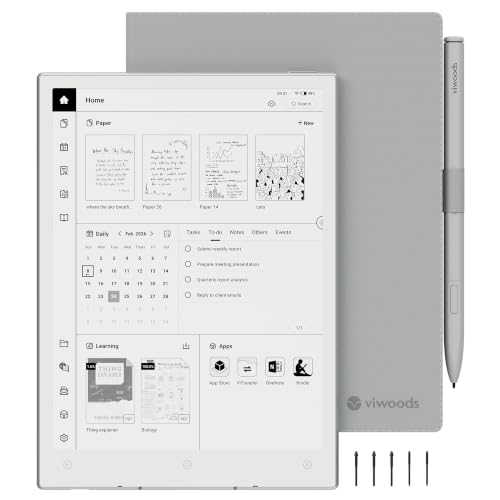
Top 3 picks at a glance
Best E Ink tablets at a glance
| Tablet | Best for | Screen | Front light | Approximate battery claim | Typical market range |
|---|---|---|---|---|---|
| reMarkable Paper Pro | Distraction-free writing with color diagrams | 11.8-inch color E Ink, 2160 × 1620 | Adjustable warm-to-cool reading light | Up to about two weeks, depending on use | Usually $550–$700 with pen |
| Kindle Scribe | Books, notes, and occasional PDF annotation | 10.2-inch monochrome E Ink, 300 ppi | Adjustable brightness and warmth | Weeks rather than days for light reading | Usually $300–$500, depending on storage and pen |
| BOOX Note Air4 C | Multitasking, Android apps, and color PDFs | 10.3-inch color E Ink, 2480 × 1860 | Adjustable front light with warm and cool controls | Often several days to multiple weeks, depending on apps | Usually $450–$600 |
| Supernote A5 X2 | Long-form notes and organized handwriting | Approximately 10.7-inch monochrome E Ink | No built-in front light | Typically measured in weeks with moderate use | Usually $400–$600 before optional accessories |
| Kobo Elipsa 2E | Library reading and handwritten annotations | 10.3-inch monochrome E Ink, 227 ppi | Adjustable brightness and color temperature | Several weeks for reading-focused use | Usually $350–$450 with stylus |
Battery figures are usage-dependent rather than directly comparable. A device used for reading at low brightness can last far longer than the same device running a note app, Wi-Fi synchronization, Bluetooth audio, or Android applications.
1. reMarkable Paper Pro: best for focused writing
The reMarkable Paper Pro is the strongest choice when handwriting quality and concentration matter more than app variety. Its large 11.8-inch display gives documents comfortable margins and makes handwritten diagrams easier to manage than on a compact reader. Color support is useful for highlighting, charts, and visual planning, although color E Ink is muted compared with an LCD tablet.
Writing latency is low enough to feel immediate for ordinary handwriting, especially with the marker’s pressure sensitivity and the tablet’s writing-focused software. The important advantage is consistency: there are no social apps, notifications, or browser tabs competing for attention. That makes it particularly suitable for meetings, university notes, journaling, and planning.
PDF handling is good for reading, marking up, and organizing documents, but it is not a full desktop document editor. Large PDFs with complex layouts can still feel slower to navigate than on an LCD tablet. File sharing works through the reMarkable cloud service, desktop and mobile applications, and supported integrations; check the subscription requirements if you need advanced cloud features.
Choose it if
- You want the least distracting writing environment.
- You regularly work with large pages, diagrams, or split-screen-style layouts.
- You value a front light but do not need Android apps.
2. Kindle Scribe: best for reading and simple annotation
The Kindle Scribe is the easiest recommendation for someone whose priority is reading books first and writing second. Its 10.2-inch, 300-pixel-per-inch monochrome display produces sharp text, while the adjustable warm light is useful for evening reading. Battery life is excellent when the Scribe is used mainly as an e-reader.
The pen experience is responsive for notes, highlights, and quick sketches. However, its notebook and PDF workflow is less flexible than the dedicated writing systems from reMarkable and Supernote. PDF files may require conversion, resizing, or careful page navigation, and handwritten annotations remain tied to the document workflow rather than behaving like a full desktop PDF editor.
File sharing is convenient for Kindle documents and supported cloud workflows, but it is not the best choice for people moving large folders of PDFs between multiple devices. It is also a relatively closed platform: the lack of general-purpose apps is a limitation for some users, but a benefit if distraction-free reading is the goal.
Choose it if
- You already read heavily in the Kindle ecosystem.
- You want sharp monochrome text, a good front light, and long battery life.
- Your writing needs are annotations and short notes rather than a full digital notebook.
3. BOOX Note Air4 C: best for flexible PDF workflows
The BOOX Note Air4 C is the most capable option here for users who need one E Ink device to handle PDFs, note-taking, web research, and selected Android apps. Its 10.3-inch color display is helpful for academic papers, technical diagrams, highlighted textbooks, and documents where color carries meaning.
BOOX devices offer several refresh modes. A high-quality mode gives cleaner text and fewer artifacts, while faster modes improve scrolling and app responsiveness at the cost of ghosting or reduced image quality. For handwriting, use the balanced or high-quality mode; for scrolling through a long PDF, switch temporarily to a faster mode.
The flexibility creates trade-offs. Android apps can increase battery consumption, introduce notifications, and make the device feel less paper-like. Writing latency is generally responsive, but the experience depends on the app: the native notes application is usually a better fit for handwriting than a third-party Android app designed for an LCD screen.
PDF handling is the BOOX’s main advantage. Reflow, cropping, zoom controls, split-screen use, cloud services, and multiple transfer methods make it more adaptable than closed e-readers. Still, very complex PDFs may need a conventional computer for editing, OCR correction, or precise layout work.
4. Supernote A5 X2: best for organized, distraction-free notes
The Supernote A5 X2 is aimed at people who treat an E Ink tablet as a notebook rather than a general-purpose computer. Its software emphasizes linking notes, headings, keywords, and navigation between documents. That structure is valuable for researchers, writers, project managers, and anyone who wants to retrieve information months later.
Its monochrome display is comfortable for text and handwriting, and the writing feel is designed to resemble a smooth pen on paper rather than a hard stylus on glass. The major compromise is the lack of a built-in front light. If you write or read in bed, on an airplane, or in dim rooms, you will need an external light.
PDF support is practical for reading and annotation, but the A5 X2 is less suitable than BOOX for app-based workflows. Its distraction-free design is intentional: fewer apps mean fewer ways to turn a notebook into a slow, expensive web browser.
5. Kobo Elipsa 2E: best for library reading with handwriting
The Kobo Elipsa 2E combines a large monochrome reading screen with adjustable front-light color temperature and stylus support. It is a sensible option for readers who use Kobo’s ecosystem and want to annotate books, workbooks, and documents without moving to a full Android tablet.
Its 10.3-inch screen is large enough for many PDFs, although technical documents with two-column layouts can still require zooming. Writing is suitable for notes and markups, but users who want advanced notebook organization, very low-latency sketching, or broad file-management control may prefer reMarkable or Supernote.
Head-to-head buying guide
| Your situation | Best match | Why | Main compromise |
|---|---|---|---|
| Handwrite daily and want zero notifications | reMarkable Paper Pro | Focused software, large display, front light, responsive pen input | Fewer apps and a higher total cost |
| Read books most of the time | Kindle Scribe | Sharp text, mature reading ecosystem, strong light and battery life | Less flexible PDF and notebook management |
| Use color PDFs or Android apps | BOOX Note Air4 C | Color display, flexible transfers, multiple refresh modes, app support | More distractions and shorter runtime under heavy app use |
| Build a searchable, linked notebook | Supernote A5 X2 | Strong organization and focused note software | No integrated front light |
| Read Kobo books and annotate them | Kobo Elipsa 2E | Large display, warm front light, integrated reading and notes | Less capable for complex PDFs and third-party workflows |
How to compare writing latency in real use
Do not judge latency by processor speed alone. A pen stroke passes through the stylus sensor, handwriting software, display refresh mode, and the E Ink panel. The best test is to write fast loops, small letters, diagonal lines, and long underlines. Look for the gap between the pen tip and the visible stroke, then check whether the line breaks or trails when you write quickly.
For a fair comparison, use the same type of note, turn off unnecessary wireless features, and test the native notes application before testing a PDF or Android app. Color E Ink and fast refresh modes can show more ghosting, while high-quality modes usually produce cleaner text but slower scrolling.
Battery life: a useful way to estimate it
Published battery claims are difficult to compare because reading and writing use different amounts of power. A simple estimate is:
Runtime in hours ≈ battery capacity in watt-hours ÷ average power draw.
For example, a tablet with a 4,000 mAh battery at a nominal 3.8 volts stores about 15.2 watt-hours:
4 Ah × 3.8 V = 15.2 Wh.
If light reading averages 0.25 watts, the theoretical runtime is about 61 hours. If an Android app, front light, Wi-Fi, and frequent page refreshes raise average consumption to 0.8 watts, the estimate falls to about 19 hours. Real runtime is lower because of standby losses, battery-management limits, and uneven workloads. This is why a closed reading device can last weeks while an app-capable color model may need charging several times in the same period.
What size E Ink tablet should you buy?
- 7–8 inches: easiest to carry, but cramped for full-page PDFs and handwriting.
- 10–10.3 inches: the best compromise for books, notes, and most documents.
- 11.8 inches and above: better for technical PDFs, music sheets, diagrams, and wide handwriting, but heavier and less pocketable.
For academic papers, manuals, and letter-sized documents, a 10.3-inch model is usable but may require cropping or zooming. If you annotate every paragraph, the larger reMarkable Paper Pro is more comfortable. If you mostly read novels and add occasional notes, the Kindle Scribe is easier to justify.
Final verdict
Choose the reMarkable Paper Pro for the best overall distraction-free writing experience, the Kindle Scribe for reading-first use, the BOOX Note Air4 C for powerful PDF and Android flexibility, the Supernote A5 X2 for structured long-term notes, and the Kobo Elipsa 2E for Kobo reading with handwritten annotation. The right choice depends less on the highest specification than on whether you value front-light comfort, document freedom, battery endurance, or protection from distractions.









