Flying a simulator punishes a graphics card in a way that shooters and racing games do not. You are rendering a whole planet’s worth of terrain, clouds, airports, and weather, often at the same time as a cockpit full of detailed gauges, and every one of those textures has to live in video memory. Frame-rate dips on final approach are more than annoying; they make flaring a landing feel like guesswork. This guide is for desktop pilots shopping for a card to run a modern flight simulator at 1080p or 1440p, whether on a monitor, ultrawide, or VR headset.
Seven cards are compared here, from newer 16GB boards to a renewed flagship and a few older entry-level models that appear in the same search. Based on the listed specs, the sections below rank them by video memory, memory type, and generation, because those are the numbers that determine whether scenery loads smoothly. Some of these cards are poor matches for a demanding simulator in 2026, and the mini-reviews say so plainly so you do not buy by habit.
Our Top Picks
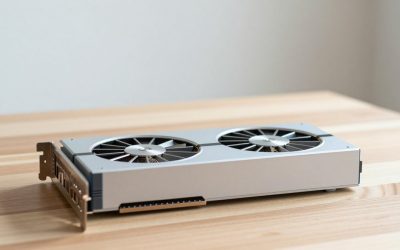
 ASUS Dual GeForce RTX 5060 Ti 16GB GDDR7RTX5060Ti|OC|16GB9 x 4.7 x 2 inches1.4 PoundsCheck on Amazon
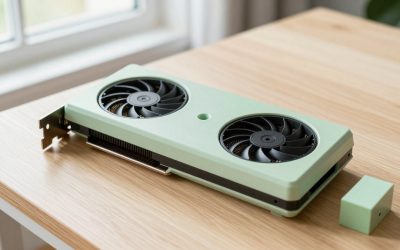
 ASUS Dual Radeon RX 9060 XT 16GB GDDR6RX9060XT|16GB|Black8 x 4.7 x 1.9 inches1.3 PoundsCheck on Amazon

Top 3 picks at a glance
Quick Picks
As an Amazon Associate we earn from qualifying purchases at no extra cost to you.




| Product | Best for | Key spec from the title |
|---|---|---|
| ASUS Dual RTX 5060 Ti 16GB | Modern simulators with room to grow | 16GB GDDR7, PCIe 5.0, DisplayPort 2.1b |
| ASUS Dual RX 9060 XT 16GB | Memory-hungry scenery at a mid-range tier | 16GB GDDR6, PCIe 5.0, DisplayPort 2.1a |
| PowerColor Red Dragon RX 6800 XT | High-resolution flying without newest-gen needs | 16GB GDDR6, RDNA 2, PCIe 4.0 |
| NVIDIA RTX 3090 Founders Edition (Renewed) | Flagship-class power from the previous generation | RTX 3090 Founders Edition, renewed |
| XFX Radeon RX 570 RS XXX | Older sims on a tight budget | 8GB GDDR5, VR Ready, dual BIOS |
| ASUS GTX 1050 Ti Phoenix | Legacy sims at low settings | 4GB, DP 1.4, 3-year warranty |
| EVGA GTX 1050 SSC | Basic flying on very old PCs | 2GB GDDR5, ACX 3.0, DX12 |
How to Choose
A flight simulator stresses your PC differently than a typical game. These four points keep your money pointed at what matters in the cockpit.
Video memory decides scenery quality
Large satellite-style scenery, high-resolution aircraft textures, and weather layers fill memory quickly. Treat 8GB as the lowest sensible target for current simulators, 12GB as comfortable, and 16GB as the right choice for 1440p, ultrawide, or VR. Cards with 2GB or 4GB, such as the two GTX 1050 models here, can run older simulators but will force very low texture settings in newer ones, causing stutter when you fly into dense cities.
Memory type and architecture generation
GDDR7 and GDDR6, listed on the newer ASUS cards and the PowerColor, move data faster than the GDDR5 on older boards. Newer generations also add upscaling and frame-generation features that can lift frame rates in supported titles. Ignore marketing about ray tracing unless your simulator supports it, and note that those effects cost frame rate, which is precious in the air.
Processor balance and monitor plan
Simulators lean heavily on the processor as well. A fast graphics card paired with a weak CPU leaves frame rates capped, so budget for both. Match the card to your screen: 1080p flying is forgiving, while 1440p, ultrawide, and VR raise memory and speed demands sharply. Check your monitor’s connectors against the card’s DisplayPort and HDMI versions. Many pilots also add a second screen for maps, charts, or instrument panels, so count the outputs and confirm that the card can drive every display you plan to connect without adapters that add lag or cost.
Power, size, and warranty
Modern cards like the ASUS 2.5-slot designs need a roomy case and a capable power supply, so measure and check connectors first. Older cards draw less power but may lack current driver features. The ASUS GTX 1050 Ti lists a three-year warranty, a helpful safety net. Renewed items, like the RTX 3090, can offer big performance but come with less certain history, so check return terms carefully.
The 7 Best Options
ASUS Dual RTX 5060 Ti 16GB
This is the most current-feeling option here. The title lists an NVIDIA GeForce RTX 5060 Ti with 16GB of GDDR7, an OC Edition, PCIe 5.0, HDMI 2.1b, DisplayPort 2.1b, a 2.5-slot design, axial-tech fans, and 0dB technology.
- Strength: 16GB of GDDR7 is well matched to texture-heavy scenery and VR.
- Strength: 0dB technology keeps fans silent during pre-flight planning and idle.
- Trade-off: the 2.5-slot cooler needs a case with real clearance.
Skip it if your power supply or case is old and cramped, or if you only fly older simulators that never touch this much memory. It suits pilots who want a long-lasting card for a modern simulator and who plan to move to an ultrawide monitor or headset down the road.
ASUS Dual RX 9060 XT 16GB
The Radeon equivalent offers 16GB of GDDR6, PCIe 5.0, HDMI 2.1b, DisplayPort 2.1a, a 2.5-slot design, axial-tech fans, and 0dB technology.
- Strength: 16GB of memory gives the same scenery headroom as the GeForce version.
- Strength: modern display outputs support high-resolution monitors.
- Trade-off: GDDR6 is the older memory type next to the RTX card’s GDDR7.
Skip it if your simulator or VR headset favors NVIDIA features, which is worth checking in community forums and the software’s own support notes. It suits flyers who put memory capacity first and want a mid-range card with a modern connector set for a high-resolution display.
PowerColor Red Dragon RX 6800 XT
The previous-generation Radeon RX 6800 XT lists 16GB of GDDR6, AMD RDNA 2 architecture, ray tracing support, PCI Express 4.0, and HDMI output on a Red Dragon cooler.
- Strength: 16GB of memory at the high end of the previous generation.
- Strength: PCIe 4.0 fits many existing boards without issue.
- Trade-off: it lacks the newest-generation features of the 2.5-slot ASUS cards.
Skip it if you want the latest upscaling features or the smallest possible power draw. It suits buyers who want high memory and strong raw power at 1440p, particularly those building around an existing PCIe 4.0 motherboard and a processor that will not hold the card back.
NVIDIA RTX 3090 Founders Edition (Renewed)
This is a renewed GeForce RTX 3090 Founders Edition. The title gives no further specification, so memory size and ports are not stated in the listing text.
- Strength: a flagship-class chip from the previous generation can handle demanding resolutions.
- Strength: Founders Edition build quality is a known reference design.
- Trade-off: renewed means prior use, and the title carries no warranty detail.
Skip it if a clear warranty and low power draw matter to you, because a flagship from that generation asks a lot of the power supply and the case. It suits flyers who accept refurbished hardware for top-tier performance, provided the return terms are solid and the seller states the condition grade.
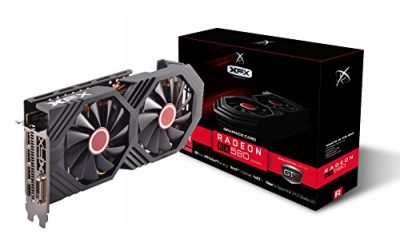
XFX Radeon RX 570 RS XXX Edition
XFX lists a Radeon RX 570 at 1286MHz with 8GB of GDDR5, DirectX 12, VR Ready branding, dual BIOS, and outputs of three DisplayPort, one HDMI, and one DVI.
- Strength: 8GB of memory is the sensible minimum for texture-heavy scenery.
- Strength: multiple outputs suit multi-monitor cockpit setups.
- Trade-off: an older GDDR5 card will need reduced settings in current simulators.
Skip it if you plan to fly in VR at high detail or want current upscaling features. It suits budget builders running older simulators or lower settings, especially anyone who wants a few extra monitor outputs for instrument panels or a map on a second screen.
ASUS GTX 1050 Ti Phoenix
The Phoenix Fan Edition offers a GTX 1050 Ti with 4GB of memory, DVI-D, HDMI, DisplayPort 1.4, and a three-year warranty.
- Strength: a compact, easy-to-fit card with a three-year warranty.
- Strength: DisplayPort 1.4 is a useful output for the era.
- Trade-off: 4GB is limiting for modern scenery and VR.
Skip it if you want current simulators at decent settings, since scenery textures will exceed 4GB quickly. It suits legacy titles and low-detail flying on an older desktop, where the warranty and simple installation make it a low-risk way to extend the life of the machine.
EVGA GTX 1050 SSC
EVGA’s GTX 1050 SSC Gaming lists 2GB of GDDR5, ACX 3.0 cooling, DirectX 12, and on-screen display support.
- Strength: ACX 3.0 cooling is a respected design for quiet running.
- Strength: it is easy on power supplies and small cases.
- Trade-off: 2GB is far too little for modern flight simulator textures.
Skip it for any current simulator, and consider a card with more memory even if you plan to fly at low detail. It only suits very old titles, basic displays, or a secondary PC that will never run a modern flight title. Treat it as the floor of this list rather than a serious recommendation for pilots.
Which One Fits Your Situation
You fly a modern simulator at 1440p or in VR
The ASUS Dual RTX 5060 Ti 16GB is the best-matched card here, with GDDR7 and plenty of memory. The ASUS Dual RX 9060 XT 16GB is a strong alternative.
You want maximum memory from the previous generation
The PowerColor Red Dragon RX 6800 XT gives you 16GB and RDNA 2 performance, which suits a PCIe 4.0 system.
You are on a tight budget and fly older sims
The XFX Radeon RX 570 with 8GB of memory is the most capable low-cost option. Lower scenery and cloud settings.
You already own a legacy PC and just want to fly
The ASUS GTX 1050 Ti Phoenix is the safer of the two GTX 1050 cards, thanks to 4GB and a warranty, but expect low settings.
Common Mistakes
- Buying a 2GB or 4GB card for a modern simulator and then blaming the sim for stutter.
- Pairing a strong graphics card with an old processor that caps frame rates.
- Forgetting power supply connectors and case clearance for a 2.5-slot card.
- Choosing renewed hardware without reading return and warranty terms.
- Maxing out ray tracing and losing smoothness that matters during landings.
Related guides
- Gaming Laptop Battery Draining While Plugged In Fix
- How To Stop Laptop Thermal Throttling In Software
- Gaming Laptop For High School Students
Frequently Asked Questions
How much video memory do I need for a flight simulator?
Eight gigabytes is the lowest sensible target, with 12GB to 16GB better for 1440p and VR. Lower amounts force very low texture settings.
Does the processor matter as much as the card?
Often yes. Simulators are demanding on the CPU, so a weak processor can hold back even a strong graphics card.
Is a renewed graphics card a good idea?
It can be, if the seller offers clear return and warranty terms. Check the condition policy, since renewed hardware carries more uncertainty. Ask how long the return window lasts, and test the card thoroughly during that window with a long flight at full load so any heat or stability issue shows up early.
Will these cards work for VR flying?
The 16GB cards are the best fit for VR. The older models have far less headroom and will need low settings. VR also doubles the rendering work, so memory and raw speed matter even more than they do on a flat monitor, and any headset buyer should lean toward the largest memory figure they can afford.