PUBG is a game of long sight lines, foliage, and the occasional frantic fight inside a house, and each of those puts a different strain on a graphics card. Wide open maps reward steady frame rates at distance, where spotting a player a few hundred meters away depends on both resolution and smooth motion. That makes the card you pick more important than the headline number on the box. For many players in 2026, the question is not which flagship to buy but which affordable older card still gives a smooth, playable result at 1080p.
This guide is for builders and upgraders working with an older desktop or a modest budget: someone adding a card to a family PC, a student building a first rig from parts, or a player whose current card finally stopped keeping up. Every product below is an entry-level or midrange card from the GTX 1050 Ti, RX 560, RX 570, RX 580 or GTX 1060 families. The reviews rely strictly on what each title says, so check the notes on power connectors, memory size and listing wording before you buy.
Our Top Picks
Top 3 picks at a glance
Quick Picks
As an Amazon Associate we earn from qualifying purchases at no extra cost to you.


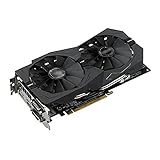


| Product | Best for | Key spec from the title |
|---|---|---|
| Rsmmpqa GTX 1060 5GB | Nvidia fans on a tight budget | GTX 1060 5GB, DVI, PCI-E |
| Rsmmpqa RX 550 4GB | Light esports play | Radeon RX 550, 4GB, VGA and DVI |
| 8KLANMMQ RX 570 4GB | 1080p play on an AMD build | RX 570 4GB, HDMI, VGA, DVI, fan cooled |
| Rsmmpqa GTX 1060 6GB | More memory in a GTX 1060 | GTX 1060 6Gb, NVIDIA, desktop PC |
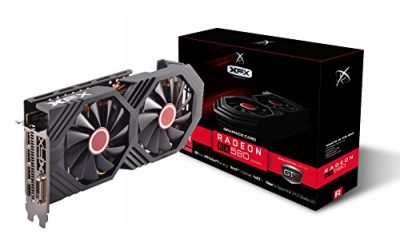
| XFX Radeon RX 580 GTS XXX | Best memory and brand support here | 1386MHz OC+, 8GB GDDR5, Dual BIOS, 3xDP |
| MSI GTX 1050 Ti 4GT OC | Small, simple Nvidia upgrade | GTX 1050 Ti, 4GB, overclocked |
| AMD RX 560 4GB | PCs with weak power supplies | 4GB GDDR5, 128-bit, no power cable |
| EVGA GTX 1050 Ti SC Gaming | Established-brand 1050 Ti | 4GB GDDR5, DX12, OSD support |
How to Choose
Pick a card family that matches your screen
For 1080p PUBG on medium settings, the entry cards in this group, such as the GTX 1050 Ti and RX 560, are the practical floor. Step up to the RX 570, RX 580 or GTX 1060 class if you want higher settings or a higher frame-rate target on a 144Hz monitor. Anything lower, such as the RX 550, is better thought of as a way to get a playable result at reduced settings rather than a comfortable one.
Video memory: 4GB is the minimum, more is safer
Four gigabytes of video memory is enough to run the game at 1080p with textures turned down a notch. Cards with 6GB or 8GB, such as the GTX 1060 6Gb or the RX 580 8GB, give more room for higher texture settings and for a future patch that grows the game. Memory bus width counts too: a 128-bit bus, as listed on the RX 560, limits bandwidth compared with wider designs.
Check the power supply and case before you click
Cards without an extra power connector, such as the one that lists “no power cable”, can run in a basic office PC with a small supply. Midrange cards usually need one or more additional PCIe power connectors and a supply that manufacturers typically size at a few hundred watts. Confirm you have the right connectors, and measure your case, because a large dual-fan card needs clearance.
Read listing wording carefully and ignore the noise
Several titles here are keyword lists, packed with other card names and phrases like “Fit for ASUS” or “not 960 580”. That wording describes search terms or comparison models, not necessarily the exact hardware inside, so a title that names two memory sizes should make you pause. Prefer listings from established makers such as XFX, MSI or EVGA, whose model numbers appear in the title, and avoid any card marketed only with performance claims.
The 8 Best Options
Rsmmpqa GTX 1060 5GB
This listing is built around a GTX 1060 5GB from a generic seller, and its title name-drops PUBG and a DVI output. It targets players who want an Nvidia card in the 1060 class without paying for a branded model. In practice, a 1060-class card is the kind of hardware buyers pick when they want 1080p PUBG on medium settings without stepping up to a recent generation, so the draw here is the tier rather than the seller.
- Strength: the GTX 1060 family is a well-known 1080p tier for competitive shooters.
- Strength: a DVI output suits older monitors without needing an adapter.
- Trade-off: the phrase “Fit for ASUS” is unclear, and the brand behind the board is not named in a standard way.
Skip it if brand support and clear model identification matter to you.
Rsmmpqa RX 550 4GB
Aimed at the lowest tier in this guide, the Radeon RX 550 with 4GB is meant for lighter games and esports titles. The title lists VGA and DVI outputs and mentions PUBG. Because the RX 550 is an entry part, this is the card to consider for a spare office PC where the goal is to launch the game at all, not to chase high frame rates in long-range fights.
- Strength: 4GB of memory is the minimum for PUBG textures at 1080p.
- Strength: VGA and DVI outputs help with older displays.
- Trade-off: the RX 550 sits at the bottom of the lineup for graphics power.
Skip it if you want smooth frame rates at medium or higher settings, or if you plan to move to a faster monitor soon.
8KLANMMQ RX 570 4GB
The RX 570 4GB is a solid midrange choice on an AMD-based build. The title lists HDMI, VGA and DVI outputs, a fan cooler and PUBG compatibility, along with card names such as 580, 560 and 550. Since the title name-checks sibling cards, treat it as a keyword-heavy listing and rely on the RX 570 and 4GB figures, which are the specifics that describe the product.
- Strength: the RX 570 class is a step above the RX 550 and RX 560 for 1080p.
- Strength: three video outputs make it easy to connect different monitors.
- Trade-off: 4GB of memory is less future-proof than the 8GB RX 580.
Skip it if you want a recognized brand name on the board and the warranty paperwork that usually comes with it.
Rsmmpqa GTX 1060 6GB
This second GTX 1060 listing advertises a 6Gb card, but the title also contains “Gtx1060 5G” and a mention of PUBG. That mixed wording is the main thing to understand. A buyer who wants 6GB for higher texture settings should read the description closely, because the memory figure is the whole reason to prefer this listing over the 5GB one.
- Strength: 6GB of memory would give more texture headroom than the 5GB version.
- Strength: Nvidia drivers and GTX 1060-class performance suit 1080p competitive play.
- Trade-off: the title lists both 5G and 6Gb, so confirm the real memory size before purchase.
Skip it if you cannot verify what hardware is inside; ask the seller for the exact model and memory configuration first.
XFX Radeon RX 580 GTS XXX
The XFX is the most clearly specified card here. Its title lists a 1386MHz OC+ clock, 8GB of GDDR5, VR readiness, Dual BIOS, and three DisplayPort outputs plus HDMI and DVI. For PUBG that extra memory pays off at higher texture settings, and the multiple outputs mean it can drive a monitor and a television or a second display without adapters.
- Strength: 8GB of GDDR5 is the most video memory in the group.
- Strength: Dual BIOS and a named brand add confidence and flexibility.
- Trade-off: a midrange card of this class typically needs additional power connectors and a capable supply.
Skip it if your power supply is small or your case is cramped, because a card with this much cooling and memory is not the compact option.
MSI GTX 1050 Ti 4GT OC
A short title from a major brand, this card is an overclocked GTX 1050 Ti with 4GB. It is a simple, widely recognized upgrade for older PCs. The appeal is simplicity: a known maker, a familiar GTX 1050 Ti chip and a factory overclock make it a low-drama upgrade for a PC that currently relies on integrated graphics.
- Strength: a known brand and a clear model name make it easy to research.
- Strength: the OC edition suggests a factory clock bump over standard versions.
- Trade-off: the title lists very little, so you must look up outputs and power needs separately.
Skip it if you want a more powerful card for high settings, since this tier is aimed at playable 1080p rather than maximum detail.
AMD RX 560 4GB
This RX 560 with 4GB of GDDR5 and a 128-bit bus claims to outperform a GT 1030 by 75 percent and an RX 550 by 40 percent. Those are seller comparisons, but the key listed feature is that it needs no power cable. That makes it relevant for a prebuilt tower where the supply has no spare connector, a situation that rules out many midrange cards and is surprisingly common in office desktops.
- Strength: no extra power cable means it works with a basic power supply.
- Strength: DisplayPort, HDMI and DVI outputs cover most monitors.
- Trade-off: the performance claims come from the seller, not independent measurement.
Skip it if you have a strong power supply and want to use it for more performance.
EVGA GTX 1050 Ti SC Gaming
The EVGA SC Gaming is a factory-overclocked GTX 1050 Ti with 4GB of GDDR5, DX12 support and on-screen display support. The SC in the name signals a factory overclock, and the title also mentions DX12 and OSD support. In plain terms, that means a recognized brand, a modern graphics API and the ability to watch clock speed and temperature figures on screen while playing. For a player who wants to see how a card behaves during a long match, that monitoring option is a genuinely useful extra, and it comes from a maker whose support pages and drivers are easy to find.
- Strength: a known brand with a clear model description.
- Strength: on-screen display support lets you watch clocks and temperatures while playing.
- Trade-off: 4GB of memory limits higher texture settings.
Skip it if you want headroom for a higher-resolution monitor.
Which One Fits Your Situation
You have a small office-style PC with a weak power supply
The AMD RX 560 4GB is the obvious candidate because its title says it needs no power cable. Pair it with realistic settings and expect lower detail.
You want the strongest option for 1080p high settings
Go with the XFX Radeon RX 580 GTS XXX. It has 8GB of GDDR5 and a named brand, and its Dual BIOS gives a spare in case a flash goes wrong.
You prefer Nvidia and want a recognized brand
The MSI GTX 1050 Ti 4GT OC and the EVGA GTX 1050 Ti SC Gaming both fit. The EVGA adds on-screen display support, while the MSI is a minimal listing.
You want a stronger card on a tight budget
The 8KLANMMQ RX 570 4GB and the Rsmmpqa GTX 1060 listings sit higher in performance class, but verify the hardware and seller details before ordering.
Common Mistakes
- Ignoring the power supply: a midrange card needs extra connectors and enough wattage.
- Trusting keyword-stuffed titles: lists of other card names are not proof of what is inside.
- Choosing too little memory: 4GB is the floor, not a comfortable target.
- Forgetting case clearance: dual-fan cards can be longer than they look.
- Pairing a strong card with a weak CPU or one memory stick: the processor and dual-channel RAM limit PUBG frame rates too.
Related guides
- Gaming Laptop Battery Draining While Plugged In Fix
- Graphics Cards For Low Wattage Power Supplies
- How To Stop Laptop Thermal Throttling In Software
Frequently Asked Questions
What is the minimum graphics card for PUBG?
A 4GB card in the GTX 1050 Ti or RX 560 class can run it at 1080p on reduced settings. For a smoother experience at higher settings, step up to an RX 570, RX 580 or GTX 1060.
Does PUBG need 8GB of video memory?
No. Four to six gigabytes handles 1080p well. The extra memory on an 8GB card helps with higher textures and gives some future room.
Are generic listings with many card names safe?
They carry more uncertainty because the title lists several models. Look for clear model numbers and established brands, and confirm the memory size before ordering.
Will an old power supply run these cards?
Cards that list no power cable can run on a basic supply. Others need one or more additional connectors, so check your supply before buying.