A PCIe riser cable is the flexible link that lets a graphics card sit away from the motherboard slot, most often turned upright in a vertical mount so the cooler faces the side panel. Because the cable carries the full x16 signal, its generation, shielding and length matter as much as the mount itself: a cable rated below your platform can hold the link at a lower speed, and an over-long ribbon is harder to route cleanly.
This guide covers standalone riser cables only, with no brackets, holders or mounting kits among the picks. The five cables below span PCIe 5.0 and PCIe 4.0, right-angle and dual-90 connector layouts, and lengths from 130 mm to 200 mm, so you can match one to a current Gen5 platform, an established Gen4 build or a compact case with a short run between slot and card.
As an Amazon Associate, we earn from qualifying purchases.
Top 3 picks at a glance
Quick answer
For most vertical GPU builds, pick a shielded PCIe x16 riser that matches or exceeds your platform generation and measures close to your route: the LINKUP AVA5 right-angle 20 cm for PCIe 5.0 systems, the Cooler Master 200 mm V2 for PCIe 4.0, and the Thermaltake dual-90 130 mm for short, tight runs.
Top picks
1. LINKUP AVA5 PCIe 5.0 Riser Cable, Right Angle, 20 cm

The AVA5 is LINKUP’s Gen5 flagship ribbon and the natural default for a build on a PCIe 5.0 motherboard with a current-generation graphics card. LINKUP rates it for the full PCIe 5.0 x16 link and builds it with tuned impedance and multilayer shielding to keep crosstalk and interference down along the run, which is where lesser ribbons give up signal quality first. The right-angle connector suits the classic vertical mount layout, where the cable leaves the slot and turns toward a card parked parallel to the motherboard tray.
At 20 cm of usable length, 24 cm total, it fits the spacing of most vertical brackets and case mounts without leaving much slack to fold away. It also runs a PCIe 4.0 platform at that platform’s own speed, so it can carry over through a motherboard upgrade. Builders who want one cable to outlast a platform change will find this the premium pick of the group.
Specs
– Interface: PCIe 5.0 x16
– Maker-rated bandwidth: 128 GB/s
– Usable length: 20 cm (24 cm total)
– Connector style: Right angle
– Shielding: Multilayer, with tuned impedance
– Model: AVA5
– Backward compatibility: PCIe 4.0
2. Cooler Master MasterAccessory Riser Cable PCIe 4.0 x16, 200 mm V2

Cooler Master’s V2 riser is the Gen4 workhorse here. It is a 200 mm PCIe 4.0 x16 cable with a 90-degree connector, EMI shielding and 30 AWG conductors wrapped in TPE cable sleeves, and Cooler Master adds a protective ABS casing at the GPU end, a detail most ribbons skip. That casing stiffens the section that takes the most handling during installation and helps the connector hold its shape over repeated reseats.
The 200 mm length matches the route in most mid-tower vertical mounts, and the cable remains backward compatible with older PCIe generations, so it also serves a Gen3 board while a wider upgrade is planned. As a mid-range pick from a case maker that sells its own vertical mounts, it is the straightforward recommendation for the many PCIe 4.0 systems in service today: shielded, sleeved and long enough for a standard tower without paying for Gen5 headroom the platform cannot use.
Specs
– Interface: PCIe 4.0 x16
– Length: 200 mm
– Connector style: 90-degree
– Conductors: 30 AWG
– Shielding: EMI shielded
– Sleeving: TPE cable sleeves
– End casing: Protective ABS at the GPU connector
– Model: MCA-U002R-KPCI40-200
3. EZDIY-FAB PCIe 5.0 X16 Riser Cable, Right Angle, 20 cm, White
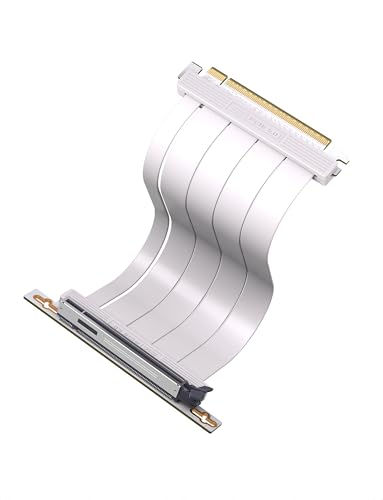
White builds are poorly served by riser cables, which usually ship in black, so this EZDIY-FAB ribbon earns its place on specification as well as colour. It is a PCIe 5.0 x16 cable rated by the maker at 128 GB/s, with a right-angle connector and a 20 cm length that suits standard vertical mounts in mid-towers. The listing names compatibility with RTX 50 and 40 series and RX 9000 and 7000 series cards, and the cable is backward compatible with PCIe 4.0 and 3.0 platforms.
For a white-themed Gen5 build, it removes the need to hide a black ribbon behind the card or accept a Gen4 cable in a Gen5 system. It sits in the mid-range tier of this group, below the LINKUP flagship in shielding detail on paper, but it matches the AVA5 on generation, length and connector angle while adding the colour option.
Specs
– Interface: PCIe 5.0 x16
– Maker-rated bandwidth: 128 GB/s
– Length: 20 cm
– Connector style: Right angle
– Colour: White
– Backward compatibility: PCIe 4.0 and 3.0
– Named card families: RTX 50 and 40 series, RX 9000 and 7000 series
4. NZXT PCIe 4.0 x16 Riser Cable, 200 mm (AB-RC200-B1)

NZXT sells this 200 mm PCIe 4.0 x16 ribbon as a standalone cable, separate from its mounting hardware, and it is aimed at owners of cases with a vertical slot arrangement who need the cable alone. NZXT describes it as flexible and shielded, built for high-speed performance at the full Gen4 x16 link, and the 200 mm span covers the usual distance between a motherboard slot and a vertically mounted card in an ATX tower.
It is a mid-range Gen4 option for builders whose mounting solution is already settled, including NZXT case owners who want the matching cable from the same maker. Like the Cooler Master above, it will not give a Gen5 platform its full link speed, so it belongs in PCIe 4.0 builds; within that scope it is a clean, single-purpose part with no kit components bundled in.
Specs
– Interface: PCIe 4.0 x16
– Length: 200 mm
– Construction: Flexible, shielded ribbon
– Model: AB-RC200-B1
– Intended use: Vertical GPU installation
– Sold as: Cable only
5. Thermaltake PCI-E 4.0 Dual 90 Degree Riser Cable, 130 mm (AC-071-CO1OTN-C1)
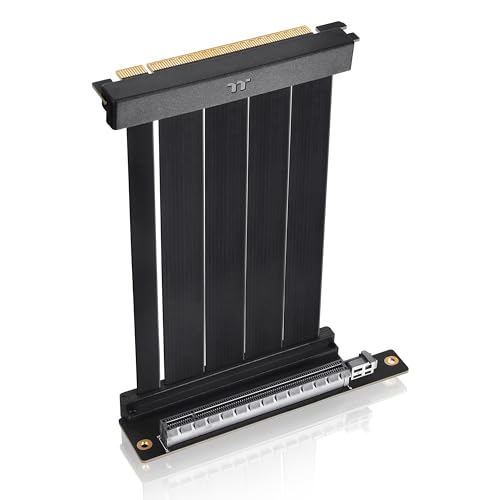
Not every vertical or relocated layout needs 200 mm of ribbon. Thermaltake’s dual-90 cable is 130 mm long with a 90-degree connector at both ends, a layout that fits short, folded routes in compact cases and open-frame builds where a longer cable would have to double back on itself. Shorter runs also leave less ribbon exposed to interference, and Thermaltake shields this one with an aluminium foil Mylar layer inside a build of thermoplastic elastomer, PCB, polypropylene and tinned copper wire.
The cable is thin at 1.3 mm and light at 0.1 kg, which helps in tight sandwich-style cases. It is the budget pick of the group and the only one under 200 mm, so treat it as the compact-route specialist: measure first, because 130 mm leaves no slack if your slot-to-card path runs longer than expected.
Specs
– Interface: PCIe 4.0 x16
– Length: 130 mm
– Connector style: Dual 90-degree (both ends)
– Cable thickness: 1.3 mm
– Materials: Thermoplastic elastomer, PCB, polypropylene, tinned copper wire, aluminium foil Mylar
– Shielding: EMI shielding
– Weight: 0.1 kg
– Model: AC-071-CO1OTN-C1
How to choose
Match the generation first. A riser rated below your motherboard and GPU generation caps the link at the lower speed, so PCIe 5.0 platforms should use a Gen5 cable such as the LINKUP AVA5 or the EZDIY-FAB, while Gen4 platforms are fully served by any cable here. A higher-rated cable on a lower-rated platform simply runs at the platform speed, which makes a Gen5 cable the safer buy if an upgrade is coming.
Measure the route second. Run a piece of string or a tape along the path the ribbon will take, including the bend at each end, and pick the closest length at or above that figure. Excess ribbon has to fold somewhere, and sharp folds are where cables get damaged; the 130 mm Thermaltake exists for routes where 200 mm would be mostly surplus.
Check the connector angle third. Right-angle and 90-degree ends suit vertical mounts where the card sits parallel to the tray; a dual-90 cable folds at both ends for compact layouts. Finally, remember that every pick here is a cable only: your case or a separate mount must still provide the bracket that physically holds the card, and heavy cards should be supported by that hardware rather than by the ribbon.
Who should skip
Skip a riser cable entirely if your case has no vertical mounting position and no room for an add-on mount, since the cable alone cannot hold a card. Skip Gen4 cables if you are building on a PCIe 5.0 platform and want the full link speed from day one. Skip the short Thermaltake if your measured route is anywhere near its 130 mm limit. And if your case already bundles a riser with its vertical kit, a second cable adds nothing unless the bundled one is a generation behind your platform.
FAQ
Does a PCIe 5.0 riser cable work with a PCIe 4.0 motherboard and GPU?
Yes. PCIe generations are backward compatible, so a Gen5 cable on a Gen4 platform runs the link at Gen4 speed. The LINKUP AVA5 and EZDIY-FAB Gen5 cables both list PCIe 4.0 backward compatibility, which makes them usable now and ready for a later platform upgrade.
How long should a riser cable be for a vertical mount?
Most vertical mounts in ATX towers are spaced for a 200 mm cable, which is why three of the five picks use that length. Compact and sandwich-style cases can need far less, down to the 130 mm of the Thermaltake dual-90. Measure your own route before ordering, because cases differ.
Can a riser cable reduce GPU performance?
A shielded cable that matches your platform generation carries the full x16 link, so frame rates stay in line with a direct slot connection. Problems come from mismatched generations, damaged folds or unshielded ribbons on long runs, which is why this guide sticks to shielded cables from established makers.
Do I still need a vertical mount bracket with a riser cable?
Yes. A riser cable is only the electrical link between the slot and the card. The card still needs physical support from a vertical bracket built into the case or from a separate mounting kit, and none of the cables in this guide includes that hardware.
Final verdict
For a PCIe 5.0 build, the LINKUP AVA5 right-angle 20 cm is the cable to buy first, with the white EZDIY-FAB Gen5 ribbon as the pick for colour-matched builds. PCIe 4.0 owners are well covered by the Cooler Master V2 and the NZXT AB-RC200-B1 at 200 mm, and compact layouts with a short, folded route should go straight to the Thermaltake dual-90 130 mm. Buy the generation that matches your platform, measure the route, and let the mount, not the ribbon, carry the card.
Related guides
More from Amazon
Programs that pair well with the guide above. Offers and eligibility are set by Amazon and may change.
Free shipping on eligible items, Prime Video and more. Eligible new members can start with a free trial.
Start a Prime free trialAd-free music streaming. Eligible new subscribers can start with a free trial.
Try Music Unlimited freeA Prime membership for ages 18-24 with a trial period. Eligibility is set by Amazon.
See Prime for Young AdultsAudiobooks and podcasts to listen to on the go. Eligible new members can start with a free trial.
Try Audible freeAs an Amazon Associate we earn from qualifying purchases.