The best rugged tablets in 2026 are the Panasonic Toughbook G2 for full Windows field work, the Samsung Galaxy Tab Active5 for a lighter Android device, the Getac ZX10 for outdoor Android use, and the Dell Latitude 7030 Rugged Extreme for buyers who need maximum drop protection and replaceable components.
Choosing between them is less about the highest processor specification and more about the environment: a warehouse, construction site, emergency vehicle, utility pole, or remote inspection job can demand very different combinations of drop resistance, sealing, screen brightness, battery access, and serviceability.
As an Amazon Associate we earn from qualifying purchases at no extra cost to you.
![AGM PAD P2 Active Rugged Android 14 Tablet with Case, Waterproof & Drop-Proof, Widevine L1 & GMS Certified, 11" 90Hz FHD 480 NITS Display, MTK G99, 8000 mAh, 16(8+8) + 256GB[TF 2TB], GPS, Compass, OTG](https://m.media-amazon.com/images/I/411JDlJ3WrL._SL160_.jpg)



Our Top Picks
 AGM PAD P2 Active Rugged Android 14 Tablet11.00-inch10.19 x 6.69 x 0.31 inches3.1 poundsCheck on Amazon
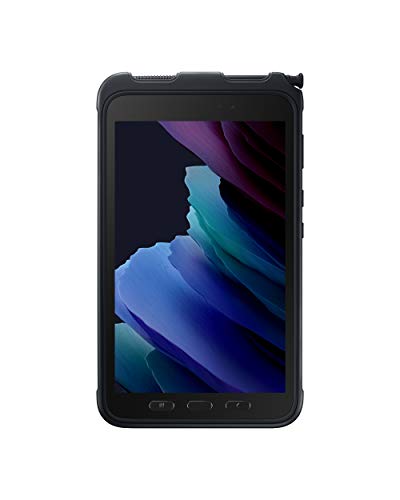 Samsung Galaxy Tab Active3 Enterprise Edition 8” Rugged64 GB8.42 x 4.99 x 0.39 inches0.9 PoundsCheck on Amazon


Top 3 picks at a glance
Best rugged tablets at a glance
| Tablet | Operating system | Protection and drop rating | Water and dust resistance | Display and outdoor use | Battery approach | Best for |
|---|---|---|---|---|---|---|
| Panasonic Toughbook G2 | Windows 11 Pro | MIL-STD-810H; designed for rugged field use, with configuration-dependent testing | Typically IP65 or higher depending on configuration | 10.1-inch high-brightness display; glove and stylus support | Removable battery; optional extended-capacity batteries | Windows software, diagnostics, and vehicle work |
| Dell Latitude 7030 Rugged Extreme Tablet | Windows 11 Pro | Ruggedized chassis with MIL-STD testing; verify the exact drop specification | IP65-class protection | 10.1-inch outdoor-readable display with touch and stylus support | Hot-swappable dual-battery design on supported configurations | Emergency services and continuous mobile work |
| Getac ZX10 | Android | MIL-STD-810H; drop performance depends on test method and configuration | IP66 | 10.1-inch display with an outdoor-readable option | Removable battery options | Construction, utilities, and Android field apps |
| Samsung Galaxy Tab Active5 | Android | MIL-STD-810H; rated for drops up to roughly 1.5 m with the specified protective setup | IP68 | 8-inch display; glove mode and S Pen support | Removable battery and battery-free mode | Portable warehouse, delivery, and service work |
| Durabook R11 | Windows 11 Pro | MIL-STD-810H; verify the selected model’s drop documentation | IP66 | 11.6-inch high-brightness display; glove-capable touch | Replaceable battery options | Larger-screen Windows applications |
Manufacturers often publish several configurations under one product family. Check the exact model’s manual before treating a quoted drop height, IP rating, display brightness, or battery capacity as universal.
Head-to-head: which rugged tablet should you buy?
Panasonic Toughbook G2: best Windows rugged tablet
The Toughbook G2 is the strongest all-round choice when a field worker must run Windows-only software, legacy serial tools, desktop browser applications, or specialized inspection programs. Its modular design can include ports and expansion options that ordinary consumer tablets do not provide, while its removable battery is more practical than an internal battery for long shifts.
Its advantages are repairability, accessory integration, and compatibility rather than slimness. Expect a heavier and more expensive device than an Android tablet; general market pricing is often around $1,500–$3,000 or more depending on processor, storage, modules, and condition. For a fleet, specify the ports, barcode reader, GPS, keyboard, and battery at purchase rather than assuming every G2 has them.
Dell Latitude 7030 Rugged Extreme: best for demanding fleet operations
The Dell Latitude 7030 Rugged Extreme Tablet is a compelling option for public safety, transportation, and industrial fleets that need Windows management tools and service support. The dual-battery approach is particularly useful: one battery can be replaced while the other keeps the tablet running, provided the selected configuration and operating mode support hot swapping.
Choose it when downtime costs more than weight. It is overkill for casual inventory scanning, but its rugged enclosure, docking ecosystem, and field-service orientation make more sense in vehicles and dispatch operations than a consumer tablet inside a thick case.
Samsung Galaxy Tab Active5: best compact rugged tablet
The Galaxy Tab Active5 is the practical choice for workers who value low weight, familiar Android software, cellular connectivity, and a removable battery. Its IP68 protection is stronger on paper than many Windows rugged tablets, and the glove mode is useful for delivery drivers, warehouse staff, and technicians wearing work gloves.
The 8-inch screen is easier to carry and operate one-handed, but it gives spreadsheets, maps, and remote-desktop sessions less room. It is also not a substitute for a full Windows tablet when the job depends on desktop-only software. Its battery-free mode can help in vehicles or fixed mounts, where the tablet is powered continuously and battery heat or charging wear is undesirable.
Getac ZX10: best Android option for outdoor work
The Getac ZX10 offers a larger 10.1-inch Android workspace than the Tab Active5 and is better suited to maps, forms, photographs, and two-handed field use. Its rugged construction, IP66 sealing, glove-capable operation, and removable-battery options target construction and utility work.
Before buying, compare the display option rather than only the screen size. A nominally rugged tablet can still be frustrating in direct sun if its brightness, anti-reflective treatment, and viewing angle are inadequate. A sun-readable configuration is worth prioritizing over a small processor upgrade.
Durabook R11: best for a larger Windows display
The Durabook R11 makes sense when a 10.1-inch screen feels cramped but a conventional laptop is inconvenient. Its 11.6-inch display gives more usable area for CAD viewers, forms, remote support, and equipment manuals. As with the Toughbook and Dell, confirm the exact port layout, battery, brightness, and drop documentation because business configurations vary.
What the ratings actually mean
Drop protection
A MIL-STD-810H claim does not automatically mean every tablet survives every drop from every angle. The test method may involve transit vibration, shock, temperature, humidity, or a defined drop procedure, and manufacturers may publish the result for a particular configuration or accessory setup. Look for a stated drop height, number of drops, surface, operating state, and whether the protective case was fitted.
If the tablet will be dropped onto concrete, prioritize a purpose-built rugged chassis and a manufacturer-approved hand strap or corner protection. A consumer tablet with a rugged case may be adequate for low-risk warehouse use, but the case, screen protector, ports, and camera can become separate failure points.
Water and dust resistance
IP ratings use two digits. The first covers solids and dust; the second covers water. IP68 generally indicates strong dust protection and immersion resistance under stated conditions, while IP65 indicates dust protection and resistance to water jets rather than guaranteed immersion. Neither rating means the tablet should be operated underwater, charged while wet, or exposed to saltwater without additional care.
Inspect port covers after every shift. A damaged or poorly seated cover can defeat the enclosure’s rating, and dried mud around a USB or docking connector can prevent a proper seal.
Glove-friendly controls
“Glove mode” is not a universal standard. Test the actual gloves used on the job: thin nitrile, insulated winter gloves, and thick leather gloves behave differently. Physical buttons, a programmable shortcut key, a responsive stylus, and a hand strap can improve productivity more than a faster CPU.
Sunlight readability
For outdoor work, compare brightness, anti-glare treatment, optical bonding, and automatic-brightness behavior. A high-brightness display with an aggressive glossy reflection can be less usable than a slightly dimmer matte screen. If workers frequently read maps or forms outside, select the sunlight-readable display option and budget for the resulting battery consumption.
Battery planning: calculate the shift before buying
Battery capacity alone is not runtime. Use watt-hours and a realistic average power draw:
Estimated runtime = battery watt-hours × 0.85 ÷ average tablet power draw.
The 0.85 factor allows for conversion losses, battery reserve, aging, and charging overhead. For example, a 40 Wh removable battery powering a tablet that averages 8 W gives approximately 40 × 0.85 ÷ 8 = 4.25 hours. If screen brightness, cellular data, GPS, camera use, and a barcode scanner raise the average to 12 W, the same battery provides only about 2.8 hours.
For an eight-hour shift at a 10 W average load, plan for roughly 94 Wh of installed capacity using the same allowance: 8 × 10 ÷ 0.85 = 94 Wh. That may mean two removable batteries, a hot-swap system, or vehicle power rather than one oversized internal battery.
Decision matrix for common jobs
| Your situation | Prioritize | Best-fit choice | Why |
|---|---|---|---|
| Windows-only inspection or engineering software | Windows compatibility, ports, replaceable battery | Panasonic Toughbook G2 or Durabook R11 | Better suited to desktop applications and serviceable field configurations |
| All-day vehicle or emergency-response use | Hot swap, docking, cellular connectivity, sunlight readability | Dell Latitude 7030 Rugged Extreme | Designed around mobile fleet workflows and continuous operation |
| Warehouse scanning and delivery work | Low weight, glove mode, removable battery, IP68 | Samsung Galaxy Tab Active5 | Compact, easy to carry, and practical for Android applications |
| Outdoor maps, forms, and utility inspections | 10-inch screen, high brightness, GPS, sealed enclosure | Getac ZX10 | Provides more workspace while retaining Android simplicity |
Repairability and total ownership cost
Look for a removable battery, replaceable screen assembly, accessible storage, documented service procedures, and available port covers. A tablet that costs $2,000 but receives a battery and screen replacement after several years can be cheaper than repeatedly replacing sealed consumer devices.
Ask the supplier four questions before ordering: Are batteries and port covers stocked separately? Can the screen be replaced without replacing the entire mainboard? Is storage user-replaceable or encrypted and soldered? How long will firmware and security updates continue? These answers matter more to a fleet than a modest difference in processor speed.
For most buyers, choose the Samsung Galaxy Tab Active5 when Android and portability come first, the Getac ZX10 when a larger outdoor Android workspace is needed, and the Panasonic Toughbook G2 or Dell Latitude 7030 when Windows compatibility, docking, and repairability justify the higher price.









