Our Top Picks
Top 3 picks at a glance

Best Smart Garage Door Controllers for Alexa and Google
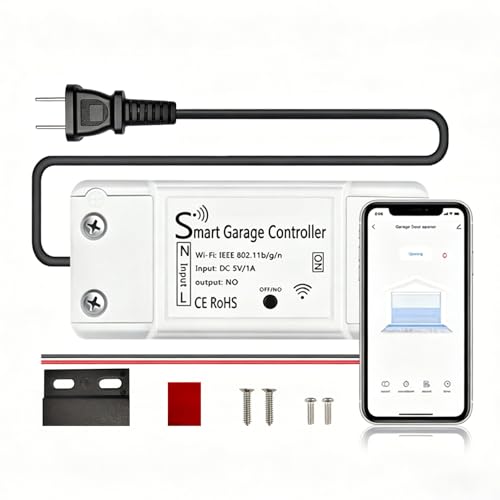
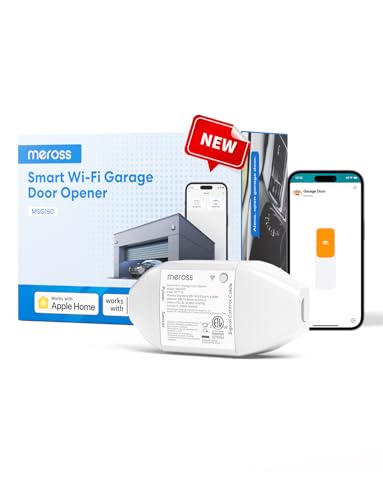
The best smart garage door controllers compatible with Alexa and Google Home are the Meross MSG100, Tailwind iQ3, Genie Aladdin Connect, and ismartgate Lite or Pro, but the right choice depends on your opener’s wiring, safety-sensor setup, garage-door type, and whether you need voice control to open the door or only close it.
Quick comparison
| Controller | Opener compatibility | Extra hardware | Alexa and Google Home | Best fit |
|---|---|---|---|---|
| Meross MSG100 | Most common sectional openers with compatible terminals | Door-position sensor; Wi-Fi bridge included | Alexa and Google Assistant voice control; confirmation and routines depend on platform settings | Low-cost retrofit for one door |
| Tailwind iQ3 | Many sectional openers; some multi-button and vehicle integrations | Door sensor; controller and wired opener connection | Alexa and Google Home support, plus presence-based automation on supported setups | Automatic opening and closing based on arrival or departure |
| Genie Aladdin Connect | Compatible Genie and many other openers, depending on model and wiring | Door-position sensor; Aladdin Connect controller | Alexa and Google Assistant integration on supported accounts and regions | Owners who want a manufacturer-supported ecosystem |
| ismartgate Lite | Broad compatibility with many wired openers | Wired controller and sensor; one-door model | Alexa and Google Home support | One garage door with detailed compatibility checking |
| ismartgate Pro | Many wired openers, including multi-door installations | Controller, sensors, and wiring; additional sensors for extra doors | Alexa and Google Home support | Two- or three-door garages and more advanced integrations |
Market prices commonly range from about $30–$80 for a single-door Wi-Fi retrofit, $80–$150 for a more automation-focused controller, and $100–$250 or more for multi-door or professionally oriented systems. Prices vary by bundle and region, so treat those as planning ranges rather than fixed prices.
As an Amazon Associate we earn from qualifying purchases at no extra cost to you.

How to verify compatibility before buying
1. Identify the opener type
Most smart controllers are designed for an electric sectional or roll-up garage-door opener with a wall-button input. Look at the opener motor and find the terminals used by the wired wall control. Take a photo of the terminal labels before disconnecting anything.
A controller is more likely to work when the opener uses a simple dry-contact or low-voltage wall-button circuit. Compatibility is less predictable with proprietary systems that use encrypted, digitally supervised wall consoles. Chamberlain, LiftMaster, and Craftsman openers with Security+ systems are common examples where a universal controller may require a model-specific adapter, or may not be supported at all.
Do not assume that a controller works merely because the opener has a pair of screw terminals. Check the controller manufacturer’s compatibility list for the exact opener model. A “universal” label usually describes the range of supported wiring, not every opener ever made.
2. Check whether the door sensor is included
A smart relay can tell the opener to move, but it cannot safely report whether the door is open unless a position sensor is installed. Most complete kits include a tilt sensor or wired magnetic sensor.
- Tilt sensors: Fast to install and suitable for a conventional overhead door. They normally use a coin-cell battery.
- Magnetic or wired sensors: More resistant to battery exhaustion and useful for installations where the controller needs a fixed open/closed signal.
- Multiple doors: One controller may need one sensor per door. Confirm the kit’s maximum door count rather than assuming one hub handles everything.
Place a tilt sensor on a rigid upper section of the door, not on a flexible panel or a moving bracket. After installation, open the door fully, close it fully, and verify that the app reports both states correctly. Voice automation should not be enabled until this test succeeds.
3. Confirm Wi-Fi coverage at the motor
Most retrofit controllers use 2.4 GHz Wi-Fi because it travels farther through walls than 5 GHz. A controller does not need much bandwidth: even a small always-on device typically uses well under 1 MB of data per day for status and commands. Signal reliability matters much more than internet speed.
As a practical check, stand beside the opener with a phone connected to the home network. If the phone frequently drops Wi-Fi or shows a very weak signal, move a mesh node closer or install the controller closer to the access point. A smart garage controller may fail even when streaming video elsewhere in the house works perfectly.
Head-to-head: which controller fits your situation?
| Your situation | Recommended direction | Why | What to verify |
|---|---|---|---|
| One compatible opener and the lowest hardware cost | Meross MSG100 | Compact retrofit design with a sensor and Wi-Fi connection in the kit | Exact opener model, 2.4 GHz Wi-Fi, and required app permissions |
| You want the door to react to your arrival | Tailwind iQ3 | Designed around presence and vehicle-based automation in addition to remote control | Phone location permissions, vehicle detection method, and safe automation rules |
| You own a Genie opener or want a Genie-branded solution | Genie Aladdin Connect | Manufacturer ecosystem can simplify opener-specific support | Whether your opener needs an adapter or a particular wall-console connection |
| You need broad wired-opener compatibility | ismartgate Lite | Useful where a conventional wired control circuit is available | Door count, sensor type, terminal wiring, and regional voice-assistant support |
| You have two or three garage doors | ismartgate Pro or a suitable multi-door kit | Designed for installations with multiple sensors and opener connections | Per-door expansion cost and whether each door appears separately in Alexa and Google Home |
| Your opener uses proprietary digital controls | Brand-specific accessory or listed adapter | A generic dry-contact controller may not communicate correctly | Compatibility list, adapter requirement, and whether remote commands are supported |
Alexa and Google Home features that matter
Both Alexa and Google Home can expose a compatible garage controller as a smart-home device, but the available actions are not always identical. Common functions include checking whether the door is open, closing it by voice, and including it in routines.
Opening is more restricted than closing. Alexa commonly requires a voice PIN before an automation can open a garage door, and Google Home may apply its own confirmation or security limitations. This is intentional: an accidental “open the garage” command creates a physical-security problem. Check the controller’s current integration instructions before buying if voice opening is essential.
For daily use, a safer routine is often “close the garage” at bedtime or when everyone leaves. Set the routine to run only when the sensor reports the door is open, and avoid a routine that repeatedly sends a close command without checking status.
Device naming also matters. Use a distinct name such as “main garage door” rather than “garage,” especially when you have lights, cameras, or multiple doors in the same room. After linking the service, ask the assistant to report the door status before creating routines.
Installation checks that prevent most failures
- Photograph the existing wiring. This gives you a reference if the opener terminals are difficult to identify.
- Disconnect opener power before wiring. The wall-button circuit is low voltage, but accidental shorts can still damage the controller or opener board.
- Connect the controller in parallel with the wall button. Do not remove the wall control unless the instructions for your exact opener require it; retaining it preserves normal manual operation.
- Pair the sensor before mounting it permanently. Confirm open and closed readings in the app first.
- Test manual operation. Press the original wall button and confirm that the app changes state correctly after the door stops.
- Test remote closing while watching the door. Smart controls are not a replacement for the opener’s photo-eye safety system or visual checks.
- Link Alexa or Google Home last. This separates wiring problems from voice-assistant account and permission problems.
What to do if it does not work
The controller is online but the door does not move
Check the two opener terminals, confirm that the controller is connected to the correct relay terminals, and verify whether the opener requires an adapter. If the original wall button still works but the smart command does not, the problem is usually wiring, an unsupported digital protocol, or a controller setting rather than Wi-Fi.
The app reports the wrong door state
Recalibrate or re-pair the sensor, then inspect its mounting position. A tilted sensor mounted on a flexible panel can report “closed” while the door is partly raised. Replace a weak coin-cell battery if the sensor intermittently disappears, but do not rely on a battery replacement to fix an incorrectly mounted sensor.
Alexa or Google Home cannot find the controller
First confirm that the controller works in its own app. Then unlink and relink the relevant skill or service, use the same account used during setup, and run device discovery again. If status appears but commands fail, review voice PIN, household-member permissions, and whether the controller’s cloud service is currently connected.
Frequently asked questions
Can I keep using the original wall button after installing a smart controller?
Yes, you should normally connect the controller in parallel with the existing wall button and keep the wall control installed. This preserves normal manual operation unless the instructions for your exact opener require its removal. After installation, press the original wall button and confirm that the app updates the door state after the door stops.
Can a smart garage controller safely open the door by voice?
Sometimes, but voice opening is more restricted than voice closing. Alexa commonly requires a voice PIN before an automation can open a garage door, while Google Home may apply its own confirmation or security limitations. Check the controller’s current integration instructions before buying if voice opening is essential, because available actions can vary by platform.
Where should I mount the door sensor?
Mount a tilt sensor on a rigid upper section of the garage door, not on a flexible panel or moving bracket. Pair the sensor before permanently mounting it, then open and close the door fully to confirm that the app reports both states correctly. A poorly positioned sensor can report the wrong state even when its battery is fine.
What happens if my garage has more than one door?
A multi-door garage may require one sensor per door and a controller that supports the required number of doors. The ismartgate Pro is described as suitable for two- or three-door garages, while additional sensors may be needed. Verify the kit’s maximum door count and whether each door appears separately in Alexa and Google Home.
Why is a strong internet connection not enough for reliable garage control?
Reliable Wi-Fi coverage at the opener matters more than internet speed. Most retrofit controllers use 2.4 GHz Wi-Fi because it travels farther through walls than 5 GHz, and the controller uses very little data for status and commands. Stand beside the opener with a phone on the home network; frequent drops or a very weak signal indicate a coverage problem.
Bottom line
Choose the Meross MSG100 for a straightforward one-door retrofit, Tailwind iQ3 for presence-based automation, Genie Aladdin Connect for a Genie-centered setup, and ismartgate Lite or Pro when wired compatibility and multi-door support are the priority. Before purchasing, verify the exact opener model, the included sensor, the required adapter or hub, 2.4 GHz Wi-Fi coverage, and the specific Alexa and Google Home actions available in your region.









