Four gigabytes of video memory is a strange place to shop. It is too small for the newest open-world games at high texture settings, yet it is a real step up from the 1GB and 2GB cards that fill the bargain bin. Anyone searching for a 4GB graphics card in 2026 is usually in one of three situations: reviving an older desktop that still has a decent processor, fitting a card into a slim office-style case, or adding extra monitor outputs without paying for a gaming-class board. This guide is built around those jobs rather than around one imaginary winner.
The catch is that the number on the box tells you very little by itself. A 4GB card with a 64-bit memory bus and DDR3 chips behaves nothing like a 4GB card with a 128-bit bus and GDDR5. The eight cards below all list 4GB, but they split into display adapters that happen to carry a lot of memory and genuine entry-level gaming cards. Based on the listed specs, the sections that follow sort them by bus width, memory type, bracket size, and video outputs so you can match the card to the machine you actually own.
Our Top Picks


Top 3 picks at a glance
Quick Picks
As an Amazon Associate we earn from qualifying purchases at no extra cost to you.



| Product | Best for | Key spec from the title |
|---|---|---|
| MSI GT 1030 4GD4 LP OC | Quiet low-profile office and light gaming builds | 4GB DDR4, 64-bit, DP and HDMI, single fan |
| ARDIYES GT 740 | Four-screen desk setups | 4GB GDDR5, 4x HDMI, PCI Express 3.0 x16 |
| MAXSUN Radeon RX 550 ITX | Small-case entry-level gaming | 4GB GDDR5, 128-bit, DirectX 12 |
| QTHREE GT 730 | Basic multi-display output on a slim PC | 4GB DDR3, 64-bit, 2x HDMI, DP, VGA |
| SOYO GT 740 | Slim desktops needing triple output | 4GB DDR3, 128-bit, HDMI/VGA/DVI-D |
| MAXSUN GTX 1050 Ti | The strongest gaming pick in the group | 4GB GDDR5, 128-bit, low profile |
| MOUGOL Radeon R7 350 | Older small-form-factor replacements | 4GB GDDR3, 128-bit, 2x HDMI |
| VisionTek Radeon RX 550 | Two-monitor DisplayPort workstations | 4GB GDDR5, 2x DisplayPort, single slot |
How to Choose
Capacity is the least informative number in a 4GB listing, so start with the specs that sit beside it. The four checks below catch most of the mistakes buyers make with this class of card.
Memory type and bus width
Look for GDDR5 on a 128-bit bus if you plan to run games at all. DDR3 and DDR4 on a 64-bit bus, as listed on several cards here, move far less data per second, which means the extra gigabytes rarely get a chance to matter. A 4GB DDR3 card is perfectly fine for spreadsheets, video playback, and extra monitors, but it should not be priced like a gaming card.
Bracket height and slot width
Slim cases need a low-profile or half-height bracket, and several titles here say so. Check whether a full-height bracket ships in the box if your case is a standard tower, since some listings mention it and others do not. Single-slot designs help in crowded boards, while dual-fan coolers can crowd the neighboring slot.
Video outputs and monitor count
Count the ports against the screens you own. Cards with four HDMI outputs or a mix of DisplayPort, HDMI, and VGA suit multi-monitor desks, but a card with only two ports will force adapters on a three-screen setup. DisplayPort is worth having if you run a high-refresh panel, because HDMI versions on budget cards are often older.
Interface lane count and power
Most of these cards list PCI Express x16, while one lists an x8 connector. Both fit a standard x16 slot, but confirm the slot on your board and make sure your power supply can cover any card that draws from the slot alone. Ignore sticker claims about ray tracing on this tier; none of these chips are built for it. Budget models cut corners on cooling, fan quality, and memory bandwidth, so judge the chip first and the memory second.
The 8 Best Options
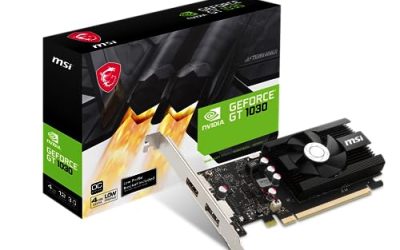
MSI GT 1030 4GD4 LP OC
This is the card for someone who wants a recognizable brand in a quiet, low-profile format. The title lists 4GB of DDR4 on a 64-bit bus, DirectX 12 support, DisplayPort and HDMI outputs, and a single fan with a factory overclock.
- Strength: the low-profile design with a single fan suits slim cases and keeps noise modest.
- Strength: DisplayPort plus HDMI covers modern monitors without adapters.
- Trade-off: the 64-bit DDR4 memory limits bandwidth, so it will not match 128-bit GDDR5 cards in games.
Skip it if gaming performance is the priority, since a GDDR5 card on a wider bus is a better use of the same budget. It suits office desktops, media rigs, and lightweight esports titles at low settings.
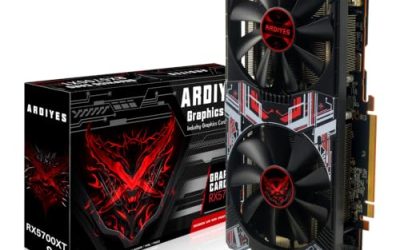
ARDIYES GT 740
The ARDIYES is built around one idea: lots of screens. The title advertises four HDMI ports for a quad-monitor arrangement, 4GB of GDDR5, a low-profile form, and a PCI Express 3.0 x16 interface with silent cooling.
- Strength: four HDMI outputs on one low-profile card is rare and handy for trading boards, dashboards, or reception displays.
- Strength: GDDR5 memory is a better foundation than the DDR3 used by neighboring GT 730 models.
- Trade-off: the GT 740 chip is old, so treat it as a display card first and a gaming card second.
Skip it if you need DisplayPort or a modern gaming feature set. Choose it when the main job is driving several monitors from a slim desktop.
MAXSUN Radeon RX 550 ITX
MAXSUN pairs the Radeon RX 550 with 4GB of GDDR5 on a 128-bit bus, which is the combination that matters most at this tier. The title also lists DirectX 12, PCI Express x16 3.0, a dual-link DVI-D connector, and HDMI, plus a compact ITX-friendly design.
- Strength: 128-bit GDDR5 gives it far more usable bandwidth than the 64-bit cards in this list.
- Strength: the compact ITX format fits mini builds that cannot take a long board.
- Trade-off: DVI-D and HDMI mean older-style connectors, so DisplayPort users may need adapters.
Skip it if you want the strongest chip available, because the GTX 1050 Ti listed below sits higher. It is a sensible step for casual gamers on small builds.
QTHREE GT 730
The QTHREE card is a connectivity-first board. Its title lists 4GB of DDR3 on a 64-bit bus, two HDMI ports, DisplayPort, and VGA, with a low-profile bracket for small-form-factor systems and an x8 connector.
- Strength: it offers four different output types, which helps when mixing a new monitor with an old VGA projector.
- Strength: the low-profile design suits SFF cases.
- Trade-off: DDR3 on a 64-bit bus is the slowest memory arrangement here, so the 4GB figure is more about headroom than speed.
Skip it if you plan to play recent games. It is a practical pick for a secondary workstation, a classroom PC, or a media player that needs several outputs.
SOYO GT 740
SOYO lists a GT 740 with 4GB of DDR3, a 128-bit bus, 384 shader processors, and triple output through HDMI, VGA, and DVI-D. The half-height bracket targets slim desktops from large manufacturers.
- Strength: the 128-bit bus is a step wider than the 64-bit DDR3 models listed nearby.
- Strength: three different outputs let you pair modern and legacy displays.
- Trade-off: DDR3 memory trails the GDDR5 cards, and the chip generation is dated.
Skip it if you want DisplayPort or any gaming ambitions beyond older titles. It fits owners of slim office towers who want a clear upgrade over integrated graphics.
MAXSUN GTX 1050 Ti
This is the one card in the group that reads like a real gaming product. The title lists a GeForce GTX 1050 Ti with 4GB of GDDR5 on a 128-bit bus, a mini slim low-profile design for small-form-factor cases, and DisplayPort output.
- Strength: the 1050 Ti chip with GDDR5 is the strongest silicon on the list for gaming.
- Strength: the low-profile format brings real gaming capability to slim cases.
- Trade-off: a compact cooler on a faster chip can mean more fan noise under load.
Skip it if you only need extra monitor ports, since you would pay for performance you will not use. Choose it for esports titles and older games in a small chassis.
MOUGOL Radeon R7 350
MOUGOL offers a Radeon R7 350 with 4GB of GDDR3, a 128-bit bus, 512 stream processors, two HDMI ports, and a half-height design for slim desktops. It targets replacements for aging small-form-factor machines.
- Strength: a 128-bit bus and two HDMI ports cover dual-monitor needs at the budget tier.
- Strength: half-height sizing fits compact cases.
- Trade-off: GDDR3 is the oldest memory type here, and the R7 350 is an older architecture.
Skip it if the RX 550 cards are available and fit your case, since they pair newer silicon with faster memory. It is a fallback for tight, older systems.
VisionTek Radeon RX 550
VisionTek lists a Radeon RX 550 with 4GB of GDDR5, two DisplayPort outputs for dual-monitor support, a low-profile single-slot form, and a full-height bracket in the box so it can move between slim and standard cases.
- Strength: two DisplayPort outputs suit dual high-refresh or high-resolution monitors.
- Strength: both bracket sizes are included, which makes it flexible across builds.
- Trade-off: with only two outputs, it does not cover a three-monitor layout without adapters.
Skip it if you need HDMI or VGA without a converter. It is a tidy choice for dual-screen productivity and light gaming.
Which One Fits Your Situation
You are upgrading a slim office desktop to play older games
The MAXSUN GTX 1050 Ti is the natural choice, because its low-profile design and 128-bit GDDR5 memory give it real gaming headroom. Confirm your power supply and case clearance first.
You need many screens, not frame rates
The ARDIYES GT 740 with four HDMI outputs is built for exactly this. If your monitors use DisplayPort, the VisionTek RX 550 handles two of them cleanly.
You want a quiet, simple, branded card
The MSI GT 1030 4GD4 LP OC fits that brief, with a single fan, low-profile format, and DisplayPort plus HDMI. Accept that its memory bus limits gaming performance.
You are on a tight budget for a mini-ITX build
The MAXSUN Radeon RX 550 ITX gives you a compact 128-bit GDDR5 card. It sits between the display-only cards and the 1050 Ti in capability.
Common Mistakes
- Treating 4GB as a performance promise when a 64-bit DDR3 card cannot use that memory effectively in games.
- Buying a full-height card for a slim case and discovering the bracket will not fit.
- Ignoring the video outputs and ending up with adapters or an unsupported monitor.
- Pairing a faster chip with a weak power supply or a case with poor airflow.
- Expecting modern ray tracing or high-resolution gaming from chips of this generation.
Related guides
- Gaming Laptop Battery Draining While Plugged In Fix
- How To Stop Laptop Thermal Throttling In Software
- Gaming Laptop For High School Students
Frequently Asked Questions
Is 4GB of video memory enough today?
It is enough for 1080p esports titles, older games, desktop work, and video playback. Newer releases at high texture settings will want more, so lower your settings expectations on any card in this class.
Does memory type matter more than capacity?
For gaming, yes. GDDR5 on a 128-bit bus moves much more data than DDR3 on a 64-bit bus, and that bandwidth shapes real performance more than the gigabyte count.
Can a low-profile card work in a normal tower?
Usually, if a full-height bracket is included or you can source one. Check the listing, since not every low-profile card ships with both bracket sizes.
Will these cards run on an older motherboard?
Cards listing PCI Express x16 generally fit any x16 slot, though older slots may have lower bandwidth. Confirm your power supply and BIOS support before you buy.