A 2560×1440 monitor asks a graphics card to draw roughly 78 percent more pixels than a Full HD one, and that is the whole reason 1440p deserves its own shopping guide. A card that glides at 1080p can feel cramped here, because textures, shadow maps, and ray-traced effects all scale with the pixel count and with video memory use. At the same time, 1440p is the sweet spot for many desktop builders: sharp enough to feel like a step up, light enough that a mid-range card can hold high refresh rates in most games without turning to 4K-class hardware.
This guide is for desktop players in 2026 who own or plan to buy a 1440p monitor and need to match a card to it. It covers eight cards from several board makers: two RTX 3060 12GB models, an Intel Arc B570, a Radeon RX 5700 XT, an RTX 5060 Ti, and three Radeon RX 9000-series cards with 16GB each. The buying section explains which numbers matter at this resolution, and the reviews help you place each card on the ladder from careful budget to confident high-refresh.
Our Top Picks
 ASUS Dual GeForce RTX 5060 Ti 16GB GDDR7RTX5060Ti|OC|16GB9 x 4.7 x 2 inches1.4 PoundsCheck on Amazon



Top 3 picks at a glance
Quick Picks
As an Amazon Associate we earn from qualifying purchases at no extra cost to you.




| Product | Best for | Key spec from the title |
|---|---|---|
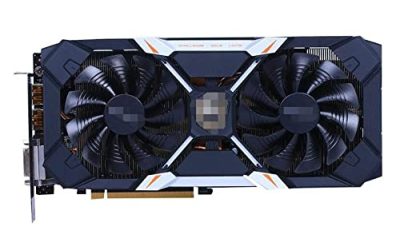
| ARDIYES RX 5700 XT 8GB | Older-generation entry to 1440p | 8GB GDDR6, 256-bit, PCIe 4.0, 3 DisplayPort and 1 HDMI |
| ASRock Radeon RX 9070 Challenger 16GB | Strong 1440p with generous memory | RDNA 4, 16GB GDDR6 256-bit, PCIe 5.0, triple fans |
| ASRock Intel Arc B570 Challenger 10GB | Lowest-cost current-generation option | 10GB GDDR6, 2600 MHz, HDMI 2.1a, DisplayPort 2.1 |
| ASUS PRIME Radeon RX 9070 XT 16GB | High-refresh 1440p with room to grow | 16GB GDDR6, PCIe 5.0, HDMI/DP 2.1, 2.5-slot |
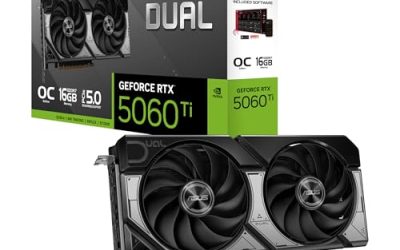
| ASUS Dual GeForce RTX 5060 Ti 16GB | NVIDIA features with large video memory | 16GB GDDR7, PCIe 5.0, HDMI 2.1b, DP 2.1b |
| MSI GeForce RTX 3060 Ventus 2X 12G OC | Budget 1440p with 12GB of memory | 12G, 15 Gbps GDDR6, 192-bit, boost 1807 MHz |
| GIGABYTE GeForce RTX 3060 Gaming OC 12G | Larger cooler on the same chip | 12GB 192-bit GDDR6, 3 WINDFORCE fans |
| ASUS Dual Radeon RX 9060 XT 16GB | Compact modern 1440p card | 16GB GDDR6, PCIe 5.0, HDMI 2.1b, DP 2.1a |
How to Choose
Video memory is the first number to read
At 1440p, 8GB is the bare minimum for current titles and starts to limit texture settings in newer ones. Ten to twelve gigabytes is comfortable for most games, and 16GB leaves headroom for high textures, ray tracing, and the next few years of releases. In this group, the RX 5700 XT lists 8GB, the Arc B570 lists 10GB, the two RTX 3060 cards list 12GB, and the RTX 5060 Ti, RX 9060 XT, RX 9070, and RX 9070 XT all list 16GB. A wide memory bus helps too, so note the 256-bit cards against the 192-bit RTX 3060 models.
Match the chip tier to your refresh rate target
If your monitor runs at 60 to 75Hz, an RTX 3060 or Arc B570 can be a reasonable fit, with settings lowered in demanding games. For 144Hz and beyond, look to the RTX 5060 Ti, RX 9060 XT, RX 9070, and RX 9070 XT as the step-up tier, with the RX 9070 XT at the top of the list. The older RX 5700 XT was pitched at 1440p in its title, but it belongs to an earlier generation and lacks newer features. Ignore overclock labels such as “OC” when comparing tiers, because they typically add only small clock changes.
Connectors, slot size, and power
PCIe 5.0 on the newer cards is backward compatible with older motherboards, so a PCIe 4.0 board will work. Display outputs matter if you plan a high-refresh monitor: look for HDMI 2.1 and DisplayPort 2.1 where listed, as on the ASRock, ASUS Dual, and PRIME cards. A 2.5-slot design, as several ASUS models list, needs room in the case and a free slot below the card. Also check the power supply and connector requirements on the full product page, since the titles do not list them.
Cooling, noise, and where budget cards cut corners
Triple-fan coolers like the Gigabyte and ASRock models tend to run quieter at the same power. Features such as 0dB modes, which stop the fans at low load, appear on the ASUS and ASRock cards and cut idle noise. Budget cards usually cut corners in cooler size, backplate quality, and memory width. A very low-cost card from an unfamiliar brand deserves extra attention to warranty terms and driver support, since the title is often the only information you get.
One last filter is the rest of your system. A fast card pairs best with a recent processor and at least 16GB of system memory, and a monitor with adaptive sync (FreeSync or G-Sync) keeps frame pacing smooth when frame rates dip below the refresh rate. If you are upgrading an older desktop, check that the power supply has the right connectors and enough capacity before you pick a card with a large cooler, because the titles here do not list those requirements.
The 8 Best Options
ARDIYES RX 5700 XT 8GB
The older-generation option. The title shows a Radeon RX 5700 XT with 8GB of GDDR6, a 256-bit bus, PCIe 4.0, three DisplayPort outputs and one HDMI, dual fans, and a 1440p label. It suits a builder who wants an entry into 1440p and understands that newer features will be missing.
- Strength: a 256-bit bus and 8GB of GDDR6 at a modest tier.
- Strength: three DisplayPort outputs plus HDMI for multi-monitor desks.
- Trade-off: it lacks the newer-generation features and 16GB capacity of the other AMD cards.
Skip it if you want the strongest long-term option or an established board brand.
ASRock Radeon RX 9070 Challenger 16GB
A high-end pick that stays sensible. The title lists RDNA 4 architecture, a 2520 MHz boost clock, 16GB of GDDR6 on a 256-bit bus, PCIe 5.0, three fans, a 0dB silent mode, and an LED indicator. It suits players who want high refresh rates at 1440p and some room for the next few years.
- Strength: 16GB of memory on a 256-bit bus.
- Strength: a triple-fan cooler with 0dB operation at low load.
- Trade-off: it sits in a higher tier than the RTX 3060 cards, and the physical size needs checking.
Skip it if you play at 1080p or have a small case.
ASRock Intel Arc B570 Challenger 10GB
The low-cost current-generation card. It lists 10GB of GDDR6, a 2600 MHz GPU clock, 19 Gbps memory, dual fans, a metal backplate, HDMI 2.1a, DisplayPort 2.1, and 0dB mode. Its 10GB of memory offers more room than 8GB cards for 1440p textures.
- Strength: 10GB of GDDR6 and modern display outputs at a low tier.
- Strength: a metal backplate and a 0dB fan mode.
- Trade-off: it is a first-generation platform for many players, so driver maturity in older games deserves a look.
Skip it if you want higher refresh rates in demanding games.
ASUS PRIME Radeon RX 9070 XT 16GB
The top of this group. The title lists 16GB of GDDR6, PCIe 5.0, HDMI and DisplayPort 2.1, a 2.5-slot design, Axial-tech fans, and dual-ball fan bearings. It is the choice for 1440p at high refresh rates, and for those who might step up to a higher resolution later.
- Strength: the highest AMD tier in the group with 16GB of memory.
- Strength: Axial-tech fans and dual-ball bearings for cooling and durability.
- Trade-off: it is the premium tier of the group, and the 2.5-slot design needs case space.
Skip it if your monitor is 60Hz or your budget is limited.
ASUS Dual GeForce RTX 5060 Ti 16GB
The NVIDIA pick. It lists 16GB of GDDR7, PCIe 5.0, HDMI 2.1b, DisplayPort 2.1b, a 2.5-slot design, Axial-tech fans, and 0dB technology. Buyers who want NVIDIA features, such as ray tracing and AI upscaling, get a large memory pool without moving to a flagship.
- Strength: 16GB of GDDR7 on a mid-tier card.
- Strength: modern outputs and a 0dB fan mode.
- Trade-off: the memory bus width is not shown in the title.
Skip it if you favor AMD or want the highest raw speed in the group.
MSI GeForce RTX 3060 Ventus 2X 12G OC
A budget option with generous memory. The title shows 12G of GDDR6 at 15 Gbps, a 1807 MHz boost clock, a 192-bit bus, HDMI and DisplayPort, PCIe 4, a Torx twin-fan cooler, and Ampere architecture. The memory pool is large for its tier, which helps with 1440p textures.
- Strength: 12GB of GDDR6 is helpful at 1440p.
- Strength: a twin-fan design fits smaller cases.
- Trade-off: it is an older Ampere design on a 192-bit bus.
Skip it if you want ray tracing at high settings or high refresh rates.
GIGABYTE GeForce RTX 3060 Gaming OC 12G
The same chip as the MSI card with a bigger cooler. The title lists 12GB of 192-bit GDDR6, three WINDFORCE fans, and the REV2.0 revision tag. It makes sense for builders who want a cooler, quieter running card at the same performance tier.
- Strength: three fans for cooling headroom.
- Strength: 12GB of GDDR6 for 1440p textures.
- Trade-off: it is the same older Ampere platform.
Skip it if you have a compact case or want the newest features.
ASUS Dual Radeon RX 9060 XT 16GB
A compact modern card. The listing shows 16GB of GDDR6, PCIe 5.0, HDMI 2.1b, DisplayPort 2.1a, a 2.5-slot design, Axial-tech fans, and 0dB technology. It is a good fit for 1440p players who want current features and a large memory pool in a mid-range tier.
- Strength: 16GB of GDDR6 and modern display outputs.
- Strength: Axial-tech fans with a 0dB mode.
- Trade-off: it sits below the RX 9070 and RX 9070 XT for raw speed.
Skip it if you want the top tier for 144Hz and beyond.
Which One Fits Your Situation
You want 1440p at a tight budget
The MSI and Gigabyte RTX 3060 12GB cards and the ASRock Arc B570 are the lowest tiers. Choose the Gigabyte for the larger cooler, the MSI for a smaller twin-fan card, and the Arc for a newer platform.
You want 144Hz in modern games
Look at the ASRock RX 9070 or the ASUS PRIME RX 9070 XT. Both carry 16GB of memory and sit at the top of the group.
You prefer NVIDIA features
The ASUS Dual RTX 5060 Ti 16GB is the current-generation option, with 16GB of GDDR7 and DisplayPort 2.1b. The RTX 3060 cards cover an older, lower tier.
You have a small or quiet build
The ASRock Arc B570 and the MSI RTX 3060 use dual-fan coolers, and the ASUS Dual cards offer 0dB modes. Measure your case clearance before choosing a 2.5-slot design.
Common Mistakes
- Buying an 8GB card for a 1440p monitor and then lowering textures within a year.
- Assuming an OC label means a large jump in speed.
- Ignoring the case clearance needed for 2.5-slot and triple-fan cards.
- Skipping the power supply and connector check, since titles rarely list them.
- Pairing a very fast card with a 60Hz monitor and never using its capability.
Related guides
- Gaming Laptop Battery Draining While Plugged In Fix
- Graphics Cards For Low Wattage Power Supplies
- How To Stop Laptop Thermal Throttling In Software
Frequently Asked Questions
How much video memory do I need for 1440p?
Eight gigabytes is the minimum, 10 to 12GB is comfortable, and 16GB gives the most headroom for textures and ray tracing in newer games.
Is an RTX 3060 still enough for 1440p?
It can be, especially with 12GB of memory, if you accept medium settings or lower refresh rates in demanding titles. Newer cards offer more headroom.
Do I need PCIe 5.0 for these cards?
No. PCIe 5.0 cards work in PCIe 4.0 slots, and the difference for most games is small.
Should I worry about a lesser-known brand?
Take extra care with warranty, return terms, and driver support. Cards from established board partners come with clearer support paths than unfamiliar labels.