Searching for the best computer bag sounds simple until you notice how many different jobs the phrase covers. A messenger bag, a structured briefcase, a fashion-forward tote, and a bare protective sleeve all get sold under the same label, and each one answers a different question. Do you need to carry only a laptop, or a laptop plus a day’s worth of paperwork? Will the bag live inside a larger backpack, or be the only thing on your shoulder? The right answer depends on the commute, the dress code, and how much weight you can comfortably tolerate.
This roundup is built for office workers, teachers, consultants, and travelers who want a dedicated bag rather than a backpack. The six picks span a slim briefcase, a three-in-one carry system, two styles of sleeve, a fashion tote, and a simple messenger. Notes rely on what each listing states, so use this as a shortlist for 2026 and verify your laptop’s width, depth, and charger size against the stated fit before you order.
Our Top Picks
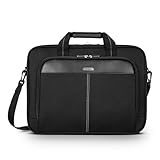
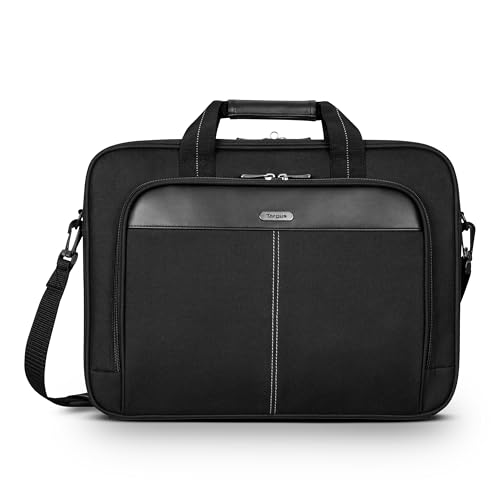 Targus 15-16 Inch Slim Lightweight Laptop Briefcase16 inch3.25 x 16.75 x 12.8 inches1.27 PoundsCheck on Amazon
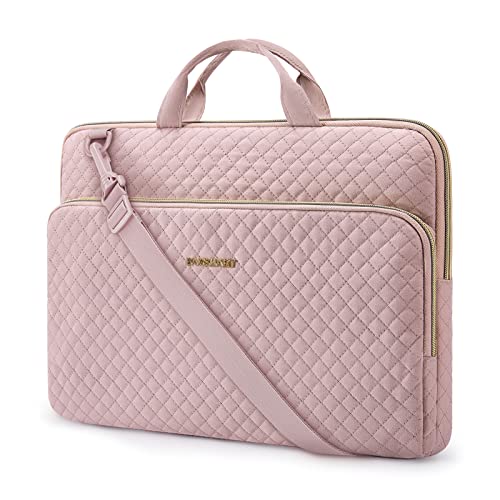 BAGSMART Laptop Sleeve Case with Handle Protective Water-Resistant15.6 Inch15.74 x 0.98 x 11.41 Inches0.7 PoundsCheck on Amazon


Top 3 picks at a glance
Quick Picks
As an Amazon Associate we earn from qualifying purchases at no extra cost to you.




| Product | Best for | Key spec from the title |
|---|---|---|
| Lenovo Laptop Bag T210 | Light everyday carry | Messenger shoulder bag for laptop or tablet |
| LOVEVOOK Laptop Tote Bag | Professional style for women | Leather work bag, waterproof, large capacity |
| BAGSMART 3 In 1 Laptop Bag | Large laptops and business travel | Fits 17.3 inch laptops, water-repellent |
| Targus 15-16 Inch Slim Briefcase | Slim business commuting | Padded compartment, trolley strap, fits 16-inch laptops |
| BAGSMART Laptop Sleeve Case | Bag-in-bag protection | 15-15.6 inch, handle, water-resistant, front pockets |
| Ytonet Laptop Case 16 Inch | Protecting a larger laptop | Fits 15-15.6 and 16 inch, water-resistant sleeve |
How to Choose
Pick the format before the brand
Briefcases and messenger bags hold a laptop upright or flat and usually add a pocket or two for papers. Totes open wide and favor style, but they often lack a closing flap, so contents shift. Sleeves are slim padded cases that slip into a backpack or briefcase, and they rarely hold anything beyond the computer. Decide whether you want a standalone bag or an extra layer of protection, because that choice eliminates half the field immediately.
Check the fit range, not just the biggest number
Listings often show a range such as 15 to 16 inches or a single maximum like 17.3 inches. A bag that is far larger than your laptop lets it rattle, while one that is only just big enough strains the zipper. Measure the width and thickness of your machine and add a little room for the sleeve padding. A 13-inch ultrabook rarely belongs in a 17.3-inch briefcase, even though it technically fits.
Look for padding, strap quality, and weather protection
A padded compartment protects against bumps, and a stiff base keeps the bag from collapsing when set down. Look for a shoulder strap with a pad and a sturdy attachment point, since all the weight hangs from it. Water-repellent fabric sheds drizzle, while a waterproof label on a leather-look tote usually refers to the outer surface. None of these claims turn a bag into a dry bag, so slip the laptop into a sleeve if you regularly walk in heavy rain. Also check how the main flap or zipper closes, since an open top invites spills and quick-grab theft on a crowded train or bus.
Know where budget bags cut corners
Lower-cost bags tend to thin out the padding, use lighter zippers, and skimp on stitching around the handle and strap anchors. Inspect the corners, because laptops usually land there when dropped. Ignore long feature lists of tiny pockets and focus instead on the main compartment and its closure. A bag with two good pockets beats one with ten flimsy ones. Also weigh the empty bag itself: a heavy leather-style briefcase can add a noticeable load before the laptop even goes in, which matters over a long walk or a full day of travel.
The 6 Best Options
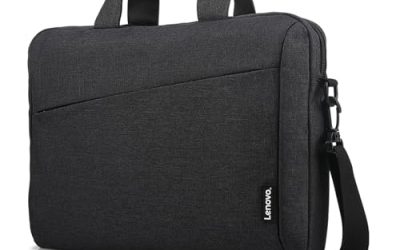
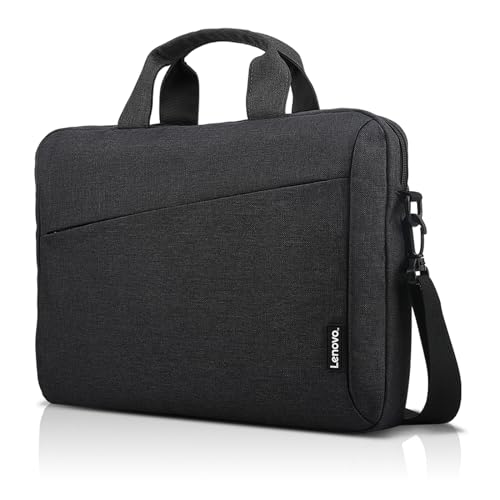
Lenovo Laptop Bag T210
The T210 is a straightforward messenger shoulder bag, and the title says it carries a laptop or a tablet. That simplicity is the appeal. It suits someone who wants to bring a laptop and little else to a coffee shop, a classroom, or a short meeting. Because the listing makes no big promises about capacity or organization, expectations are easy to set, and the plain look should blend into most office settings. Students and hybrid workers who split time between a desk and a couch will likely find the single-strap format convenient.
- Strength: the messenger format is quick to open and easy to carry on one shoulder.
- Strength: a brand-name design aimed at both laptops and tablets suits light, flexible use.
- Trade-off: the title lists no sizes or special features, so buyers must verify dimensions themselves.
Who should skip it: people carrying a large laptop plus documents and accessories need a roomier briefcase.
LOVEVOOK Laptop Tote Bag for Women
This tote is positioned as a leather work bag that doubles as a handbag, a purse, and a briefcase, according to the title. It is also described as waterproof, large, and suited to teachers and business users. It speaks to professionals who want a laptop carrier that looks like a fashion accessory instead of tech gear, and the large handbag format leaves space for personal items alongside the computer.
- Strength: the polished, leather-style look suits office and classroom settings.
- Strength: the large capacity leaves room beyond the laptop for everyday items.
- Trade-off: totes generally lack a structured closure, so contents can shift in transit.
Who should skip it: buyers who want a gender-neutral look or a compact, structured briefcase may prefer a different style.
BAGSMART 3 In 1 Laptop Bag
BAGSMART’s three-in-one bag fits a 17.3 inch laptop, according to the title, and is described as a water-repellent shoulder bag and computer briefcase for business, travel, and office use. The three-in-one label points to multiple ways to carry it, and the size makes it the most accommodating option among the briefcase styles on this list.
- Strength: the 17.3-inch fit accepts large laptops that smaller bags cannot hold.
- Strength: the water-repellent shoulder bag design handles drizzle between car and office.
- Trade-off: a bag sized for 17.3 inches can feel oversized for a 14-inch laptop.
Who should skip it: commuters with compact laptops who want a slim silhouette should shop for a smaller briefcase.
Targus 15-16 Inch Slim Briefcase
Targus describes this as a slim, lightweight laptop briefcase, usable as a messenger and shoulder bag, with a padded compartment and a trolley strap for 16-inch laptops. The trolley strap slides over a rolling suitcase handle, which is handy in airports. It is a classic, understated option for a buyer who needs dependable protection and a professional profile without extra bulk. Frequent flyers who walk long terminal corridors will also appreciate that the slim shape slips under a seat more easily than a boxy case.
- Strength: a stated 15 to 16 inch fit covers many mainstream laptops.
- Strength: the trolley strap makes airport travel with a rolling suitcase easier.
- Trade-off: a slim design means limited room for bulky papers or accessories.
Who should skip it: anyone who carries binders, a lunch, and a tablet daily will need a larger bag.
BAGSMART Laptop Sleeve Case with Handle
This is a protective sleeve rather than a full bag. The title lists a 15 to 15.6 inch fit, water-resistant material, a carrying handle, and front pockets, aimed at lightweight carry. It works on its own for short trips or slides into a larger tote or backpack to add padding. In concept it is the lightest route to protection among the six picks, adding the least weight and bulk to a bag you already own, which suits people who change bags depending on the day.
- Strength: the handle lets you carry it alone without a separate bag.
- Strength: front pockets hold a charger and small accessories.
- Trade-off: a sleeve offers little storage beyond the laptop and small items.
Who should skip it: people who need to carry documents, a tablet, and a bottle should look at a briefcase or tote.
Ytonet Laptop Case 16 Inch
The Ytonet is another sleeve, and its title lists 16 inch and 15 to 15.6 inch laptops, water resistance, and a TSA-friendly designation. It also states compatibility with MacBook Pro models. It is a practical choice for adding a padded layer to a larger laptop before it goes into a backpack, tote, or carry-on, and the broader size range suits households sharing one case across different machines.
- Strength: it covers both 15.6-inch and 16-inch laptops, which gives flexibility.
- Strength: water-resistant material adds a layer of protection against spills and light rain.
- Trade-off: like any sleeve, it offers minimal storage and needs a second bag for the rest of your gear.
Who should skip it: buyers who want a single bag with a strap and plenty of pockets should choose a briefcase.
Which One Fits Your Situation
You commute with a 17-inch laptop
The BAGSMART 3 In 1 is the only pick that states a 17.3 inch fit, so it is the natural starting point for large-screen owners.
You fly often with a rolling suitcase
The Targus briefcase includes a trolley strap, which lets the bag ride on a suitcase handle while you walk through terminals.
You want style that does not look like tech gear
The LOVEVOOK tote is built around a leather-style look and a large capacity, so it works as a handbag that happens to hold a laptop.
You already own a backpack and want extra protection
Either sleeve works. Pick the Ytonet for a 16-inch laptop and the BAGSMART sleeve if you want a handle and front pockets for chargers.
Common Mistakes
- Buying a bag by the maximum stated size without measuring the laptop’s actual thickness.
- Choosing a tote for a long commute, then discovering it lacks a secure closure.
- Expecting a sleeve to carry documents, a charger brick, and a tablet comfortably.
- Equating water-repellent fabric with a fully waterproof bag.
- Ignoring strap padding, which decides comfort when a laptop and charger hang from one shoulder.
Related guides
- Gaming Laptop Battery Draining While Plugged In Fix
- Graphics Cards For Low Wattage Power Supplies
- How To Stop Laptop Thermal Throttling In Software
Frequently Asked Questions
Is a briefcase or a messenger bag better for a laptop?
A briefcase keeps a more structured shape and often protects better, while a messenger bag is quicker to access and easier to carry. Choose by dress code and how often you open the bag during the day.
Can a sleeve replace a computer bag?
For short trips with only a laptop, yes. For anything involving documents, a tablet, and accessories, a sleeve works better as a protective layer inside a larger bag.
What does a trolley strap do?
It is a pass-through sleeve on the back of the bag that slides over the extended handle of a rolling suitcase. It frees your shoulder during airport walks.
How do I size a bag for a 16-inch laptop?
Look for a listing that names the 16-inch size, as the Targus and Ytonet do. Bags built for 15.6 inches may fit only barely, and a forced zipper wears out quickly.