The best SSD for a laptop is the one that physically fits your slot and your cooling: a PCIe 4.0 NVMe drive such as the Samsung 990 Pro or WD_Black SN850X suits gaming laptops with an M.2 2280 slot, a drive like the Crucial P310 or WD_Black SN770M in the short 2230 size suits handhelds and compact notebooks, and a value drive such as the Crucial P3 Plus or Kingston NV3 suits budget upgrades. Fit and heat matter more here than in a desktop, so this guide covers form factor, interface and thermals before the models.
As an Amazon Associate we earn from qualifying purchases at no extra cost to you.


Our Top Picks

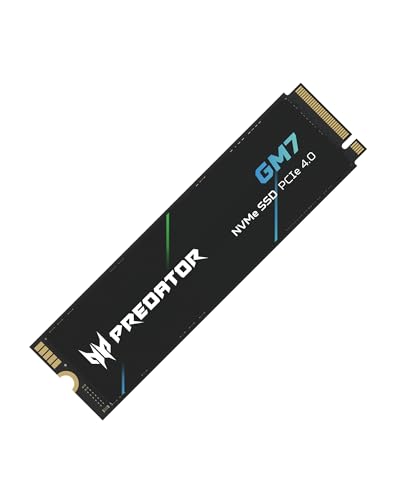

Top 3 picks at a glance
SSD Options at a Glance
| Drive | Form factor | Interface | Best for | Limits |
|---|---|---|---|---|
| Samsung 990 Pro | M.2 2280 | PCIe 4.0 x4 | Gaming laptops wanting top-tier speed | Premium tier; heatsink version may not fit |
| WD_Black SN850X | M.2 2280 | PCIe 4.0 x4 | Game libraries and fast loads | Heatsink variant is for desktops and some consoles |
| Samsung 990 EVO Plus | M.2 2280 | PCIe 4.0 x4 or 5.0 x2 (maker) | Efficient everyday upgrade | Not the fastest in its family |
| Crucial P310 | M.2 2230 and 2280 | PCIe 4.0 x4 | Handhelds and compact devices | Capacity options vary by size |
| WD_Black SN770M | M.2 2230 | PCIe 4.0 x4 | Handheld gaming PC upgrades | Check that your handheld is compatible |
| Crucial T500 | M.2 2280 | PCIe 4.0 x4 | Balanced speed and efficiency | Runs warmer than entry-level drives |
| Crucial P3 Plus | M.2 2280 | PCIe 4.0 x4 | Budget capacity upgrade | Sustained writes slow when the cache is full |
| Kingston NV3 | M.2 2280 | PCIe 4.0 x4 | Low-cost general use | Not for heavy video work |
Specifications such as the generation of the controller, NAND or speed rating can differ between revisions of the same model, so confirm details on the maker’s product page.
Step One: Check What Your Laptop Actually Supports
Before you shop, find your laptop’s exact model number and read the service manual or the maker’s support page. Three questions decide everything:
- Which size does the slot take? Most laptops use M.2 2280, meaning 22 mm wide and 80 mm long. Many handhelds and ultra-thin devices use the shorter 2230.
- Which interface does the slot use? M.2 slots can be PCIe NVMe or SATA. Plugging in the wrong type may not work. Older notebooks may support only PCIe 3.0, in which case a PCIe 4.0 drive still works but runs at 3.0 speeds.
- Is the drive replaceable? Some thin laptops solder the storage to the board. In that case, you can only add storage through a USB enclosure or a spare slot.
Single-Sided vs Double-Sided Drives
High-capacity M.2 drives sometimes place memory chips on both sides of the board. Thin laptops with a tight gap between the slot and the chassis may only fit single-sided drives. If your manual mentions height limits or the original drive was single-sided, check the new drive’s thickness listing, or choose a lower-capacity single-sided option.
PCIe 4.0 vs 5.0 in a Laptop
PCIe 5.0 drives such as the Crucial T705 and Samsung 9100 Pro advertise higher peak speeds, but they generate more heat and draw more power. Laptops usually lack the cooling space, and most can only use PCIe 4.0 anyway. For game loading, reviewers generally find that real-world differences between fast PCIe 4.0 drives and PCIe 5.0 drives are small. A strong PCIe 4.0 drive is the sensible target for almost every laptop.
Samsung 990 Pro and WD_Black SN850X: Performance Choices
The Samsung 990 Pro is a PCIe 4.0 NVMe drive that the maker lists with read speeds in the high 7,000 MB/s range. It is a common choice for gaming laptops where the slot supports full speed. Samsung’s version with a heatsink is aimed at desktops and consoles, so the bare drive is usually the right choice in a notebook.
The WD_Black SN850X is its closest rival. Western Digital lists similar PCIe 4.0 speeds and a Game Mode feature in its dashboard software. Both drives tend to run warm under sustained writes, so make sure your laptop’s thermal pad or cover is in place after installation.
Samsung 990 EVO Plus and Crucial T500: Balanced Picks
The 990 EVO Plus is positioned as an efficient mainstream drive. Samsung lists compatibility with both PCIe 4.0 x4 and PCIe 5.0 x2, which can be useful in newer notebooks. Reviewers generally point to its lower power draw and temperature compared with flagship drives, which is a benefit in a laptop with limited cooling.
The Crucial T500 is another mid-to-high option. It offers strong PCIe 4.0 performance and DRAM caching and is often compared to the SN850X on value. It runs a bit warmer than entry-level drives, so thermal headroom still matters.
2230 Drives for Handhelds and Slim Laptops
If you own a handheld gaming PC or a compact notebook with a 2230 slot, your choice is narrower. The WD_Black SN770M was designed for handheld devices, and the Crucial P310 is offered in a 2230 version alongside the 2280 one. Both use PCIe 4.0. Because 2230 drives fit less memory on the board, capacity options vary, and prices tend to be higher per terabyte than 2280 drives.
If your device supports it, a 2230 drive with an adapter bracket can sometimes fit a 2280 slot, but a full-length drive does not fit a 2230 slot. Always check that your device supports the model you are buying, since some handhelds are particular about firmware.
Budget Drives: Crucial P3 Plus and Kingston NV3
These are common choices for people who want more space without paying for peak speeds. Reviewers note that they work well for game libraries and everyday use, but once the pseudo-SLC cache fills, sustained write speeds can drop. For occasional installs this rarely matters. For regular large video exports or game library moves, a drive with DRAM and faster flash such as the 990 EVO Plus or T500 is a better match.
Budget Tiers
| Tier | What to expect | Examples |
|---|---|---|
| Budget | Good everyday speed, slower when sustained writes continue | Crucial P3 Plus, Kingston NV3 |
| Mid-range | Balanced speed, efficiency and capacity | Samsung 990 EVO Plus, Crucial T500, Crucial P310 |
| Premium | Top PCIe 4.0 speeds, strong endurance | Samsung 990 Pro, WD_Black SN850X |
Pick X If You Have…
| Your situation | Pick |
|---|---|
| Gaming laptop, M.2 2280 PCIe 4.0 slot, heavy use | Samsung 990 Pro or WD_Black SN850X |
| Thin notebook with limited cooling | Samsung 990 EVO Plus |
| Handheld gaming PC with a 2230 slot | WD_Black SN770M or Crucial P310 (2230) |
| Older laptop with PCIe 3.0 only | Any PCIe 4.0 drive, but do not overpay for speed it cannot use |
| Tight budget and light use | Crucial P3 Plus or Kingston NV3 |
Alternatives
- External SSD: If your laptop’s storage is soldered, a USB4 or USB 3.2 external drive adds fast storage for games and files.
- SATA 2.5-inch SSD: Only for older notebooks with a 2.5-inch bay. It is slower than NVMe but still a large improvement over a hard drive.
- Memory-card storage: Handheld PCs with microSD slots can add capacity, but card speed is far below NVMe.
Installation and Migration Tips
Back up your data first. Disconnect the battery according to your laptop’s manual before opening the case. Many laptops have a retaining screw and a thermal pad or shield over the drive, so keep them in place. To transfer the old system, use the drive maker’s cloning software or an external enclosure. After installation, check the BIOS to confirm the drive is detected, and update the drive’s firmware using the maker’s utility.
Endurance, Warranty and Software
Makers list endurance ratings in terabytes written and offer warranty periods that often last several years. Check both when choosing a drive for heavy use such as video editing. Samsung, Western Digital and Crucial provide utilities for firmware updates and health monitoring, which are worth installing. A drive that shows rising error counts or unexpected slowdowns should be backed up and replaced promptly.
Frequently Asked Questions
Will any M.2 SSD fit my laptop?
No. You need to match the length, usually 2280 or 2230, and the interface type. Check your laptop’s service manual or support page for the supported sizes, and check the height limit if your laptop is very thin.
Is PCIe 5.0 worth it in a laptop?
For most buyers, no. Many laptop slots only support PCIe 4.0 or 3.0, and PCIe 5.0 drives run hotter. A good PCIe 4.0 drive is faster than most real tasks need.
Do I need a heatsink on a laptop SSD?
Usually not. Laptops generally use a thin thermal pad, plate or cover. A thick heatsink can stop the case from closing, so use the bare drive unless the maker says otherwise.
Can I use a 2230 SSD in a 2280 slot?
Sometimes, with a holder bracket sold for this purpose. A 2280 drive cannot fit in a 2230 slot. Confirm both the slot length and the mounting screw position in your manual.
How much capacity should I get for gaming?
Modern games can be very large, so many players choose 1 TB as a minimum and 2 TB if they keep many titles installed. Check your slot count before buying, because laptops with a single slot cannot expand later.
Does a faster SSD improve frame rates?
Not much. Faster storage mainly shortens load times and can reduce stutter in games that stream large assets. Frame rates depend mostly on your GPU and CPU.