- Top Pick: Elgato Facecam Pro
- Runner-up: Razer Kiyo Pro Ultra
- Also consider: OBSBOT Tiny 2
A gaming PC can push high frame rates all day, yet the facecam in the corner of the stream is what viewers judge first. A dedicated USB webcam fixes the soft, dim image a built-in laptop camera produces, and the current premium tier has moved well past basic 1080p. Large sensors, true 4K capture and motorized tracking mounts are now normal at the top of the category.
This roundup compares five standalone USB webcams built for streaming and gaming: one true 4K60 model, one large-sensor low-light model, one all-rounder with strong built-in microphones, and two PTZ cameras that pan and tilt to follow you. Every pick is described from published manufacturer specifications only, and the lineup is grouped into premium and mid-range tiers so you can match a camera to your room, your lighting and your desk.
As an Amazon Associate, we earn from qualifying purchases.
Top 3 picks at a glance
Quick answer
For most streamers, the Logitech MX Brio is the safest all-round pick, with 4K video, strong built-in microphones and simple controls. The Elgato Facecam Pro leads on motion with true 4K at 60 frames per second, the Razer Kiyo Pro Ultra leads on low light, and the two PTZ models from OBSBOT and Insta360 follow you around the room.
The five picks
Elgato Facecam Pro

The Facecam Pro is the premium pick for streamers who record or broadcast fast-moving gameplay and want the camera to keep up. It is built around a 1/1.8-inch Sony CMOS sensor and captures uncompressed-style 4K video at a full 60 frames per second, a mode no other fixed webcam in this roundup matches. The f/2.0 autofocus lens covers a wide 90-degree field of view, and focus can be locked manually through the Elgato Camera Hub software, which also stores settings on the device itself. There is no built-in microphone, so plan on a separate USB or XLR mic, which most serious streamers already own. The body is large for a webcam and needs a USB 3.0 connection to deliver its top modes.
Specs
- Maximum resolution: 2160p at 60 fps (also 2160p30, 1080p60, 720p60)
- Sensor: 1/1.8-inch Sony CMOS
- Lens: f/2.0, 21 mm full-frame equivalent
- Field of view: 90 degrees
- Focus: autofocus or manual, 10 cm to infinity
- Microphone: none built in
- Connection: USB-C, USB 3.0, UVC
- Dimensions: 116 x 38 x 79 mm without mount
- Weight: 240 g without mount
Razer Kiyo Pro Ultra

The Kiyo Pro Ultra is the premium pick for dim rooms and evening streams. Its 1/1.2-inch Sony CMOS sensor is the largest in this roundup, and each pixel measures 2.9 micrometers, so the sensor gathers far more light than a typical webcam sensor. Paired with a bright f/1.7 lens, that hardware produces natural background separation without software blur. Capture tops out at 4K at 30 frames per second, with 1080p at 60 available for faster motion. Razer Synapse exposes manual control over ISO, shutter speed, white balance and field of view, which can be narrowed from 82 to 72 degrees. A basic omnidirectional microphone and an integrated privacy shutter are built in, and the camera connects over USB 3.0.
Specs
- Maximum resolution: 4K at 30 fps (also 1440p30, 1080p60, 720p60)
- Sensor: 1/1.2-inch Sony CMOS, 8.3 megapixels, 2.9 micrometer pixels
- Lens: f/1.7, 8.5 mm
- Field of view: adjustable, 82 to 72 degrees
- Focus: autofocus with phase detection
- Microphone: built-in omnidirectional
- Privacy: integrated shutter
- Connection: USB 3.0, USB-C to USB-A cable included
- Software: Razer Synapse
Logitech MX Brio
The MX Brio is the mid-range all-rounder and the easiest recommendation for a streamer who wants one box that handles picture and sound. It records 4K at 30 frames per second or 1080p at 60, using an 8.5-megapixel Sony sensor behind an f/2.0 glass lens. Three field-of-view presets (90, 78 and 65 degrees) plus 4x digital zoom cover solo and two-person framing, and a Show Mode tilts the camera down to share a desk, a controller or a product. The dual beamforming microphones are the strongest built-in audio in this roundup, rated for pickup up to 1.2 meters. An aluminum body, a built-in privacy shutter and Logi Tune or G Hub controls round out a complete package.
Specs
- Maximum resolution: 4K at 30 fps (also 1080p60)
- Sensor: 8.5-megapixel Sony CMOS
- Lens: f/2.0 glass
- Field of view: 90, 78 or 65 degrees, 4x digital zoom
- Focus: autofocus
- Microphone: dual beamforming, noise reducing, up to 1.2 m range
- Privacy: built-in shutter
- Connection: USB-C, USB 3.0
- Dimensions: 98 x 44 x 36 mm
- Weight: 137 g without clip, 176 g with clip
OBSBOT Tiny 2
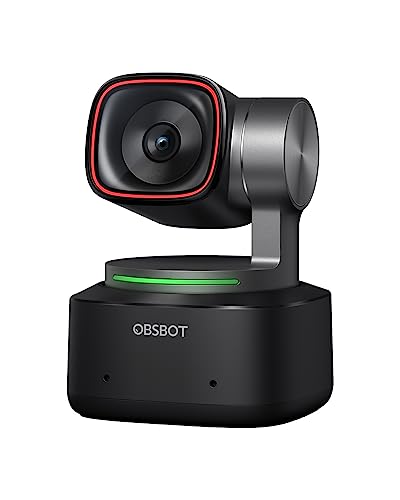
The Tiny 2 is the premium PTZ pick for streamers who move around, unbox hardware on camera or teach while standing. A two-axis gimbal pans up to 140 degrees to either side and tilts through a wide range, while AI tracking with auto zoom keeps the subject framed without touching the mouse. Voice commands and gesture control let you direct the camera mid-stream. The 1/1.5-inch CMOS sensor records 4K at 30 frames per second or 1080p at 60, and dual native ISO supports clean HDR video in mixed lighting. All-pixel phase-detection autofocus locks on quickly, and the OBSBOT Center app handles presets and framing. It is compact enough to sit on a monitor or a small tripod.
Specs
- Maximum resolution: 4K at 30 fps (also 1080p60, 720p60)
- Sensor: 1/1.5-inch CMOS, 50-megapixel effective pixels
- Lens: f/1.9, 26 mm equivalent
- Field of view: 85.5 degrees diagonal
- Focus: all-pixel PDAF autofocus, 10 cm minimum distance
- Gimbal: 2-axis, pan plus or minus 140 degrees, tilt plus 30 to minus 70 degrees
- Controls: AI tracking, voice control, gesture control
- Connection: USB-C, USB 3.0
- Dimensions: 47 x 44 x 62.02 mm
- Weight: 143.3 g with mount, 95.6 g without
Insta360 Link 2
The Link 2 is the mid-range PTZ alternative, packing a two-axis gimbal and AI tracking into a body that weighs about 100 grams. Its 1/2-inch sensor records 4K at 30 frames per second in landscape or portrait orientation, and 1080p at 60, with HDR support and phase-detection autofocus. Tracking modes cover a single presenter, groups and whiteboard framing, and DeskView tilts the camera down to show your hands and desk. Gesture control handles tracking and zoom from across the room. The built-in microphone applies AI noise canceling, and the magnetic mount snaps onto a monitor in seconds. Note the USB-C connection runs at USB 2.0 speeds, so the camera leans on efficient compression rather than raw bandwidth.
Specs
- Maximum resolution: 4K at 30 fps (also 1080p60, 720p60), landscape and portrait
- Sensor: 1/2-inch CMOS, 8 megapixels
- Lens: f/1.8, 26 mm equivalent
- Field of view: 79.5 degrees diagonal
- Focus: PDAF autofocus
- Gimbal: 2-axis with AI tracking, gesture control
- Microphone: built-in with AI noise canceling
- Connection: USB-C, USB 2.0
- Dimensions: 71.3 x 58.9 x 38 mm
- Weight: 101.5 g without magnetic mount, 166.5 g with mount
How to choose
Match the frame rate to your content first. Fast gameplay and hand cams benefit from 1080p at 60 frames per second or the Facecam Pro at 2160p60, while a talking-head stream looks fine at 4K30. Sensor size decides low-light quality more than resolution does: the 1/1.2-inch sensor in the Kiyo Pro Ultra and the 1/1.5-inch sensor in the Tiny 2 hold up in dim rooms where small sensors turn grainy.
Decide whether you sit still or move. Fixed cameras are simpler and lighter on the monitor, while the two PTZ models follow you and reframe automatically, which suits unboxings, whiteboard segments and standing presentations. Audio is the third filter: the MX Brio and Link 2 can carry a stream on their built-in microphones, the Kiyo Pro Ultra offers basic backup audio, and the Facecam Pro and Tiny 2 are best paired with a dedicated microphone. Finally, check your ports. The top modes on the USB 3.0 models need a USB 3.0 connection and a reasonably current PC, and companion software from Elgato, Razer, Logitech, OBSBOT and Insta360 unlocks the manual controls on each camera.
Who should skip
Skip this category if you already own a mirrorless or compact camera with clean HDMI output and a capture card, since that rig will out-resolve every webcam here. Skip it if your camera only appears in short work calls, where a laptop camera remains adequate. Skip the PTZ models if you never leave your chair, because the gimbal premium buys movement you will not use. And skip the premium tier entirely if your room lighting is uncontrolled and your PC lacks USB 3.0 ports, since the top capture modes on the flagship models depend on both.
FAQ
Is 4K worth it for live streaming?
For most channels, 4K pays off as flexibility rather than raw output quality. Platforms compress the live feed, but a 4K sensor gives cleaner downscaled 1080p video, room to crop and zoom without softness, and sharper recordings for edited uploads. If you only stream and never record, a strong 1080p60 mode covers you.
Do I need a separate microphone with a streaming webcam?
It depends on the model. The Logitech MX Brio and Insta360 Link 2 publish beamforming or noise-canceling microphone systems that are usable on their own. The Elgato Facecam Pro has no microphone at all, and the Razer and OBSBOT models treat audio as secondary, so a dedicated USB microphone is the better pairing for them.
What is the difference between a fixed webcam and a PTZ tracking webcam?
A fixed webcam points where you aim it and crops digitally to reframe. A PTZ model such as the OBSBOT Tiny 2 or Insta360 Link 2 sits on a motorized two-axis gimbal that physically pans and tilts, following your face or body as you move, with AI tracking and gesture or voice control on top.
Can I use these webcams with OBS and Streamlabs?
Yes. All five are USB Video Class devices, so OBS, Streamlabs and similar broadcast software detect them as standard camera sources on Windows and macOS with no capture hardware in between. Install each maker companion app only if you want manual exposure, field-of-view or tracking controls beyond the defaults.
Final verdict
Pick the Elgato Facecam Pro for the smoothest motion in the category, the Razer Kiyo Pro Ultra for dim rooms and natural background blur, and the Logitech MX Brio for the most complete single-box setup. Choose the OBSBOT Tiny 2 if you present on your feet and want the strongest tracking hardware, or the Insta360 Link 2 for similar tracking in a lighter, simpler package. Every model here is a clear step up from a built-in laptop camera, and the right choice comes down to frame rate, sensor size and how much you move on camera.


Related guides
More from Amazon
Programs that pair well with the guide above. Offers and eligibility are set by Amazon and may change.
Free shipping on eligible items, Prime Video and more. Eligible new members can start with a free trial.
Start a Prime free trialAd-free music streaming. Eligible new subscribers can start with a free trial.
Try Music Unlimited freeA Prime membership for ages 18-24 with a trial period. Eligibility is set by Amazon.
See Prime for Young AdultsAudiobooks and podcasts to listen to on the go. Eligible new members can start with a free trial.
Try Audible freeAs an Amazon Associate we earn from qualifying purchases.