Transmit buffers are the small pools of packet memory inside a network switch that hold frames for a brief moment when an output port is busier than the traffic arriving for it. A switch with a larger transmit buffer absorbs short bursts of traffic without dropping packets, while a switch with a tiny buffer begins discarding frames the moment several devices send at once. That is why two switches with the same port speed can feel very different on a busy home network: the one with more buffer memory keeps game downloads, video calls, and file transfers moving smoothly when traffic spikes.
If you have ever seen a game stutter while someone else in the house begins a large download, or a video call freeze for a second when a backup kicks off, a small transmit buffer may be part of the story. The buffer does not make any single connection faster, and it cannot fix a slow internet plan. What it does is give the switch somewhere to park packets during the short moments when more data arrives than a port can send out, so those packets get delivered a fraction of a second later instead of being thrown away and sent again.
Our Top Picks
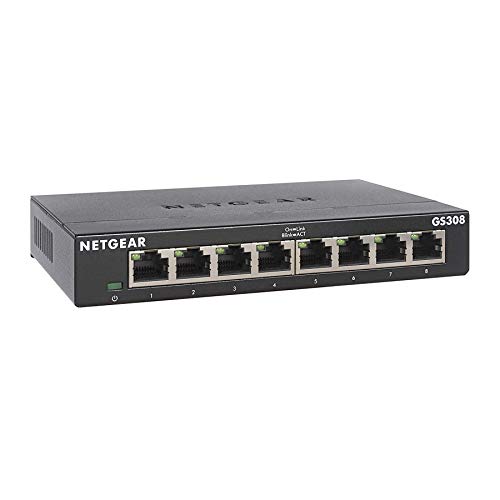 NETGEAR 8-Port Gigabit Ethernet Unmanaged Network Switch8 Port6.22 x 4.02 x 1.02 inches0.86 poundsCheck on Amazon

Top 3 picks at a glance

What Transmit Buffers Do Inside a Switch
A switch moves frames between its ports. Each port can send data at a fixed speed, usually one gigabit per second on the switches in this guide. Traffic rarely arrives in a perfectly even stream. A game console downloads an update in heavy bursts, a network drive sends a large file in a sudden rush, and a video call sends steady small packets that cannot wait. When several input ports send frames toward one output port at the same time, the output port becomes a bottleneck for a few milliseconds. The switch stores the extra frames in its transmit buffer until the output port catches up.
Think of the buffer as a short waiting line at a checkout. A longer line holds more shoppers during a rush, so fewer people are turned away. A switch with a larger buffer holds more frames during a traffic rush, so fewer packets get dropped. Dropped packets are not simply lost; the sending device has to transmit them again, which adds delay and can make a connection feel uneven. For gaming and live video, that added delay is exactly what you want to avoid, because those uses care more about steady timing than about raw throughput.
Buffer memory is shared across the ports of a switch, and it is measured in kilobytes or megabits. On the small desktop switches in this guide, published buffer sizes run from 128 KB up to 1.5 Mb. That range sounds small next to the gigabytes of memory in a PC, but a switch only needs to hold a few milliseconds of traffic at a time. Even a modest buffer can cover the gap while a busy port clears its queue. The difference between a small buffer and a larger one shows up when many devices talk at once, which is the normal state of a modern home network with a console, a PC, a smart TV, and a phone all connected.
There is a limit to how much buffer helps. A very large buffer can hold packets so long that interactive traffic waits behind a long queue, a problem network engineers call bufferbloat. For the desktop switches in this guide, published buffer sizes stay in a sensible range, so more buffer is generally better for a busy home network, as long as the switch also has sensible queue management. The picks below all come from manufacturers that publish their buffer figures, so you can compare them on the specification itself rather than on marketing language.
How to Choose a Switch by Its Transmit Buffer
Begin with the number of ports you need, then look at the buffer. A five-port switch suits a single desk or entertainment center, while an eight-port switch covers a living room plus a home office without a second device. Count the wired devices you own today and leave one or two ports free for the next device you add. A switch with no free ports forces you to unplug something every time a guest or a new gadget arrives.
Next, compare the published packet buffer memory. For a quiet network with two or three devices, 128 KB is enough. For a household where a game download, a video stream, and a cloud backup can all run at once, look for 1 Mb or more. The buffer figure is printed in the specifications of most switches from TP-Link and NETGEAR, and this guide only lists switches where that figure comes from the manufacturer. If a switch listing does not publish a buffer size, treat that as a gap in the information rather than a sign that the buffer is large.
Management features matter when you want control over which traffic goes first. An unmanaged switch simply forwards frames and needs no setup, which suits most homes. A smart managed switch adds controls such as virtual LANs, traffic priority, and port mirroring, which let you give game traffic priority over a background download. The TP-Link TL-SG108E in this guide is the only managed pick, and it is the right choice if you want to shape traffic rather than just expand ports.
Build and placement are practical concerns. All four switches in this guide are fanless, so they run silently next to a TV or on a desk. Metal cases handle heat better than plastic and survive being moved around, while a plastic case is lighter and cheaper. Check whether the switch can sit on a desk or mount on a wall, and confirm that the power adapter fits your outlet strip. Finally, look at switching capacity and the media access control table size: a 16 Gbps switching capacity with an 8K table suits an eight-port gigabit switch, while a 10 Gbps capacity with a 2K table is the normal match for a five-port model.
The Switches We Picked
Every switch below is a wired network switch with a published packet buffer size, and every one is a current model with a live Amazon US listing. The buffer figures come from the manufacturers.
NETGEAR GS305 5-Port Gigabit Ethernet Unmanaged Switch
NETGEAR GS305 5-Port Gigabit Ethernet Unmanaged Switch
The GS305 is a compact five-port gigabit switch with 128 KB of packet buffer memory, which is the figure NETGEAR publishes for the current hardware. It provides 10 Gbps of switching capacity, a 2K media access control table, and jumbo frame support up to 9,216 bytes. The metal case is fanless, so the switch runs silently, and it works on a desktop or mounted on a wall.
This switch is for a small setup where you need a few more wired ports and want a simple device that needs no configuration. A desk with a PC, a console, and a printer is the classic use, as is an entertainment center with a console and a smart TV. The five ports cover that kind of setup with a spare port left over.
The limits are plain. Five ports fill up fast, and 128 KB is the smallest buffer in this guide, so a household with several heavy users at once will see more benefit from one of the larger-buffer picks. There is no management interface, so you cannot set traffic priority or separate devices into virtual networks.
NETGEAR GS308 8-Port Gigabit Ethernet Unmanaged Switch
NETGEAR GS308 8-Port Gigabit Ethernet Unmanaged Switch
The GS308 adds three more gigabit ports to the same simple formula, with 192 KB of packet buffer memory listed for the current hardware revision. It provides 16 Gbps of switching capacity, an 8K media access control table, and jumbo frame support up to 9,216 bytes. Like its smaller sibling, it has a fanless metal case, silent operation, and a choice of desktop or wall mounting.
This switch is for a home that has outgrown a five-port model. Eight ports cover a console, a PC, a smart TV, a network drive, and a printer with room to spare, and the larger buffer gives the switch more room to absorb bursts when several of those devices send at once. It remains a plug-and-play device with no setup, which keeps it simple for anyone who just wants more wired ports.
The limits are the same kind as the GS305, only smaller in effect. There is no management interface, so traffic priority and virtual networks are not available. The buffer is larger than the GS305 but still smaller than the TP-Link picks below, so a network with constant heavy traffic from many devices at once may still benefit from a managed switch with a bigger buffer.
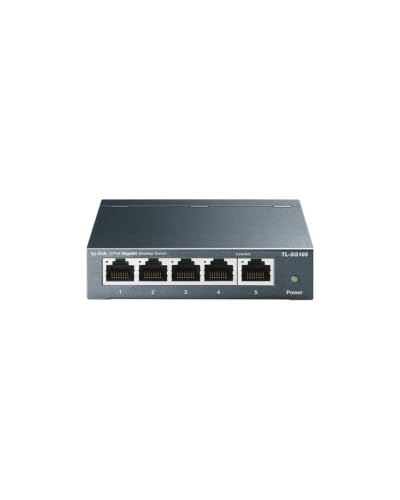
TP-Link TL-SG105 5-Port Gigabit Desktop Switch
TP-Link TL-SG105 5-Port Gigabit Desktop Switch
The TL-SG105 is a five-port gigabit switch with 1 Mb of packet buffer memory, which is roughly eight times the buffer of the NETGEAR GS305. It provides 10 Gbps of switching capacity, a 7.4 Mpps forwarding rate, a 2K media access control table, and jumbo frame support. The case is metal and fanless, the ports are shielded, and the switch supports traffic priority and multicast optimization without any configuration.
This switch is for a small network where traffic bursts are the problem rather than port count. A desk where a PC downloads large files while a console plays online is a good match, because the larger buffer holds burst traffic while the output port clears. The shielded ports and traffic priority features add a little extra care for signal quality and for keeping interactive traffic moving.
The limits are the port count and the lack of management. Five ports cover a single room, not a whole house, and there is no interface for virtual networks or per-port controls. If you need more ports, the eight-port TP-Link pick below is the natural step up.
TP-Link TL-SG108E 8-Port Gigabit Easy Smart Switch
TP-Link TL-SG108E 8-Port Gigabit Easy Smart Switch
The TL-SG108E is an eight-port gigabit switch with 1.5 Mb of packet buffer memory on the current manufacturer specification, the largest buffer in this guide. It provides 16 Gbps of switching capacity, an 11.9 Mpps forwarding rate, a 4K media access control table, and 16 KB jumbo frame support. Unlike the other picks, it is a smart managed switch, with port-based and 802.1p traffic priority, four priority queues, virtual LAN support, link aggregation, storm control, and IGMP snooping, all managed through a simple utility.
This switch is for a busy home network where you want both a large buffer and control over traffic. A household with a gaming PC, a console, a streaming box, and a network drive can use the traffic priority settings to keep game and video packets ahead of background downloads, while the large buffer absorbs the bursts that remain. It is also the pick for a small office that wants basic management without the cost or complexity of a fully managed switch.
The limits are modest. The management features need a short setup through the utility, so it is not quite as hands-off as an unmanaged switch. The metal case is compact and fanless, which keeps it quiet, but the power adapter and the switch itself need a little more desk space than the five-port models.
Comparison Table
| Switch | Ports | Packet Buffer | Management | Switching Capacity |
|---|---|---|---|---|
| NETGEAR GS305 | 5 | 128 KB | Unmanaged | 10 Gbps |
| NETGEAR GS308 | 8 | 192 KB | Unmanaged | 16 Gbps |
| TP-Link TL-SG105 | 5 | 1 Mb | Unmanaged | 10 Gbps |
| TP-Link TL-SG108E | 8 | 1.5 Mb | Easy Smart managed | 16 Gbps |
Frequently Asked Questions
What is a transmit buffer in a network switch?
A transmit buffer is the packet memory inside a switch that stores frames briefly when an output port is busy. When several devices send data toward one port at the same time, the buffer holds the extra frames until the port can send them, which keeps packets from being dropped during short traffic bursts.
How big should a transmit buffer be for home gaming?
For a home network, 128 KB handles light use with two or three devices, while 1 Mb or more suits a busy household where game downloads, streaming, and backups run at the same time. Buffer size matters most when many devices send at once, so match the buffer to how crowded your network gets rather than to any single device.
Does a larger transmit buffer make games faster?
A larger buffer does not raise the speed of any single connection, and it cannot fix a slow internet plan. What it does is reduce dropped packets during bursts, which keeps latency steadier when the network is busy. For gaming, steadier timing matters more than a higher headline speed.
Do I need a managed switch for a bigger transmit buffer?
No. Buffer size and management are separate features. The TP-Link TL-SG105 is unmanaged and still has a 1 Mb buffer, which is larger than many managed switches. A managed switch is worth it when you want traffic priority, virtual networks, or link aggregation, not simply for a bigger buffer.
Why do two switches with the same speed feel different?
Port speed is only one part of the story. Buffer size, queue management, and the media access control table all shape how a switch behaves when traffic spikes. Two gigabit switches can post the same speed in a quiet test and behave very differently once several devices send at once, which is why the buffer figure is worth checking before you buy.
Conclusion
Transmit buffers are the quiet part of a switch specification, but they decide how a network behaves at its busiest moments. A larger buffer gives the switch room to hold packets during bursts instead of dropping them, which keeps game sessions steady and video calls smooth when the rest of the house is also online. For a small and quiet setup, the NETGEAR GS305 covers the basics with a published 128 KB buffer. The GS308 adds ports and a larger buffer for a growing home, the TP-Link TL-SG105 brings a 1 Mb buffer to a compact five-port switch, and the TL-SG108E pairs the largest buffer in this guide with smart management for a busy network. Pick the port count you need, then choose the buffer that matches how crowded your network gets, and check the buffer figure on the manufacturer specification before you buy.
Disclosure: As an Amazon Associate, we may earn from qualifying purchases.
Related guides
More from Amazon
Programs that pair well with the guide above. Offers and eligibility are set by Amazon and may change.
Free shipping on eligible items, Prime Video and more. Eligible new members can start with a free trial.
Start a Prime free trialAd-free music streaming. Eligible new subscribers can start with a free trial.
Try Music Unlimited freeA Prime membership for ages 18-24 with a trial period. Eligibility is set by Amazon.
See Prime for Young AdultsAudiobooks and podcasts to listen to on the go. Eligible new members can start with a free trial.
Try Audible freeAs an Amazon Associate we earn from qualifying purchases.