For a lot of players, the mouse is the part of the setup that is always on show. It sits in front of the keyboard, it moves, and its lighting is the piece of the desk you actually see while you play. The best gaming mouse with RGB treats lighting as a designed feature rather than a single glowing logo: multiple zones you can colour independently, effects that react to game events, and software that syncs the mouse with your keyboard, headset and case lighting so the whole desk reads as one setup instead of a pile of unrelated colours.
The good news is that strong lighting no longer means giving up performance. The three mice in this guide pair multi-zone RGB with sensors and switches that hold up in competitive games, and they cover three different shapes: an ergonomic wired mouse with a full underglow strip, a heavier feature-packed wired mouse with tunable weight, and a multi-genre wired mouse with lighting strips along both flanks. All three are real, currently listed products on Amazon US. This guide explains what each lighting system actually does, who each mouse suits, and how to judge RGB quality beyond counting colours in a product title.
Disclosure: As an Amazon Associate, this site may earn from qualifying purchases made through links in this article, at no additional cost to you.
Our Top Picks


Top 3 picks at a glance


Quick picks
- Razer Basilisk V3 Customizable Ergonomic Gaming Mouse – ASIN: B09C13PZX7
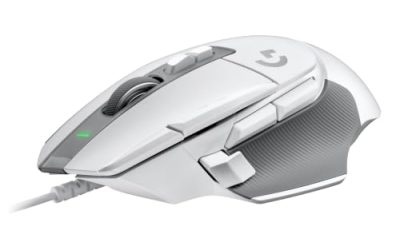
- Logitech G502 HERO High Performance Wired Gaming Mouse – ASIN: B07GBZ4Q68
- SteelSeries Rival 5 Gaming Mouse with PrismSync RGB Lighting – ASIN: B093LSMKL3
Use the quick list to shortlist, then read the individual notes below. Lighting zones and sensor figures are taken from the product listings named here, so confirm the exact variant on the listing before you order, because several of these mice have wireless or updated versions sold under similar names.
Razer Basilisk V3 Customizable Ergonomic Gaming Mouse
Best for: Players who want the most expressive lighting in this guide, including a full underglow, on an ergonomic wired mouse with a rich feature set for mixed genres. View on Amazon – ASIN: B09C13PZX7
Lighting: The Basilisk V3 carries eleven individually addressable Chroma RGB zones, more than the other picks here, and it is the only one with a continuous underglow strip that washes light onto the desk surface around the mouse. Through Razer Synapse and Chroma Studio you can set each zone independently, layer effects, and sync with a large library of Chroma-integrated games that react to in-game events such as damage, ultimates and alerts. The lighting is bright enough to read in a lit room, and the underglow gives a floating effect on dark pads.
Sensor, switches and shape: Under the lighting sits a Focus Plus optical sensor rated to 26,000 DPI, second-generation Razer optical switches, and eleven programmable buttons including a multi-function paddle on the thumb side. The HyperScroll tilt wheel switches between tactile and free-spin modes and adds left and right tilt clicks, which suits players who split time between shooters and productivity. The right-handed ergonomic shell has a pronounced thumb rest, and the listed weight is around 101 grams.
Strengths: No mouse here gives you more lighting control, and the Chroma ecosystem is the deepest of the three for game-reactive effects and cross-device sync with Razer keyboards, headsets and ambient gear. The wheel is genuinely useful beyond gaming. Onboard memory stores a profile so your core settings travel with the mouse.
Points to consider: It is wired only, and at around 101 grams it is heavier than the ultralight mice many shooter players now prefer. The full feature set depends on Synapse, which is a substantial application. Players who want a symmetrical shape should look at the Rival 5 instead.
Logitech G502 HERO High Performance Wired Gaming Mouse
Best for: Players who want RGB as part of a complete, tunable package: adjustable weight, many buttons, a dual-mode wheel and lighting that can signal which profile or sensitivity stage is active. View on Amazon – ASIN: B07GBZ4Q68
Lighting: The G502 HERO uses Logitech LIGHTSYNC RGB in two visible areas, the G logo on the palm and the DPI indicator lights along the thumb side. That is fewer zones than the Razer, but the implementation is more functional than decorative: the logo colour can be matched to your active profile, and the indicators show your current sensitivity stage at a glance. Through G Hub, LIGHTSYNC can sample your screen colours or sync effects across Logitech G keyboards, headsets and speakers so the desk shifts colour as one system.
Sensor, switches and shape: The HERO sensor is rated to 25,600 DPI with consistent tracking and strong power efficiency for its generation. Eleven programmable buttons include the sniper button on the thumb, dual-mode hyper-fast scroll wheel with tilt inputs, and onboard memory for stored profiles. The defining hardware feature is the weight system: five removable 3.6 gram weights let you tune the roughly 121 gram base weight and shift the balance point forward or back to taste. The shape is a sculpted right-handed design with rubberised side grips, sized for medium to large hands.
Strengths: Few mice at any level match the G502 formula of buttons, wheel and tunable weight, which is why the design has remained a default recommendation for mixed-genre players for years. The lighting serves the profile system rather than fighting it. Build and switch feel are a strong point, and the braided cable and PTFE feet keep the wired experience tidy.
Points to consider: Even with all weights removed this is a heavy mouse, and competitive shooter players chasing the lightest possible aim will prefer the Rival 5 or a dedicated ultralight. The RGB is restrained compared with the Basilisk V3, so if lighting is your first priority rather than one feature among many, the Razer shows more. G Hub is required for full lighting and button control.
SteelSeries Rival 5 Gaming Mouse with PrismSync RGB Lighting
Best for: Multi-genre players who want bright, segmented lighting on a lighter wired mouse with a versatile button layout for shooters, MOBAs and battle royale titles. View on Amazon – ASIN: B093LSMKL3
Lighting: The Rival 5 runs PrismSync RGB across ten zones, arranged as segmented light strips running along both sides of the shell plus the logo and wheel area. Because each strip is divided into separately controlled segments, effects such as gradients and reactive pulses look more animated than a single-zone glow, and SteelSeries GG software can sync the mouse with SteelSeries keyboards and headsets and tie effects to game events and chat notifications through supported integrations.
Sensor, switches and shape: The TrueMove Air optical sensor, developed with PixArt, is rated to 18,000 CPI with true one-to-one tracking and acceleration and tilt correction aimed at consistent flicks. Nine programmable buttons include a dedicated sniper button and a thumb panel with a tilt-style switch that suits ability-heavy games. The switches are rated for a long click life with dust and water resistance under an IP54 certification according to the listing, the cable is a lightweight mesh design that reduces drag, and the listed weight is 85 grams, noticeably lighter than the other two picks. The shape is a universal ergonomic form that works across palm, claw and fingertip grips for most hand sizes.
Strengths: This is the balanced pick: near-flagship lighting, a genuinely competitive sensor and the lightest body here, in one wired mouse that does not force a genre choice. The side light strips are visible from normal playing angles, which is where RGB is actually seen. GG software keeps lighting, button mapping and sensitivity in one place.
Points to consider: The shape is safe rather than sculpted, so players who love a deep ergonomic thumb rest may prefer the Basilisk. Ten zones still trail the Razer’s eleven plus underglow for pure show. As with the others, full lighting control needs the maker’s software running on a PC.
How to choose a gaming mouse with RGB
Judge lighting by zones and placement, not by the headline colour count, which is the same 16.8 million figure on almost every product page. Zones tell you how independently parts of the mouse can be coloured, and placement tells you whether you will see the effect: side strips and underglow are visible in play, while a palm logo disappears under your hand. If you already own a keyboard or headset from one of these makers, staying in that ecosystem is the simplest route to a synced desk, because each brand’s software controls its own gear best.
Then apply the normal mouse checks with the same rigour as any gaming purchase. Shape and grip come first, since you hold the mouse for hours; weight second, with lighter suiting fast shooters and heavier suiting control-focused and mixed play; sensor figures from all three makers here are far beyond what human aim can use, so treat them as equal and decide on shape, buttons and wheel instead. Finally, check whether profiles and lighting can be stored onboard if you move between PCs, and whether the software supports the reactive effects you actually want, such as low-health warnings or ability cooldown colours.
Setting up RGB that looks good, not noisy
Pick one base colour scheme for the whole desk and let the mouse follow it, rather than running a rainbow cycle on every device at different speeds. Use reactive effects sparingly: a brief pulse on damage or a colour change on profile switch is informative, while constant full-brightness animation becomes visual noise within a week. Lower the brightness for evening play, since LEDs at full output in a dark room are fatiguing and wash out the colours themselves. If your mouse supports per-profile lighting, assign each game profile a distinct colour so you can confirm the right keybinds are loaded before the match starts.
Frequently asked questions
Does RGB lighting affect gaming performance?
The lighting itself has no meaningful effect on sensor tracking or click response. On wireless mice it reduces battery life, which is why all three picks here are wired; on a wired mouse the only cost is the software running in the background.
Can I sync mouse lighting with my keyboard from another brand?
Each maker’s software syncs its own ecosystem best. Cross-brand sync is possible through some motherboard and third-party tools, but coverage and effect quality vary, so players who want a perfectly matched desk usually standardise on one ecosystem.
What is the difference between lighting zones and colours?
Colours are the palette every RGB device shares. Zones are the separately controlled areas of the device. More zones means smoother gradients and more detailed effects, which is the real difference between basic and advanced RGB mice.
Can I turn the lighting off?
Yes. All three makers let you disable lighting per profile or set brightness to zero in software, and profiles stored onboard can keep the lights off on other PCs too.
Is an underglow practical, or just decoration?
It is decoration, but useful decoration for some players: it makes the mouse easy to locate in a dark room and gives a clear visual signal when profiles change. It needs a reasonably smooth, darker surface to show at its best.
Conclusion
Choose the Razer Basilisk V3 if lighting is a headline feature for you: eleven zones, full underglow and the deepest reactive ecosystem make it the showpiece pick, with performance to match. Choose the Logitech G502 HERO if you want RGB integrated into a complete, tunable all-rounder with adjustable weight and the strongest button and wheel package. Choose the SteelSeries Rival 5 if you want bright, segmented lighting in a lighter multi-genre mouse that stays competitive in shooters. In every case, set the lighting up once, sync it across your desk, and then let it work quietly in your peripheral vision where it belongs.
Related guides
More from Amazon
Programs that pair well with the guide above. Offers and eligibility are set by Amazon and may change.
Free shipping on eligible items, Prime Video and more. Eligible new members can start with a free trial.
Start a Prime free trialAd-free music streaming. Eligible new subscribers can start with a free trial.
Try Music Unlimited freeA Prime membership for ages 18-24 with a trial period. Eligibility is set by Amazon.
See Prime for Young AdultsAudiobooks and podcasts to listen to on the go. Eligible new members can start with a free trial.
Try Audible freeAs an Amazon Associate we earn from qualifying purchases.