A red gaming mouse sounds simple to find until you begin opening listings. Most results turn out to be black mice with red lighting, black mice with red accents, or mice where red is only one of several color options buried in a dropdown. If you want a mouse whose shell is red, you have to read the listing itself, not the search result thumbnail, because the thumbnail often shows the wrong color variant.
This guide is for players building a red-themed desk, anyone tired of black peripherals, and shoppers who want the color to match the rest of their setup. Every mouse below is a gaming mouse whose Amazon listing names red as the body color, and every specification comes from the Amazon listing for that exact red variant.
Top 3 picks at a glance

Quick Picks
As an Amazon Associate we earn from qualifying purchases.
| Product | Best for | Key spec from title |
|---|---|---|
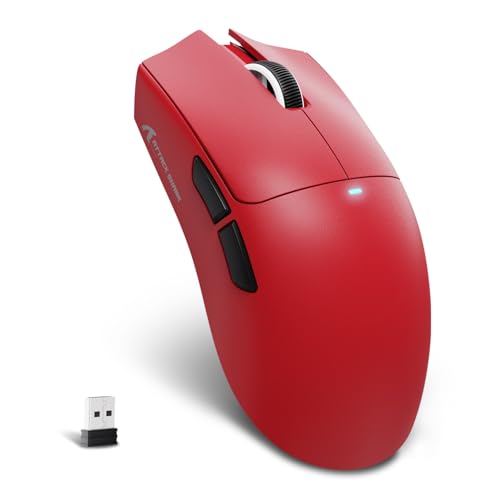
| ATTACK SHARK R5 Ultra (Red) | Competitive FPS players who want the lightest red mouse | 42,000 DPI, 39g, PAW3950MAX sensor |
| Pulsar X2H Mini Wireless (Red) | Claw-grip players who want a small red wireless mouse | 26,000 DPI, 52g, PAW3395 sensor |
| ATTACK SHARK X11 SE (Red) | Everyday players who want a light red mouse with long battery life | 22,000 DPI, 59g, tri-mode connection |
How to Choose
Confirm the Body Is Actually Red
The most important check here is the color field on the listing, because the word red appears in gaming mouse listings for many reasons that have nothing to do with the shell. A black mouse can have red backlighting, red side buttons, a red scroll wheel, or a red logo, and the listing will still mention red several times. Open the listing, look for the color selector, and confirm that the selected option reads Red rather than Black or another color. The title should also name red, and the images should show a red shell from more than one angle. If the images show a black mouse while the title mentions red lighting, move on.
Sensor and DPI Range
A gaming mouse lives or dies by its sensor, and the headline DPI number is only the first check. Look for the sensor model name: a named PixArt sensor such as the PAW3950MAX or PAW3395 tells you more than a large DPI ceiling, because those sensors are built for stable tracking at high movement speeds. Then check the tracking speed and acceleration figures the listing gives, since those describe how the sensor behaves during fast flicks rather than slow movement. A very high DPI ceiling matters most if you play at low sensitivity on a large pad and want fine adjustment steps. For most players, clean tracking at 400 inches per second beats a bigger number on the box.
Shape, Size, and Grip
Shape decides whether a mouse feels right after three hours. Symmetrical mice suit fingertip and claw grips and work for either hand, while ergonomic right-handed shapes support the palm and thumb during long sessions. Check the listing for length, width, and height, then compare those numbers with the mouse you use now. A mini or small model around 110 millimeters long fits smaller hands and claw grips, while a full-size mouse near 128 millimeters suits larger hands and palm grips. Weight matters here too: a mouse under 60 grams changes direction with less effort, which helps in fast shooters, but some players prefer a little more weight for control.
Wired, Wireless, and Battery
Connection type shapes how the mouse fits your desk. A wired mouse never needs charging and keeps a constant link, which suits desk-bound players. A wireless mouse removes the cable drag that can catch on a pad edge, and modern 2.4 GHz links keep up with wired models. Tri-mode mice add Bluetooth, which lets one mouse move between a gaming PC and a laptop without swapping receivers. If you go wireless, read the battery figure on the listing and think about your habits: a mouse with long battery life suits players who forget to charge, while a shorter battery life needs a regular charging routine. Keep the charging cable within reach and confirm the mouse works while plugged in.
The 3 Best Options
ATTACK SHARK R5 Ultra (Red)

The R5 Ultra in red is the strongest pick here for players who want a red shell without giving up flagship tracking. Its carbon fiber shell keeps the weight down to 39 grams, lighter than most mice, and the PAW3950MAX sensor reaches 42,000 DPI with an 8,000 Hz polling rate. The listing names the color as Red with grip tape included, so the red finish is part of the product rather than a lighting effect. Tri-mode connection covers 2.4 GHz wireless, Bluetooth, and wired USB-C use, for a desktop and a laptop. The shape is symmetrical, so it suits fingertip and claw grips better than a full palm grip.
Specs
- Color: Red with grip tape, per the Amazon listing
- Sensor: PixArt PAW3950MAX optical sensor
- Maximum DPI: 42,000 DPI, programmable
- Weight: 39 grams
- Shell: Carbon fiber composites
- Polling rate: Up to 8,000 Hz wireless and wired
- Switches: Omron mechanical microswitches rated for 100 million clicks
- Connection: 2.4 GHz wireless, Bluetooth, and USB-C wired
- MCU: Nordic 52840
Best for: Competitive FPS players who want the lightest red mouse with a flagship sensor.
Watch out for: The 39-gram body and symmetrical shape feel very different from a heavier ergonomic mouse, so confirm the shape suits your grip before ordering.
Pulsar X2H Mini Wireless (Red)
The X2H Mini in red is a limited-edition color of a small symmetrical mouse built for claw grips, and the best choice here for smaller hands. The red edition keeps the same raised rear hump as the standard X2H, which supports the palm during aggressive claw grips while the slimmer waist leaves room for the fingers. Its PAW3395 sensor reaches 26,000 DPI with 650 inches per second tracking and 50G acceleration, and the optical switches remove the double-click faults that mechanical switches can develop. At 52 grams it is light enough for fast flicks, and the listing gives battery life of up to 90 hours (one field on the listing states a higher figure, so this guide uses the lower one). It works wirelessly or wired.
Specs
- Color: Red, limited edition, per the Amazon listing
- Sensor: PixArt PAW3395 optical sensor
- Maximum DPI: 26,000 DPI
- Tracking speed: 650 IPS
- Acceleration: 50G
- Weight: 52 grams
- Polling rate: 1,000 Hz
- Switches: Optical switches
- Connection: 2.4 GHz wireless and wired
- Battery life: Up to 90 hours (listing description states a higher figure; lower figure used)
- Shape: Symmetrical with a high rear hump
Best for: Claw-grip players with smaller hands who want a small red wireless mouse.
Watch out for: This is a mini-size mouse, so players with large hands or a full palm grip should check the dimensions against their current mouse first.
ATTACK SHARK X11 SE (Red)
The X11 SE in red is the practical pick here for players who want a red mouse for gaming and everything else. Its 59-gram shell is light enough for fast shooters but keeps enough presence for long work sessions, and the symmetrical shape suits medium to large hands. The PAW3311 sensor reaches 22,000 DPI with 400 inches per second tracking, which covers competitive play. Tri-mode connection switches between Bluetooth, 2.4 GHz wireless, and USB-C wired, so one mouse serves a desktop and a laptop. The listing gives battery life of up to 65 hours, and the HUANO switches are rated for 20 million clicks with a TTC scroll encoder.
Specs
- Color: Red, per the Amazon listing
- Sensor: PixArt PAW3311 optical sensor
- Maximum DPI: 22,000 DPI
- Tracking speed: 400 IPS
- Acceleration: 40G
- Weight: 59 grams
- Polling rate: Up to 1,000 Hz
- Switches: HUANO micro switches rated for 20 million clicks
- Scroll wheel: TTC encoder
- Connection: Bluetooth, 2.4 GHz wireless, and USB-C wired
- Battery life: Up to 65 hours
Best for: Everyday players who want one light red mouse for gaming, study, and work.
Watch out for: The polling rate tops out at 1,000 Hz, so players chasing the highest polling figures should look at the R5 Ultra instead.
Which One Fits Your Situation
You Play Competitive Shooters and Count Every Gram
Pick the ATTACK SHARK R5 Ultra in red. Its 39-gram carbon fiber shell is the lightest option in this guide, and the PAW3950MAX sensor with an 8,000 Hz polling rate is built for the fast flicks and tracking that competitive shooters demand. The symmetrical shape suits fingertip and claw grips, which are common among shooter players.
You Have Smaller Hands and Use a Claw Grip
Pick the Pulsar X2H Mini in red. The mini size, 52-gram weight, and high rear hump fit smaller hands and support an aggressive claw grip, while the PAW3395 sensor and optical switches keep tracking and clicks consistent. The limited-edition red finish also makes it the most distinctive-looking mouse in this guide.
You Want One Red Mouse for Gaming, Study, and Work
Pick the ATTACK SHARK X11 SE in red. Its 59-gram body and symmetrical shape work for long sessions at your desk, tri-mode connection moves it between devices, and battery life of up to 65 hours means fewer charging interruptions. The PAW3311 sensor covers competitive games while the mouse stays comfortable for everyday use.
You Want a Red Mouse That Travels With You
Pick the Pulsar X2H Mini in red. Its small size and light weight fit easily in a bag, and the wireless connection with a wired fallback means it works on a laptop at a friend’s house or a tournament desk. The red shell is easy to spot among other gear, and the symmetrical shape suits quick sessions on unfamiliar desks.
Safety Notes
Wireless mice run on rechargeable batteries, so treat charging as part of owning one. Charge with the cable that came with the mouse or a standard USB cable in good condition, and keep the mouse on a hard, flat surface while it charges rather than on bedding or fabric. Unplug the mouse once it is charged instead of leaving it connected for days, and store the charging cable where it will not bend sharply at the connector. If a battery ever swells, feels hot during charging, or the shell changes shape, stop using the mouse and contact the maker.
Common Mistakes
- Buying a black mouse with red lighting and expecting a red shell when it arrives.
- Choosing by the biggest DPI number instead of the sensor model and tracking figures.
- Ignoring hand size and grip style, then finding the mouse too small or too large.
- Forgetting that a listing can carry several colors, and ordering without confirming that Red is the selected option.
- Assuming a wireless mouse never needs a cable, then having no charging routine when the battery runs out.
Frequently Asked Questions
Are red gaming mice harder to find than black ones?
Yes, genuinely red gaming mice are much rarer than black ones. Most gaming mice ship in black first, and red appears as a lighting color or an accent rather than a shell color. That is why this guide checks the color field on each listing instead of trusting thumbnails. Expect fewer options, and confirm the red variant is the one you order.
Does a red mouse perform differently from the same model in black?
No, the color of the shell does not change the sensor, switches, or connection. A red variant uses the same internal parts as the black variant, so tracking and clicks behave the same. The only differences are cosmetic, such as the finish and any color-matched accessories in the box. Judge performance by the sensor and shape.
What DPI should I use for shooters?
Most shooter players use a DPI between 400 and 1,600 combined with an in-game sensitivity that lets them turn comfortably across their pad. A higher DPI is not automatically better, because very high sensitivity makes small hand movements cover large distances. Begin near 800 DPI, adjust sensitivity until a full swipe turns about 180 degrees, and change one setting at a time.
Can I use these red wireless mice while they charge?
Yes, all three mice in this guide can run wired while charging. The R5 Ultra, the X2H Mini, and the X11 SE each support a wired connection over USB-C, so you can plug in and keep playing when the battery runs low. Keep the cable nearby during long sessions, and give the battery an occasional full charge to keep it healthy.
Related guides
More from Amazon
Programs that pair well with the guide above. Offers and eligibility are set by Amazon and may change.
Free shipping on eligible items, Prime Video and more. Eligible new members can start with a free trial.
Start a Prime free trialAd-free music streaming. Eligible new subscribers can start with a free trial.
Try Music Unlimited freeA Prime membership for ages 18-24 with a trial period. Eligibility is set by Amazon.
See Prime for Young AdultsAudiobooks and podcasts to listen to on the go. Eligible new members can start with a free trial.
Try Audible freeAs an Amazon Associate we earn from qualifying purchases.