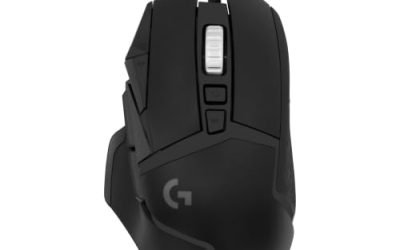
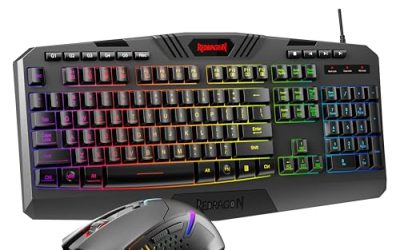
The real decision behind a quiet gaming combo is not whether the keyboard looks silent in a photo. It is whether late-night key presses and mouse clicks stay soft enough that nobody in the next room wakes up, while your movement keys and aim still respond the instant you press them. A board that feels mushy or a mouse that misses a flick costs you rounds, and a loud clicky set costs you peace at home.
This guide is for gamers who play after everyone else has gone to bed, students in shared dorm rooms, and anyone whose desk sits beside a sleeping partner or a baby. Each pick below is a keyboard and mouse combo chosen from its name and specifications on its Amazon listing, so you can compare membrane feel, connection type, layout, and mouse sensitivity on the same terms.
Top 3 picks at a glance


Quick Picks
As an Amazon Associate we earn from qualifying purchases
| Product | Best for | Key spec from title |
|---|---|---|
| Redragon S155-PRO Wireless Gaming Keyboard and Mouse Combo | Multi-device gaming with a compact wireless set | 75 percent quiet rechargeable membrane keyboard and 12800 DPI mouse |
| Redragon S101-3 PRO Gaming Keyboard and Mouse Combo | First wired gaming setup with RGB lighting | RGB backlit keyboard and 3200 DPI programmable mouse |
| MageGee GT838 Gaming Keyboard and Mouse Combo | Full-size wired gaming on a shared desk | 104-key RGB backlit quiet keyboard with anti-ghosting |
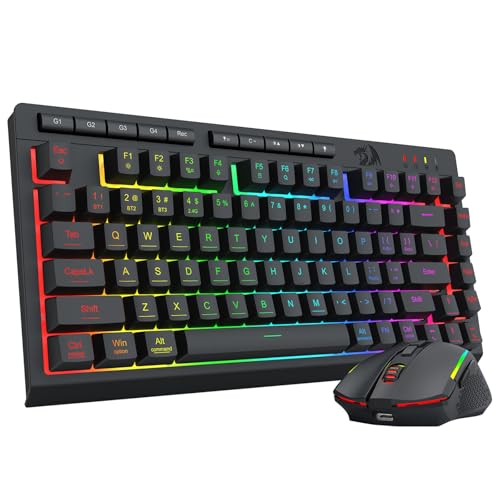
| RedThunder K84 Wireless Gaming Keyboard and Mouse Combo | Small wireless desk with a light mouse | 75 percent 84-key keyboard and 3200 DPI honeycomb mouse |
| Logitech MK295 Silent Wireless Mouse and Keyboard Combo | Quietest typing and clicking for late-night sessions | SilentTouch technology with 90 percent less noise |
How to Choose
Start With the Switch Type, Not the Lighting
Quiet gaming combos almost always use membrane keys rather than clicky mechanical switches, and that single choice shapes most of the sound you hear. Membrane keys press down on a soft rubber layer, so each keystroke lands with a muted thud instead of a sharp click. A board described as membrane or quiet membrane suits shared rooms far better than a board built around loud tactile switches. Check the listing for the switch description before you look at lighting modes, because no lighting setting can quiet a loud switch. If the listing never names a mechanical switch, and calls the keys membrane, that is the sound profile you want for night play.
Match the Mouse Sensitivity to the Games You Play
Mouse sensitivity decides how far your aim moves for the same hand movement, so it matters as much as keyboard feel. A mouse that steps through several sensitivity levels lets you use a low setting for careful aiming in shooters and a higher setting for fast turns in action games or quick movement across a wide monitor. Look for the highest sensitivity figure and the number of steps on the listing, and check whether the steps change with a dedicated button or through software. A combo whose mouse tops out at 3200 DPI covers most casual and mid-level play, while a mouse reaching 12800 DPI gives competitive players finer control across more sensitivity steps.
Choose Wired, Wireless, or Tri-Mode for Your Desk
Connection type decides cable clutter, charging habits, and how the combo behaves when a battery runs low. A wired combo never needs charging and stays ready whenever the computer is on, which suits a fixed desk where cables can be routed out of the way. A wireless combo keeps the desk clear and works well for a couch or a shared table, but it needs regular charging or fresh batteries. A tri-mode set that connects through Bluetooth, a 2.4G receiver, and a USB-C cable gives you the most flexibility, because you can switch to a cable mid-session if the wireless link drops or the battery runs down.
Check Layout and Battery Life Before You Commit
Layout decides whether the keys you need are actually on the board. A full-size combo keeps the number pad and dedicated media keys, which helps games with many keybinds and players who also work at the same desk. A 75 percent board drops the number pad but keeps arrow keys, which frees mouse room on a small desk without losing the keys most games use. For wireless sets, read the battery figures on the listing and note whether they assume the lighting is on or off, because backlighting shortens runtime sharply. A keyboard rated for hundreds of hours with lighting off may last only a fraction of that with RGB running.
The 5 Best Options
Redragon S155-PRO Wireless Gaming Keyboard and Mouse Combo
This Redragon set suits gamers who want one quiet combo for a PC, a Mac, and a tablet without swapping cables between devices. The 75 percent membrane keyboard keeps arrow keys while dropping the number pad, so the mouse gets more room on a small desk. Both the keyboard and the mouse connect through Bluetooth 5.0, a shared 2.4G receiver, or a USB-C cable, which means a dead battery never ends a session outright. The mouse reaches high sensitivity in software, so careful aiming and fast turns are both available from the same hand.
Specs
- 75 percent quiet membrane keyboard with RGB backlighting
- Tri-mode connection: Bluetooth 5.0, 2.4G wireless, and USB-C wired
- Keyboard battery: 4000mAh, rated up to 50 hours with RGB on and 300 hours with RGB off
- Mouse battery: 700mAh rechargeable
- Mouse sensitivity: up to 12800 DPI in software, with 5 preset DPI steps
- Mouse polling: 125 to 1000Hz in software
- 7-button mouse with macro support through software
- RGB lighting with 8 effects and 6 DIY modes
- Compatible with Windows, Mac, tablet, phone, PS, and Xbox
Best for: Gamers who switch between several devices and want a compact, quiet wireless set.
Watch out for: The listing size field says TKL while the title says 75 percent, so confirm the exact footprint against your desk before ordering.
Redragon S101-3 PRO Gaming Keyboard and Mouse Combo
This Redragon wired set suits players building a first gaming desk who want RGB lighting, a wrist rest, and a programmable mouse in one box. The membrane keyboard stays quieter than a clicky mechanical board, which helps during late sessions in a shared room, and the integrated wrist rest supports long sessions without adding a separate accessory. The mouse adjusts through four sensitivity steps, so you can slow down for aiming and speed up for menu navigation. A dedicated Windows key lock stops an accidental press from pulling you out of a game at the worst moment.
Specs
- 114-key RGB backlit membrane keyboard with 7 lighting modes and 4 brightness levels
- 25-key anti-ghosting for conflict-free key presses during fast input
- 10 dedicated multimedia keys plus 12 additional FN multimedia keys
- Integrated wrist rest and spill-resistant keyboard design
- Windows key can be disabled for gaming
- Wired gaming mouse up to 3200 DPI, adjustable at 800, 1600, 2400, and 3200 DPI
- Mouse with 6 buttons, 5 programmable through software, and weight tuning set
- Red backlit mouse with 30G acceleration
- Compatible with Windows 10, 8, 7, Vista, and XP, with limited Mac OS keyboard support
Best for: New gamers who want a complete wired RGB setup with a wrist rest included.
Watch out for: The keyboard backlight is true RGB, but the mouse backlight is red only, so expect a single-color glow from the mouse.
MageGee GT838 Gaming Keyboard and Mouse Combo
This MageGee set suits gamers who need a full-size board with a number pad and want a quiet wired combo for a shared desk. The membrane keys keep typing and gaming sounds low, while the aluminum alloy top panel gives the deck a firm feel under fast key presses. Anti-ghosting across the board means simultaneous movement and ability keys register together during busy fights. The mouse steps through six sensitivity levels, each shown by a different LED color, so you can tell your current setting at a glance without opening any software.
Specs
- 104-key full-size keyboard with number pad and 12 multimedia function keys
- Quiet membrane switches under an aluminum alloy metal panel
- Anti-ghosting design across all keys
- RGB backlight with true RGB effects and 6 single-color modes, with glow on four sides
- FN plus arrow keys control backlight brightness and animation speed
- Wired USB 2.0 connection with plug-and-play setup
- Gaming mouse with 6 DPI steps: 600, 800, 1200, 1600, 2400, and 3200 DPI
- 7-color LED mouse with anti-skid scroll wheel
- Compatible with Windows, Linux, and Mac
Best for: Full-size wired gaming where a number pad and quiet membrane keys both matter.
Watch out for: The mouse lighting changes color with the DPI setting, so the glow you see is tied to sensitivity rather than a free color choice.
RedThunder K84 Wireless Gaming Keyboard and Mouse Combo

This RedThunder set suits gamers with a small desk who want a light mouse and a compact wireless board that still keeps arrow keys. The 84-key layout drops the number pad but keeps dedicated media keys, so the mouse has wide room to move without the board crowding the desk. The honeycomb mouse weighs about 65 grams, which helps during long sessions when a heavy mouse tires the wrist. Both parts recharge through USB-C and share one 2.4G receiver, so a single port covers the whole combo and there is no second dongle to lose.
Specs
- 75 percent wireless keyboard with 84 keys, including dedicated media keys and arrow keys
- 2.4G wireless connection through one shared USB receiver
- Keyboard battery: 1850mAh rechargeable; mouse battery: 500mAh rechargeable
- Listed runtime about 8 hours of continuous use with lighting enabled
- Auto-sleep after 2 minutes idle
- Honeycomb optical mouse, about 65 grams, up to 3200 DPI
- Rainbow backlight with 4 dynamic modes and 7 solid colors
- Keycaps rated for 10,000,000 keystrokes
- USB-C charging cable included
Best for: Compact wireless desks where a light mouse and a small board free up mouse room.
Watch out for: The listed runtime with lighting on is short, so plan on charging often or turning the backlight down during long sessions.
Logitech MK295 Silent Wireless Mouse and Keyboard Combo

This Logitech set suits gamers who care most about silence and want the quietest typing and clicking in this guide. SilentTouch technology cuts keyboard and mouse noise by 90 percent compared with a standard Logitech combo, while keeping the familiar feel of full-size keys. The full-size keyboard includes a number pad and eight shortcut keys, so games with many binds and everyday shortcuts both fit. Battery life is the other strength here: the keyboard runs for months on two AAA batteries and the mouse for months on one AA battery, with on and off switches to save power between sessions.
Specs
- SilentTouch technology for 90 percent less keyboard typing and mouse clicking noise
- Full-size keyboard with full numpad and 8 shortcut keys
- 2.4 GHz wireless connection with a 10 m range through a tiny USB receiver
- Keyboard battery life up to 36 months on 2 AAA batteries
- Mouse battery life up to 18 months on 1 AA battery
- On and off switches on both keyboard and mouse
- Spill-resistant keyboard with adjustable tilt legs
- Ambidextrous mouse with advanced optical tracking and 1000 DPI sensor
- Compatible with Windows 7, 8, 10 or later, and Chrome OS
Best for: Late-night and shared-room gaming where silence matters more than RGB lighting.
Watch out for: There is no backlight on this combo, so the keys are harder to read in a dark room without a desk lamp.
Which One Fits Your Situation
You Play Late at Night in a Shared Home
Pick the Logitech MK295 if silence is the deciding factor, because its SilentTouch design quiets both the keyboard and the mouse. The full-size layout keeps the number pad for games with many binds, and the long battery life means no charging cable on the desk. If you also want RGB glow for night play, the Redragon S155-PRO is the quieter lit alternative, with a membrane board and a wireless mouse that still keeps clicks soft.
You Want a Complete First Gaming Setup
Pick the Redragon S101-3 PRO if you are setting up a first gaming desk and want everything in one box. The wired connection needs no charging, the wrist rest is built in, and the RGB keyboard plus programmable mouse cover the features most new players look for first. The MageGee GT838 is the better pick if you need a full-size board with a number pad and prefer a metal panel under your hands.
Your Desk Is Small and the Mouse Needs Room
Pick the RedThunder K84 if a full-size board crowds your mouse hand. The 84-key layout keeps arrows and media keys while freeing a wide strip of desk, and the honeycomb mouse is light enough for long sessions. The Redragon S155-PRO fits the same small-desk situation with more connection choices, since it adds Bluetooth and a USB-C wired mode beside its 2.4G receiver.
You Switch Between a PC, a Console, and a Tablet
Pick the Redragon S155-PRO if your gaming moves between devices. Bluetooth 5.0, 2.4G, and USB-C cover a PC, a Mac, a tablet, and a console from the same set, and the large keyboard battery lasts far longer with the lighting off. The Logitech MK295 is the simpler choice if you only play on one computer and want months of battery life without any charging at all.
Common Mistakes
- Buying a clicky mechanical board for a shared room and only discovering the noise level on the first late-night session.
- Choosing a mouse by its highest sensitivity number alone, without checking how many steps it offers or how you switch between them.
- Picking a 75 percent board for games that rely on the number pad, then finding the keys you need are missing.
- Leaving RGB lighting on full brightness on a wireless combo and wondering why the battery runs down far sooner than the listing suggests.
- Assuming a combo with a quiet keyboard also has a quiet mouse, when the mouse clicks can be just as loud as the keys.
Frequently Asked Questions
Are membrane keyboards really quieter for gaming?
Yes, membrane keyboards are generally quieter than clicky mechanical boards because each key presses a soft rubber layer instead of a hard switch that snaps. The difference is clearest during fast typing and repeated key presses, which is exactly what gaming involves. Movement and ability keys still respond well through the key travel, so choose a combo whose listing calls the keyboard membrane or quiet membrane.
Does a quiet mouse matter as much as a quiet keyboard?
Yes, because mouse clicks happen constantly during play, from firing and looting to clicking through menus. A loud mouse click can carry just as far as a key press in a quiet room, especially late at night. Combos built around silent clicks keep both halves of the set soft, so check whether the quiet claim covers the mouse as well as the keyboard before you buy.
Is wireless fast enough for gaming, or should I stay wired?
Wireless through a 2.4G receiver is fast enough for most casual and mid-level gaming, and it keeps the desk free of cables. Wired still suits players who want zero charging and no chance of a battery running low mid-match. A tri-mode combo gives you both, since you can play wireless most of the time and switch to a USB-C cable whenever the battery runs low.
What should I check before ordering a quiet gaming combo?
Check the switch type, the mouse sensitivity steps, the layout, and the connection type. Confirm whether the number pad is present if your keybinds use it, and read the battery figures with the lighting setting in mind. Check system support for the mouse software too. Finally, measure your desk, because a full-size board with a wrist rest takes far more room than a compact set.
Related guides
More from Amazon
Programs that pair well with the guide above. Offers and eligibility are set by Amazon and may change.
Free shipping on eligible items, Prime Video and more. Eligible new members can start with a free trial.
Start a Prime free trialAd-free music streaming. Eligible new subscribers can start with a free trial.
Try Music Unlimited freeA Prime membership for ages 18-24 with a trial period. Eligibility is set by Amazon.
See Prime for Young AdultsAudiobooks and podcasts to listen to on the go. Eligible new members can start with a free trial.
Try Audible freeAs an Amazon Associate we earn from qualifying purchases.