For most buyers the best Ryzen 7 prebuilt gaming PC in this set is the Skytech King 95: it combines a Ryzen 7 9800X3D with an RTX 5070 Ti, 32GB of DDR5 6000, a 2TB drive and an 850W Gold power supply. Nothing else here matches that spec line. If that tier is out of reach, the RTX 5060-class machines with a Ryzen 7 8700F or 5700X are the sensible middle, and the lone budget option is a 1080p-only compromise. “Ryzen 7” covers chips from very different eras, so this guide reads each title line by line, flags wording that does not add up and shows how to size a power supply before you pay.
Our Top Picks

Top 3 picks at a glance
Nine Ryzen 7 prebuilts in one table
As an Amazon Associate we earn from qualifying purchases at no extra cost to you.




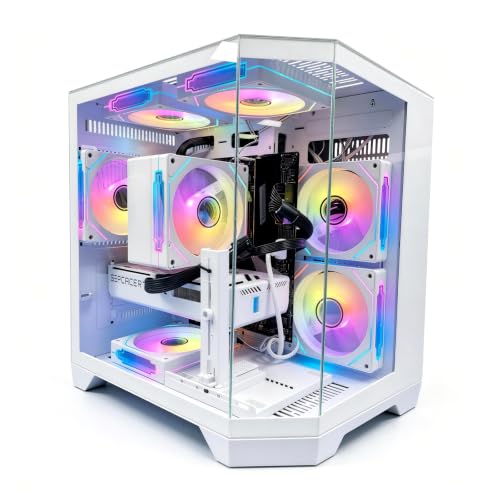


| Model | Key point from title | Price tier | Best for |
|---|---|---|---|
| Skytech King 95 | 9800X3D, RTX 5070 Ti, 32GB DDR5 | Premium | Top frame rates |
| KOTIN 9700X | RX 9070 XT 16GB, 32GB DDR5, 360mm cooler | Premium | 1440p, some 4K |
| Skytech Rampage | 7700, RX 9070 XT, 16GB DDR5 | Premium (price not shown) | Upgrading RAM later |
| CyberPowerPC Gamer Master | 8700F, RTX 5060 Ti 8GB, code GMA2900A3 | Mid-range | Traceable configuration |
| KOTIN 8700F | RTX 5060 Ti 8GB, WiFi 7, 650W Gold | Mid-range | 1080p and 1440p |
| LXZ 8700F | RTX 5060, 16GB DDR5, 650W | Mid-range | Lower-cost DDR5 |
| YAWYORE | 5700X, RTX 5060, 32GB DDR4 | Mid-range | Memory-heavy multitasking |
| LXZ 5700X | RTX 5060, 16GB DDR4, 650W | Mid-range | Lowest RTX 5060 entry |
| WIWB | “R7 4700LE”, RX 6500 XT 4GB | Budget | 1080p esports |
Premium and X3D builds
Skytech King 95 with Ryzen 7 9800X3D and RTX 5070 Ti
The title lists a Ryzen 7 9800X3D, RTX 5070 Ti, 32GB RAM, a 2TB Gen4 SSD, DDR5 6000, an 850W Gold ATX 3 power supply, a 360 ARGB liquid cooler and Wi-Fi 5. The X3D suffix marks AMD’s stacked-cache line, which generally leads in games limited by the processor. DDR5 6000 is a commonly recommended speed for current AMD boards. Expect it to be comfortable at 1440p, an assumption rather than a title claim. Wi-Fi 5 is the one dated detail; check for wired Ethernet. The title does not name the motherboard or case, so ask about free memory slots before relying on later upgrades.
Pros
- X3D processor with 32GB of DDR5 6000
- 850W Gold supply and 360 liquid cooler
- 2TB of storage out of the box
Cons
- Highest price tier in the set
- Wi-Fi 5 trails newer standards
Who it’s for: players chasing the strongest processor-limited frame rates with a PSU that already has headroom.
KOTIN Ryzen 7 9700X with RX 9070 XT 16GB
This listing shows a Ryzen 7 9700X, RX 9070 XT 16GB, 32GB DDR5, a 1TB SSD, a 360mm liquid cooler, WiFi 7, an 850W Gold PSU and an 11.3-inch smart display. The 9700X is a non-X3D chip, so it trails the King 95 in some games but costs less. “1440p 4K” is seller wording: we would read it as strong 1440p with 4K depending on the game and settings. The smart display is a novelty; check what it needs to run and whether it keeps working if the software is removed.
Pros
- 16GB of graphics memory and 32GB DDR5
- WiFi 7 and an 850W supply
Cons
- The display adds a part that may need software
- 1TB is thin next to 32GB of RAM
Who it’s for: buyers who want a big GPU and modern wireless without paying for X3D.
Skytech Rampage with Ryzen 7 7700 and RX 9070 XT
The Rampage pairs a Ryzen 7 7700 with an RX 9070 XT, 16GB of DDR5 5200, a 1TB NVMe drive, an 850W Gold ATX 3 PSU and Wi-Fi 5. No price appears in our data, so check the listing; we judge its tier by its parts. A strong card beside only 16GB at 5200 is the leanest memory setup in the premium group, and the title names no CPU cooler. Both are fixable, but only if the board has free slots, so ask.
Pros
- Strong graphics card and a named 850W Gold supply
- Memory can be expanded later if slots are free
Cons
- 16GB at 5200 is modest for this class
- No cooler named; Wi-Fi 5
Who it’s for: graphics-first buyers willing to add RAM.
Mid-range RTX 5060-class builds
CyberPowerPC Gamer Master (GMA2900A3) with Ryzen 7 8700F and RTX 5060 Ti
The title shows a Ryzen 7 8700F, RTX 5060 Ti 8GB, 16GB DDR5, a 1TB PCIe 4.0 SSD and “WiFi Ready” wording, plus a model code. That code identifies one exact configuration, useful for support and price comparison. The F suffix generally means no integrated graphics, which is fine with a discrete card. The 8GB of video memory is the compromise, and no PSU wattage appears in the title, which is the first question to put to the seller before you order.
Pros
- Model code makes the build traceable
- DDR5 and a PCIe 4.0 drive
Cons
- 8GB graphics memory; PSU not named
- “WiFi Ready” may not include an adapter
Who it’s for: shoppers who value an established brand and a verifiable parts list.
KOTIN Ryzen 7 8700F with RTX 5060 Ti 8GB
The core parts match the CyberPower listing, a Ryzen 7 8700F, RTX 5060 Ti 8GB, 16GB DDR5 and 1TB SSD, but this title adds WiFi 7, DLSS 4, ARGB cooling and a 650W Gold PSU, and pitches 1080p and 1440p. That pitch is realistic for an 8GB card. A 650W supply is fine for this build, yet leaves little room for a bigger GPU later. The cooler type is not named, and “DLSS 4” describes a feature of the card, not extra speed from the rest of the PC.
Pros
- PSU wattage and WiFi 7 are listed
- Realistic 1080p and 1440p positioning
Cons
- 650W limits a future GPU upgrade
- Cooler unspecified; 8GB video memory
Who it’s for: buyers who want the 5060 Ti tier with a disclosed power supply.
LXZ Ryzen 7 8700F with RTX 5060 and 16GB DDR5
This LXZ listing drops to an RTX 5060 but keeps the 8700F, 16GB DDR5 and 1TB SSD, adding six RGB fans, a 650W PSU and a port list of 7x USB 2.0 and 3x USB 3.0. Seven USB 2.0 ports are plentiful for peripherals, while three faster ports may feel tight with external drives. The title does not give the PSU efficiency rating, so ask for it, and treat the RTX 5060 as a 1080p-first card with some 1440p ability.
Pros
- DDR5 platform at a lower tier than the 5060 Ti builds
- Ten USB ports in total
Cons
- Only three faster USB ports
- PSU rating not stated
Who it’s for: budget-aware 1080p players who prefer DDR5.
YAWYORE Ryzen 7 5700X with RTX 5060 and 32GB DDR4
YAWYORE lists a Ryzen 7 5700X, RTX 5060, 32GB of DDR4, a 1TB NVMe drive, ARGB fans and WiFi plus Bluetooth. Thirty-two gigabytes is the best memory figure among the mid-range builds. DDR4 hints at an older platform whose upgrade path ends sooner, and the title names no PSU or cooler. A stray double comma suggests a rushed listing, so confirm details with the seller. Its price tier sits just above the LXZ 5700X, and the extra money mostly buys the second 16GB of RAM.
Pros
- 32GB of RAM at this tier
- Eight-core processor and RTX 5060
Cons
- DDR4 platform limits upgrades
- PSU and cooler not named
Who it’s for: multitaskers who prefer capacity over a newer platform.
LXZ Ryzen 7 5700X with RTX 5060 and 16GB DDR4
The title shows a Ryzen 7 5700X, RTX 5060, 16GB DDR4 3200, a 1TB NVMe drive, a 650W PSU and six ARGB fans, and describes the chip as 8-core, 16-thread. The wording “GDDR7” sits beside the CPU thread count, so it is ambiguous whether it describes the graphics memory; check the listing. It is the lowest-priced RTX 5060 option here, but it matches the YAWYORE on platform while giving up half the RAM. Adding a second memory kit later is the obvious fix, assuming a free slot.
Pros
- Lowest RTX 5060 entry price
- 650W supply is named
Cons
- 16GB DDR4 and an older platform
- Ambiguous GDDR7 wording
Who it’s for: cost-first buyers who can add RAM later.
Budget runner-up
WIWB Ryzen 7 “R7 4700LE” with RX 6500 XT 4GB
The WIWB title lists “Ryzen 7”, an “R7 4700LE”, an RX 6500 XT 4GB, 16GB DDR4, a 512GB SSD and WiFi 6, aimed at 1080p, streaming, esports and home office use. We could not match “4700LE” to a mainstream retail Ryzen 7 from the title alone, so ask the seller exactly what it is. A 4GB card suits esports and older games rather than recent releases. It is a runner-up for gaming. Its low price may suit a second PC for a child or a desk setup, provided the processor question is answered.
Pros
- Budget price tier
- WiFi 6 and a sensible esports target
Cons
- 4GB video memory; unusual processor name
- 512GB drive and DDR4
Who it’s for: students and esports players on a strict budget.
How we picked these
We ordered the nine listings by the parts each title actually names: processor, graphics card, memory, storage, power supply and cooling. Our basis is published specifications, manufacturer documentation and buyer reviews. Nobody on the team used or measured these units. Titles are written by sellers, so performance comments are general expectations, not results, and numbers beyond a title are labeled estimates. Price tiers are relative within this set. Where a title leaves a part unnamed, we say so instead of guessing.
What to look for in a Ryzen 7 prebuilt
X3D or not
X3D chips carry extra cache that generally helps CPU-limited games, and they cost more. Non-X3D parts such as the 7700, 8700F and 9700X still game well when the graphics card is the limit, which is the case in most 1440p and 4K scenes. Spend on the card first, then on the processor tier. The X3D premium is easiest to justify at high refresh rates or in simulation-heavy titles.
GPU pairing and video memory
Pair the processor with a card of similar ambition. Eight gigabytes of video memory is workable for 1080p and many 1440p games but can run tight at high textures; 16GB gives breathing room. Here, only the two RX 9070 XT builds list 16GB cards; the rest are 8GB or 4GB.
PSU headroom, worked out
This is an estimate with stated assumptions, not a listing fact. Assume a mid-class card draws about 180W, a high-end card about 300W, the processor 65W to 120W, and the rest of the system 100W, then add 30% for spikes and aging. Mid-class: 180 + 90 + 100 = 370W, times 1.3 is about 480W, so 650W has room. High-end: 300 + 120 + 100 = 520W, times 1.3 is about 676W, so 850W is the safer choice. Always check the card maker’s recommendation.
RAM, platform and cooling
DDR5 platforms outlast DDR4 ones for upgrades, and 32GB suits streaming. A 360mm liquid cooler suits the hottest chips, but a decent air cooler is enough for an 8700F or 5700X. If you need portability instead, see our Ryzen 9 9955HX laptop picks or the Legion Pro 5 Ryzen 7 8745HX write-up.
Reading the spec line
Look for what is missing. A good title names the PSU wattage and rating, the cooler, the RAM speed and the drive type. Missing items are questions for the seller. Also check the motherboard form factor, the number of free M.2 slots and the warranty length, because those decide how far the PC can grow. Wi-Fi standard and front-panel ports are the last details to confirm.
Mistakes buyers make
- Choosing the CPU label over the graphics card; for most games at 1440p and above, the card sets the ceiling.
- Trusting “4K” or “DLSS 4” in a title as proof of performance at that resolution.
- Ignoring a missing PSU rating on a build with a power-hungry card.
- Buying DDR4 and expecting a long upgrade path; the platform may cap out sooner than the price suggests.
- Skipping unusual names such as “4700LE” instead of asking what the chip is, or accepting a build with one memory stick when two sticks are normally better.
- Forgetting the monitor: a high-end card on a basic 60Hz screen wastes much of the spend, so budget for a matching display.
- Assuming every Ryzen 7 is the same; the 4700LE, 5700X and 9800X3D sit generations apart.
Verdict
Pick the Skytech King 95 if you want the strongest all-round Ryzen 7 prebuilt here. The KOTIN 9700X with an RX 9070 XT is the better value if you prefer a bigger graphics card over X3D. For most budgets, the KOTIN or CyberPowerPC RTX 5060 Ti builds are the balanced middle, and the YAWYORE suits those who want 32GB of memory today. Treat the WIWB as a runner-up for esports only, and confirm its processor and return terms before buying.
Related guides
- Gaming Laptop Battery Draining While Plugged In Fix
- Graphics Cards For Low Wattage Power Supplies
- How To Stop Laptop Thermal Throttling In Software
Frequently asked questions
Is a Ryzen 7 enough for gaming?
Yes. A Ryzen 7 handles current games with headroom for streaming and background apps, and in most 1440p and 4K scenes the graphics card is the limit. Pick the generation with care, since a 5700X and a 9800X3D behave very differently, and match the processor tier to the card so that neither sits idle.
Is X3D worth the extra cost?
It helps most in games limited by the processor, usually at lower resolutions and high frame rates. If you play at 1440p or 4K with demanding settings, the extra money is often better spent on a stronger graphics card. Check the listing for the exact chip, because not every Ryzen 7 here carries the extra cache.
How much power supply do I need?
It depends on the card. As a rough estimate, add the card, processor and about 100W for the rest, then 30% headroom. A 650W unit suits RTX 5060-class parts, while a 9070 XT or 5070 Ti is better with 850W. Check the card maker’s guidance and prefer a unit with a stated rating from a named brand.
Are DDR4 builds a bad choice?
Not automatically, and the answer depends on your plans. A 5700X with 32GB of DDR4 still games well, but the platform has a shorter upgrade path than DDR5. If you plan to upgrade for years, favor the DDR5 builds, and check whether the 32GB figure is two sticks or four.
What does a model code like GMA2900A3 tell me?
It identifies one exact configuration, so you can check parts, compare prices and ask support about that exact build. The same product name can hide different parts under different codes, so copy the code from the listing. If a listing shows no code, ask the seller for a full parts list.