The best gaming chair cushions for comfort and support are usually a medium-firm memory-foam seat cushion paired with a breathable, adjustable lumbar cushion; choose gel when heat is your main problem and a thinner design when desk height is already tight.
As an Amazon Associate we earn from qualifying purchases at no extra cost to you.


Our Top Picks
 Widened Gaming Chair Cushion Set with Lumbar Support23.6" x 19.7" x 2.8"23.62 x 19.69 x 2.8 inchesCheck on Amazon


Top 3 picks at a glance
Quick comparison: memory foam vs. gel vs. lumbar cushions
| Cushion type | Best for | Useful thickness | Main advantage | Watch out for |
|---|---|---|---|---|
| Memory foam seat cushion | Long sessions and pressure relief | 2.5–4 inches | Contours around the hips and spreads load | Can retain heat and raise sitting height |
| Gel or gel-infused cushion | Warm rooms and users who dislike heat buildup | 1.5–3 inches | Redistributes pressure with a cooler initial feel | May feel firmer and can bottom out if too thin |
| Lumbar support cushion | Lower-back support and posture correction | 3–6 inches at the thickest point | Fills the gap between your back and the chair | Too much forward push can cause hip or back discomfort |
| Wedge or coccyx cushion | Pelvic positioning and tailbone pressure | 2–4 inches, often sloped | Tilts the pelvis and reduces direct coccyx contact | Changes your hip and knee angles more than a flat cushion |
How to choose the best gaming chair cushion for your setup
Start with the problem you want to solve rather than the material printed on the label. A cushion cannot compensate for a seat that is too high, a desk that is too low, or a backrest that does not support your torso. Use the following decision guide.
| Your situation | Recommended design | Target specification |
|---|---|---|
| Tailbone pressure after 60–90 minutes | Contoured memory-foam coccyx cushion | 3–4 inches, U-shaped rear cutout, medium firmness |
| Back of thighs feels compressed | Sloped wedge cushion | 2–4-inch rear height with a gradual front taper |
| Lower back feels unsupported | Separate lumbar cushion | Adjustable straps and 3–5-inch lumbar thickness |
| Chair feels hot during summer or long sessions | Ventilated gel or thin gel-foam hybrid | Perforated surface, 1.5–3 inches thick, removable mesh cover |
| Desk and armrests are already close to the correct height | Low-profile cushion | 1.5–2.5 inches compressed height |
| Firm racing-style chair feels too hard | Medium-firm memory foam | 2.5–3.5 inches with a flat or mildly contoured base |
Memory foam: the best all-round choice for pressure relief
Memory foam is the strongest default choice for most PC gamers because it spreads pressure over a wider area. Instead of concentrating your weight at the tailbone and sitting bones, it compresses around those points and supports the surrounding thighs and hips.
Look for medium-firm foam rather than the softest available option. Very soft foam may feel comfortable for the first few minutes but can compress until the base of the chair becomes noticeable. A cushion around 2.5–4 inches thick is generally sufficient for an adult chair, while heavier users may benefit from a denser core rather than simply adding more height.
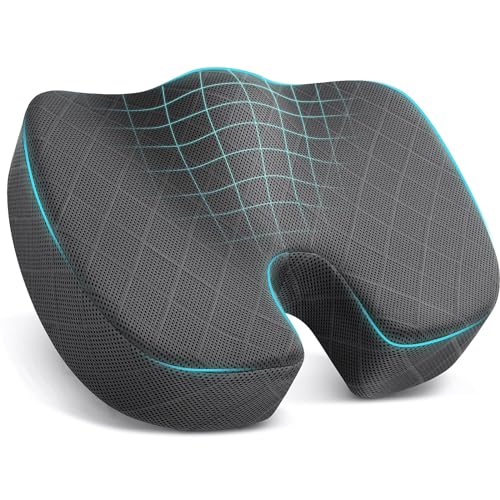
Contour matters as much as thickness. A U-shaped rear cutout can reduce pressure around the coccyx, but an excessively deep cutout may leave the pelvis unstable. A gently sloped front edge is useful because it reduces the chance that the cushion presses into the underside of your thighs.
The main memory-foam drawback: heat
Traditional viscoelastic foam holds warmth, particularly when covered by a thick polyester or faux-leather case. Improve airflow by choosing open-cell or ventilated foam, a perforated cover, and a fabric surface such as mesh, cotton blend, or moisture-wicking polyester. A breathable cover will not make dense foam cool like an office fan, but it can prevent sweat from becoming trapped between you and the cushion.
Gel cushions: cooler initial feel, different support behavior
Gel cushions are attractive if your chair becomes uncomfortable because of heat rather than pressure. Gel can distribute load across a grid or honeycomb structure, allowing air to move through some of the open areas. Gel-infused foam combines this effect with the contouring of memory foam.
Do not judge a gel cushion by its top layer alone. A thin gel sheet over soft foam may feel cool when you first sit down but provide little meaningful support. For long sessions, check the total construction: a supportive foam base, a gel layer that cannot shift, and enough thickness to keep your body from reaching the chair pan.
Gel is often a better choice than thick memory foam when your chair already fits your legs correctly. Its lower profile can preserve your original seat height and armrest alignment. However, some gel grids feel firmer or less stable when you change position frequently, which may be distracting during competitive games.
Lumbar cushions: support the curve, not the entire back
A lumbar cushion should fill the natural gap between your lower back and the chair backrest without forcing your torso too far forward. The thickest point usually belongs around the belt-line area, not directly beneath the shoulder blades.
Adjustability is more important than an impressive maximum thickness. A cushion with two straps lets you move the support up or down until it contacts the inward curve of your lower back. Start with the center of the cushion approximately level with your waistband, then make small changes while keeping your shoulders relaxed.
For a chair with a pronounced built-in lumbar mechanism, choose a thinner external cushion, usually 2–3 inches at its thickest point. For a flat office-style backrest, a fuller 3–6-inch cushion may be appropriate. Do not combine a thick external cushion with aggressive built-in lumbar support without checking whether your pelvis is being pushed forward.
Thickness, desk height, and a practical fit calculation
Adding a seat cushion changes more than comfort. It raises your hips, knees, elbows, and eyes. Before buying, measure the cushion’s compressed height rather than relying only on its uncompressed specification.
For example, suppose your current chair seat is 18 inches from the floor and a cushion compresses to 3 inches. Your effective seat height becomes:
18 inches + 3 inches = 21 inches.
If your feet were already flat with your knees near a 90-degree angle, this extra height may leave your heels floating. You could lower the chair by 2 inches, but that may make your armrests too low relative to a 30-inch desk. In that case, a 1.5–2-inch cushion or a footrest is more suitable than a thicker model.
Use this order when checking fit:
- Set the chair so your feet are fully supported and your knees are roughly level with or slightly below your hips.
- Check that the cushion does not press into the backs of your thighs.
- Keep your elbows near 90 degrees when your hands rest on the keyboard and mouse.
- Adjust the monitor so you are not leaning forward to see over the added cushion height.
Cover materials and durability
The cover is the part you touch every day, so its construction often determines whether a cushion remains pleasant after months of use. A zipper-removable cover is preferable because it can be washed separately and replaced if the foam remains sound.
- Mesh: best airflow, but cheaper mesh can snag on chair edges or lose tension.
- Polyester knit: a practical balance of stretch, drying speed, and durability.
- Cotton blend: comfortable and relatively breathable, but more likely to absorb sweat.
- Faux leather: easy to wipe clean, but warm and prone to cracking if exposed to heat or repeated flexing.
- Velour or plush fabric: soft and quiet, but less suitable for hot rooms and harder to keep dry.
Inspect the zipper placement, stitching around the corners, and the underside’s grip material. A non-slip base or straps prevent constant repositioning, which can stretch seams and expose the cushion to uneven wear. Avoid washing foam unless the manufacturer specifically permits it; usually, only the cover should go in the laundry.
How to set up a new cushion without creating new discomfort
- Use it for 30 minutes first. Check pressure, heat, and whether your thighs remain supported.
- Adjust the chair height. Lower the seat if possible while keeping both feet flat.
- Reposition the lumbar cushion. Move it in small increments until it supports the lower-back curve without pushing your chest forward.
- Check your armrests. Raise or lower them so your shoulders stay relaxed while gaming.
- Reassess after two hours. Numbness, tingling, or increasing pain indicates a fit problem, excessive firmness, or unsuitable thickness rather than a normal break-in period.
Frequently asked questions
Can I use a seat cushion and a lumbar cushion at the same time?
Yes, you can pair a seat cushion with a lumbar cushion, as long as the lumbar support does not push your torso too far forward. Position it at the inward curve of your lower back and check that your shoulders stay relaxed. If your chair already has pronounced lumbar support, choose a thinner external cushion and make sure the combined support does not push your pelvis forward.
What does a U-shaped cutout do in a seat cushion?
A U-shaped rear cutout can reduce pressure around the coccyx by leaving space beneath the tailbone. Choose a cushion with a medium-firm feel and a cutout that does not leave your pelvis unstable. If the back of your thighs feel compressed, a sloped front edge may also help reduce pressure there.
How can I tell whether a cushion is too thick?
A cushion may be too thick if it raises you so your feet no longer rest flat, presses into the backs of your thighs, or disrupts your armrest alignment. Check its compressed height, not only its uncompressed thickness. If you cannot lower the chair while keeping a suitable desk and armrest position, consider a low-profile cushion or a footrest.
Should I wash the foam cushion or just its cover?
Usually, wash only the removable cover, not the foam. The article advises washing foam only if the manufacturer specifically permits it. A zipper-removable cover is useful because it can be washed separately, while a non-slip base or straps can help prevent the cushion from shifting and wearing unevenly.
Is numbness or tingling normal while getting used to a new cushion?
No; numbness, tingling, or increasing pain indicates a fit problem, excessive firmness, or unsuitable thickness rather than a normal break-in period. Try adjusting the chair height and cushion position, and check whether your feet and thighs remain supported. If discomfort continues, the cushion may not suit your setup.
Bottom line
For most long gaming sessions, choose a 2.5–4-inch medium-firm memory-foam seat cushion with a breathable, removable cover and a non-slip base. Choose a gel or gel-foam hybrid when heat is the deciding issue, and choose an adjustable lumbar cushion when your seat is comfortable but your lower back lacks contact. The best gaming chair cushions are not necessarily the thickest; they are the ones that relieve pressure while preserving your feet, knees, elbows, and monitor position.









