The name “Yoga Slim 7i Aura Edition” appears in seven listings in this set, and they describe at least five different laptops. Some are 15.3-inch, some are 14-inch. Some name a Core Ultra 7, one names a Core Ultra 5. Memory runs from 16GB to 32GB, displays from “2.8K” to “FHD+” to “WUXGA”, and one listing is titled only “Lenovo Laptop | Win 11 Home”. Before you can judge the Aura Edition, you have to decide which Aura Edition you mean. This page sorts the listings so you can.
Nobody on the team used or measured these units. The comparison relies on listing titles, manufacturer documentation and the way buyers generally discuss thin-and-light laptops. Numbers that go beyond a title are estimates, and their assumptions are shown.
A point worth stating up front: this is a productivity laptop, not a gaming one. It sits on a gaming-focused site because many readers ask whether a slim machine can pull double duty. The honest answer is that it can handle light games and everything else, but a dedicated gaming laptop with an RTX-class graphics card is a better fit for demanding titles.
Our Top Picks
 Lenovo Yoga Slim 7i Aura Edition w/Ultra 716GB | 1TB SSD (No USB Bundle)14 x 10 x 1 inches5.48 PoundsCheck on Amazon
 Lenovo Yoga Slim 7i Copilot+ PC 15.3" 3K16GB RAM|1TB SSD13.5 x 9.4 x 0.6 inches3.4 PoundsCheck on Amazon
 Lenovo Slim 7i with Intel Core Ultra 732GB RAM | 1TB SSD12.28 x 8.63 x 0.55 Inches2.8 PoundsCheck on Amazon
The seven listings at a glance
Lenovo Yoga Slim 7i Aura Edition w/Ultra 7, 16GB RAM, 1TB SSD, 2.8K Touch | 15.3" 2.8K 500nit 120Hz Touchscreen Copilot+ Laptop with Intel Core Ultra 7 256V Processor, Backlit Keyboard, Windows 11 Pro


As an Amazon Associate we earn from qualifying purchases. Product prices and availability are accurate as of the date/time indicated.
Lenovo Yoga Slim 7i Copilot+ PC 15.3" 3K Touch Display, Ultra 7, 16GB/1TB | Aura Edition, Intel Evo 8-Core Processor 48 tops, Backlit KB, 2 Thunderbolt 4, FDH IR Webcam, WiFi 7, Win 11 Home


As an Amazon Associate we earn from qualifying purchases. Product prices and availability are accurate as of the date/time indicated.
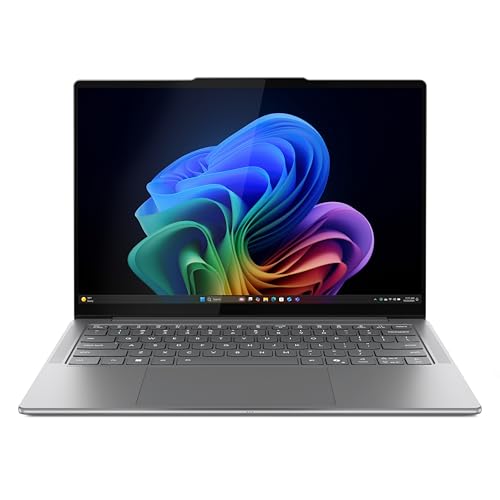
Lenovo Slim 7i Aura Edition - 2025 - Copilot+ PC - Core Ultra 7 Processor 256V - 14" WUXGA OLED Display - 16 GB Memory - 1 TB Storage - Luna Grey


As an Amazon Associate we earn from qualifying purchases. Product prices and availability are accurate as of the date/time indicated.

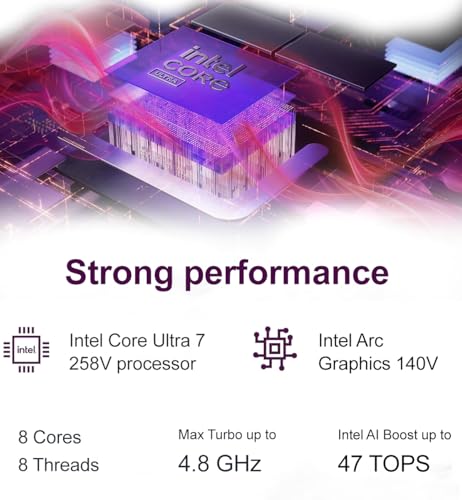
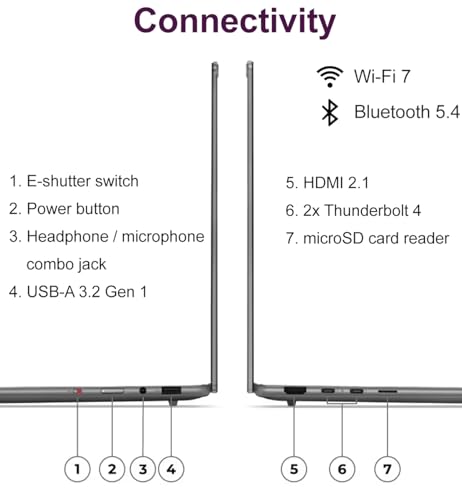
Lenovo Slim 7i Aura Edition Laptop, Intel Ultra 7 258V, 32GB DDR5, 1TB SSD | 14" FHD+ OLED Touchscreen, Arc 140V GPU, AI PC, Ultra-Thin, 17-Hr Long Battery Life, 5MP IR Webcam, Wi-Fi 7, Win 11 Pro




As an Amazon Associate we earn from qualifying purchases. Product prices and availability are accurate as of the date/time indicated.
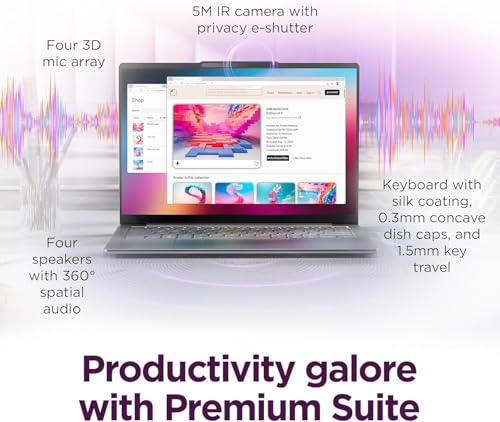
Lenovo Slim 7i Aura Edition, Core Ultra 5, 14” OLED, 16GB, 1TB, Win 11 Pro | 14” Touchscreen 400nits Display, with Intel Core Ultra 5 226V Processor, 16 GB LPDDR5X Memory, Wi-Fi 7, and 5MP RGB+IR Camera




As an Amazon Associate we earn from qualifying purchases. Product prices and availability are accurate as of the date/time indicated.
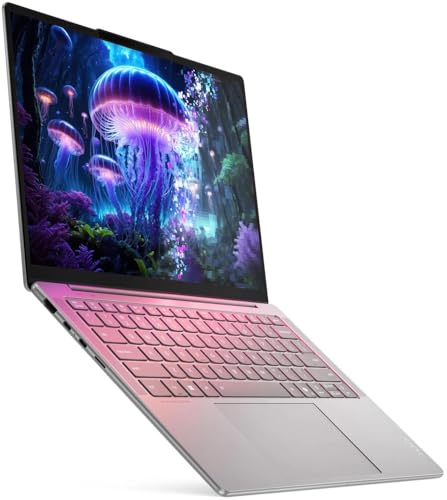
Lenovo Slim 7i with Intel Core Ultra 7 258V, 14” OLED Touchscreen, 32GB | LPDDR5X-8533MT/s Memory, 1TB SSD, 100% DCI-P3, 5MP RGB+IR Camera, Aura Edition, Copilot+ PC, Wi-Fi 7, Windows 11 Pro
As an Amazon Associate we earn from qualifying purchases. Product prices and availability are accurate as of the date/time indicated.

Lenovo Laptop | Win 11 Home

As an Amazon Associate we earn from qualifying purchases. Product prices and availability are accurate as of the date/time indicated.
The table lists only facts that appear in each title. Spec claims in titles are seller claims. “Price tier” is relative within this set of seven, based on the order of the listed prices, and is not a statement about the market.
| Model | Key points from the title | Price tier | Best for |
|---|---|---|---|
| Yoga Slim 7i Aura Edition, 15.3″, Ultra 7 256V (lead) | 16GB RAM, 1TB SSD, 2.8K 500-nit 120Hz touchscreen, Windows 11 Pro, Copilot+ PC | Budget | Buyers who want the biggest screen and a stated 120Hz refresh |
| Yoga Slim 7i, 15.3″ 3K touch, Ultra 7 (third-party seller) | 16GB/1TB, Intel Evo, 48 TOPS claim, 2 Thunderbolt 4, WiFi 7, Windows 11 Home | Budget | Buyers who prefer an explicit port and wireless list |
| Slim 7i Aura Edition, 14″ WUXGA OLED, Ultra 7 256V | 16GB, 1TB, Copilot+ PC, Luna Grey | Mid-range | Buyers who want a compact OLED laptop |
| Slim 7i Aura Edition, 14″ FHD+ OLED touch, Ultra 7 258V | 32GB DDR5, 1TB, Arc 140V GPU, 5MP IR webcam, Wi-Fi 7, 17-hour battery claim, Windows 11 Pro | Premium | Buyers who want the most memory and a battery claim |
| Slim 7i Aura Edition, 14″ OLED touch, Core Ultra 5 226V | 16GB LPDDR5X, 1TB, 400 nits, Wi-Fi 7, 5MP RGB+IR camera, Windows 11 Pro | Budget | Buyers who want the lowest entry cost with OLED |
| Slim 7i, 14″ OLED touch, Ultra 7 258V, 32GB | LPDDR5X-8533, 1TB, 100% DCI-P3, 5MP camera, Copilot+ PC, Wi-Fi 7, Windows 11 Pro | Mid-range | Buyers who care about color coverage and memory |
| “Lenovo Laptop | Win 11 Home” | The title names only the brand and operating system | Premium | No one, until the seller supplies a real spec list |
Who the lead listing suits, and who should skip it
Yoga Slim 7i Aura Edition, 15.3-inch, Ultra 7 256V (the lead listing)
The lead listing is for someone who wants a large, bright, high-resolution touchscreen in a slim laptop. It names a Core Ultra 7 256V, 16GB of RAM, a 1TB SSD, a 15.3-inch panel described as 2.8K with 500 nits and a 120Hz refresh rate, Windows 11 Pro and a backlit keyboard. For students, remote workers, writers and anyone who lives in spreadsheets and video calls, that is a coherent package. The 15.3-inch size offers extra room for two windows side by side, and a 120Hz panel makes scrolling and pen or touch input feel smoother.
It also suits people who like to keep a single laptop for years and are happy with the memory it ships with. Sixteen gigabytes covers most office, browsing and creative work without strain.
Skip it if: you want to play demanding games at high settings, because the title names no dedicated graphics card; you need to carry the laptop everywhere and want the smallest size, in which case a 14-inch listing is a better starting point; or you expect to expand memory later, because thin laptops with LPDDR5X-class memory usually solder it down. If you want a gaming machine from a similar brand, look at the Lenovo gaming pages linked later in this review.
What the title says, and what it does not
The lead title is dense, but it leaves out several items buyers care about.
It states: the Intel Core Ultra 7 256V processor, 16GB of RAM, a 1TB SSD, a 15.3-inch 2.8K touchscreen at 500 nits and 120Hz, a backlit keyboard, Copilot+ PC branding and Windows 11 Pro.
It does not state:
- The exact resolution behind “2.8K”. Sellers use “2.8K” and “3K” loosely, and the second 15.3-inch listing says “3K”. They may be the same panel, so compare the pixel counts on the manufacturer’s page.
- The panel technology for the 15.3-inch listing. The 14-inch listings say OLED; the lead does not.
- Weight, battery capacity and charger wattage.
- Port selection. Only the second listing names its ports (two Thunderbolt 4).
- Whether the memory is soldered.
- Warranty terms and who covers them. The second listing is sold under a third-party seller name rather than the manufacturer’s, and so is the 32GB 258V listing in the Premium tier.
Copilot+ PC branding and TOPS figures are marketing labels attached to the processor’s neural engine. They matter only if you use software that takes advantage of it. For ordinary office use, memory, display quality and battery life will be more noticeable.
Questions to ask before you buy
- Which exact model code is this, and does Lenovo’s own page list the same processor, memory and screen?
- Is the display OLED, and what is the real resolution?
- Is the memory soldered, and is 16GB enough for my work in three years?
- Which seller ships it, and who honors the warranty?
- What is the weight with the charger?
- How do lower-rated buyers describe battery life, fan noise and the keyboard?
- Do I need a touchscreen, or would a non-touch model be cheaper and lighter?
The other six listings, compared
These are the other listings in the set, each with its own trade-off. Most are 14-inch OLED models, so they trade screen area for portability.
Yoga Slim 7i, 15.3″ 3K touch, from a third-party seller
This listing is the closest sibling to the lead. It names a 15.3-inch 3K touchscreen, an Ultra 7 processor, 16GB of RAM, a 1TB SSD, an Intel Evo label, a “48 tops” claim, two Thunderbolt 4 ports, an FHD IR webcam, Wi-Fi 7 and Windows 11 Home. The list of ports and wireless is more explicit than the lead title, which is useful. The catch is the seller: the brand field names a reseller rather than Lenovo, and the OS is Windows 11 Home rather than Pro.
- Pros: explicit ports and Wi-Fi 7; same memory and storage as the lead; budget price tier.
- Cons: third-party seller; Home edition instead of Pro; “3K” is not defined; processor model number is not given.
Question to ask: Does the reseller offer a clear return policy and a documented manufacturer warranty?
Slim 7i Aura Edition, 14″ WUXGA OLED, Ultra 7 256V
This listing moves to a 14-inch WUXGA OLED display, keeping the Ultra 7 256V, 16GB of memory and a 1TB drive, with Copilot+ PC branding. WUXGA usually means 1920×1200, so the panel is lower resolution than the lead’s 2.8K but is OLED and more compact. It is a good fit if you travel with the laptop and care about contrast for movies and photos.
- Pros: OLED named; compact size; same processor and storage as the lead; manufacturer-branded.
- Cons: mid-range price tier; no touch mention in the title; lower resolution than the 15.3-inch models; no refresh rate stated.
Question to ask: Is the touchscreen included, and what refresh rate does the OLED panel run at?
Slim 7i Aura Edition, 14″ FHD+ OLED touch, Ultra 7 258V, 32GB
The first of two 32GB listings names an Ultra 7 258V, 32GB of DDR5, a 1TB SSD, a 14-inch FHD+ OLED touchscreen, an Arc 140V GPU, a 5MP IR webcam, Wi-Fi 7, Windows 11 Pro and a 17-hour battery claim. It has the strongest list of features, and the highest price tier among the 14-inch models. The battery claim is a seller statement with no stated test conditions, so treat it as a ceiling.
- Pros: 32GB; Arc 140V named; touchscreen OLED; Wi-Fi 7.
- Cons: premium price tier; sold by a third party; battery claim is unverified; 32GB may be more than most need.
Question to ask: Do I need 32GB, or would the 16GB listing cover my work at a lower tier?
Slim 7i Aura Edition, 14″ OLED touch, Core Ultra 5 226V
This is the entry listing. It names a Core Ultra 5 226V, 16GB of LPDDR5X, a 1TB SSD, a 14-inch touchscreen OLED at 400 nits, Wi-Fi 7, a 5MP RGB+IR camera and Windows 11 Pro. Lower processor tier and brightness are the trade-offs. For everyday office, browsing and streaming, it is likely enough, and it keeps the OLED display and 1TB storage at the lowest price tier among the 14-inch models.
- Pros: lowest entry price in the set; OLED touch; 1TB; Pro edition.
- Cons: Ultra 5 tier; 400 nits is lower than the lead’s 500; 16GB only.
Question to ask: Will I work near windows or outdoors, where the lower brightness could matter?
Slim 7i with Ultra 7 258V, 14″ OLED touch, 32GB LPDDR5X-8533
The second 32GB listing names an Ultra 7 258V, LPDDR5X-8533MT/s memory, a 1TB SSD, a 14-inch OLED touchscreen with 100% DCI-P3 coverage, a 5MP RGB+IR camera, Wi-Fi 7, Copilot+ PC branding and Windows 11 Pro. The DCI-P3 claim is attractive for photo and video work, though it is a seller figure and should be matched to the maker’s documentation.
- Pros: 32GB; stated color coverage; named memory speed; mid-range price tier.
- Cons: the title omits the screen resolution, so confirm it; the color figure is a claim; weight unknown.
Question to ask: What is the panel resolution, and does the manufacturer list the DCI-P3 figure?
“Lenovo Laptop | Win 11 Home”
This listing is titled only with the brand and an operating system. It gives no processor, memory, storage or screen size, so there is nothing to compare or recommend. It sits at a high price tier in this set, which makes the missing detail more concerning. Do not buy it on this evidence; ask the seller for a full specification list and model code first, or choose a listing that discloses its configuration.
- Pros: none that the title supports.
- Cons: no specifications; unclear match to the Yoga Slim 7i name; price tier above most of the detailed listings.
Question to ask: What are the processor, memory, storage and screen, and is the model code listed on Lenovo’s site?
Where a slim laptop stops and a gaming laptop starts
If part of your reason for looking at this model is gaming, the gap is worth understanding. The Aura Edition listings emphasize thin design, OLED displays, battery life and AI branding. A gaming laptop emphasizes a dedicated graphics card, bigger cooling and a higher power budget. For a clearer idea of that class, the site has pages on the Lenovo Legion 5i, the Lenovo LOQ with an RTX 5050 and the Legion 5a with a 15.3-inch OLED display. They come from the same Lenovo family but serve a different job: more performance, more weight, and shorter time away from a wall outlet.
Buying checklist, with a worked example
| Spec concept | What to look for | Why it matters |
|---|---|---|
| Screen size and resolution | Exact pixel count and panel type | “2.8K” and “3K” are loose labels |
| Memory | 16GB for office use; 32GB for heavy multitasking | Often soldered on thin laptops |
| Processor tier | Core Ultra 5 versus Ultra 7 and the model suffix | Affects performance and battery |
| Ports | Thunderbolt 4 or USB-C count, HDMI, headphone jack | Thin laptops have few ports |
| Operating system edition | Home or Pro | Pro adds business features |
| Battery | Capacity in watt-hours on the maker’s page | Hour claims lack test conditions |
| Seller and warranty | Manufacturer or authorized retailer | Third-party listings vary |
Worked example: 15.3-inch versus 14-inch
Assumptions (estimates): both sizes use a 16:10 panel; “2.8K” means 2880×1800 on the 15.3-inch model; the 14-inch WUXGA and FHD+ panels are 1920×1200. These resolutions are not stated in the titles, so confirm them before relying on the numbers.
- Screen area scales with the square of the diagonal, so (15.3 / 14) squared is about 1.19. The 15.3-inch panel has roughly 19 percent more area.
- Pixel density for the 15.3-inch model: the diagonal pixel count of 2880×1800 is about 3,396, which divided by 15.3 inches gives roughly 222 pixels per inch.
- Pixel density for the 14-inch model: the diagonal of 1920×1200 is about 2,264, which divided by 14 inches gives roughly 162 pixels per inch.
Reading it together: the 15.3-inch listings should look noticeably sharper and give you a fifth more room, while the 14-inch listings are easier to carry and are OLED. If you edit photos or keep several windows open, the larger screen pays off. If you carry the laptop daily, pick the smaller one and spend any savings on more memory.
Verdict
The lead listing is the best match for the keyword and a sensible budget-tier pick for buyers who want a big, high-resolution touchscreen and 16GB of memory. The third-party 15.3-inch listing is nearly the same laptop with clearer port details and a less certain warranty path. Among the 14-inch listings, the Core Ultra 5 version is the low-cost choice, the 258V models are the high-memory choices, and the WUXGA listing is a middle road. The bare “Lenovo Laptop” listing gives you nothing to evaluate, so skip it unless the seller supplies a specification list.
As always, nobody here has run these laptops. Verify the model code, the display resolution and the warranty before you order. Charge and store the laptop according to the manufacturer’s instructions, and stop using any unit that swells, overheats abnormally or smells of burning.
Frequently asked questions
What does Aura Edition mean on a Lenovo laptop?
In these listings, Aura Edition is a label attached to specific Lenovo configurations that name Intel Core Ultra “V” series processors and Copilot+ PC branding. The titles do not define the term, so treat it as a product-line name rather than a spec you can compare. To learn what the edition includes, read the manufacturer’s page for the exact model code, and compare it against the processor, memory, display and port details in the listing.
Is the Yoga Slim 7i a gaming laptop?
No. It is a thin-and-light laptop built for work, study and media, and the lead listing names an Intel Core Ultra 7 processor with a 15.3-inch touchscreen but no dedicated graphics card. One 14-inch listing names an Arc 140V GPU, which is integrated graphics. Light and older games may run, but demanding titles are better served by a laptop with an RTX-class graphics card. Check the manufacturer’s documentation for graphics details.
Should I buy the 15.3-inch or the 14-inch version?
Choose the 15.3-inch listing if you want more screen area, a bigger canvas for spreadsheets or editing, and a higher-resolution panel named in the title. Choose a 14-inch listing if you carry the laptop daily and want a smaller footprint. The 14-inch listings name OLED panels, which suit media and color work. Weight is not stated in any title, so compare it on the manufacturer’s page.
Is 16GB of RAM enough, or should I pick 32GB?
For office work, browsing, video calls and light photo editing, 16GB is generally enough. Two 14-inch listings in this set name 32GB, which is more comfortable for heavy multitasking, large spreadsheets, virtual machines or longer-lived use. The titles describe the memory as LPDDR5X or DDR5, which is usually soldered on thin laptops, so you may not be able to upgrade later. Buy the capacity you expect to need.
Can I trust the battery life claims in the titles?
Treat them as seller claims. One listing mentions a 17-hour battery life, but the title does not say under what workload or at what screen brightness. Real runtime depends on brightness, refresh rate, workload and settings. Compare the claim against the manufacturer’s documentation and look for patterns in buyer reviews, especially in the lower-rated ones, before relying on a figure when you plan a full day away from a charger.
Why does one listing list a third-party seller as the brand?
Marketplace listings sometimes appear under the name of a reseller or bundler instead of the manufacturer. That is not automatically a problem, but it can affect returns, warranty handling and the exact configuration you receive. Check the seller name on the listing, read the return policy, and ask whether the manufacturer’s warranty applies. If those answers are unclear, a listing sold by the manufacturer or a well-known retailer is usually the safer path.