The ROG Strix G16 with the 300Hz QHD+ screen, 32GB of DDR5 and a 1TB SSD is the best overall pick among these six Ryzen 9 9955HX gaming laptops. It pairs the full 16-core processor with a sharp, very fast panel and enough memory for current games plus background apps. The 9955HX is AMD’s top non-3D “Fire Range” mobile chip, so the real differences between these laptops come down to GPU tier, RAM, storage and display. Players who want a bigger canvas and more storage should look at the 18-inch G18 with 2TB, while the 16GB models suit anyone who plans to upgrade memory later.
Our Top Picks
 ASUS ROG Strix G16 AMD Ryzen 9 9955HX64GB RAM | 4TB SSD13.94 x 10.39 x 1.2 inches5.51 poundsCheck on Amazon

Top 3 picks at a glance
Quick List
- ROG Strix G16 QHD+ 300Hz – best for competitive play on a sharp 16-inch screen
- ROG Strix G18 32GB / 2TB 240Hz – best for a large 2.5K display and big game libraries
- ROG Strix G16 32GB / 2TB – best for storage-heavy setups on a 16-inch body
- ROG Strix G16 (2025) 165Hz FHD+ – best for high frame rates at 1920×1200
- ROG Strix G18 RTX 5070 – best for shoppers who want the 18-inch chassis and will confirm the configuration
- ROG Strix G16 16GB / 1TB WUXGA – best as a straightforward 16-inch option with the GPU tier to be confirmed
Which One Is Right for You?
| If you… | Choose |
|---|---|
| Play fast shooters and want the highest refresh rate with a sharper-than-1080p panel | ROG Strix G16 QHD+ 300Hz |
| Want a big 18-inch 2560×1600 screen and lots of local storage | ROG Strix G18 32GB / 2TB 240Hz |
| Keep many large games installed and prefer a more compact 16-inch frame | ROG Strix G16 32GB / 2TB |
| Care more about frame rate than resolution and are happy with 1920×1200 | ROG Strix G16 (2025) 165Hz FHD+ |
| Want an 18-inch Strix and are willing to check RAM and storage on the product page | ROG Strix G18 RTX 5070 |
| Want a plain 16GB and 1TB 16-inch build and will verify the graphics tier first | ROG Strix G16 16GB / 1TB WUXGA |
All six share the same processor, so choose by screen size, refresh rate and how much memory and storage you need on day one. Two listings do not state the graphics tier in the name, which is why they sit lower in the ranking. The two listings that spell out both RTX 5070 graphics and 32GB of RAM, the 300Hz G16 and the 32GB / 2TB G16, are the easiest to recommend with confidence.
All 6 Picks in Detail
1. ROG Strix G16 32GB / 2TB – Best for storage-heavy setups on a 16-inch body
As an Amazon Associate we earn from qualifying purchases at no extra cost to you.

If you want a 16-inch laptop that will not need an SSD upgrade soon, this listing is the one. It names the 9955HX, an RTX 5070 and 32GB of DDR5 with a 2TB SSD, which covers most of what a gaming laptop buyer ends up wanting after a few months of ownership. The display details are not in the listing name, so check them before buying.
- Processor: AMD Ryzen 9 9955HX
- Graphics: RTX 5070 laptop GPU
- Memory: 32GB DDR5
- Storage: 2TB SSD
- Display: not stated in the listing name; confirm resolution and refresh rate
- Form factor: 16-inch ROG Strix G16
Pros
- Memory and storage are both already generous
- Compact enough to move between rooms more easily than an 18-inch machine
Cons
- Screen specifications must be verified on the product page
- The RTX 5070 laptop GPU carries 8GB of video memory in most configurations, which can limit maximum texture settings in the newest games
It is the closest alternative to the 300Hz G16 and wins whenever capacity matters more than panel speed. Because the name does not describe the screen, look for the resolution and refresh rate on the product page; the 2025 G16 family has been sold with both 1920×1200 165Hz and 2560×1600 240Hz panels, and which one you get changes how well the RTX 5070 is used. Pair it with an external monitor if you want a larger display at a desk.
2. ROG Strix G16 (2025) 165Hz FHD+ – Best for high frame rates at 1920×1200

This is the clearest example of the 2025 G16 design: a 16-inch 16:10 FHD+ panel at 165Hz with 3ms response, an RTX 5070 and DDR5-5600 memory. Because 1920×1200 is easier to drive than QHD+, an RTX 5070 can push higher frame rates here, which suits players who prefer smooth motion over extra sharpness.
- Processor: AMD Ryzen 9 9955HX
- Graphics: NVIDIA GeForce RTX 5070
- Memory: 16GB DDR5-5600
- Storage: the listing name is cut off; confirm capacity on the product page
- Display: 16-inch 16:10 FHD+ (1920×1200), 165Hz, 3ms
- Model year: 2025
Pros
- Lower resolution makes high frame rates easier to reach
- Clearly documented screen and memory speed
Cons
- 16GB of RAM is the minimum comfortable amount for current games
- Lower pixel density than the QHD+ and 2.5K options
Compared with the 16GB / 1TB WUXGA G16 in this list, it is the better choice because it states the graphics tier outright. Its 16GB of DDR5-5600 is the main limitation; if the product page shows two memory slots, adding a second module later is an easy way to widen the gap, and ASUS describes the memory in this chassis family as upgradeable. Check that detail on the page for this exact configuration before planning an upgrade.
3. ROG Strix G16 QHD+ 300Hz – Best for competitive play on a sharp 16-inch screen
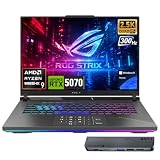
This is the configuration that best balances the 9955HX’s strengths. The listing names a 16-inch QHD+ 2.5K IPS panel running at 300Hz, a rare combination at this size, plus 32GB of DDR5 and a 1TB SSD. It suits players who care about motion clarity in esports titles but still want enough resolution for single-player games.
- Processor: AMD Ryzen 9 9955HX, 16 cores and 32 threads, boost up to 5.4 GHz
- Graphics: GeForce RTX 5070 laptop GPU
- Memory: 32GB DDR5
- Storage: 1TB SSD
- Display: 16-inch QHD+ 2.5K IPS, 300Hz
- Keyboard: 4-zone RGB backlighting
Pros
- High-refresh panel with a resolution above 1080p
- 32GB of RAM leaves headroom for streaming or browsing alongside a game
Cons
- 1TB of storage fills quickly with modern game installs
- An RTX 5070 laptop GPU will not hold 300 frames per second at QHD+ in demanding new releases, so the refresh rate mainly benefits lighter competitive games
Next to the 32GB / 2TB G16 in this list, it gives up half the storage in exchange for a faster, sharper display, and against the 16GB G16 models it doubles the memory. Think of it as the pick for people who spend most of their time in a handful of competitive games rather than a huge library. The listing also notes 4-zone RGB keyboard lighting, a nice touch if you play in a dark room, though it does not change performance. Confirm the model year on the product page, because ASUS has released more than one G16 generation and the specifications differ between them.
4. ROG Strix G18 RTX 5070 – Best for shoppers who want the 18-inch chassis and will confirm the configuration

This listing states very little: an ASUS ROG Strix G18 with the Ryzen 9 9955HX and an NVIDIA GeForce RTX 5070. That is enough to place it in the facet, but memory, storage and display are not given in the name, and G18 configurations vary. It suits buyers who already know they want the 18-inch body and are willing to read the product page carefully.
- Processor: AMD Ryzen 9 9955HX
- Graphics: NVIDIA GeForce RTX 5070
- Memory: confirm on listing
- Storage: confirm on listing
- Display: confirm on listing; G18 models are commonly offered with a 2.5K 240Hz panel
- Form factor: 18-inch ROG Strix G18
Pros
- Large 18-inch chassis with room for stronger cooling
- Same processor and GPU class as the best-equipped picks
Cons
- Key specifications are not visible in the listing name
- Harder to compare directly with the other G18
Choose the 32GB / 2TB G18 instead unless this listing’s product page shows a configuration you prefer. The two G18 listings share a chassis, so the difference comes down to which one gives you the memory, storage and display you want without guesswork. If the product page lists 32GB, a 2TB drive and the 2.5K 240Hz panel, the two would be close to equal; if it lists less, the other G18 is the better fit. Always read the full specification block, not just the title.
5. ROG Strix G18 32GB / 2TB 240Hz – Best for a large 2.5K display and big game libraries

The 18-inch chassis is the main reason to pick this one. The listing gives 32GB of DDR5, a 2TB PCIe SSD and an 18-inch 2.5K (2560×1600) 240Hz display, which is the most generous memory-storage-screen mix in the group. It suits players who want a desktop-replacement feel and rarely move the machine around.
- Processor: AMD Ryzen 9-9955HX, 16 cores and 32 threads
- Memory: 32GB DDR5
- Storage: 2TB PCIe SSD
- Display: 18-inch 2.5K, 2560×1600, 240Hz
- Graphics: an Nvidia RTX card; the listing name cuts off before the exact model, so confirm the tier on the product page
- Form factor: 18-inch ROG Strix G18 body
Pros
- Largest screen and the most storage in this list
- The 16:10 2560×1600 panel gives extra vertical space for work as well as play
Cons
- Bigger and heavier than the 16-inch models, so it travels less easily
- Exact GPU tier is not stated in the listing name
Against the 300Hz G16 it offers more screen and twice the storage, while the G16 offers a faster panel in a smaller package. If portability matters even a little, the 16-inch bodies are easier to live with. If the laptop mostly sits on one desk, the extra display area and storage here are hard to beat in this group. Check the full product page for the RTX model before ordering, since that single detail decides how well the 2560×1600 panel will be driven.
6. ROG Strix G16 16GB / 1TB WUXGA – Best as a straightforward 16-inch option with the GPU tier to be confirmed

The listing names a 16-inch WUXGA (1920×1200) 165Hz display, 16GB of DDR5 and a 1TB PCIe SSD, but the graphics name is cut off after “Nvidia G-Force RTX”. The tier is therefore not confirmed here. Treat it as a runner-up: it matches the facet on the processor, yet you should not assume it carries an RTX 5070 until the product page says so.
- Processor: AMD Ryzen 9-9955HX
- Graphics: an Nvidia RTX GPU; the exact model is not shown, so confirm on listing
- Memory: 16GB DDR5
- Storage: 1TB PCIe SSD
- Display: 16-inch WUXGA, 1920×1200, 165Hz
- Form factor: 16-inch ROG Strix G16
Pros
- Clearly stated memory, storage and screen
- Same 16-core processor as every other pick
Cons
- Graphics tier unconfirmed, which affects performance more than any other spec
- 16GB of RAM and 1TB of storage are the smallest amounts in the group
The 2025 G16 with the named RTX 5070 and the same 165Hz panel is the safer choice if you want certainty. If the product page confirms an RTX 5070 or better here, this listing becomes a reasonable match for that model with storage stated outright. If it shows an RTX 5060, treat it as a step down in graphics performance that no amount of CPU power can offset, and decide whether that suits the games you play.
Specs Compared
| Laptop | CPU | GPU | RAM | Storage | Screen |
|---|---|---|---|---|---|
| ROG Strix G16 QHD+ 300Hz | Ryzen 9 9955HX | RTX 5070 | 32GB DDR5 | 1TB SSD | 16-inch QHD+ 2.5K IPS, 300Hz |
| ROG Strix G18 32GB / 2TB | Ryzen 9 9955HX | Nvidia RTX, tier confirm on listing | 32GB DDR5 | 2TB PCIe SSD | 18-inch 2560×1600, 240Hz |
| ROG Strix G16 32GB / 2TB | Ryzen 9 9955HX | RTX 5070 | 32GB DDR5 | 2TB SSD | confirm on listing |
| ROG Strix G16 (2025) 165Hz | Ryzen 9 9955HX | RTX 5070 | 16GB DDR5-5600 | confirm on listing | 16-inch 16:10 1920×1200, 165Hz, 3ms |
| ROG Strix G18 RTX 5070 | Ryzen 9 9955HX | RTX 5070 | confirm on listing | confirm on listing | confirm on listing |
| ROG Strix G16 16GB / 1TB | Ryzen 9 9955HX | Nvidia RTX, tier confirm on listing | 16GB DDR5 | 1TB PCIe SSD | 16-inch 1920×1200, 165Hz |
How We Chose These
This list is built from research, not bench time. We started with current listings that name the Ryzen 9 9955HX, then checked each listing name against the manufacturer’s published specification pages for the ROG Strix G16 and G18 families and against processor and graphics specification databases. We compared the details that actually separate these laptops: the graphics tier, memory capacity and speed, storage size, and the display’s size, resolution and refresh rate. Where a listing name did not state a value, we marked it “confirm on listing” instead of filling in a guess. Listings that name their full configuration ranked higher than listings that leave key details out, because you can judge them before you buy.
What to Look For
What the Ryzen 9 9955HX actually is
The Ryzen 9 9955HX is a Zen 5 mobile processor in AMD’s “Fire Range” line. It has 16 cores and 32 threads and boosts up to 5.4 GHz, with a base clock around 2.5 GHz and a large 64MB L3 cache according to processor specification databases. It is designed for high-power gaming laptops rather than thin-and-light designs, with a default power target of 55W that laptop makers can raise. ASUS lists a maximum 75W for the chip in the G18 family. It is not the 3D V-Cache version: that chip carries “X3D” in its name, and a few G16 variants use it. If a listing says 9955HX3D, it is a different processor, so read the name carefully.
Because the CPU is identical across all six picks here, it should not drive your decision. Games at QHD or higher resolutions are almost always limited by the graphics chip first. The processor matters more for streaming, video editing, compiling code or running several heavy apps at once, where 32 threads help.
The graphics tier matters most
The GPU is the largest performance lever in these laptops. The GeForce RTX 5070 laptop GPU has 4,608 CUDA cores and 8GB of GDDR7 memory on a 128-bit bus in the configurations sold with these models, though NVIDIA now also offers a 12GB version in some other brands’ 2026 models. Laptop GPUs also differ in power limit: ASUS quotes up to 115W for the RTX 5070 in the G18, including Dynamic Boost. A step up to an RTX 5070 Ti brings 12GB of video memory, and an RTX 5060 sits one tier below. The same laptop name can be sold with any of these, which is why listings that cut off the GPU name need checking.
A practical rule: match the GPU to your target resolution. An RTX 5070 handles 1920×1200 at high frame rates in nearly all games and can manage 2560×1600 with a few settings reduced or upscaling and frame generation enabled. If you mostly play at 2560×1600 or want to turn on ray tracing everywhere, prefer a Ti-class GPU over spending extra on a faster screen.
Screen size, resolution and refresh rate
ASUS sells these chassis with 16:10 panels, which give more vertical space than 16:9 screens. The common options are 1920×1200 at 165Hz, 2560×1600 at 240Hz, and in newer G16 builds a 300Hz QHD+ panel. A higher refresh rate only helps if the GPU can feed it: a 300Hz screen showing 120 frames per second looks smoother than a 60Hz one but does not reach its limit. Pixel density also changes the experience. At 16 inches, 2560×1600 is noticeably crisper than 1920×1200, while the 18-inch 2560×1600 panel looks similar in sharpness to the 16-inch FHD+ panel because the pixels are spread over a larger area. Pick the 18-inch body for size and immersion, not for sharpness.
Memory and storage sizing
Many current games recommend 16GB for the whole system, so 16GB is the practical floor, and 32GB is the sensible target for anyone who streams, edits video or keeps many tabs open. ASUS lists DDR5-5600 memory for this chassis family and describes it as upgradeable on some models, so a 16GB laptop may be expandable later; confirm the slot layout on the product page first.
Worked example: if you install four games averaging 120GB each, that is 480GB, and Windows with apps takes around 100GB more. A 1TB drive then has roughly 400GB left, so three or four more games would fill it. With a 2TB drive you keep room for about ten more titles before you have to uninstall anything. If you expect to keep a large library installed, count the storage capacity as seriously as the RAM.
Cooling, power and portability
High-power laptops draw a lot from the wall. Use the supplied power adapter for gaming, since running on battery limits performance on every gaming laptop. The 18-inch chassis generally offers more cooling room and a larger battery, but it is also heavier; review coverage of the 2025 G18 puts it around 2.9 kg. Keep vents clear, use a hard flat surface, and do not leave the laptop running games inside a bag. Rely on the manufacturer’s performance modes rather than aggressive third-party overclocking, which can raise temperatures without much return.
Questions
Is the Ryzen 9 9955HX good for gaming?
Yes. It has 16 cores and 32 threads with a boost clock up to 5.4 GHz, which is more than any current game needs. In most cases the graphics chip, not this processor, decides how smooth a game feels.
What is the difference between the 9955HX and the 9955HX3D?
The 9955HX3D adds extra stacked L3 cache aimed at gaming workloads, while the plain 9955HX does not. Every laptop in this list names the plain 9955HX, so check the name if you want the 3D version.
Is an RTX 5070 enough with this processor?
For 1920×1200 and most 2560×1600 play, yes, particularly with upscaling enabled. If you want maximum settings and ray tracing at the highest resolution, a higher GPU tier such as the RTX 5070 Ti is a better match for this class of processor.
Should I choose a 16-inch or 18-inch model?
Choose 16 inches if you move the laptop often and want less weight on your desk or in your bag. Choose 18 inches if it stays at home and you value a larger screen and more cooling room.
Is 16GB of RAM enough?
It runs current games, but 32GB gives more room for streaming, editing and multitasking. ASUS describes the memory in this chassis family as upgradeable on some models, so you may be able to add more later, but confirm that on the product page.
Why do some listings say “confirm on listing”?
Some product names are shortened and do not state the GPU tier, memory, storage or display. We avoid guessing those values, so check the full specification section before buying.
Update History
- October 14, 2026 – Initial publication; product set drawn from current catalog listings.
- Check the product page for current specifications and availability before buying.
Sources
- Manufacturer product and specification pages from ASUS for the ROG Strix G16 and G18 families
- Retailer listing titles and specification fields
- Processor and graphics specification databases covering the Ryzen 9 9955HX and GeForce RTX 5070 laptop GPU
- Published hardware review coverage of the 2025 ROG Strix G16 and G18