A virtual reality headset asks more of a graphics card than a monitor ever will. The card has to render two slightly different images at once, hold a steady frame rate so the picture never stutters against your head movement, and do it without leaving the rest of the PC starved for power. That is why shopping for a VR graphics card is a different exercise from shopping for a general gaming card: a few frames dropped in a flat game are an annoyance, while the same drops in a headset can cause real discomfort.
This guide is written for people upgrading an existing desktop for VR, usually a tower with an older card and a modest power supply, and for anyone building a first VR-capable machine around a sensible budget. Every card below carries a “VR Ready” label in its listing and one entry-level display card was deliberately left out, and the comparison leans on what the spec sheet shows: memory size, memory type, bus width, display outputs, and whether the unit is new or renewed. Several of these cards are older generation parts that are still sold in 2026, so the real question is which generation gives you the most headroom for the money you want to spend.
Our Top Picks
Top 3 picks at a glance
Quick Picks
As an Amazon Associate we earn from qualifying purchases at no extra cost to you.





| Product | Best for | Key spec from the title |
|---|---|---|
| XFX Radeon RX 580 GTS XXX (Renewed) | Lowest-cost entry into VR | 8GB GDDR5, 1386MHz OC+, Dual BIOS |
| XFX Radeon RX 580 GTS XXX | Same card bought new | 8GB GDDR5, 3xDP, HDMI, DVI |
| ASUS GeForce GTX 1060 6GB Dual-Fan OC (Renewed) | Nvidia loyalists on a tight budget | 6GB, Dual HDMI, DP 1.4 |
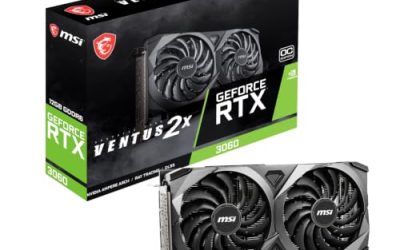
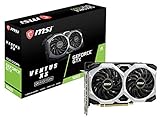
| MSI GeForce GTX 1660 VENTUS XS 6G OC | Balanced mid-range upgrade | 6GB, 192-bit, DirectX 12, dual fan |
| 51RISC Radeon RX 580 8GB | Cheapest 8GB option on paper | 8GB GDDR5, 256-bit, 2048SP |
| ASUS PH-GTX1060-3G Phoenix (Renewed) | Small cases and short budgets | 3GB, Phoenix fan, HDMI, DP, DVI |
| MSI GeForce RTX 2060 Ventus GP | Most headroom in this group | 6GB GDDR6, 1710MHz boost, ray tracing |
How to Choose
Video memory and memory type
VR renders at a higher effective resolution than the panel inside the headset, because the image is oversampled before it is warped to fit the lens. That pushes video memory use up quickly. Treat 6GB as the practical floor for current headsets and 8GB as the comfortable target if you plan to raise supersampling. A 3GB card can launch a headset, but it leaves no room when a scene gets busy. Memory type matters too: GDDR6 moves data faster than GDDR5 at the same capacity, which is why a 6GB GDDR6 card can feel more capable than an 8GB GDDR5 one in some scenes.
Generation and architecture
Raw clock speed tells you less than the architecture. The listings span the older Polaris-based Radeon RX 580, Pascal-based GTX 1060, Turing-based GTX 1660 and RTX 2060 families. A newer generation generally squeezes more frames out of the same wattage, and the RTX 2060 in this list adds ray tracing hardware that VR titles seldom exploit. For pure VR, the tier you buy within a generation matters more than any single brand feature, so compare the memory bus and memory size before you compare names.
Display outputs and headset connection
Most headsets connect through DisplayPort or HDMI, with some older models wanting a specific port version. A card with DisplayPort 1.4 and a free HDMI port covers nearly every mainstream headset and still leaves room for your monitor. Count the outputs before you buy: a card with three DisplayPort connectors, one HDMI, and one DVI gives you the flexibility to run a headset and two desktop screens at once, while a card with only a single DisplayPort and single HDMI forces you to choose.
Power supply, case clearance, and condition
A dual-fan card is longer than a single-fan card, so measure your case before ordering. Check the six-pin or eight-pin power connector the card needs and confirm your power supply has a spare lead; budget power supplies often lack one. Where the title says “Renewed,” the card has been refurbished and resold, which can be a sound way to save but means you should read the seller terms on warranty length and return window. Budget-tier cards cut corners on cooler quality, so fan noise under sustained VR load is worth reading about.
The 7 Best Options
XFX Radeon RX 580 GTS XXX Edition (Renewed)
This renewed RX 580 is the entry ticket for a first VR build on a tight budget. The title lists 8GB of GDDR5, a 1386MHz OC+ clock, Dual BIOS, and a generous port set with three DisplayPort outputs, one HDMI, and one DVI. The eight gigabytes of memory is the headline here, since it gives oversampled scenes room to breathe. Look for the Dual BIOS switch if you want a quieter profile for long sessions.
- Strength: 8GB of video memory at the lowest tier of cost.
- Strength: Plenty of outputs for a headset plus multiple monitors.
- Trade-off: Renewed stock means warranty terms depend on the seller.
Skip it if you want guaranteed new hardware or the most efficient modern architecture.
XFX Radeon RX 580 GTS XXX Edition
This is the same RX 580 GTS XXX Edition without the renewed label, sharing the 8GB GDDR5 memory, the 1386MHz OC+ clock, Dual BIOS, and the 3xDP, HDMI, and DVI output set. Buyers who like the Radeon specs but do not want to gamble on refurbished condition will find this the safer way to get them. Its card-level features are identical, so the decision comes down to condition and how much more you will pay for it.
- Strength: Same 8GB memory and output layout as the renewed version.
- Strength: Dual BIOS gives a fallback if a firmware change goes wrong.
- Trade-off: Polaris is an older design, so efficiency trails newer cards.
Skip it if the renewed version fits your budget, or if you want hardware ray tracing support.
ASUS GeForce GTX 1060 6GB Dual-Fan OC Edition (Renewed)
For buyers who prefer Nvidia drivers, this ASUS card offers 6GB of memory, a dual-fan cooler, and an OC Edition clock. The title lists dual HDMI and DisplayPort 1.4, which is enough to run a headset while keeping a monitor attached. The dual-fan design suits long play sessions where thermals can creep up. It is renewed, so the same warranty caution applies. A GTX 1060 6GB also pairs sensibly with a modest processor and a mid-sized power supply, which keeps a whole-system upgrade affordable.
- Strength: 6GB meets the practical memory floor for VR.
- Strength: Dual-fan cooling suits extended sessions.
- Trade-off: Fewer outputs than the Radeon cards in this group.
Skip it if you plan to run several monitors beside your headset or want the largest memory pool available.
MSI GeForce GTX 1660 VENTUS XS 6G OC
The GTX 1660 sits a generation above the GTX 1060 and brings a 192-bit memory bus, DirectX 12 support, and a dual-fan cooler on a 6GB card. This is the middle option for buyers who want more efficiency without moving to a higher tier. Its HDMI and DisplayPort outputs cover standard headset connections. Because the title lists it as VR Ready and lists HDCP support, it handles video playback alongside gaming duties.
- Strength: A newer architecture than the GTX 1060 and Radeon RX 580 cards.
- Strength: Dual-fan cooling with a 192-bit bus on 6GB.
- Trade-off: GDDR5 memory limits bandwidth compared with the RTX 2060.
Skip it if you want ray tracing hardware or need more than six gigabytes of memory.
51RISC Radeon RX 580 8GB
This 51RISC card carries the RX 580 name with 8GB of GDDR5 on a 256-bit bus and DisplayPort plus HDMI outputs. The listing mentions 2048SP, which indicates the shader count, and a VR Ready label. It is from a lesser-known brand than XFX or MSI, which makes support quality and fan build the unknowns. For buyers chasing the lowest possible ticket, the spec sheet reads attractively. Read the seller policy on returns first, because an unfamiliar brand makes a clear return window more valuable than usual.
- Strength: 8GB on a 256-bit bus at an entry-level tier.
- Strength: DisplayPort and HDMI cover standard headset connections.
- Trade-off: Brand support and cooler quality are less established.
Skip it if warranty service and a known cooler design matter more than saving a little.
ASUS PH-GTX1060-3G Phoenix Fan Edition (Renewed)
The Phoenix Fan Edition is the compact option here: a renewed GTX 1060 with 3GB of memory, a single Phoenix fan, and HDMI, DisplayPort, and DVI outputs. Smaller cards fit shorter cases, which helps in compact desktops. The memory is the compromise, since three gigabytes leaves little room as scenes get busier, so this suits lighter VR titles and lower supersampling. Think of it as a way to get a headset running on a restricted budget, not as a long-term solution, and plan to step up later if your library grows.
- Strength: Single-fan design fits compact cases.
- Strength: Offers a full set of display outputs, including DVI.
- Trade-off: 3GB of memory is tight for demanding VR scenes.
Skip it if you want headroom for newer titles or plan to raise render resolution.
MSI GeForce RTX 2060 Ventus GP
The RTX 2060 is the top card in this group, with 6GB of GDDR6, a 192-bit bus, a 1710MHz boost clock, and the Turing architecture with ray tracing support. GDDR6 means faster memory bandwidth than the GDDR5 cards above, which helps when a headset demands high render resolution. It carries a VR Ready label and HDMI plus DisplayPort outputs, making it the card that should last longest across future headset upgrades. Make sure the power supply can feed it, since a higher tier card asks more of the supply than the older cards above.
- Strength: GDDR6 memory and a newer architecture than any other card here.
- Strength: Ray tracing hardware gives some future-proofing.
- Trade-off: Sits at the highest cost tier of the seven.
Skip it if you only play light VR titles and do not need the extra headroom.
Which One Fits Your Situation
You are upgrading an old family PC with a small power supply
Pick the ASUS PH-GTX1060-3G Phoenix. Its compact single-fan design suits a short case, and the light VR titles you are likely to start with will not demand more memory. Confirm the power connector before buying.
You want the most memory for the lowest ticket
Choose the XFX Radeon RX 580 GTS XXX Edition (Renewed). Eight gigabytes of GDDR5 is the largest pool you will find at this tier, and the output set means a headset and two monitors can run together.
You want a card that stays useful for several years
Go with the MSI GeForce RTX 2060 Ventus GP. GDDR6 memory and the Turing architecture give this card the most runway when headset resolutions rise.
You prefer Nvidia and want a middle path
The MSI GeForce GTX 1660 VENTUS XS 6G OC is the sensible step between the older GTX 1060 and the RTX 2060, with a newer architecture and a dual-fan cooler.
Common Mistakes
- Buying on the “VR Ready” label alone. It signals a minimum, not comfort at high supersampling.
- Ignoring video memory and choosing a 3GB card because it is cheaper.
- Forgetting to confirm the power supply has the right six-pin or eight-pin lead.
- Skipping a case measurement before buying a long dual-fan card.
- Assuming a renewed card carries the same warranty as a new one without reading the seller terms.
Related guides
- Gaming Laptop Battery Draining While Plugged In Fix
- How To Stop Laptop Thermal Throttling In Software
- Gaming Laptop For High School Students
Frequently Asked Questions
Is 6GB of video memory enough for VR?
For most current headsets, yes, as a minimum. If you raise supersampling or run large open-world titles, 8GB offers more breathing room.
Does a renewed graphics card work as well as a new one?
The hardware is the same model, and a renewed card has been refurbished before resale. The difference is usually the warranty and return terms, so read the seller conditions before ordering.
Do I need DisplayPort for my headset?
Many headsets accept either DisplayPort or HDMI, but check the connector version your headset requires. A card with both ports covers most cases.
Why leave out an entry-level display card?
A basic 2GB DDR3 card in the same search results is designed for desktop display output, not VR rendering, so it does not meet the baseline for headset use.