Open a layered poster file with hundreds of smart objects, zoom to 400 percent, and drag a blur across it. If the canvas stutters, the bottleneck is often the graphics card rather than the processor. Graphic design software leans on the GPU for canvas panning, filters, live effects, and the preview of large artboards, so a card with enough video memory and fast outputs can make a daily workflow feel smoother. This guide is for illustrators, layout artists, brand designers, and photo retouchers who are building or upgrading a desktop and want to know which card tiers make sense.
Seven cards qualify here. They come from a single board partner and span two chip families and several memory sizes, plus one low-profile entry card from another maker. Based on the listed specs, the sections below compare them on video memory, display connections, and physical size, which are the factors that matter most for creative work in 2026. One note on the search results: a book of design reference cards appeared in this product set, but it is a printed study guide rather than hardware, so it is left out.
Our Top Picks
 ASUS Dual Radeon RX 9060 XT 16GB GDDR6RX9060XT|16GB|Black8 x 4.7 x 1.9 inches1.3 PoundsCheck on Amazon
Top 3 picks at a glance
Quick Picks
As an Amazon Associate we earn from qualifying purchases at no extra cost to you.




| Product | Best for | Key spec from the title |
|---|---|---|
| ASUS Dual RTX 5060 Ti 16GB | Large files plus GPU-accelerated effects | 16GB GDDR7, PCIe 5.0, DisplayPort 2.1b |
| ASUS Dual RX 9060 XT 16GB | Roomy memory at a mid-range tier | 16GB GDDR6, PCIe 5.0, DisplayPort 2.1a |
| ASUS PRIME RX 9070 XT | Heavy multitasking and high-resolution canvases | 16GB GDDR6, OC Edition, HDMI/DP 2.1 |
| ASUS ATS RX 9070 GRE 12GB | A step down in memory with strong cooling | 12GB GDDR6, OC Edition, dual-ball bearings |
| ASUS Prime RX 9070 GRE EVO | Dual-BIOS flexibility for tinkerers | OC Edition, PCIe 5.0, HDMI/DP 2.1 |
| ASUS Dual RTX 5060 Ti 8GB | Lighter 2D and photo work on a budget | 8GB GDDR7, PCIe 5.0, 0dB technology |
| MAXSUN GTX 1050 low profile | Slim office PCs and basic layout work | 4GB GDDR5, 128-bit, low profile |
How to Choose
Design work is not gaming, and the best card for it is not always the one with the biggest number on the box. These four checks keep you focused on what your software actually uses.
Video memory is the first threshold
Large canvases, many layers, high-resolution textures, and 3D previews all consume video memory. A practical ladder is 8GB for photo editing and standard illustration, 12GB for large print layouts and mixed 3D, and 16GB for very big files or running several creative apps at once. Four gigabytes, as on the low-profile MAXSUN, works for simple layouts and basic photo touch-ups but will limit more ambitious projects.
Display outputs and monitor quality
Designers care about the screen as much as the card. DisplayPort 2.1 and HDMI 2.1, listed on the ASUS models, give you headroom for high-resolution and high-refresh monitors, including wide-gamut panels at 4K. Count the outputs against your monitor plan, and check that your monitor accepts the connection you want. The card cannot improve a poor panel, so spend on the display too.
Chip family and software support
Both NVIDIA and AMD chips accelerate common design software, though specific features vary by program and driver. Check your applications for GPU support lists before choosing. Ignore gaming-only features like ray tracing as a reason to buy, and treat core counts and boost claims as secondary to memory and drivers for 2D work. Stability matters more than headline speed for a deadline. Before buying, also check that your power supply has the right connectors for a 2.5-slot card and that the motherboard has a free full-length slot, because PCIe 5.0 cards remain backward compatible with older slots but lose nothing meaningful in 2D work when they do.
Size, cooling, and noise
The ASUS cards listed here are 2.5-slot designs with axial-tech fans, which means they need a roomy case and good airflow. Several also list 0dB technology, where fans stop at idle, a nice feature in a quiet studio. Budget cards cut corners on cooling and fan bearings, so noise under load is where cheaper models disappoint. Low-profile cards fit small cases but sacrifice memory and speed.
The 7 Best Options
ASUS Dual RTX 5060 Ti 16GB
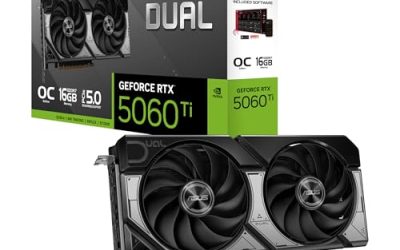
This card pairs 16GB of GDDR7 with a GeForce RTX 5060 Ti in an OC Edition. The title lists PCIe 5.0, HDMI 2.1b, DisplayPort 2.1b, a 2.5-slot design, axial-tech fans, and 0dB technology.
- Strength: 16GB of memory gives plenty of room for large files and several apps at once.
- Strength: 0dB technology keeps the fans silent when the canvas is idle.
- Trade-off: the 2.5-slot cooler needs a spacious case.
Skip it if your tower is compact or your workload is simple, since a smaller card would do the same job in a lighter package. It suits designers who combine layout, photo retouching, and light 3D work, and who would rather buy memory headroom once than upgrade again when files grow.
ASUS Dual RX 9060 XT 16GB
The Radeon RX 9060 XT version offers 16GB of GDDR6 with PCIe 5.0, HDMI 2.1b, DisplayPort 2.1a, a 2.5-slot design, axial-tech fans, and 0dB technology.
- Strength: 16GB of memory matches the larger GeForce model on capacity.
- Strength: the same quiet idle behavior with 0dB technology.
- Trade-off: GDDR6 is the older memory type compared with the GDDR7 on the RTX card.
Skip it if your key applications favor NVIDIA acceleration, which is worth confirming in each program’s documentation. It fits designers who want memory capacity and a quiet card in a mid-range tier, for example a brand studio that keeps large archive files open while building new layouts.
ASUS PRIME RX 9070 XT
The Radeon RX 9070 XT sits higher in the product stack. The title lists 16GB of GDDR6, an OC Edition, PCIe 5.0, HDMI and DisplayPort 2.1, a 2.5-slot design, axial-tech fans, and dual-ball fan bearings.
- Strength: the stronger chip suits heavy multitasking and demanding effects.
- Strength: dual-ball bearings are designed for longevity in long working sessions.
- Trade-off: it adds processing power without adding memory capacity over the mid-range 16GB cards.
Skip it if your workflow is mostly 2D, since you may not use the extra power and the memory figure matches cheaper cards in this list. It suits studios mixing design with video and 3D, where effects, timelines, and rendering all compete for the same graphics chip during a busy delivery week.
ASUS ATS RX 9070 GRE 12GB
This Radeon RX 9070 GRE carries 12GB of GDDR6 in an OC Edition. The title lists PCIe 5.0, HDMI and DisplayPort 2.1, a 2.5-slot design, axial-tech fans, and dual-ball fan bearings.
- Strength: 12GB sits in the useful middle for large print layouts.
- Strength: robust cooling with dual-ball bearings.
- Trade-off: 12GB may be limiting for the largest projects.
Skip it if you routinely work with enormous files or plan to keep the card for many years of growing project sizes. It suits professionals who want a strong chip and good cooling without paying for the full 16GB, such as freelancers working mostly on print and web layouts.
ASUS Prime RX 9070 GRE EVO
The EVO edition lists an OC Edition card with PCIe 5.0, HDMI and DisplayPort 2.1, a 2.5-slot design, axial-tech fans, dual-ball fan bearings, and dual BIOS options. The title shown does not state the memory size.
- Strength: dual BIOS gives a fallback if a tweak goes wrong.
- Strength: modern display outputs and strong cooling.
- Trade-off: the memory capacity is not clear from the listed title, so verify before buying.
Skip it if you need a confirmed memory figure at a glance, since the sibling ATS card in this list carries 12GB and the EVO may differ. It suits experienced builders who read the full specification page and appreciate the safety net of a second firmware option.
ASUS Dual RTX 5060 Ti 8GB
This variant keeps the RTX 5060 Ti chip but with 8GB of GDDR7. The title lists PCIe 5.0, HDMI 2.1b, DisplayPort 2.1b, a 2.5-slot design, axial-tech fans, and 0dB technology.
- Strength: 8GB of GDDR7 is enough for photo editing and standard illustration.
- Strength: 0dB technology and modern outputs match the larger sibling.
- Trade-off: the 8GB limit can bite on big canvases and many open apps.
Skip it if you want room to grow, since the 16GB model of the same card is the safer long-term choice. It suits lighter creative work, such as social graphics, web layouts, and photo editing at ordinary file sizes, where a quiet modern card matters more than maximum memory.
MAXSUN GTX 1050 Low Profile
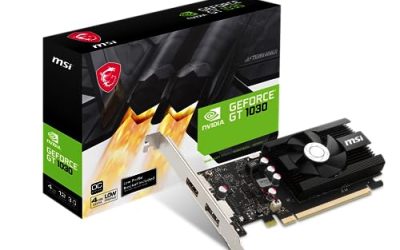
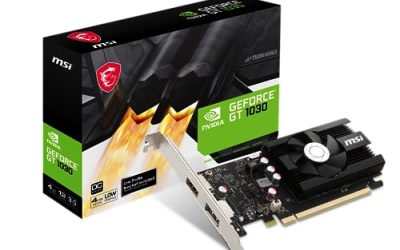
The MAXSUN is the odd one out: a GeForce GTX 1050 with 4GB of GDDR5 on a 128-bit bus in a mini slim low-profile design for small form factor cases.
- Strength: the low-profile format fits compact office computers.
- Strength: it is enough to drive monitors for basic layout and email-grade design work.
- Trade-off: 4GB of older memory limits large files and heavy effects.
Skip it if you handle large layered files or use GPU-heavy filters often. It suits a modest upgrade to a slim desktop for light tasks, such as a front-desk or print-shop workstation that mainly needs reliable monitor output and basic layout software.
Which One Fits Your Situation
You edit huge layered files all day
Choose the ASUS Dual RTX 5060 Ti 16GB or the ASUS Dual RX 9060 XT 16GB for the memory headroom. Your software’s GPU support list can break the tie.
You split time between design, video, and 3D
The ASUS PRIME RX 9070 XT adds processing power on top of 16GB of memory, which helps when effects and rendering stack up.
You work on mostly photos and standard illustrations
The ASUS Dual RTX 5060 Ti 8GB covers that tier, with modern outputs and silent idle operation. The ASUS ATS RX 9070 GRE 12GB is the middle option if you want a little more room.
You only need a basic card for a small office PC
The MAXSUN GTX 1050 Low Profile is the practical fit for slim cases and light layout tasks.
Common Mistakes
- Buying for gaming frame-rate charts when design software depends on memory and drivers.
- Choosing 8GB of memory for very large files and then hitting limits.
- Forgetting that a 2.5-slot card needs case clearance and airflow.
- Pairing a premium card with a monitor that cannot show the colors you work in.
- Ignoring whether your software supports your chip family before purchase.
Related guides
- Gaming Laptop Battery Draining While Plugged In Fix
- How To Stop Laptop Thermal Throttling In Software
- Gaming Laptop For High School Students
Frequently Asked Questions
How much video memory does graphic design need?
Eight gigabytes covers most photo and illustration work, while 12GB to 16GB suits large layouts and multitasking. Four gigabytes is workable only for light tasks.
Do I need a workstation card?
Not necessarily. Many designers use consumer cards successfully, though some professional pipelines specify certified drivers, so check your employer or software requirements.
NVIDIA or AMD for design software?
Both work well in common applications, with differences in specific accelerated features. Look at your software’s documentation rather than choosing by brand.
Does a faster card improve color accuracy?
No. Color accuracy comes from the monitor and calibration. The card determines how smoothly your software runs and which outputs and resolutions you can use.