Picking the best HP laptop for business starts with a boring but important question: what will this machine actually do all day? A sales rep who lives in email and slide decks needs something different from a bookkeeper with fifty spreadsheet tabs, and both need something different from a shop owner who wants a spare laptop for the back office. HP sells many lines under the business banner, and the labels on the listings can blur together. This guide sorts seven listed HP models by the traits that separate a dependable work machine from a bargain that frustrates by the second month.
The focus is small businesses, freelancers, and managers who buy their own equipment. Judgments come only from what each title states: processor family, memory, storage, screen size, operating system edition, and extras such as a webcam shutter or numeric keypad. Titles are sometimes cut off, so confirm any missing detail on the product page. As of 2026, the useful baseline for business work is 16GB of memory, a 512GB drive, and Windows 11 Pro if your company relies on domain or encryption features.
Our Top Picks
 HP Windows 11 Pro 15 15.6" FHD Business16GB RAM | 512GB PCIe SSD14.11 x 9.53 x 0.71 inches3.75 PoundsCheck on Amazon
 HP 255 G10 15.6" FHD Business Laptop32GB RAM | 1TB SSD14.17 x 9.29 x 0.73 inches3.35 PoundsCheck on Amazon


Top 3 picks at a glance
Quick Picks
As an Amazon Associate we earn from qualifying purchases at no extra cost to you.


| Product | Best for | Key spec from the title |
|---|---|---|
| HP 17 Business Laptop | Data-heavy desk work | 17.3″ FHD, Ryzen 5, 16GB, 512GB SSD |
| HP New Business Laptop (Ryzen 5 7430U) | Large-screen multitasking | 17.3″ FHD, 16GB, 512GB PCIe, Wi-Fi 6 |
| HP 255 G10 (quad-core) | Managed office setups | W11 Pro, 15.6″ FHD, webcam shutter |
| HP Windows 11 Pro 15 | Traditional Intel office use | Core i5-1135G7, 16GB, Iris Xe |
| HP 255 G10 (Ryzen 7) | Power users and heavy workloads | Ryzen 7 7730U, 32GB, 1TB PCIe SSD |
| HP 14 Business Students | Light, portable email machine | 14″ display, 128GB UFS, Copilot AI, MS 365 |
| HP 14 Student Business | Entry-level documents | Win 11 Pro, Intel 4-core, 4GB DDR5 |
How to Choose
Windows 11 Pro versus Home
Pro adds features that matter to a business: device encryption management, joining a company domain, and remote desktop hosting. If you run a one-person shop, Home may be enough. If an IT provider manages your devices, Pro is usually required. Four of the seven models here name Windows 11 Pro in the title, so filter by that first when your workplace has policies.
Memory and storage thresholds
Sixteen gigabytes of RAM and a 512GB SSD are a dependable baseline for business software, video meetings, and large spreadsheets. For accounting suites, databases, or virtual machines, step up to 32GB and 1TB. Drop to 4GB only for single-purpose machines, such as a reception desk running one web app, because modern browsers and meeting tools can fill that memory quickly.
Screen size, keyboard, and webcam
A 15.6-inch screen is the classic business size, and 17.3-inch panels suit data entry and side-by-side documents at the cost of weight. A 14-inch body is easier to carry. A numeric keypad speeds up financial entry, and a webcam privacy shutter is a small but welcome security feature for people who take many calls. Make sure the display is full HD rather than a lower-resolution panel.
What to ignore in a business title
Bundled office subscriptions, cloud storage, and “AI” labels are extras that expire or vary. Likewise, a title that claims one chip “beats” another is marketing, not a measured result. Compare the actual processor model, memory, and storage instead, and use the product page for battery details, since titles usually do not give hours. A final check is warranty and support: business buyers benefit from clear coverage terms, so read the seller and warranty details before you commit.
The 7 Best Options
HP 17 Business Laptop
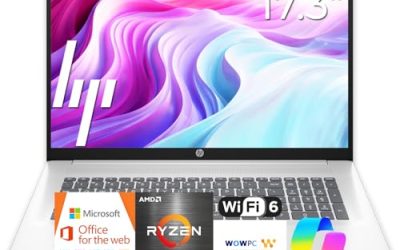
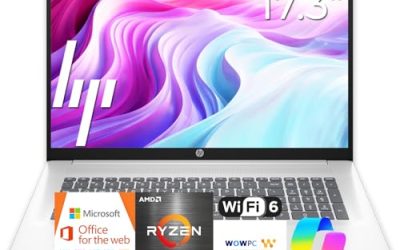
The title lists a Ryzen 5 processor, 16GB of RAM, a 512GB SSD, a 17.3-inch FHD display, a numeric keypad, and a long battery claim. That combination suits professionals who handle large spreadsheets, reports, and multiple windows at a desk. The large panel reduces the need for an external monitor, which saves space in small offices and home workspaces. The long battery mention is worth confirming on the product page, but even without exact hours, the specs show a configuration that should stay comfortable for daily reports, email, and conference calls.
- Strength: 16GB and 512GB cover a full business workload.
- Strength: the 17.3-inch screen and keypad speed up data entry.
- Trade-off: the body is large for frequent travel.
Skip it if your job takes you to a different location every day.
HP New Business Laptop (Ryzen 5 7430U)
This listing also carries a 17.3-inch FHD screen, 16GB of RAM, a 512GB PCIe drive, and Wi-Fi 6, powered by a Ryzen 5 7430U. The title includes a comparison against an Intel chip, which should be treated as promotional. What matters is a current-generation mobile processor with a solid memory and storage pairing, suitable for office suites, browsers, and video calls. It makes sense for managers who want a big screen and a modern wireless standard without stepping up to a workstation, and who will handle the license question by reading the product page.
- Strength: Wi-Fi 6 and a PCIe drive in a roomy 17.3-inch body.
- Strength: a named processor model makes comparison easy.
- Trade-off: the operating system edition is not shown in the visible title.
Skip it if you need a confirmed Windows Pro license; verify on the product page.
HP 255 G10 (quad-core)
The 255 G10 is HP’s straightforward office line. This listing includes an AMD quad-core CPU, 16GB of RAM, a 512GB SSD, Windows 11 Pro, a 15.6-inch Full HD display, a webcam with a shutter, and a numeric keypad. For small teams that need standard company laptops, it ticks the checklist items that managers actually care about: Pro edition, enough memory, and privacy hardware. Because it is a mainstream business line, it is also easier to replace or standardize across several employees, which matters when you want every laptop in the office to behave the same way.
- Strength: Windows 11 Pro and a webcam shutter.
- Strength: a classic 15.6-inch layout with a keypad.
- Trade-off: the processor name is generic in the title.
Skip it if you want a particular named chip, or a thin, premium design.
HP Windows 11 Pro 15
Here an eleventh-generation Intel Core i5-1135G7 meets 16GB of RAM, a 512GB SSD, Iris Xe graphics, a 15.6-inch FHD screen, a numeric pad, and Windows 11 Pro. The chip is older than the newest options, but it remains capable for office software and comes with a Pro edition for managed environments. Companies that already have images or policies built around Intel hardware may find this the least disruptive option, and it is a reasonable choice for staff who mostly use email, documents, and web tools.
- Strength: Windows 11 Pro with 16GB of RAM.
- Strength: Iris Xe graphics suit presentations and multiple displays.
- Trade-off: the processor generation is dated compared with newer releases.
Skip it if you want the latest platform or the longest software support window.
HP 255 G10 (Ryzen 7)
This is the heavyweight of the group on paper: a Ryzen 7 7730U, 32GB of RAM, a 1TB PCIe SSD, a 15.6-inch FHD display, a numeric keypad, a webcam, Wi-Fi 6, HDMI, and Windows 11 Pro. It fits owners, analysts, and consultants who run large files and many programs at once and want a laptop that will last. With this much memory and storage, it can handle databases, large presentations, and several browser windows without strain, and the HDMI port makes connecting to a conference room display straightforward.
- Strength: 32GB and 1TB provide serious headroom.
- Strength: Ryzen 7 and Pro edition suit demanding business use.
- Trade-off: it likely sits at the top of the price tiers here.
Skip it if your tasks are light and a smaller configuration would do.
HP 14 Business Students
The listing highlights Copilot AI, Microsoft 365, an Intel CPU, 128GB of UFS storage, a 500GB external hard drive, Wi-Fi 6, and a 14-inch LED display in an ultralight body. It is a portable email and documents device, with the external drive adding backup space. It suits students or part-time staff who need a simple travel laptop. The lighter body and Wi-Fi 6 help on the road, but keep the work files light, and use the external drive for backups rather than for running programs.
- Strength: light 14-inch size and an included external drive.
- Strength: Wi-Fi 6 and a bundled office suite.
- Trade-off: 128GB of UFS storage is small and slower than a typical SSD.
Skip it if your work needs large local files or heavy software.
HP 14 Student Business
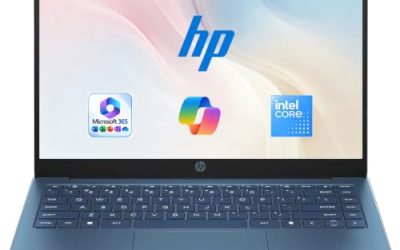
The title shows Windows 11 Pro, Copilot AI, Microsoft Office, an Intel 4-core CPU, 4GB of DDR5, and a total storage figure that is cut off. It occupies the entry tier, aimed at documents, web apps, and basic communication. It could serve as a single-purpose terminal in a small office, such as a front-desk check-in or a back-room inventory lookup. The truncated storage figure means you should read the full listing to see how much space is actually internal.
- Strength: Windows 11 Pro on a very light and basic machine.
- Strength: DDR5 memory is a modern type.
- Trade-off: 4GB of RAM limits multitasking and long-term use.
Skip it if you plan to run video meetings alongside several apps.
Which One Fits Your Situation
You run a small team and need standard laptops
The HP 255 G10 with the quad-core CPU is the straightforward fleet choice: Pro edition, 16GB, 512GB, and a webcam shutter.
You handle financial data all day
The HP 17 Business Laptop pairs a big FHD screen with a numeric keypad and 16GB of RAM, a good match for accounting work.
You need maximum power for large files
The HP 255 G10 with the Ryzen 7 lists 32GB of RAM and a 1TB drive, giving the most headroom of the seven. It is the one to pick if the laptop must still feel fast near the end of its service life.
You travel often and only need email and documents
The HP 14 Business Students model is the lightest body, and its included external drive helps with backups, though its internal storage is small.
Common Mistakes
- Assuming every business-labeled laptop includes Windows 11 Pro; read the edition in the title.
- Choosing 4GB of RAM for a primary work machine.
- Counting a bundled Microsoft 365 term as a permanent license.
- Overlooking ports: a missing HDMI or USB-C connection forces dongles.
- Believing in chip “beats” claims instead of comparing processor models, memory, and storage.
Related guides
- Gaming Laptop Battery Draining While Plugged In Fix
- Graphics Cards For Low Wattage Power Supplies
- How To Stop Laptop Thermal Throttling In Software
Frequently Asked Questions
Do I need Windows 11 Pro for a small business?
Not always, but Pro helps if you need encryption management, remote access, or domain features. If an IT provider manages your devices, ask what edition they require before buying.
Is 16GB of RAM necessary for business use?
It is a comfortable target. Eight gigabytes can do basic office work, but video calls plus large spreadsheets and many browser tabs are easier with 16GB.
Should I choose a 15-inch or 17-inch HP?
Choose 15.6 inches for balance and 17.3 inches if you do data-heavy work at a desk. The larger body is heavier and less friendly for commuting.
Is UFS storage as good as an SSD?
UFS is a flash storage type common in phones and light laptops. It works for basic tasks but is generally smaller in capacity here and not the usual choice for demanding business use.