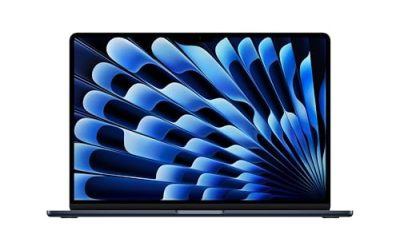
A large screen laptop is a trade: you gain a canvas that can hold two documents, a spreadsheet and a video call, or a long timeline without squinting, and you pay in weight, battery drain, and bag space. For many buyers the right answer is a 17.3-inch model from a known brand. For others, an 18.5-inch machine with a sprawling desktop feel sounds tempting, but unfamiliar brands and unusual specs call for a careful read. This guide separates seven listed models into those two camps and explains which screen size and spec mix fit which kind of user.
The audience is people who stay mostly at a desk or on a couch: remote workers, seniors who prefer larger text, students with a dorm desk, and anyone who wants a single screen that replaces a small monitor. Each pick is judged only on what its title states, because several titles are cut off and some use unusual wording. Where a detail is unclear, the advice is to check the listing. Remember that in 2026 a laptop with a big panel is still a laptop: look at memory and storage as seriously as you look at screen size.
Our Top Picks
 EKY 18.5 Inch Large Screen Laptop Computer16GB RAM+1TB SSD16.8 x 10.97 x 0.83 inches1.9 KilogramsCheck on Amazon
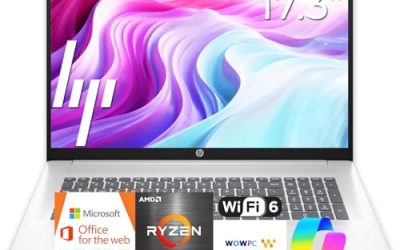
 HP 17.3" Touchscreen Laptop Computer32GB RAM | 1.5TB Storage14.14 x 9.31 x 0.78 Inches6 PoundsCheck on Amazon


Top 3 picks at a glance
Quick Picks
As an Amazon Associate we earn from qualifying purchases at no extra cost to you.




| Product | Best for | Key spec from the title |
|---|---|---|
| HP 17 Business Laptop | Balanced large-screen work | 17.3″ FHD, Ryzen 5, 16GB, 512GB SSD |
| EKY 18.5 Inch Laptop | Biggest panel with many ports | 18.5″, 16GB RAM, 1TB SSD, RJ45, HDMI |
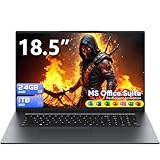
| BWPED 18.5″ Laptop | Maximum memory and storage | 24GB RAM, 1TB SSD, 48Wh battery |
| HP 17.3″ Touchscreen (Core Ultra 7) | Touch input and security | Core Ultra 7, 16GB, fingerprint reader, Win11 Pro |
| HP 17.3 (Ryzen 5 7520U) | Everyday family laptop | HD+ display, 16GB, 512GB SSD |
| 18.5 Inch Laptop (Core i9) | Color-aware display seekers | 100% sRGB FHD, backlit keyboard, numeric pad |
| HP OmniBook 3 17.3 (Ryzen 3) | Simple, budget-friendly use | FHD, 8GB RAM, 512GB SSD, Radeon 610M |
How to Choose
17.3 inches versus 18.5 inches
The difference between 17.3 and 18.5 inches sounds small, but the larger body gets awkward fast. A 17.3-inch laptop usually still fits a large backpack and sits on most desks. An 18.5-inch machine behaves more like a portable desktop: it needs a bigger bag, an outlet for most of the day, and a stable surface. Choose the larger size only if you rarely move the laptop.
Resolution matters more than diagonal size
Stretching a low-resolution panel across a big screen makes text look soft. Prefer full HD (1920×1080) or higher. An “HD+” label means a resolution below full HD, which is acceptable for casual use but less sharp for documents. If a title mentions sRGB coverage, as the Core i9 listing does with 100% sRGB, the panel is aimed at better color accuracy, though you should still confirm brightness on the product page.
Memory, storage, and unfamiliar brands
Sixteen gigabytes of RAM and a 512GB drive are a reasonable floor. Several 18.5-inch listings offer unusually high memory or storage for the money, which sounds attractive, but remember that the processor decides how smoothly it all runs, and unfamiliar brands may offer limited support. Read the warranty and return terms before committing.
Battery, ports, and weight
Large panels drain batteries quickly. A 48Wh figure, as shown for one listing, is modest for an 18.5-inch screen, so plan on staying plugged in. Useful ports include HDMI for a second display, RJ45 Ethernet for stable wired internet, and several USB ports. A TF card slot helps cameras and small drives. Confirm USB-C and charging details on the listing, since titles are short.
The 7 Best Options
HP 17 Business Laptop
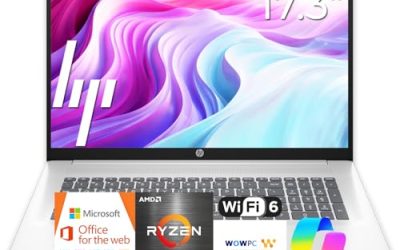
This model lists a Ryzen 5 processor, 16GB of RAM, a 512GB SSD, a 17.3-inch FHD display, a numeric keypad, and a long battery claim. It is the most balanced large-screen laptop in the set because it sits at a familiar size, from a familiar brand, with a configuration suited to documents, spreadsheets, and video calls. The numeric keypad is a bonus for finance work, and the wide screen means you can keep a report on one side and a browser on the other without resizing windows constantly. The battery claim in the title is worth verifying, but the overall package is the safest starting point for most buyers.
- Strength: 16GB and 512GB cover typical large-screen workloads.
- Strength: a standard 17.3-inch body is easier to manage than larger sizes.
- Trade-off: it is still bulky for daily commuting.
Skip it if you want an even larger display or a thin travel laptop.
EKY 18.5 Inch Laptop
The title advertises an 18.5-inch screen, 16GB of RAM, a 1TB SSD, a processor up to 3.4GHz, a 6316mAh battery, a privacy shutter camera, a TF card slot, RJ45, and HDMI. The port list is generous, and the large panel gives a desktop-like feel. It fits home offices and dorm desks where the laptop rarely leaves the table. The TF card slot is useful for photographers who want quick access to memory cards, and the 6316mAh figure should be read as a battery capacity detail, not a promise of hours of runtime.
- Strength: 1TB of storage and a wide port selection.
- Strength: privacy shutter on the camera.
- Trade-off: the processor is described only by a clock speed, so verify the model.
Skip it if you want a recognizable processor name or a portable body.
BWPED 18.5″ Laptop
BWPED lists an 18.5-inch screen with 24GB of RAM, a 1TB SSD, a 3.4GHz Core m3, a 48Wh battery, three USB ports, HDMI, RJ45, dual-band Wi-Fi, and Bluetooth 5.0, in grey. The headline is the memory and storage combination, which offers plenty of room for files. The Core m3 name suggests an older, low-power chip, so keep expectations modest. The three USB ports and wired Ethernet are practical for a desk setup with a mouse, a keyboard, and a network cable, and the large drive gives space for a growing photo library or a collection of documents.
- Strength: 24GB of RAM and 1TB of storage.
- Strength: HDMI, RJ45, and multiple USB ports.
- Trade-off: the processor class likely favors light tasks over heavy work.
Skip it if you plan demanding workloads such as editing large video files.
HP 17.3″ Touchscreen (Core Ultra 7)
HP lists a 17.3-inch touchscreen, an Intel Core Ultra 7 processor, 16GB of RAM, 1TB of storage split between a 512GB SSD and a 512GB external docking set, Windows 11 Pro, and a fingerprint reader. The newer processor family and the Pro edition give it a business-ready profile, while touch adds flexibility for reviewing documents. Because the second 512GB is an external docking set, treat the internal drive as 512GB and the rest as portable add-on storage that you will need to carry and connect when you want those files.
- Strength: modern Core Ultra 7 processor and Windows 11 Pro.
- Strength: fingerprint reader and touchscreen add convenience.
- Trade-off: half of the 1TB is an external dock set, not internal storage.
Skip it if you want all of the storage inside the laptop itself.
HP 17.3 (Ryzen 5 7520U)
This HP lists a 17.3-inch HD+ display, a Ryzen 5 7520U, 16GB of RAM, a 512GB SSD, AMD Radeon graphics, and Windows 11 Home in Natural Silver. It is a family-friendly option: large screen, reasonable memory, and enough storage for photos and documents. The HD+ resolution is the compromise, since text will look softer than on a full HD panel. Even so, an established model number and a mainstream processor make it easier to find drivers, accessories, and support, which counts for family purchases where simplicity matters most.
- Strength: 16GB and 512GB at a mainstream class.
- Strength: a large display from an established brand.
- Trade-off: HD+ resolution is below full HD.
Skip it if sharp text matters most to you.
18.5 Inch Laptop (Core i9)
The title lists an 18.5-inch FHD display with 100% sRGB, a Core i9 processor up to 4.8GHz, 16GB of RAM, a 512GB SSD, Wi-Fi 6, Windows 11 Home, a backlit keyboard, and a numeric pad (the title cuts off after a finger-related word, so confirm any fingerprint reader). The display and keyboard are its selling points. Treat the i9 label with caution until you confirm the exact model and cooling on the product page. If the color-accurate panel is what you want, such as for photo editing or design work, make sure the brightness and viewing angles match your needs too.
- Strength: full HD panel with strong color coverage.
- Strength: backlit keyboard and numeric pad.
- Trade-off: the brand and processor details are unclear from the title.
Skip it if you need a recognizable brand and clear support terms.
HP OmniBook 3 17.3 (Ryzen 3)
HP’s OmniBook 3 lists a 17.3-inch FHD display, an AMD Ryzen 3 chip, 8GB of RAM, a 512GB SSD, Radeon 610M graphics, and Windows 11 Home in Mica Silver. It aims at simple, large-screen computing for browsing, documents, and streaming. The full HD panel and 512GB storage keep it practical at the entry level. It is the easiest model to explain to a first-time laptop buyer: big screen, familiar brand, and enough storage for several years of files if you avoid large video libraries.
- Strength: full HD 17.3-inch screen and 512GB SSD.
- Strength: an established brand with a clear model line.
- Trade-off: 8GB of RAM and a Ryzen 3 chip suit light use only.
Skip it if you plan to multitask heavily.
Which One Fits Your Situation
You want a big screen but need to move it occasionally
The HP 17 Business Laptop keeps the body at 17.3 inches while offering 16GB and 512GB. It is the best compromise between space and portability.
Your laptop will live on one desk
The EKY 18.5 Inch Laptop offers the biggest panel plus RJ45 and HDMI, so it behaves like a small desktop. Verify the processor details first.
You need a Pro-level business laptop with touch
The HP 17.3″ Touchscreen with the Core Ultra 7 and Windows 11 Pro fits professionals who want security features and a modern chip.
You are on a budget and want simple browsing
The HP OmniBook 3 17.3 with the Ryzen 3 provides a full HD large screen at the entry tier for streaming, video calls, and homework.
Common Mistakes
- Buying an 18.5-inch laptop and expecting it to travel like a thin ultraportable.
- Choosing an HD+ panel and expecting sharp text on a huge screen.
- Treating a high memory figure as proof of fast performance.
- Ignoring battery size; big panels drain quickly, so plan on a charger nearby.
- Skipping warranty and return terms on unfamiliar brands.
Related guides
- Gaming Laptop Battery Draining While Plugged In Fix
- Graphics Cards For Low Wattage Power Supplies
- How To Stop Laptop Thermal Throttling In Software
Frequently Asked Questions
Is a 17-inch laptop too heavy for everyday use?
It is heavier than a 14-inch laptop, but many people carry one in a backpack without issue. Check the listed weight if you commute often.
Do large laptops have better performance?
Not automatically. Screen size and processor power are separate. Look at the chip, memory, and storage for performance, not the diagonal size.
Is a touchscreen helpful on a big laptop?
It can be helpful for reviewing documents and quick navigation, though it adds glare and weight. Choose it only if you will use it.
Can I use a large laptop as a desktop replacement?
Yes, if you add an external keyboard or mouse and keep it plugged in. Ports like HDMI and RJ45 make that setup simpler.