To buy a gaming laptop online with confidence, confirm the exact model and its true specifications, check who sells and ships it, read the return policy before paying, then inspect and stress the machine inside the return window. This guide walks through that process in order, then compares eight laptops sold online. Prices move frequently, so verify each listing before you order.
Our Top Picks
 msi Vector 16 HX AI Gaming Laptop 16"16GB RAM | 1TB SSD19 x 12.4 x 3.5 inches7 poundsCheck on Amazon
Top 3 picks at a glance
Eight laptops compared at a glance
As an Amazon Associate we earn from qualifying purchases at no extra cost to you.


| Model | Key point from title | Price tier | Best for |
|---|---|---|---|
| ASUS ROG Strix G16 (RTX 5060) | i7-14650HX, 16GB DDR5, 1TB, Wi-Fi 7 | Premium | Buyers wanting a brand-name chassis |
| ASUS ROG Strix G16 (RTX 5070) | Ryzen 9 9955HX, 16GB DDR5-5600, 1TB | Premium | Higher-tier graphics |
| Alienware 16 Aurora | RTX 5050, Core 7 240H, WQXGA 120Hz | Mid-range | Sharper screen on a modest GPU |
| HP Victus 15 (i5-13420H) | RTX 3050, 16GB, 1TB, comparative claim in title | Budget | Bigger SSD at a low tier |
| HP Victus 15.6 (i5-12450H) | RTX 3050, 16GB, 512GB, Windows 11 Pro | Budget | Lowest price in the set |
| Lenovo LOQ | RTX 4050, Ryzen 5 7235HS, 16GB DDR5, 1TB | Mid-range | Wired network users |
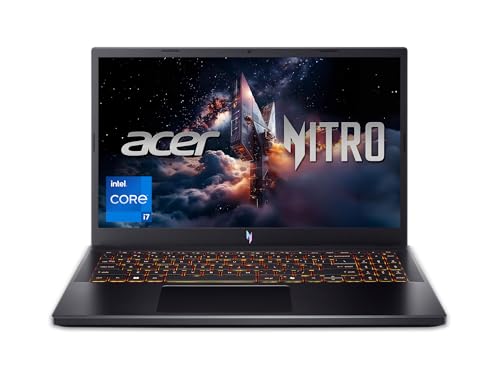
| Acer Nitro V (i7-13620H) | RTX 4050, 16GB DDR5, 1TB Gen 4, 165Hz | Mid-range | Balanced mid-tier build |
| msi Vector 16 HX AI | RTX 5070 Ti 12GB, Ultra 7 255HX, 16GB, 1TB | Premium | Strongest graphics listed |
The eight laptops
ASUS ROG Strix G16 with RTX 5060
The title lists an RTX 5060, an i7-14650HX, 16GB DDR5, a 1TB Gen 4 SSD, Wi-Fi 7 and a 16:10 165Hz panel quoted at 3ms. That response figure is a seller claim. It is a polished spec set from a well-known brand, and the premium goes toward service reach as much as hardware.
- Pro: Wi-Fi 7 and a 1TB drive listed
- Pro: Large brand service network
- Con: 16GB is modest at this tier
Who it’s for: Buyers who want a recognisable name when ordering sight unseen.
ASUS ROG Strix G16 with RTX 5070
This version lists an RTX 5070 and a Ryzen 9 9955HX with 16GB DDR5-5600 and 1TB storage, plus Wi-Fi 6E. Of the two Strix listings, it carries the stronger graphics tier and the older Wi-Fi standard. A model number is given, which makes it easy to verify.
- Pro: Higher graphics tier than its sibling
- Pro: Model number in the title
- Con: Pricey for 16GB RAM
- Con: Wi-Fi 6E rather than Wi-Fi 7
Who it’s for: Players who want more graphics headroom and will add memory.
Alienware 16 Aurora
An RTX 5050, Intel Core 7 240H, 16GB DDR5 and 1TB SSD sit behind a WQXGA 120Hz display. The resolution is high for an entry-class GPU, so you may lower settings to keep frame rates smooth. The title also repeats the GPU brand without extra detail.
- Pro: High-resolution screen
- Pro: Wi-Fi 7
- Con: Entry-class GPU driving a sharp panel
Who it’s for: Buyers who care about screen quality as much as speed.
HP Victus 15 with i5-13420H
The listing shows an RTX 3050, 16GB RAM and a 1TB SSD, with Windows 11 named in the title. Its title includes “(>i7-12650H)”, a comparative claim we cannot verify, and an accessory note (“ICP Acc”) that is unclear. Read the product page to see what is in the box.
- Pro: 1TB drive for the tier
- Pro: Newer CPU than the other Victus
- Con: Unclear accessory wording
- Con: Entry-class GPU
Who it’s for: Buyers who want more storage at a low tier.
HP Victus 15.6 with i5-12450H
With an RTX 3050, 16GB RAM and a 512GB PCIe SSD, this is the lowest-cost listing here and uses an older CPU generation than the other Victus. It suits lighter games and a first purchase, and the 512GB drive fills quickly.
- Pro: Lowest tier
- Pro: Windows 11 Pro
- Con: 512GB storage
- Con: Older platform
Who it’s for: First-time buyers on a tight limit.
Lenovo LOQ
The title lists an RTX 4050, Ryzen 5 7235HS, 16GB DDR5 and 1TB SSD, a 15.6-inch 144Hz panel, plus Ethernet, USB-C and HDMI. A wired port is a practical help for large online downloads, which matters when you are buying a machine over the internet.
- Pro: Ethernet port listed
- Pro: 1TB storage
- Con: 144Hz is the lowest refresh rate here
Who it’s for: Wired-network players on a mid-tier price.
Acer Nitro V with i7-13620H
An RTX 4050, Core i7-13620H, 16GB DDR5 and 1TB Gen 4 SSD are paired with a 15.6-inch 165Hz IPS panel. It is a balanced mid-tier spec sheet with a model code in the title that helps you cross-check listings. See also our notes on 240Hz gaming laptops.
- Pro: Balanced RAM, storage and refresh
- Pro: Model code in the title
- Con: Entry-to-mid GPU class
Who it’s for: Buyers who want fewer compromises on a mid-tier budget.
msi Vector 16 HX AI
This listing pairs an RTX 5070 Ti with 12GB, a Core Ultra 7 255HX, 16GB DDR5 and a 1TB PCIe SSD behind a 16-inch 144Hz panel. It has the strongest graphics tier in the set, though 16GB of RAM feels light next to that GPU, and the refresh rate is only 144Hz.
- Pro: Strongest GPU listed
- Pro: 12GB VRAM named
- Con: 16GB RAM for the price
- Con: Panel is 144Hz
Who it’s for: Buyers who prioritize graphics power.
How we picked these
The Editorial team compiled this list from published specifications, manufacturer documentation and buyer reviews, choosing laptops that appear in current US online listings across budget, mid-range and premium tiers. Nobody on the team used or measured these units. Every spec is drawn from the listing title, so confirm each on the product page before ordering.
Buying online, step by step
Step 1: Read the spec sheet for traps
Match the model number in the title to the manufacturer’s page. Check GPU power (TGP), because the same chip name can run at different limits. Check memory: a single stick can run in single-channel mode, which may lower performance, and see DDR5 speed and compatibility for compatibility notes. Confirm the display refresh rate and whether the SSD is a standard slot size.
Step 2: Seller versus shipper
“Sold by” is who you deal with in a dispute; “shipped by” is who packs the box. Look for the listing detail on both. A retailer-sold, retailer-shipped unit is simplest for returns.
Step 3: Return policy and payment
Know the window in days, whether you pay return shipping and whether opened gaming laptops carry a restocking fee. Pay through the platform so disputes stay protected.
Step 4: Unboxing day checks
Photograph the box and tape before opening. Look for dents, loose hinges and missing accessories. Boot the machine, verify model and serial, then show full-screen white, black, red, green and blue to find dead or stuck pixels. Install updates, then play a demanding game for at least 30 minutes and listen for fan noise and watch for stuttering as heat builds.
Step 5: Plan your return clock
As a planning estimate, assume a 30-day window. Do the physical and screen checks on day 1, a thermal and battery check by day 7, and a wider week of ordinary use by day 14. That leaves about two weeks as buffer for shipping a return. If your window is 14 days, compress the same steps into the first 5 days.
Step 6: Register the warranty
Once the machine passes your checks, register it with the manufacturer, and store the invoice and serial number somewhere safe.
What to look for in a laptop you cannot hold first
Graphics power and cooling
The GPU name sets the tier, but power limit and cooling decide how long it holds its speed. A thin chassis with a higher-tier chip may throttle sooner than a thicker one with a lower-tier chip. Read the manufacturer page for the power figure, and look in buyer reviews for repeated complaints about heat or fan noise on the exact model number.
Screen choices
Refresh rate, resolution and panel type all vary inside the same family. A 144Hz full HD screen suits a lower-tier GPU, while a high-resolution panel paired with an entry GPU often forces lower settings. Check whether the title states sRGB gamut or brightness; if not, treat colour quality as unknown.
Memory and storage
Sixteen gigabytes of RAM is the practical floor for current games, and 1TB of storage saves an early upgrade. Large installs commonly run past 100GB each, so a 512GB drive can hold only a handful of titles after Windows and updates. Confirm whether slots are free before planning upgrades.
Ports and power
Check for Ethernet, HDMI and USB-C, and ask whether USB-C charging is supported, since gaming laptops usually need the supplied barrel charger. Keep the original power adapter and box, because returns without them can be refused.
First-boot software checks
On first start, update Windows and the graphics driver straight from the manufacturer, then check the preinstalled software for trial offers you do not want. Confirm in system information that the RAM total, storage size and GPU match your order. A mismatch, even a small one such as 8GB instead of 16GB, is a reason to start a return the same day rather than wait.
Weight, size and shipping
Sixteen- and eighteen-inch models are larger than they look in photos, and many listings leave out the weight. If you carry the laptop daily, find the weight on the manufacturer page and add roughly one kilogram for the charger as a planning estimate. Use the original packaging for any return, so keep it for the first month.
Mistakes buyers make
Comparing laptops by GPU name only and ignoring wattage. Ordering from a third-party seller without reading the return terms. Postponing the inspection until the return window is nearly over. Assuming a comparative line in a title, such as “beats” another chip, is a verified result. Skipping the warranty registration, which makes later claims slower. Buying the highest GPU tier while accepting 16GB of RAM, then finding a memory-hungry game stutters. Failing to keep the original box, which can complicate a return.
Verdict
If graphics power matters most, the msi Vector 16 HX AI leads this set; the ROG Strix G16 with RTX 5060 is the brand-backed all-rounder; the Lenovo LOQ and Acer Nitro V are the practical mid-tier picks; the HP Victus models are the low-cost entry. Whichever you choose, run the checks on arrival. If two laptops look equal, prefer the one with the longer return window and the seller you can identify, because a good inspection plan is worth more than a small price difference. Keep a short log of what you checked and when, with photos, so that any return or warranty request is easy to support.
Related guides
- Gaming Laptop Battery Draining While Plugged In Fix
- Graphics Cards For Low Wattage Power Supplies
- How To Stop Laptop Thermal Throttling In Software
Frequently asked questions
Is it safe to buy a gaming laptop online?
Yes, when you control the risks you can control: buy from a seller you can identify, confirm the exact model number, read the return policy before paying and keep every receipt. Most problems, such as damage in transit or a panel flaw, are solvable inside a return window, which is why the inspection steps below matter.
What should I check first when the laptop arrives?
Photograph the box before opening it, then inspect the chassis for dents and loose parts. Power it on, check the model number and serial against the order, and run a solid-colour screen check for dead pixels. Do these on day one, while returns are simplest.
What is the difference between sold by and shipped by?
The seller is who you contract with and who handles disputes, while the shipper is who packs and sends the box. A listing sold and shipped by a reputable retailer is simplest. A third-party seller using a retailer’s fulfilment can add a layer, so read the return terms on the listing.
Why does GPU power matter when two laptops share the same GPU name?
Manufacturers can configure the same graphics chip at different power limits, which changes performance and heat. Titles seldom list that figure, so check the manufacturer’s specification page for the exact model number before comparing prices.
When should I register the warranty?
As soon as you have confirmed the laptop works, ideally in the first week. Save the invoice, serial number and registration confirmation together. Registration can speed support requests, and a missing receipt is a common reason claims stall.