Diablo asks something different from a mouse than a shooter does. Your left hand lives on a handful of keys while your right hand steers, targets and fires skills for hours, and the deciding question is how much of that work the mouse can take over. Extra programmable buttons move potions, mounts and cooldown skills off the keyboard, and switches that survive tens of millions of clicks matter because an ARPG season is a click marathon. The real choice is between a full side-button grid, a balanced all-rounder, or a wireless mouse that keeps long sessions untethered.


This guide is for Diablo 4 players and ARPG fans generally — the same logic covers similar loot games with skill bars and potion keys. Every pick comes from its Amazon US product page, and the specs quoted are the ones those listings state: programmable button counts, side button layouts, sensor ranges and switch ratings. If a mouse could not show extra controls or a durability figure on its listing, it did not make this list, because those are the two things this genre actually rewards.
Top 3 picks at a glance

Quick Picks
As an Amazon Associate we earn from qualifying purchases.
| Product | Best for | Key spec from title |
|---|---|---|
| Corsair Scimitar RGB Elite | Players who want the whole skill bar under the thumb | 17 programmable buttons, 12 side buttons with Key Slider |
| Razer Naga V2 HyperSpeed | Wireless play with the largest button count here | 19 programmable buttons, Focus Pro 30K sensor |
| Logitech G502 HERO | A proven all-rounder that also plays everything else | HERO 25K sensor, 11 programmable buttons |
| Razer Basilisk V3 | Fewer buttons, faster switches, tilt wheel utility | Focus+ 26K sensor, 11 programmable buttons |
How to Choose
Count the buttons you will bind, not the buttons that exist
Diablo 4 gives you a skill bar, a potion, a mount, an evade and menus you open constantly. Map those honestly and most players land between four and eight mouse binds they will actually use. A twelve-button side grid like the Scimitar’s or the Naga’s nineteen controls makes sense if you genuinely play that way or also play MMOs; it is wasted plastic if your thumb only ever finds two buttons. Start from your current binds, add the two or three you wish you had, and buy for that number. Overshooting the count adds weight, cost and a learning curve with no payoff.
Side button layout matters more than the total
A grid of small side buttons works when the buttons are textured or shaped so your thumb can tell them apart without looking, and better designs let you adjust their position. Corsair’s Key Slider physically moves the side panel to meet your thumb, which is the kind of detail that decides whether a grid feels usable at hour three. Two large thumb buttons, as on the G502 and Basilisk, are easier to hit reliably and suit players who bind only skills and a potion. Neither layout is superior in the abstract; grids reward players who train their thumb, and simple pairs reward everyone else immediately.
Take switch ratings seriously in this genre
An ARPG session can mean thousands of clicks an hour, season after season, so the switch rating on the listing is a practical figure rather than trivia. The Scimitar’s Omron switches are rated at 50 million clicks on its listing, and optical switches like the Basilisk’s avoid the mechanical wear pattern behind double-click faults altogether. You cannot feel a rating in a shop, but you can read it before buying, and in this genre it is one of the best predictors of whether the mouse survives your second and third characters. Prioritize it over lighting zones every time.
Decide how much weight your wrist wants
Button-heavy mice are not light mice. Grids, sliders and big shells push these picks well past the weight of a shooter mouse, and Diablo’s constant small movements mean you feel that mass for hours. A heavier mouse is not a problem for most ARPG players — the game rarely asks for huge flicks — but if you play at low sensitivity with wide arm movements, the Naga’s wireless freedom and mid-weight body may suit you better than a wired grid mouse. Think about your sensitivity and session length together, because the right answer is personal rather than universal.
The 4 Best Options
Corsair Scimitar RGB Elite
The Scimitar is the mouse this genre’s heaviest binders reach for: seventeen programmable buttons, twelve of them in a side grid that slides forward or back to sit exactly under your thumb. The listing states Omron switches rated at 50 million clicks and a braided cable, which speaks directly to the two ways ARPG mice die — worn switches and frayed cables. Its PixArt sensor adjusts in single-DPI steps up to 18,000. It is wired and substantial, and the grid takes practice, but if you want your whole rotation, potion and mount on one thumb, nothing else here goes as far.
Specs
- Buttons: 17 fully programmable buttons, including 12 side buttons
- Side panel: patented Key Slider system to reposition the side buttons
- Sensor: native 18,000 DPI optical sensor, adjustable in 1 DPI steps
- Switches: Omron switches rated for 50 million clicks, per the listing
- Software: iCUE for macros, remaps and onboard profiles
- Connection: wired, braided cable
Best for: players who bind most of their skill bar to the mouse and also play MMOs.
Watch out for: the twelve-button grid has a real learning curve, and the wired, weighty body will not suit low-sensitivity arm aimers.
ASIN: B082LRMY53
Razer Naga V2 HyperSpeed
The Naga V2 HyperSpeed takes the grid idea wireless. Nineteen programmable buttons cover a full skill bar and then some, the Focus Pro 30K sensor is far beyond what an ARPG needs, and the battery figures on the listing — up to 250 hours on HyperSpeed wireless and up to 400 hours on Bluetooth — mean charging is a rare event even in long seasons. Razer’s Gen-2 mechanical switches handle the clicking load, and the dual-mode HyperScroll wheel flips between free-spin and tactile steps. It is the most expensive style of pick here, but for a wireless mouse that can run an entire ARPG control scheme, it stands alone in this list.
Specs
- Buttons: 19 programmable buttons
- Sensor: Razer Focus Pro 30K optical sensor
- Connection: HyperSpeed Wireless (2.4GHz) and Bluetooth
- Battery life: up to 250 hours on HyperSpeed, up to 400 hours on Bluetooth, per the listing
- Switches: Razer Mechanical Mouse Switches Gen-2
- Wheel: HyperScroll wheel with free-spin and tactile modes
Best for: wireless players who want maximum binds and very long battery life.
Watch out for: it runs on a replaceable AA battery rather than a rechargeable cell, and nineteen buttons is more than many Diablo builds will ever use.
ASIN: B0BGJT87N2
Logitech G502 HERO
The G502 HERO is the balanced answer: eleven programmable buttons are enough for a skill bar’s essentials plus a potion, the HERO 25K sensor is proven across every genre, and the dual-mode wheel handles inventory scrolling beautifully in free-spin. Five included weights let you tune the balance, and onboard memory keeps five profiles on the mouse. It lacks a full grid, so MMO-style players should look at the two picks above, but for Diablo specifically — where a handful of well-placed binds beats a keyboard’s worth of tiny buttons for most people — it is the easiest mouse here to recommend without conditions.
Specs
- Sensor: HERO 25K sensor, 100 to 25,600 DPI
- Buttons: 11 programmable buttons, dual-mode hyper-fast scroll wheel
- Weights: up to five 3.6g weights included for tuning
- Weight: 121 grams before added weights
- Memory: on-board memory for up to five profiles
- Lighting: LIGHTSYNC RGB
- Connection: wired USB
Best for: Diablo players who also play other genres and want one mouse for all of it.
Watch out for: it is a heavy mouse, and players who want more than a few thumb binds will outgrow the layout.
ASIN: B07GBZ4Q68
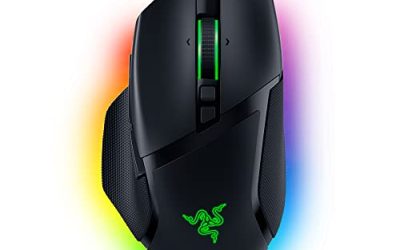
Razer Basilisk V3

The Basilisk V3 suits the player who binds a few keys, clicks constantly, and wants those clicks to last. Its Gen-2 optical switches actuate with light rather than metal contacts, which removes the classic double-click wear path, and the listing credits them with a 70 million click lifespan. Eleven programmable buttons include a multi-function trigger at the thumb, handy for a potion or an ultimate. The HyperScroll tilt wheel adds two more inputs and a free-spin mode for long inventory lists. It gives up the big grids, and in exchange it is the most comfortable long-session shape here for palm and claw grips.
Specs
- Sensor: Razer Focus+ 26K DPI optical sensor
- Buttons: 11 programmable buttons, including a multi-function trigger
- Switches: Razer optical mouse switches Gen-2, rated for 70 million clicks per the listing
- Wheel: HyperScroll tilt wheel with free-spin and tactile modes
- Shape: right-handed ergonomic design with thumb rest
- Lighting: Chroma RGB
- Connection: wired
Best for: players who bind a few essentials and want optical switch durability for heavy clicking.
Watch out for: no side grid, so full-rotation mouse control is not on offer, and the shape is right-handed only.
ASIN: B09C13PZX7
Which One Fits Your Situation
You want your whole build on the mouse
Choose the Scimitar RGB Elite if you play wired, or the Naga V2 HyperSpeed if you do not. Both put a full grid under your thumb; the Scimitar’s sliding side panel fits more thumbs precisely, while the Naga removes the cable and stretches battery life across an entire season. Either way, spend the first week training your thumb in easier content.
You play Diablo plus three other genres
The G502 HERO is your mouse. Eleven buttons cover Diablo’s needs, the sensor and wheel serve shooters and strategy games equally well, and the weight system lets you set a feel you can keep everywhere. It is the pick that asks the fewest compromises once you step outside Sanctuary.
Click durability is your top worry
Look at the Basilisk V3 first, because its optical switches sidestep mechanical contact wear, then the Scimitar with its 50 million click Omron rating. In a genre measured in millions of clicks per season, the switch specification is the closest thing to a lifespan promise a listing can make.
You play long sessions from a couch or recliner
The Naga V2 HyperSpeed is the only wireless pick here, and its battery life makes it practical away from a desk. Pair it with a firm lap surface so the sensor tracks evenly. The wired picks are better value at a fixed desk, but distance settles this question quickly.
Common Mistakes
- Buying a twelve-button grid, then binding only two of the buttons and carrying the extra weight for nothing.
- Mapping the potion to a hard-to-find grid button instead of the largest, easiest control on the mouse.
- Ignoring switch ratings in the genre with the highest click volume in gaming.
- Setting DPI far higher than you control comfortably, then blaming the mouse for sloppy targeting in dense packs.
- Forgetting to save your binds to onboard memory or a profile before a reinstall or a second PC wipes them.
Frequently Asked Questions
How many mouse buttons does Diablo 4 actually need?
Most builds play well with four to six mouse binds: a couple of skills, the potion, and perhaps the mount or evade. The grid mice here serve players who want everything, including town portal and menus, under the thumb, and they shine in MMOs too. Count your current keyboard reaches during a session; every awkward one is a candidate for the mouse, and the total tells you which class of mouse to buy.
Are MMO mice too heavy for an ARPG?
They are heavier than shooter mice, and you will feel it in the first session. After that, most ARPG players stop noticing, because the genre uses small, constant movements rather than repeated full-arm flicks. If you play at very low sensitivity with big swipes, test your tolerance with any heavier mouse you own before committing to a grid design.
Wired or wireless for long Diablo sessions?
Both work. Wired picks like the Scimitar and G502 never need power and cost less to build with big button counts. The Naga V2 HyperSpeed answers the battery question with hundreds of hours per battery, so wireless is a comfort choice rather than a performance compromise. Pick based on your seating and whether a cable crosses your play space.
What DPI should I use for Diablo?
Lower than you might expect. Isometric games reward calm, precise cursor placement, and most players settle in the low thousands or below, whatever the sensor’s ceiling says. Set the mouse so a relaxed hand movement crosses the screen without wrist strain, then adjust in small steps. The exact number matters far less than keeping it consistent across sessions.
Related guides
More from Amazon
Programs that pair well with the guide above. Offers and eligibility are set by Amazon and may change.
Free shipping on eligible items, Prime Video and more. Eligible new members can start with a free trial.
Start a Prime free trialAd-free music streaming. Eligible new subscribers can start with a free trial.
Try Music Unlimited freeA Prime membership for ages 18-24 with a trial period. Eligibility is set by Amazon.
See Prime for Young AdultsAudiobooks and podcasts to listen to on the go. Eligible new members can start with a free trial.
Try Audible freeAs an Amazon Associate we earn from qualifying purchases.