Buying a keyboard and a mouse separately sounds simple until the two halves of the setup begin fighting each other. One cable is too short, the lighting software does not match, the mouse feels too heavy next to a feather-light keyboard, or the keyboard takes up so much desk space that the mouse has nowhere to travel. A matched set removes most of that friction at the beginning, because the two pieces were designed to sit side by side, share one design language, and work from the same connection or the same software.
This guide is for first-time PC gamers building a desk from scratch, for players replacing a worn-out pair in one move, and for households where one desk has to serve both games and school or office work. Every pick below comes from the name and the listed details on its Amazon product page, so the keyboard layout, the mouse sensor, the connection type, and the lighting are taken from what the listing itself states.
Our Top Picks

Top 3 picks at a glance


Quick Picks
As an Amazon Associate we earn from qualifying purchases.
| Product | Best for | Key spec from title |
|---|---|---|
| Redragon S101-3 PRO Gaming Keyboard and Mouse | A first RGB gaming setup on a single purchase | RGB backlit programmable keyboard and mouse combo |
| HAVIT Mechanical Keyboard and Mouse Combo | Typists who want clicky mechanical keys with a matching mouse | RGB gaming 104 keys with blue switches and detachable wrist rest |
| HAVIT LED Gaming Keyboard and Mouse Combo Bundle | A simple backlit set for evening play and homework | LED gaming keyboard and mouse combo bundle |
| Logitech MK345 Wireless Keyboard and Mouse Combo | A quiet wireless desk shared between games and work | Wireless keyboard and mouse combo with palm rest |
| Logitech MK270 Wireless Keyboard and Mouse Combo | A compact wireless set for a small desk or a laptop | Wireless keyboard and mouse combo with 2.4 GHz connection |
How to Choose
Wired or Wireless
A wired set draws its connection straight through USB, so there is no battery to charge and no receiver to lose, which suits a fixed gaming desk where the keyboard and mouse rarely move. Wireless sets free the desk from cables and make it easy to pull the keyboard onto a lap or pack the mouse for a laptop, yet they need batteries or charging and a receiver that stays plugged in. Think about how often the desk changes shape. If the setup stays put and the priority is a connection that never sleeps mid-match, wired wins. If the same set travels between a desktop and a laptop, or the desk doubles as a dining table, wireless flexibility matters more than anything else.
Keyboard Switches and Layout
Membrane keyboards use a rubber layer under the keys, which keeps typing quiet and soft, while mechanical switches give each key a distinct click and a firmer reset that many gamers prefer for fast repeated presses. Full-size layouts include a number pad, which helps with inventory shortcuts and with spreadsheet work, while a tenkeyless board frees desk space for wide mouse sweeps. Before choosing, count how often the number pad gets used in a normal week. Players who bind abilities to the numpad or who type numbers all day will miss it, while players who aim with broad arm movements will welcome the extra room that a shorter board leaves behind.
Mouse Sensor and Shape
The mouse sensor decides how cleanly the cursor follows a fast flick, and the shell decides whether the hand stays relaxed after an hour. A higher DPI range gives more room to tune sensitivity, yet most players settle far below the maximum, so the shape and the weight matter at least as much as the headline number. Palm grippers need a taller, fuller shell, claw grippers need a shorter body with a defined hump, and fingertip players need a light mouse they can lift easily. Hold a ruler next to the hand and compare it with the listed dimensions. A mouse that is too long forces the fingers to stretch, while one that is too short leaves the palm unsupported.
Lighting, Software, and Extras
RGB lighting looks good in photos, but its real value is practical: backlit keys stay readable in a dark room, and per-key or zoned lighting can mark ability groups or movement keys. Software control adds macro recording and lighting profiles, yet it also adds one more program to install and keep updated. Extras such as a wrist rest, a spill-resistant coating, or dedicated media keys change daily comfort more than a lighting effect ever will. Decide which of those extras will be used every day. A wrist rest helps during long sessions, media keys help players who listen to music while they play, and macro keys help players who repeat the same sequence of commands.
The 5 Best Options
Redragon S101-3 PRO Gaming Keyboard and Mouse
The Redragon S101-3 PRO suits a new gamer who wants a complete RGB setup in one box without hunting for matching parts. Its keyboard carries programmable keys and RGB backlighting, while the bundled mouse shares the same lighting style, so the desk looks coherent from the first evening. Independent macro record keys give players a way to store repeated commands, and the wired connection keeps both devices ready whenever the PC wakes. It is a natural first set for someone moving from a laptop keyboard to a dedicated gaming desk.
Specs
- RGB backlit programmable keyboard and mouse combo
- Independent macro record keys
- Software support for keyboard and mouse settings
- Wired connection for keyboard and mouse
- Full-size keyboard layout with number pad
Best for: A first RGB gaming setup bought in a single step.
Watch out for: Confirm the keyboard layout and language in the listing before ordering, since combo listings sometimes show several layout variants.
HAVIT Mechanical Keyboard and Mouse Combo
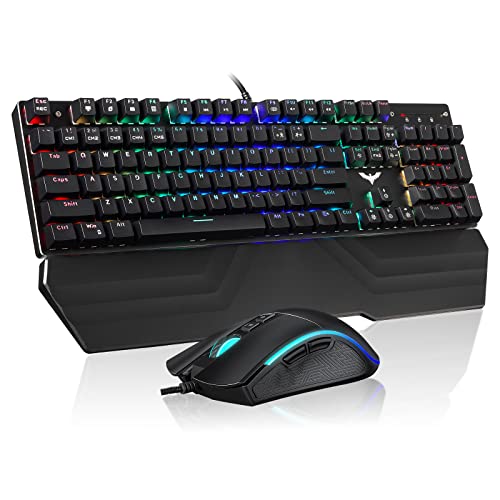
The HAVIT mechanical combo suits players who like a firm, clicky keystroke and want the mouse to match the keyboard in style and lighting. Blue switches give each press a clear tactile point, which helps with typing accuracy and with games where a key press must register exactly once. A detachable wrist rest supports the palms during long sessions, and the RGB lighting on both pieces keeps the desk looking unified. It fits a desk where the keyboard gets heavy daily use for both games and writing.
Specs
- RGB gaming keyboard with 104 keys
- Blue mechanical switches
- Detachable wrist rest
- Programmable gaming mouse included in the combo
- Wired USB connection
Best for: Players who want mechanical keys and a matching RGB mouse.
Watch out for: Mechanical blue switches are louder than membrane keys, so check whether anyone nearby minds keyboard noise during late sessions.
HAVIT LED Gaming Keyboard and Mouse Combo Bundle
The HAVIT LED combo suits a household that needs one set for evening games, homework, and general computer use. Its LED backlighting keeps keys visible after dark without the complexity of full RGB software, and the bundled mouse uses an adjustable DPI setting so the same mouse can feel slow and steady for documents and quicker for games. An ergonomic wrist rest is built into the keyboard shape, which helps during longer stretches at the desk. It is a straightforward choice when simplicity matters more than deep customization.
Specs
- LED gaming keyboard and mouse combo bundle
- Backlit keyboard with ergonomic wrist rest
- Adjustable DPI mouse
- 104-key keyboard layout
- Wired USB connection
Best for: A simple backlit set for shared family desks.
Watch out for: Check the listed backlight colours and modes, since LED combos often cycle through fixed colours rather than providing per-key control.
Logitech MK345 Wireless Keyboard and Mouse Combo

The Logitech MK345 suits a desk that must switch between games, work calls, and browsing without a tangle of cables. Its full-size keyboard includes a palm rest and media keys, while the right-handed mouse sits comfortably beside it, and a single 2.4 GHz receiver links both devices to the computer. A spill-resistant design adds peace of mind for desks that hold drinks, and the wireless link keeps the surface clear for notebooks and controllers. It fits players who game casually and work at the same desk every day.
Specs
- Wireless keyboard and mouse combo with palm rest
- 2.4 GHz USB receiver
- Full-size keyboard with media keys
- Comfortable right-handed mouse
- Spill-resistant keyboard design
Best for: A quiet wireless desk shared between games and work.
Watch out for: Confirm the receiver is stored inside the mouse or keyboard on arrival, and keep a spare battery nearby so a flat battery does not end a session.
Logitech MK270 Wireless Keyboard and Mouse Combo
The Logitech MK270 suits a small desk, a dorm room, or a laptop setup where space is tight and cables are unwelcome. Its compact mouse pairs with a full-size keyboard that still carries eight multimedia and shortcut keys, so media and volume stay within reach. The 2.4 GHz wireless connection works through a tiny receiver, and the long battery life means the set can sit ready for weeks of mixed use. It is a practical pick for a second desk, a living-room PC, or a beginner setup that may later move.
Specs
- Wireless keyboard and mouse combo for Windows
- 2.4 GHz wireless connection
- Compact mouse included
- 8 multimedia and shortcut keys
- Long battery life for keyboard and mouse
Best for: A compact wireless set for a small desk or a laptop.
Watch out for: The compact mouse suits medium and smaller hands best, so players with large hands should compare its size with their grip before ordering.
Which One Fits Your Situation
Building a First Gaming Desk
Choose the Redragon S101-3 PRO when the desk is empty and the goal is a complete gaming look in one purchase. Its RGB keyboard and matching mouse arrive as a pair, the macro keys cover repeated commands, and the wired link removes battery worries. Pair it with a large mouse pad and the setup is ready for an evening of play without extra shopping trips.
Typing All Day and Gaming at Night
Choose the HAVIT mechanical combo when the keyboard must handle essays, messages, and work documents as well as games. Blue switches give typing a firm rhythm, the wrist rest supports long sessions, and the RGB mouse keeps the gaming side of the desk intact. It is the strongest fit when the keyboard is the most-used object on the desk.
Sharing One Desk With the Family
Choose the HAVIT LED combo or the Logitech MK345 when several people use the same computer. The HAVIT LED set keeps things simple with backlit keys and an adjustable mouse, while the MK345 adds wireless freedom, a palm rest, and a spill-resistant keyboard. Pick the HAVIT set for a fixed gaming corner and the MK345 when the desk must stay tidy between uses.
Setting Up in a Small Room
Choose the Logitech MK270 when floor space and desk space are both limited. Its compact mouse and wireless receiver keep the surface clear, the keyboard still provides shortcut keys, and the whole set packs away easily. It also works well as a living-room set beside a PC connected to a television.
Common Mistakes
- Buying a set for its lighting alone and ignoring whether the keyboard layout and the mouse shape suit the hand.
- Choosing a loud mechanical switch for a shared bedroom without checking how the noise carries at night.
- Forgetting to measure desk depth before ordering a full-size keyboard, then leaving no room for mouse movement.
- Assuming every wireless set includes a charging cable, when many run on disposable batteries that need spares.
- Skipping the listing details on layout, connection type, and included parts, then discovering a missing wrist rest or receiver.
Frequently Asked Questions
Are keyboard and mouse sets good for gaming?
A matched set can serve gaming well when its keyboard layout, mouse sensor, and connection suit the games being played. Wired RGB sets suit fast games where a steady connection matters, while wireless sets suit casual play and mixed work. The deciding factors are switch feel, mouse shape, and desk space, not whether the two pieces arrived in one box.
Should I choose a wired or a wireless set?
Choose wired when the desk stays fixed and a connection that never sleeps matters most, since USB power removes batteries from the equation. Choose wireless when the set moves between computers, the desk doubles for other uses, or cables get in the way. Both types can play the same games, so the choice follows the desk rather than the game library.
Do I need a mechanical keyboard for gaming?
A mechanical keyboard is not required for gaming, and many players do well on membrane boards. Mechanical switches give a firmer feel and a clearer actuation point, which some players prefer for fast repeated presses. Membrane keyboards are quieter and often lighter, so players in shared rooms may prefer them.
What should I check before ordering a combo?
Check the keyboard layout and language, the mouse size and grip style, the connection type, and the battery or cable situation. Also confirm which extras are included, such as a wrist rest, software support, or a receiver. A quick check of those details avoids the most common surprise, which is a set that looks right but fits the desk or the hand badly.
Related guides
More from Amazon
Programs that pair well with the guide above. Offers and eligibility are set by Amazon and may change.
Free shipping on eligible items, Prime Video and more. Eligible new members can start with a free trial.
Start a Prime free trialAd-free music streaming. Eligible new subscribers can start with a free trial.
Try Music Unlimited freeA Prime membership for ages 18-24 with a trial period. Eligibility is set by Amazon.
See Prime for Young AdultsAudiobooks and podcasts to listen to on the go. Eligible new members can start with a free trial.
Try Audible freeAs an Amazon Associate we earn from qualifying purchases.