Not every player wants a mouse covered in lights and extra buttons. Some players want a quiet office mouse that also handles games, a comfortable ergonomic shell for long evenings, or a compact travel mouse that works on a laptop anywhere. Ordinary mice, built for productivity rather than esports, can play games surprisingly well, provided the genre matches the hardware. Slow-paced strategy games, city builders, adventure titles, and casual games ask far less of a sensor than competitive shooters do.
This guide is for players who want one mouse for work and play, without gaming branding or a steep learning curve. Office workers who game after hours, strategy and simulation players, travellers who game on a laptop, and people with wrist discomfort will each find a relevant option. Every pick below is an ordinary, non-gaming-branded mouse used for gaming, and every specification comes from the name and details shown on its Amazon product page.
Top 3 picks at a glance


Quick Picks
As an Amazon Associate we earn from qualifying purchases
| Product | Best for | Key spec from title |
|---|---|---|
| Logitech MX Master 3S | Desk work plus strategy and simulation games | 8K DPI any-surface tracking, MagSpeed scrolling, quiet clicks |
| Logitech MX Anywhere 3S | Travel and laptop gaming in small spaces | 8K DPI any-surface tracking, compact shape, quiet clicks |
| Logitech MX Vertical | Wrist comfort during long casual sessions | 57-degree vertical angle, 4000 DPI sensor, rechargeable |
| Logitech M720 Triathlon | Multi-device use across PC, laptop, and tablet | 1000 DPI, 6 programmable buttons, 2-year battery life |
How to Choose
Sensor accuracy for slower games
Ordinary mice carry sensors built for documents, spreadsheets, and browsing, not for fast flick shots. That matters less than it sounds, because strategy, simulation, and adventure games move the cursor in measured steps rather than sudden flicks. Look for the DPI figure on the listing and check whether the sensor tracks on the surfaces used most, since glass desks and glossy tables defeat basic sensors. A mouse with an 8,000 DPI sensor and any-surface tracking handles casual games comfortably, while a 1,000 DPI mouse suits slower play and precise clicks on menus and maps.
Comfort and shape for long sessions
Comfort decides whether an ordinary mouse survives a long evening of gaming, because these mice are designed for eight-hour workdays rather than short matches. Ergonomic shells support the palm and thumb, vertical shells hold the hand in a handshake position, and compact shells suit travellers who value a small footprint. Check the hand orientation on the listing, since most office mice are right-handed, and compare the dimensions with hand size. A mouse that feels good during work will usually feel good during a slow game, while a mouse that causes wrist strain at work will only feel worse after an extra hour of play.
Buttons, wheel, and shortcuts
Ordinary mice usually carry fewer buttons than gaming mice, yet the buttons they do carry can still help in games. Forward and back buttons suit menu navigation, a thumb button can hold push-to-talk, and a mode-shift wheel switches between stepped and free-spinning scrolling for long inventories. Check how many buttons the listing states and whether they can be customised in software, because a button that cannot be remapped is less useful in games. A fast scroll wheel matters more than it first appears, since strategy games and inventories involve long lists that a stepped wheel scrolls slowly.
Connection, battery, and multi-device use
Ordinary mice often connect through Bluetooth and a USB receiver, which suits laptops, tablets, and shared desks. Bluetooth is convenient and quiet, yet it can feel slower than a dedicated gaming receiver, so it suits casual games better than competitive shooters. Battery life varies from months on a single AA cell to weeks on a rechargeable battery, and quick charging can rescue a flat mouse in minutes. Multi-device pairing lets one mouse switch between a PC, a laptop, and a tablet, which helps players who move between machines during the day.
The 4 Best Options
Logitech MX Master 3S

The MX Master 3S is the strongest ordinary mouse for gaming in this guide, because its sensor and scroll wheels handle both work and slow-paced games with ease. An 8,000 DPI Darkfield sensor tracks on glass and other tricky surfaces, while the MagSpeed wheel scrolls through long inventories and maps in seconds. Quiet clicks keep shared rooms calm, and a thumb wheel adds horizontal scrolling for strategy maps and timelines. Seven buttons cover shortcuts, forward and back navigation, and push-to-talk, making this a natural choice for players who want one premium mouse for everything.
Specs
- 8,000 DPI Darkfield sensor with any-surface tracking
- MagSpeed electromagnetic scroll wheel
- Quiet clicks
- Logi Bolt USB receiver included
- Bluetooth and USB-C charging
- Ergonomic right-handed shape
- Thumb wheel for horizontal scrolling
- For Windows, Mac, Linux, and Chrome
Best for: Players who want a premium office mouse that also handles strategy, simulation, and adventure games at the desk.
Watch out for: The mouse is right-handed and fairly heavy, so check hand size and grip style, and note that Bluetooth suits casual games better than fast competitive shooters.
Logitech MX Anywhere 3S
The MX Anywhere 3S brings the same sensor family into a compact body that fits a laptop bag and a small desk. Its 8,000 DPI sensor tracks on glass, which helps when gaming on a hotel desk, a cafe table, or a glossy surface with no mousepad. Quiet clicks and a MagSpeed wheel keep the mouse discreet in shared spaces, while six buttons cover shortcuts and navigation. A rechargeable battery with quick charging gives three hours of use from a one-minute charge, so a flat battery rarely ends a session. This is the pick for travellers and laptop players who want a capable mouse without carrying a full-size shell.
Specs
- 8,000 DPI any-surface tracking
- Compact shape, 99 grams
- Quiet clicks
- MagSpeed scroll wheel
- 6 buttons, including back, forward, and wheel mode-shift
- Rechargeable battery with USB-C quick charging
- Bluetooth connection
- For Windows, Mac, Linux, Chrome, iPadOS, and Android
Best for: Laptop and travel players who want a compact mouse that tracks on glass and fits in a small bag.
Watch out for: The compact shape suits small to medium hands best, so larger hands should check the dimensions, and the standard model ships without a USB receiver in the box.
Logitech MX Vertical
The MX Vertical suits players whose wrist complains during long sessions, because its vertical shell holds the hand in a natural handshake position. A 57-degree angle reduces forearm twist, while a 4,000 DPI sensor with a cursor speed switch lets the player adjust sensitivity without opening software. Wireless connection runs through Bluetooth or the included USB receiver, and the rechargeable battery lasts for months of typical use. Four buttons keep the layout simple, which suits adventure games, city builders, and strategy titles where the keyboard carries most commands and the mouse mainly points and clicks.
Specs
- 57-degree vertical angle
- 4,000 DPI high-precision sensor
- Cursor speed switch
- Wireless via Bluetooth or included USB receiver
- Rechargeable battery with USB-C charging
- 4 buttons
- Right-handed ergonomic shape
- For Windows and Mac
Best for: Players who want wrist comfort during long casual gaming sessions and everyday desk work.
Watch out for: The vertical shape changes aiming completely, so fast shooter play feels awkward, and the right-handed shell does not suit left-handed players.
Logitech M720 Triathlon
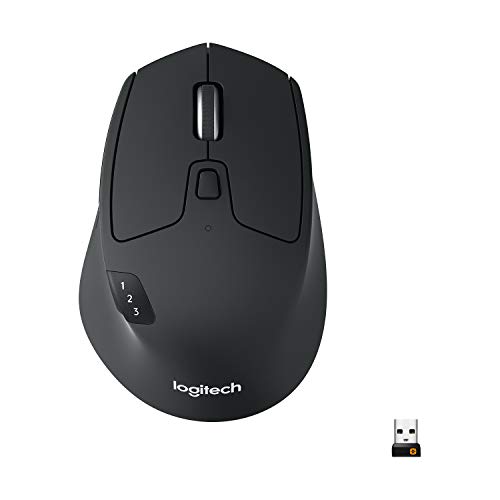
The M720 Triathlon is the most practical ordinary mouse in this guide for players who switch between several machines. Easy-Switch buttons pair the mouse with up to three devices, so one mouse can move between a gaming PC, a work laptop, and a tablet without re-pairing. Six programmable buttons cover shortcuts and push-to-talk, while a hyper-fast scroll wheel handles long lists. A single AA battery lasts for up to two years of typical use, which removes charging from the routine entirely. The full-size ergonomic shell suits palm grips, and the 1,000 DPI sensor covers slow-paced games and precise menu clicks.
Specs
- 1,000 DPI sensor
- 6 programmable buttons
- Up to 2 years of battery life on one AA battery
- Bluetooth and USB Unifying receiver
- Easy-Switch pairing for up to 3 devices
- Hyper-fast scroll wheel
- Full-size ergonomic shape
- For laptop, PC, Mac, and iPadOS
Best for: Players who share one mouse between a gaming PC, a laptop, and a tablet and want very long battery life.
Watch out for: The 1,000 DPI sensor suits slow-paced games, so competitive shooters will feel sluggish, and the right-handed shell needs a hand-size check.
Which One Fits Your Situation
One premium mouse for work and strategy games
Pick the Logitech MX Master 3S when a single desk mouse must cover documents, spreadsheets, and slow-paced games. Its 8,000 DPI sensor tracks on glass, the MagSpeed wheel handles long maps and inventories, and quiet clicks suit shared rooms and late-night sessions alike. The thumb wheel also adds horizontal scrolling for strategy maps, timelines, and wide spreadsheets.
Laptop gaming while travelling
Pick the Logitech MX Anywhere 3S when gaming happens on the move. Its compact body fits a laptop bag, the 8,000 DPI sensor tracks on glass desks and cafe tables, and quick charging rescues a flat battery with a one-minute top-up before a session. Six buttons cover shortcuts and navigation, while the MagSpeed wheel scrolls through long lists without repeated flicks.
Wrist comfort during long casual sessions
Pick the Logitech MX Vertical when the wrist needs a break from flat mice. Its 57-degree handshake angle reduces forearm twist, the cursor speed switch adjusts sensitivity on the fly, and the simple four-button layout suits adventure and city-building games. Wireless connection through Bluetooth or the included receiver also keeps the desk tidy during long casual sessions.
One mouse across three devices
Pick the Logitech M720 Triathlon when a gaming PC, a laptop, and a tablet share one desk. Easy-Switch buttons move between devices instantly, six programmable buttons cover shortcuts, and a single AA battery lasts for up to two years of typical use. The full-size ergonomic shell also suits palm grips during long evenings of slow-paced play.
Common Mistakes
- Buying an ordinary mouse for competitive shooters, then discovering its sensor and Bluetooth connection cannot keep up with fast flicks.
- Ignoring the DPI figure on the listing, so a 1,000 DPI mouse feels sluggish on a large high-resolution monitor.
- Choosing a compact travel mouse for a large hand, then finding the shell cramped during long sessions.
- Forgetting to check whether a USB receiver is included, which matters for laptops with limited Bluetooth reliability.
- Mapping gaming actions to buttons that cannot be customised, leaving useful controls unused during play.
Frequently Asked Questions
Can a non-gaming mouse work well for gaming?
Yes, for slow-paced games such as strategy, simulation, adventure, and city-building titles, where the cursor moves in measured steps. Ordinary mice struggle in competitive shooters, because their sensors, polling, and Bluetooth connections respond more slowly than gaming hardware. Match the mouse to the genre, and a good office mouse can serve both work and play.
What DPI do I need for casual gaming with an office mouse?
A sensor near 1,000 DPI suits slow games on a standard monitor, while 4,000 to 8,000 DPI suits larger monitors and faster cursor movement across maps. Higher DPI is not always better, since very high sensitivity makes small movements cover too much screen space. Start near the middle of the range and adjust in the mouse software until the cursor feels steady.
Is Bluetooth fast enough for gaming with an office mouse?
Bluetooth is fast enough for casual, strategy, and adventure games, where timing is forgiving. Competitive shooters benefit from a dedicated receiver or a wired connection, because Bluetooth can add latency. If the mouse includes a USB receiver, use it for games and keep Bluetooth for travel and casual use.
Why do office mice feel comfortable for long gaming sessions?
Office mice are designed for eight-hour workdays, so their shells, palm support, and quiet clicks suit long use. Vertical and ergonomic shapes reduce wrist twist, while thumb rests support the hand during slow games. That comfort matters most in long strategy and simulation sessions, where the mouse stays in the hand for hours at a time.
Related guides
More from Amazon
Programs that pair well with the guide above. Offers and eligibility are set by Amazon and may change.
Free shipping on eligible items, Prime Video and more. Eligible new members can start with a free trial.
Start a Prime free trialAd-free music streaming. Eligible new subscribers can start with a free trial.
Try Music Unlimited freeA Prime membership for ages 18-24 with a trial period. Eligibility is set by Amazon.
See Prime for Young AdultsAudiobooks and podcasts to listen to on the go. Eligible new members can start with a free trial.
Try Audible freeAs an Amazon Associate we earn from qualifying purchases.