If your MMO rotation lives on a full hotbar, the best 12 button gaming mouse is the one whose thumb grid you can work without looking down. Every pick below puts a 12-button side panel under your thumb, so a full row of abilities, mounts, potions, and cooldowns sits on the mouse instead of stretching your keyboard hand across the number row. The short answer: the Razer Naga V2 Pro is the most complete package thanks to its swappable side plates and modern optical sensor, the Corsair Scimitar Elite Wireless is the strongest pick for players who want a movable grid on a proven shape, and the Redragon M908 Impact covers the same 12-button layout for far less commitment. The Logitech G600 remains the old-school wired standard, while the SteelSeries Aerox 9 Wireless is the lightweight outlier in a category that usually runs heavy.


As an Amazon Associate, we earn from qualifying purchases.
A 12-button side panel changes how an MMO plays. Instead of splitting attention between movement keys and a distant hotbar row, your thumb handles the skills you press most, and muscle memory builds around a fixed three-by-four grid. The five mice below differ in how that grid feels, how the sensor tracks, and whether a cable is involved, so read the layout notes as carefully as the spec sheets.
Top 3 picks at a glance

Razer Naga V2 Pro
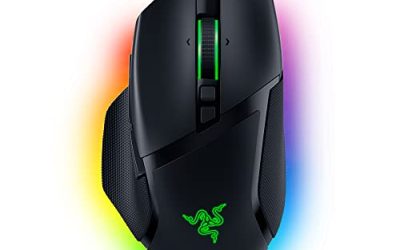
The Naga line defined this category, and the V2 Pro is its most flexible version. Razer ships the mouse with three magnetic side plates, and the 12-button plate is the one that matters here: a clean three-by-four grid with sculpted keycaps you can identify by touch. Swap in the six-button or two-button plate and the same mouse covers MOBAs and shooters, which makes it the easiest recommendation for players who split time between genres.
Under the shell, the Focus Pro 30K optical sensor is more sensor than any MMO needs, but the real benefits are consistency and lift-off behaviour on cloth pads. Optical Mouse Switches Gen-3 remove the double-click lottery that plagued older Nagas, and the HyperScroll Pro wheel adds a free-spinning mode that is genuinely useful for scrolling long auction-house listings. Battery life is rated up to 150 hours on the 2.4 GHz HyperSpeed connection and up to 300 hours on Bluetooth, and the mouse also works over USB-C while it charges. At 134 grams it is not light, yet the weight suits the deliberate, grid-first play style this mouse is built for.
Specs
- Side panel: swappable plates, 12-button grid included (2, 6, and 12 options)
- Total programmable buttons: up to 22 with the 12-button plate
- Sensor: Razer Focus Pro 30K optical, up to 30,000 DPI
- Switches: Razer Optical Mouse Switches Gen-3
- Connectivity: HyperSpeed 2.4 GHz wireless, Bluetooth, wired USB-C
- Battery life: up to 150 hours (HyperSpeed), up to 300 hours (Bluetooth)
- Weight: 134 g
- Model: RZ01-04400100-R3U1
Tier: premium
Corsair Scimitar Elite Wireless
Corsair’s Scimitar family has one party trick nobody else copies: the Key Slider system. The 12-button side panel sits on a rail and can be slid forward or backward, then locked with a hex key, so the grid lines up with where your thumb naturally rests instead of forcing your grip to adapt to the mouse. For players with shorter or longer thumbs, that adjustment is the difference between reaching the back row comfortably and straining for it.
The Elite Wireless version runs Corsair’s Marksman 26K optical sensor and connects over Slipstream 2.4 GHz wireless, Bluetooth, or a cable, with battery life rated up to 150 hours when the lighting is kept sensible. The side buttons are mechanical, with a firm, deliberate press that suits ability spam without feeling mushy, and iCUE handles remapping, macros, and per-game profiles. Sixteen programmable buttons in total means the grid, the DPI controls, and the wheel all feed into your layout. At 114 grams it undercuts the Naga V2 Pro while keeping the same broad, ring-finger-friendly shape that Scimitar owners tend to stay loyal to.
Specs
- Side panel: 12-button Key Slider grid, adjustable and lockable position
- Total programmable buttons: 16
- Sensor: Corsair Marksman 26K optical, up to 26,000 DPI
- Switches: optical main switches, mechanical side buttons
- Connectivity: Slipstream 2.4 GHz wireless, Bluetooth, wired USB-C
- Battery life: up to 150 hours
- Weight: 114 g
- Software: Corsair iCUE
Tier: premium
SteelSeries Aerox 9 Wireless
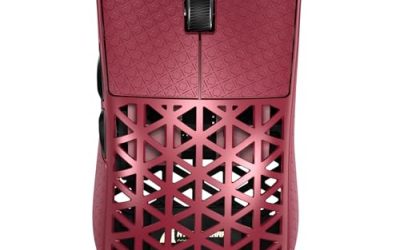
Most 12-button mice are heavy because a grid, a battery, and a sturdy shell add up. The Aerox 9 Wireless attacks that assumption with a perforated honeycomb shell that brings it down to 89 grams, light enough that fast camera turns in arena or battlegrounds feel noticeably less sluggish than on the other picks here. The 12 side buttons sit in a tighter cluster with a textured top row, arranged so your thumb rolls across them rather than stabbing down.
The TrueMove Air sensor, co-developed with PixArt, tops out at 18,000 CPI and tracks cleanly at the low sensitivities most MMO players actually use. Quantum 2.0 Wireless covers 2.4 GHz and Bluetooth, battery life is rated up to 180 hours, and the AquaBarrier design carries an IP54 rating against dust and splashes, which matters for a perforated mouse at a desk where drinks live. The trade-offs are real: the open shell collects dust over time, and the smaller grid is less forgiving for large thumbs. Players who found older MMO mice fatiguing, though, will treat those compromises as the entire point.
Specs
- Side panel: 12-button side grid, 18 programmable buttons total
- Sensor: SteelSeries TrueMove Air optical, up to 18,000 CPI
- Switches: SteelSeries mechanical switches, rated for 80 million clicks
- Connectivity: Quantum 2.0 Wireless (2.4 GHz), Bluetooth, wired USB-C
- Battery life: up to 180 hours
- Weight: 89 g
- Protection: AquaBarrier IP54 dust and splash resistance
Tier: premium
Logitech G600

The G600 is the design that taught a generation of MMO players to use a thumb grid, and it is still on sale because the formula works. Twelve thumb buttons sit in two angled banks of six with a contoured ridge between them, so your thumb can tell which half of the grid it is on without looking. A third finger button beside the right click, called G-Shift, doubles every thumb button while held, pushing the total to 20 programmable inputs and effectively giving you two hotbars on one panel.
Everything else is deliberately old school. The laser sensor tops out at 8,200 DPI, which is plenty for cursor work and MMO camera control even if it trails modern optical sensors on paper. It is wired only, with a braided cable, onboard memory for one profile plus software profiles through Logitech G HUB, and a tilting scroll wheel. At 133 grams with a wide, tall shape, it suits palm grips and larger hands. Players who want a simple, proven grid that never needs charging, and who do not mind the dated sensor, keep buying this mouse for a reason.
Specs
- Side panel: 12 thumb buttons in two angled banks, G9 through G20
- Total programmable buttons: 20, with G-Shift doubling thumb inputs
- Sensor: laser, up to 8,200 DPI
- Switches: mechanical, rated for 20 million clicks
- Connectivity: wired USB, braided cable
- Extras: tilt scroll wheel, onboard memory, RGB lighting
- Weight: 133 g
- Model: 910-002864
Tier: mid-range
Redragon M908 Impact

The M908 Impact is the budget door into this category, and its grid is the real thing: 12 numbered side buttons in a three-by-four layout, plus a rapid-fire button beside the left click, for 18 programmable inputs in total. The buttons are smaller and closer together than on the Razer or Corsair grids, so expect a learning curve and the odd mispress early on, but the layout maps one-to-one onto a standard MMO hotbar.
The optical sensor reaches 12,400 DPI with five adjustable levels, polling runs at up to 1,000 Hz, and Redragon’s software handles macros and per-button remaps. A weight-tuning kit with eight 2.4-gram weights in the base lets you settle the balance, which is a feature the premium picks above have mostly dropped. It is wired only, the shell plastics feel a step below the big brands, and the cable is stiffer than ideal. None of that changes the core offer: a genuine 12-button grid, a usable sensor, and RGB lighting for players who want to find out whether an MMO mouse suits them before spending premium money.
Specs
- Side panel: 12 numbered side buttons, three-by-four grid
- Total programmable buttons: 18, including rapid-fire button
- Sensor: optical, up to 12,400 DPI with 5 adjustable levels
- Polling rate: up to 1,000 Hz
- Connectivity: wired USB
- Extras: weight tuning kit (8 x 2.4 g), RGB lighting, macro software
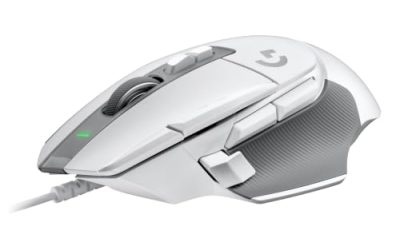
- Colour listed: White
- Model: M908
Tier: budget
How to Choose
Start with the grid, because it is the reason this category exists. Sculpted, separated buttons like the Naga’s are easier to learn by touch, while a sliding panel like the Scimitar’s suits players whose thumb lands in an awkward spot on fixed grids. If you have small hands or a short thumb, prioritise adjustability or a compact cluster like the Aerox 9; if you have large hands, the G600’s wide banks and the Naga’s full-size shell are safer.
Next, decide on a cable. Wired picks like the G600 and M908 never need charging and never drop a connection mid-raid, but the cable drags on a grid-heavy mouse that moves in small, constant corrections. Wireless picks cost more and add weight, yet the current 2.4 GHz connections from Razer, Corsair, and SteelSeries are effectively lag-free for MMO play, and battery ratings now stretch past a hundred hours.
Then match the sensor to your actual play. Every sensor here tracks far beyond what MMO camera work demands, so treat headline DPI as a tiebreaker at most. Shape, weight, and button feel matter more: a heavy mouse with a grid you trust beats a light mouse whose back row you keep missing. Finally, check the software. Your profiles, macros, and per-game layers live there, so confirm the brand’s app supports the remapping depth you want before committing.
Frequently Asked Questions
Are 12 side buttons actually useful outside MMOs?
Yes, within limits. The grid maps well to any hotbar-driven game, including MOBAs, action RPGs, and survival titles, and the buttons can hold macros, push-to-talk, or media controls on the desktop. For fast-paced shooters, most players prefer fewer, larger side buttons, which is why the Naga V2 Pro’s swappable plates are handy.
How long does it take to learn a 12-button grid?
Most players build reliable muscle memory for the front two rows within a few sessions and the full grid within a couple of weeks of regular play. Start by binding only the abilities you press most, leave the back row empty at first, and add bindings gradually instead of filling all twelve on day one.
Is wireless reliable enough for a 12-button MMO mouse?
For modern 2.4 GHz connections, yes. The wireless picks here use the same low-latency links as esports mice, and MMO inputs are far less timing-sensitive than shooter flicks. Keep the receiver close to the mouse with the included extension adapter, and charge during downtime rather than mid-session.
Wired or wireless: which suits a 12-button mouse better?
It depends on your desk and habits. Wired models like the G600 and M908 are lighter on features but never run flat, and they anchor the budget end of the category. Wireless models free the mouse from cable drag during constant small movements, which many grid users prefer, at the cost of higher weight and periodic charging.
Final Verdict
The Razer Naga V2 Pro is the best 12 button gaming mouse for most players: the 12-button plate is the easiest grid to learn, the sensor and switches are current-generation, and the extra plates keep it useful outside MMOs. The Corsair Scimitar Elite Wireless is the better call if fixed grids never quite line up with your thumb, and the SteelSeries Aerox 9 Wireless is the one to pick if every MMO mouse you have tried felt too heavy. The Logitech G600 remains a dependable wired classic with its G-Shift trick, and the Redragon M908 Impact proves the layout works at a budget tier too. Pick by grid fit first, then by cable, and any of the five will run a full hotbar from your thumb.
Product and ASIN Reference
| Product | ASIN |
|---|---|
| Razer Naga V2 Pro | B0BGJTLFN5 |
| Corsair Scimitar Elite Wireless | B0CCVYHZ9N |
| SteelSeries Aerox 9 Wireless | B09VNPB6Q1 |
| Logitech G600 | B0086UK7IQ |
| Redragon M908 Impact (White) | B0C69892G8 |
Related guides
More from Amazon
Programs that pair well with the guide above. Offers and eligibility are set by Amazon and may change.
Free shipping on eligible items, Prime Video and more. Eligible new members can start with a free trial.
Start a Prime free trialAd-free music streaming. Eligible new subscribers can start with a free trial.
Try Music Unlimited freeA Prime membership for ages 18-24 with a trial period. Eligibility is set by Amazon.
See Prime for Young AdultsAudiobooks and podcasts to listen to on the go. Eligible new members can start with a free trial.
Try Audible freeAs an Amazon Associate we earn from qualifying purchases.