Choosing an optical gaming mouse comes down to three real decisions: the shape your hand rests on for hours, the sensor ceiling you will actually use, and whether a cable or a battery fits the way you play. A mouse that feels perfect in a store photo can still cramp a claw grip after one long session, and a sensor rated far beyond your sensitivity setting adds nothing to your aim. The four mice below cover the shapes and sensor tiers that matter most, from a featherweight wireless esports shell to a heavier wired mouse built around extra buttons.
This guide is written for competitive shooter players, MOBA and MMO players who need extra buttons, and everyday players who want one mouse for work and play. Every pick below is listed on Amazon with an optical sensor, and each entry names the sensor, the DPI ceiling, the weight, and the buttons straight from its Amazon listing.
Our Top Picks


Top 3 picks at a glance

Quick Picks
As an Amazon Associate we earn from qualifying purchases
| Product | Best for | Key spec from title |
|---|---|---|
| Logitech G502 HERO | Players who want many buttons for MOBA and MMO play | HERO 25K sensor, 25,600 DPI |
| Razer DeathAdder V2 | Right-handed palm-grip players who want a classic ergonomic shape | Focus+ 20K DPI optical sensor |
| Razer Viper V2 Pro | Competitive FPS players who want the lightest wireless mouse here | Focus Pro 30K optical sensor, 58 grams |
| Logitech G305 LIGHTSPEED | Players who want wireless freedom and long battery life | HERO 12K sensor, 250-hour battery |
How to Choose
Sensor Ceiling and Tracking
Every mouse in this guide uses an optical sensor, which reads the surface with light instead of a laser, and that design is the standard for competitive play because it tracks consistently across cloth pads. The DPI ceiling tells you the highest sensitivity the sensor supports, from 12,000 on the G305 to 30,000 on the Viper V2 Pro, yet most players settle between 400 and 3,200 DPI, so the ceiling matters less than clean tracking at your own setting. Look instead for a sensor that holds steady during fast flicks and does not spin out when you lift and reset the mouse mid-fight.
Shape, Grip, and Weight
Shape decides comfort long before the sensor decides accuracy, so match the shell to your grip instead of copying a favorite streamer. Palm-grip players with larger hands usually fit the DeathAdder V2 and the G502 HERO, whose taller, right-handed shells fill the hand and support the fingers during long sessions. Claw and fingertip players tend to prefer the slimmer, symmetrical Viper V2 Pro, which leaves the palm free and makes quick repositioning easier. Weight matters just as much: a 58-gram shell flicks faster and tires the wrist less, while a 121-gram shell with tuning weights feels planted and steady for players who anchor their aim.
Wired or Wireless
A wired mouse never needs charging and never drops a connection, which is why the G502 HERO and the DeathAdder V2 still appeal to players who sit at one desk and never move their setup. The trade-off is cable drag, so check whether the cable is flexible and light enough to disappear behind the pad, and consider a bungee if it tugs during wide swipes. Wireless mice such as the Viper V2 Pro and the G305 remove the cable and now report at the same 1,000 Hz polling rate as wired models, so the question is battery routine: a rechargeable shell needs a charging habit, while the G305 runs on a single AA cell you can swap in seconds.
Buttons, Profiles, and Software
Extra buttons only help when they sit where your thumb already rests, so count the buttons you will actually press instead of chasing the biggest number. The G502 HERO carries eleven programmable buttons, which suits MOBA and MMO players who map abilities, items, and push-to-talk within thumb reach, while the Viper V2 Pro and the G305 keep five or six buttons for players who want a clean shell and fewer accidental presses. On-board memory is worth checking too: it stores your settings on the mouse itself, so your sensitivity and button maps travel with you to another computer without reinstalling software. Make sure the companion app runs on your system before you buy.
The 4 Best Options
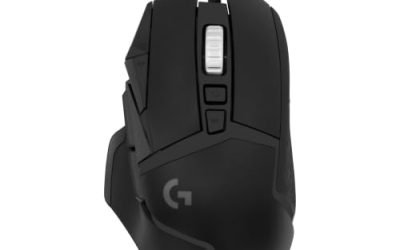
Logitech G502 HERO

The G502 HERO is the pick for players who want one mouse to cover shooters, MOBAs, MMOs, and daily work without swapping hardware. Eleven programmable buttons put abilities, weapon swaps, and macros under the thumb, and the dual-mode scroll wheel switches between precise clicks and free spinning for long documents and inventory lists. Five small tuning weights slide into the base so the balance can shift toward the front or the rear of the shell, and the right-handed ergonomic shape supports a full palm grip through long sessions. It is the heaviest mouse in this guide, and that planted feel is exactly what some players want.
Specs
- Sensor: HERO 25K optical sensor, up to 25,600 DPI
- Buttons: 11 programmable buttons
- Scroll wheel: Dual-mode hyper-fast scroll wheel
- Weight: 121 grams, plus five removable 3.6-gram weights
- Memory: On-board memory for game profiles
- Lighting: Customizable RGB lighting
- Connection: Wired USB
Best for: MOBA and MMO players who want many buttons and a planted, adjustable feel.
Watch out for: The 121-gram body plus weights is heavy for low-sensitivity flick shots, and the right-handed shape does not suit left-handed players.
Razer DeathAdder V2
The DeathAdder V2 keeps the ergonomic shape that made this line a default choice for palm-grip players, with a tall right-handed shell and rubberized side grips that hold steady during long matches. Its Focus+ optical sensor reaches 20,000 DPI, and eight programmable buttons cover the essentials: two side buttons, a DPI switch, and the standard clicks, all without crowding the shell. The lightweight Speedflex cable is built to drag as little as possible, so wired play feels close to wireless, and on-board memory stores up to five profiles on the mouse itself. It is a straightforward pick for players who want comfort first and extra buttons second.
Specs
- Sensor: Focus+ 20K DPI optical sensor
- Buttons: 8 programmable buttons
- Cable: Razer Speedflex cable for drag-free movement
- Feet: PTFE mouse feet
- Memory: On-board memory for up to 5 profiles
- Lighting: Chroma RGB lighting
- Weight: 82 grams
- Grips: Rubberized side grips
Best for: Right-handed palm-grip players who want a comfortable ergonomic shell for long sessions.
Watch out for: The right-handed shape excludes left-handed players, and the 20,000 DPI ceiling is lower than the flagship sensors in this guide.
Razer Viper V2 Pro
The Viper V2 Pro is built for FPS players who count every gram. At 58 grams it is the lightest mouse in this guide, and the slim symmetrical shell suits claw and fingertip grips that need fast repositioning between targets. The Focus Pro 30K optical sensor tracks up to 30,000 DPI, and on-mouse DPI controls let you switch between five sensitivity stages without opening software. HyperSpeed wireless keeps the connection lag-free, and the battery runs for up to 90 hours on a charge, so charging is a weekly habit rather than a daily one. There is no RGB lighting, which is part of how Razer kept the weight down.
Specs
- Sensor: Focus Pro 30K optical sensor, up to 30,000 DPI
- Weight: 58 grams
- Battery: Up to 90 hours on a single charge
- Switches: Optical Mouse Switches Gen-3, 90-million click lifecycle
- Connectivity: HyperSpeed wireless, USB-C charging
- Controls: On-mouse DPI controls with five DPI stages
- Design: Symmetrical right-handed shape, no RGB lighting
Best for: Competitive FPS players who want the lightest wireless mouse in this guide.
Watch out for: The slim shell has no side buttons on the right, so left-handed players lose thumb controls, and there is no RGB lighting if you want a lit setup.
Logitech G305 LIGHTSPEED
The G305 is the simplest wireless pick in this guide, and that simplicity is the point. It runs on a single AA battery for up to 250 hours, so you swap a cell instead of hunting for a charging cable, and the built-in storage slot keeps the tiny USB receiver inside the shell when you travel. The HERO 12K optical sensor reaches 12,000 DPI with a 1-millisecond wireless report rate, which is fast enough for ranked play, and six programmable buttons cover the controls most players actually use. At 99 grams with the battery installed, it stays light enough for long sessions without feeling hollow.
Specs
- Sensor: HERO 12K optical sensor, up to 12,000 DPI
- Buttons: 6 programmable buttons
- Battery: Up to 250 hours on a single AA battery
- Weight: 99 grams with battery installed
- Wireless: LIGHTSPEED wireless with 1 ms report rate
- Memory: On-board memory
- Receiver: Built-in storage for the USB wireless receiver
Best for: Players who want wireless freedom with a battery they can swap in seconds.
Watch out for: There is no Bluetooth and no rechargeable battery, so the mouse works only through its USB receiver and needs a spare AA cell on hand.
Which One Fits Your Situation
You Play Competitive FPS on Low Sensitivity
Pick the Razer Viper V2 Pro. Its 58-gram shell and symmetrical shape make wide arm sweeps and fast resets easier, and the Focus Pro 30K sensor holds tracking steady through flick shots. The five on-mouse DPI stages let you switch sensitivity between games without software, and the 90-hour battery means charging never interrupts a ranked session. Skip the heavier G502 HERO here, since its weight fights against quick repositioning.
You Play MOBA or MMO Games
Pick the Logitech G502 HERO. Eleven programmable buttons put abilities, items, and consumables within thumb reach, so your left hand stays on movement keys instead of stretching across the keyboard. The dual-mode scroll wheel helps with inventory and long ability lists, and the tuning weights let you set a planted feel that stays put during long team fights. The DeathAdder V2 is the fallback if eleven buttons feel like too many.
You Want Wireless Without Charging Every Day
Pick the Logitech G305 LIGHTSPEED. A single AA battery runs for up to 250 hours, so you replace a cell every few months instead of plugging in each night, and the receiver stores inside the shell when you pack the mouse away. The 99-gram body stays light for long sessions, and the HERO 12K sensor is fast enough for ranked play. Choose the Viper V2 Pro instead if you want a rechargeable battery and the lightest shell available.
You Want One Mouse for Work and Play
Pick the Razer DeathAdder V2. Its tall ergonomic shell and rubberized grips stay comfortable through a full workday, then handle evening games without a second mouse on the desk. Eight programmable buttons are enough for shortcuts and macros without overwhelming the shell, and the on-board memory carries your profiles between computers. The G502 HERO is the alternative if your work involves heavy macro use and you want more buttons.
Common Mistakes
- Buying the highest DPI number on the box and then playing at a sensitivity the sensor was never tuned for: set your DPI first, then check that the sensor tracks cleanly there.
- Choosing a mouse by weight alone: a 58-gram shell can feel twitchy if you anchor your wrist, while a 121-gram shell can steady aim for players who rest their whole hand.
- Ignoring grip shape and ordering a symmetrical shell for a palm grip, or a tall ergonomic shell for a fingertip grip, then blaming the sensor for hand fatigue.
- Forgetting to check whether the companion software runs on your system before buying a mouse whose buttons and lighting depend on it.
- Assuming every wireless mouse charges the same way: the Viper V2 Pro recharges over USB-C, while the G305 runs on a replaceable AA battery, so plan for the routine you will actually keep.
Frequently Asked Questions
What Makes a Gaming Mouse Optical?
An optical gaming mouse uses a light-based sensor to read the surface below it, tracking movement by comparing tiny images of the surface many times per second. This design became the standard for competitive play because it tracks consistently on cloth mousepads without the acceleration quirks older laser sensors showed. Every mouse in this guide uses an optical sensor.
Is a Higher DPI Always Better?
No. DPI sets how far the cursor moves for each inch the mouse travels, and most players settle between 400 and 3,200 DPI regardless of the sensor ceiling. A 30,000 DPI sensor matters because it shows the sensor can track cleanly across a wide range, not because you should play at the maximum. Pick a DPI that feels natural, check that the sensor holds steady at that setting during flicks.
Should I Choose Wired or Wireless for Competitive Play?
Both work. Wired mice such as the G502 HERO and the DeathAdder V2 never need charging and cannot drop a wireless signal mid-match, which suits players who never move their setup. Wireless mice such as the Viper V2 Pro and the G305 report at the same 1,000 Hz polling rate, so the choice comes down to routine: a cable you can forget, or a battery you must charge or swap.
Do I Need Software to Use These Mice?
No, all four mice work as soon as you plug them in or connect the receiver, with standard clicks, scrolling, and a default sensitivity ready to go. Software adds the extras: remapping buttons, setting custom DPI stages, saving profiles to on-board memory, and tuning lighting. Install the companion app once to set your preferences, then the mouse keeps those settings even on a computer without the app installed.
Related guides
More from Amazon
Programs that pair well with the guide above. Offers and eligibility are set by Amazon and may change.
Free shipping on eligible items, Prime Video and more. Eligible new members can start with a free trial.
Start a Prime free trialAd-free music streaming. Eligible new subscribers can start with a free trial.
Try Music Unlimited freeA Prime membership for ages 18-24 with a trial period. Eligibility is set by Amazon.
See Prime for Young AdultsAudiobooks and podcasts to listen to on the go. Eligible new members can start with a free trial.
Try Audible freeAs an Amazon Associate we earn from qualifying purchases.